
On this page
Start here
Quick answer
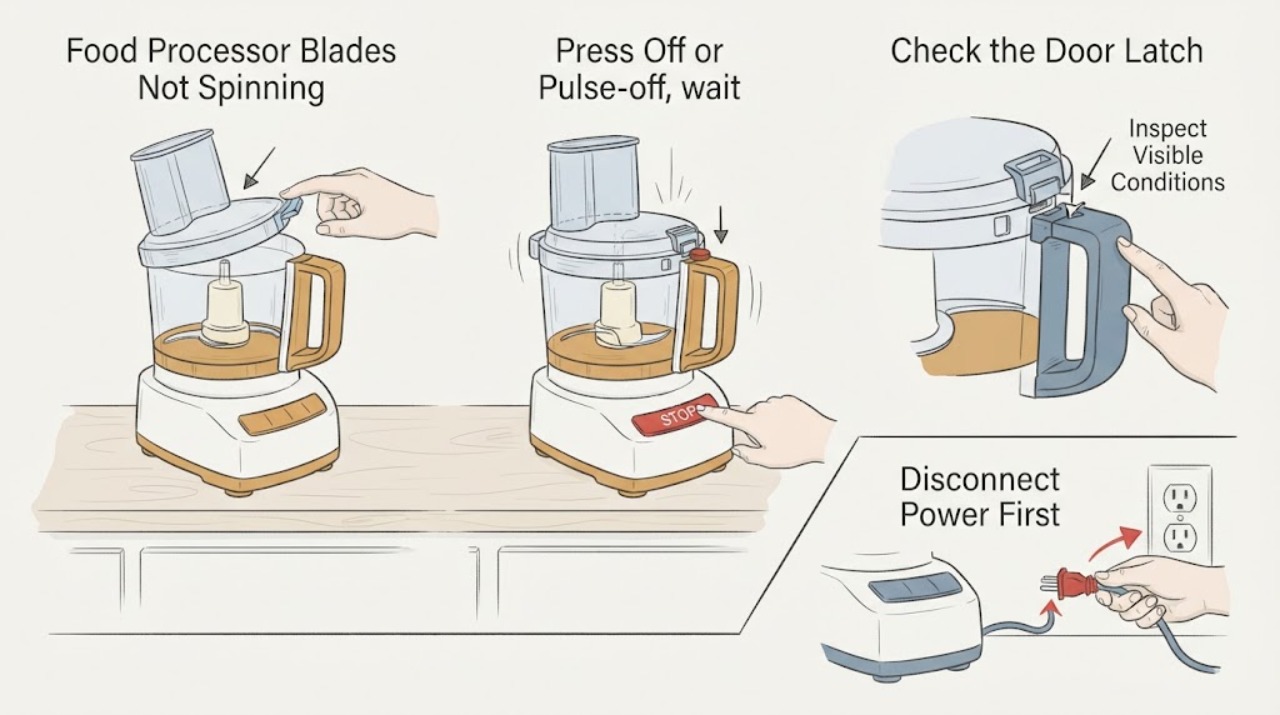
Turn the food processor off and unplug it before touching the bowl, lid, blade, disc, or jammed food. Food processors commonly refuse to run when the work bowl, lid, or pusher has not engaged the safety interlock, and KitchenAid specifically lists bowl/lid alignment and blade or disc position among its blade-not-spinning checks. If the motor hums while the blade stays still, the blade or drive assembly is damaged, the machine has overloaded, or the appliance starts with the lid unlocked, stop using it and arrange service rather than forcing the blade or bypassing the interlock. Use only the exact model manual for any clearing or reassembly step; never reach toward a sharp blade while power is connected.
Work through in order
Diagnostic checks
Use only checks that match the exact appliance or system and its official guide.
-
Check 1
Press Off or Pulse-off, wait for the blade and motor to stop, and unplug the food processor before touching the bowl, lid, blade, disc, shaft, or food. Do not hold the blade, insert a utensil, or test the motor with the lid removed.
Expected result: The blade has stopped and the plug is disconnected, or the motor continues, the blade coasts unexpectedly, or the unit cannot be safely powered down.
Next step: If the unit cannot be made electrically safe, leave it alone and arrange qualified small-appliance service. Do not bypass the switch or open the motor base.
Why this matters
Why: KitchenAid and Breville both place power isolation and complete blade stop before disassembly. Continuing motion or an unsafe power control is outside a user clearing check.
-
Check 2
With power disconnected, check only the exact model manual's external assembly points: the work bowl seated on the base, the lid fully aligned and latched, the pusher or feed-tube interlock engaged, and the blade or disc seated on its specified adapter. Do not force a lock or substitute a different accessory.
Expected result: The bowl, lid, pusher, blade, or disc is visibly out of position, or all accessible assembly points appear correctly seated.
Next step: If the exact manual shows a safe correction, reseat the part with power disconnected and sharp edges controlled. If the assembly is correct or a part will not seat without force, stop and request service.
Why this matters
Why: KitchenAid identifies bowl/lid alignment and disc position as blade-not-spinning checks; Breville explains that bowl, lid, and pusher interlocks prevent operation when not correctly engaged. A correctly assembled processor that still will not spin needs further diagnosis.
-
Check 3
Inspect the contents and blade area only after unplugging and only as the exact manual permits. Look for a hard or oversized ingredient, food wedged between the blade and bowl, a visibly cracked blade hub, or a damaged drive adapter; use a non-hand method specified by the manual and keep the sharp edge covered or controlled.
Expected result: Food is visibly wedged or the load was unusually stiff/large, or the blade, hub, adapter, or motor shaft is cracked, bent, stripped, or otherwise damaged.
Next step: Remove only accessible food using the exact manual's safe method. If damage is visible, the blade remains stuck, or a jam recurs, stop using the processor and arrange service; do not file, glue, sharpen, or force the drive parts.
Why this matters
Why: Breville documents overload and jam protection and directs unplugged clearing; KitchenAid says damage or malformation of the shaft or multipurpose blade increases recurrence. Neither source supports identifying a specific failed part on this unbranded appliance.
-
Check 4
Record what the motor does without repeating a risky test: no sound or lights, a hum with no blade movement, an overload indication, burning odor, smoke, or operation when the lid is not correctly locked. Do not reconnect power to reproduce a hum, smell, or unsafe interlock condition.
Expected result: The processor is completely unresponsive, previously hummed or overheated, or started with the lid/pusher not correctly engaged.
Next step: For burning odor, smoke, overheating, unexpected start, or repeated jam, keep the processor unplugged and request qualified service. For a normal-looking but unresponsive unit, provide the model and the exact assembly state to the manufacturer or service provider.
Why this matters
Why: The observation helps a technician separate a power/control complaint from a jam, overload, drive, or safety-interlock complaint, but it does not prove a motor, switch, belt, board, or blade failure.
Use your observations
Decision map
Find the observation that best matches what you see, then follow the next safe action.
-
PATH 01Next step
What you see
The bowl, lid, pusher, and blade/disc were misaligned, and the exact manual permits reseating them with power disconnected.
Do this next
Reseat only as the exact manual shows, keep hands clear of sharp edges, and stop if the processor still will not spin or requires force.
Why this path and its safety boundary
Why it matters: A safety interlock or assembly position may have prevented operation; this does not prove an electrical or blade failure.
-
PATH 02Next step
What you see
Food is wedged, the load was unusually stiff or large, or an overload indication was previously shown.
Do this next
Unplug, cool, and clear only with the exact model's safe procedure. Keep the processor out of service if the jam returns or the drive/blade looks damaged.
Why this path and its safety boundary
Why it matters: A jam or overload can stop or slow the blade, but the processor must be de-energized before clearing and a recurring jam needs inspection.
-
PATH 03Next step
What you see
The motor hums or sounds active while the blade remains stationary, or the blade/shaft/adapter is visibly damaged.
Do this next
Unplug the unit and arrange qualified service. Do not force the blade, run it empty, or order a motor, shaft, blade, or adapter from a visual match.
Why this path and its safety boundary
Why it matters: The public manufacturer guidance supports a damaged or unresolved drive/assembly condition but does not identify a compatible replacement part for an unbranded processor.
-
PATH 04Next step
What you see
The processor starts with the bowl/lid/pusher not correctly locked, or there is smoke, burning odor, overheating, or a damaged cord.
Do this next
Disconnect power if it can be done safely, keep the appliance unused, and arrange qualified service. Never bypass, tape, or defeat the interlock.
Why this path and its safety boundary
Why it matters: The safety-interlock or electrical boundary has failed or is unsafe to test further.
Helpful context
Understand the symptom
A blade that does not spin is often an assembly or overload boundary
The topic has no brand or model, so the display lights, bowl shape, lid latch, pusher switch, and drive adapter cannot be assumed. KitchenAid's official blade-not-spinning page checks the blade/shaft, disc position, and bowl/lid alignment; Breville's manual shows that safety interlocks can prevent the motor from starting until the bowl, lid, and pusher are correctly engaged. These are model-family examples, not permission to defeat an interlock or select a replacement blade by appearance.
Make the blade safe before investigating a jam
KitchenAid says to turn the processor off and unplug it before disassembly, and Breville requires the motor and blade to be stopped before the lid or bowl is removed. A jam, a stationary blade with a running motor, or a machine that starts without its lid correctly locked is a stop point. Keep hands and utensils away until the exact manual's safe removal procedure has been followed with power disconnected.
When checks do not resolve it
Need a professional?
Arrange qualified small-appliance service when the blade remains stationary after the exact assembly check, the motor hums, the drive or blade is damaged, a jam recurs, an overload repeats, the unit overheats, a burning odor or smoke appears, the cord is damaged, or the processor starts without its bowl/lid/pusher safely locked. Do not bypass the interlock or choose a replacement part from appearance alone.
Common questions
FAQ
Why will a food processor not spin its blades?
Common manufacturer-documented checks include bowl/lid or pusher interlock alignment, blade or disc position, a jam or overload, and visible blade/shaft damage. The symptom alone does not identify which part failed, especially without a brand and model.
Can I hold the blade or push food down while the processor is running?
No. Turn the processor off, wait for the blade to stop, and unplug it before disassembly or jam clearing. Keep hands and utensils away from a moving or potentially energized blade.
Can I tape down or bypass the food processor lid interlock?
Never. Breville describes the interlock as a safety system and says to disconnect power and contact support if the processor starts with the lid incorrectly locked. Use the exact model manual and qualified service.
Should I replace the blade, motor, or shaft?
Not from the symptom alone. KitchenAid recommends checking for damage but routes unresolved cases to service; a compatible part depends on the exact model, bowl, adapter, and blade assembly.
Read the exact guide
Official sources
- BFP800 Food Processor Instruction ManualBreville · Used as a clearly scoped manufacturer-manual example: the bowl/lid/pusher interlock, unplugged jam clearing, overload cooling, and stop-use response when the unit starts unlocked. It is not used to claim the unbranded processor has the same controls or parts.
- Blade Not Spinning - Has Power - Food ProcessorKitchenAid Product Help · Used as a manufacturer-specific example for bowl/lid alignment, disc position, visible blade/shaft damage, and service escalation. The article does not transfer KitchenAid-specific parts or dimensions to the unbranded topic.
- Removing Processed FoodsKitchenAid Product Help · Used for the general safety boundary that the processor must be off and unplugged before disassembly and that service is available when the issue persists. Exact removal details remain model-specific.
Community feedback
Share a repair observation
Share a plain-text repair observation. Accepted observations are published automatically; this page may take a moment to update.