
On this page
Start here
Quick answer
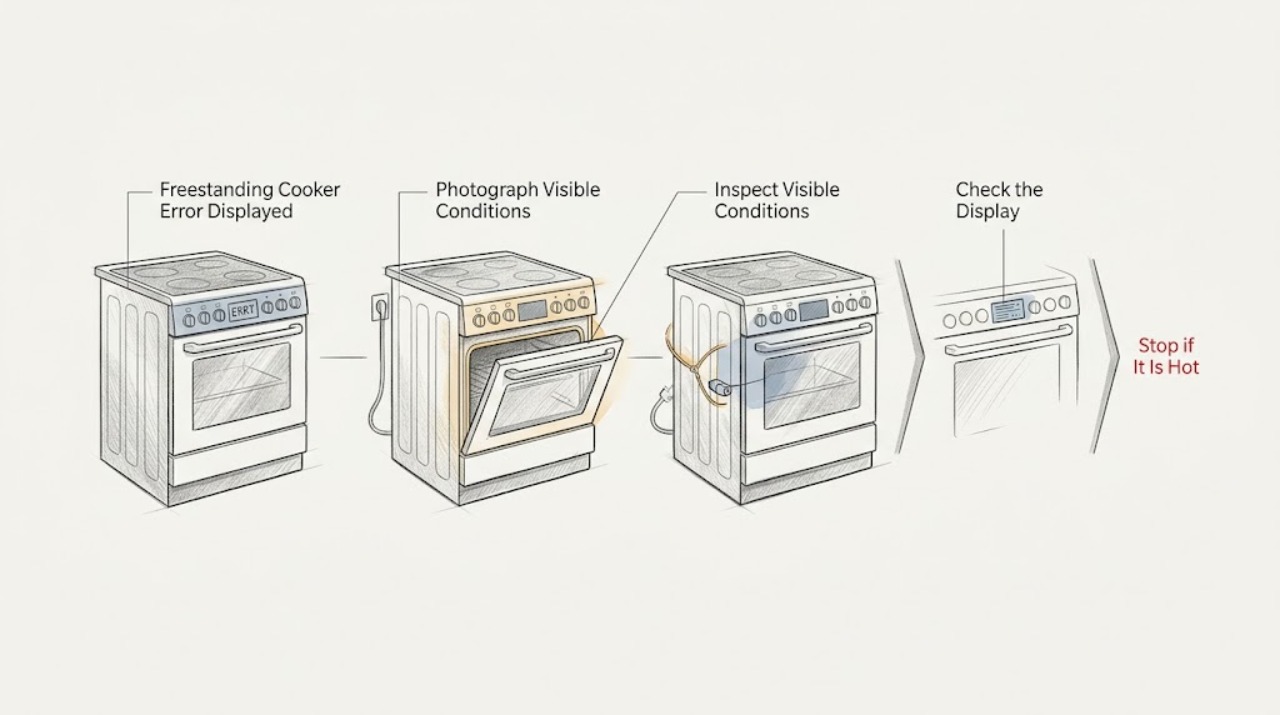
A freestanding cooker error display must be read together with the complete code, model number, energy type, and operating phase. Do not apply a code meaning from another brand or model. First rule out an active gas, fire, electrical, or uncontrolled-heating hazard; then use the exact owner manual for control lock, clock, door-lock, temperature, power, and one permitted reset step. Gas smell, delayed ignition, abnormal flame, smoke, arcing, a burning odor, a cracked glass surface, uncontrolled heating, or a breaker that trips again means stop using the cooker and obtain qualified or emergency help. If the code returns after the model-approved step, leave the appliance off and arrange service.
Work through in order
Diagnostic checks
Use only checks that match the exact appliance or system and its official guide.
-
Check 1
From a safe position, photograph and transcribe the full display and note the model number, energy type, affected cavity or zone, selected function, and event immediately before the message.
Expected result: The display is a complete code or message, the model and energy type are known, and the trigger phase is recorded; or the display is partial, blank, or unreadable.
Next step: Use the exact manual when identity is complete. If the code or model cannot be confirmed, keep the cooker unused and request model-specific support rather than guessing.
Why this matters
Why: The full identity determines which manual and branch apply. A partial or unknown display cannot support a reliable code interpretation.
-
Check 2
Before pressing reset or selecting a function, check the immediate safety state without touching hot surfaces or damaged equipment: look for gas odor, flame outside its intended area, smoke, arcing, burning odor, abnormal heat, damaged wiring, or a breaker that has tripped repeatedly.
Expected result: Any gas, fire, smoke, arcing, burning odor, uncontrolled heating, damaged electrical part, or repeated trip is present.
Next step: Stop using the cooker. For suspected gas, leave immediately and contact the gas supplier or emergency services from outside. For smoke or fire, evacuate and contact emergency services; for electrical danger, keep clear and arrange qualified service.
Why this matters
Why: The condition may involve gas, fire, or electrical risk and is not a routine display-clearing problem.
-
Check 3
Open the exact model manual and compare the complete message with its display, fault, setting, lock, temperature, and power-loss sections. Check the manual's stated response for the same operating phase and energy type.
Expected result: The manual has an exact match with a permitted user action, or the code is absent, ambiguous, or documented as service-only.
Next step: Follow only the exact low-risk instruction. For an unmatched or service-only code, record it and arrange qualified service without trying another model's sequence.
Why this matters
Why: Only an exact model match supports the documented clear, cool-down, unlock, or reset procedure. An unmatched code does not identify a particular part.
-
Check 4
From a dry, safe position, verify that the clock, selected mode, temperature, Start control, Control Lock, Sabbath or demo mode, and self-clean door latch match the model manual. Do not force a latch or operate a damaged door.
Expected result: A clock, lock, mode, Start step, or latch condition is shown, or all settings are correct but the error remains.
Next step: Correct only the documented setting or visible latch position. If the message remains or the door will not release normally, leave the cooker off and request service.
Why this matters
Why: A control prerequisite can present as an error or prevent heating without proving a component failure. A persistent message with correct settings needs service-level diagnosis.
-
Check 5
If the manual permits one power reset, perform it once from a dry and safe position after the cooker is cool and no hazard is present. Restore power only as the manual directs, then observe whether the same message returns before starting a cooking or cleaning cycle.
Expected result: The display clears and remains clear, or the same message returns, the cooker remains unresponsive, or power protection trips again.
Next step: Do not repeat the reset. Leave the cooker off and arrange qualified appliance or electrical service if the message returns, the panel remains unresponsive, or protection trips.
Why this matters
Why: A reset can clear a transient control state, but recurrence or unstable power indicates an unresolved control, supply, sensor, lock, heating, or gas condition.
-
Check 6
For a gas or dual-fuel cooker, confirm the energy type and use only the manual's safe external checks for gas supply, burner control, and oven function. If the surface burners work but the oven does not, note whether the oven's documented igniter behavior appears through the intended viewing area; do not keep releasing gas when ignition is absent or delayed.
Expected result: Surface burners work but the oven remains cold, the igniter does not show expected behavior, or the flame is delayed, yellow, unstable, or absent.
Next step: Stop using the cooker and arrange qualified gas-appliance service. For gas odor, leave immediately and contact the gas supplier or emergency services from outside; do not move the appliance or inspect its connector.
Why this matters
Why: An oven regulator, igniter, control, or burner path may fail independently of surface burners. Abnormal flame, delayed ignition, or gas odor is a safety event.
-
Check 7
For an electric or induction cooker, record whether all zones and the oven are affected, whether the display is stable, and whether a suitable induction pan or the model's Bake and Broil functions respond. Do not touch elements, glass, or wiring to test heat or power.
Expected result: Only one function or zone fails, an induction pan is rejected, the display works but heating does not, or the entire appliance is inactive.
Next step: Use the exact manual for cookware and function checks. If the correct pan and settings do not restore operation, leave the cooker off and request service.
Why this matters
Why: A local element, pan-detection, sensor, or control path is more likely with a partial failure; a whole-appliance failure points toward supply or main control. An active display does not prove sufficient heating power.
-
Check 8
Prepare a service record with the complete code, model and serial information, energy type, phase, clock and lock state, temperature or function selected, power events, and any gas, heat, smoke, fire, arcing, or door-lock symptom.
Expected result: The message is repeatable, the manual gives no safe user remedy, or the error returns after one permitted step.
Next step: Keep the cooker off and contact the manufacturer or qualified appliance service. Use an electrician for supply faults and the gas supplier or emergency services for suspected gas.
Why this matters
Why: A precise record lets a qualified technician distinguish a setting message from a control, sensor, door-lock, power, heating, or ignition fault without unsafe disassembly.
Use your observations
Decision map
Find the observation that best matches what you see, then follow the next safe action.
-
PATH 01Safety boundary
What you see
Is there gas odor, delayed ignition, abnormal flame, smoke, fire, arcing, burning odor, uncontrolled heat, damaged wiring, or repeated breaker tripping?
Do this next
Stop using the cooker. For suspected gas, leave immediately and contact the gas supplier or emergency services from outside; for smoke or fire, evacuate and call emergency services.
Why this path and its safety boundary
Safety stop: Do not light a flame, operate electrical switches, use a phone in a suspected gas-leak area, or move the appliance to inspect a connector.
-
PATH 02Safety boundary
What you see
Are the complete code, model number, energy type, and trigger phase known?
Do this next
Use the exact model manual and record the code's documented category and permitted response.
Why this path and its safety boundary
Safety stop: Stop troubleshooting if the display or model remains uncertain and request model-specific support.
-
PATH 03Safety boundary
What you see
Does the exact manual identify a control lock, invalid setting, clock, Sabbath or demo mode, power-loss message, or self-clean lock?
Do this next
Correct only the documented setting or wait for the documented cool-down before trying the function once.
Why this path and its safety boundary
Safety stop: Stop if the message returns, the door will not release normally, or heating or lock behavior is abnormal.
-
PATH 04Safety boundary
What you see
Did one model-approved power reset clear the message without a safety symptom?
Do this next
Record the recovery and monitor according to the manual, stopping at the first recurrence.
Why this path and its safety boundary
Safety stop: Do not repeat resets or keep using an appliance that returns the fault or heats uncontrollably.
-
PATH 05Safety boundary
What you see
Is the cooker gas or dual fuel, with surface burners operating but the oven fault displayed?
Do this next
Use only the exact manual's safe external checks and record igniter, regulator, flame, and timing observations for qualified service.
Why this path and its safety boundary
Safety stop: Stop for gas odor, delayed ignition, abnormal flame, or any need to inspect or move a gas connection.
-
PATH 06Safety boundary
What you see
Is the cooker electric or induction, with stable controls but a partial or whole no-operation symptom?
Do this next
Check only the model's power, mode, door, Bake/Broil, or induction-pan conditions; request service if correct checks do not restore operation.
Why this path and its safety boundary
Safety stop: Do not touch elements, glass, internal wiring, or energized parts to test the fault.
Helpful context
Understand the symptom
Record the identity before interpreting the display
Write down the complete message exactly as shown, including letters, digits, dashes, decimal points, flashing behavior, and any alternating text. Record the model number, whether the cooker is gas, electric, dual fuel, or induction, and whether the message appeared during preheat, Bake, Broil, a cleaning cycle, a power event, or while idle. A partial code is not a reliable diagnosis.
Codes are not universal across brands
An error table from another brand, model family, or region may describe a different control. Even common-looking messages such as a lock, invalid entry, power-loss notice, or temperature fault can have different reset and service instructions. Use the model manual and retain the display photo for service.
Safety takes priority over clearing the message
Do not keep operating a cooker that smells of gas, ignites late, shows an abnormal flame, produces smoke or a burning odor, arcs, heats when switched off, or repeatedly trips power protection. Leave a suspected gas leak and contact the gas supplier or emergency services from outside. Leave fire and severe electrical faults to emergency or qualified professionals.
Safety boundary
Stop conditions
- Stop immediately for gas odor, delayed ignition, abnormal flame, smoke, fire, visible arcing, burning odor, uncontrolled heating, damaged wiring, or a breaker that trips again.
- For suspected gas, leave the area and contact the gas supplier or emergency services from outside; do not light a flame, operate electrical switches, use a phone in the area, or move the cooker.
- Do not open the cooker, test live wiring, remove a control, sensor, heating or ignition part, force a door lock, or use another brand's error-code sequence.
- Do not repeatedly reset the control or supply when the message returns.
- Keep the door closed during an oven fire or dangerous uncontrolled heating; leave and call emergency services if flames escape.
Only after diagnosis
Potential parts
- electronic control
Consider only when the exact model manual and qualified diagnosis link the returning display fault to the control.
Control boards vary by model and revision; confirm exact fitment and manufacturer documentation before ordering. - temperature sensor
Consider only when the exact code and qualified diagnosis identify the temperature-sensing path.
Do not infer sensor failure from a display message alone; verify model and approved replacement information. - door-lock assembly
Consider only when a lock or self-clean message persists after the manual's safe cool-down and clear procedure and service confirms the lock fault.
Lock mechanisms differ across models; confirm exact fitment and never bypass the lock. - heating element or gas igniter
Consider only after the energy type and exact model are confirmed and qualified service identifies the heating or ignition component.
Electric heating parts and gas ignition parts are not interchangeable; verify model, energy type, and manufacturer fit information.
When checks do not resolve it
Need a professional?
Call qualified appliance service when the code is not documented for the exact model, returns after one permitted step, or is linked to a door lock, temperature, power, heating, or control fault., Call a qualified electrician for repeated breaker trips, a persistent blank display, damaged cord or outlet, or a suspected supply-side issue., Contact the gas supplier or emergency services for suspected gas, and emergency services for smoke or fire.
Have this ready
- Provide the complete display, model and serial information, energy type, phase, clock and lock state, selected function, reset result, and any gas, smoke, fire, arcing, burning odor, or breaker event.
Common questions
FAQ
What should I record when a freestanding cooker shows an error?
Record the complete message exactly as shown, the model and serial information, energy type, affected cavity or zone, selected function, trigger phase, and any door-lock, power, gas, heat, smoke, or arcing symptom. A partial code is not enough to choose a repair.
Can I use an error-code chart from another cooker brand?
No. Code meanings, controls, and reset procedures vary by model and brand. Use the exact owner manual and request service when the code is not documented or returns after the permitted step.
Can a single reset clear a cooker error?
Sometimes a model-approved power reset clears a transient control state. Perform it only when the cooker is cool and there is no gas, smoke, fire, arcing, burning odor, uncontrolled heat, or unstable power. Do it once and stop if the message returns.
What does a lock or door message mean?
It may indicate Control Lock, a self-clean door that is still hot or locked, or a door-lock fault. Use the exact model manual and never force or bypass the latch. Persistent messages need qualified service.
What if the cooker is gas or dual fuel?
Record the energy type and separate the gas branch from electric controls. A surface burner can work while the oven regulator, igniter, or control does not. Stop for gas odor, delayed ignition, or abnormal flame and contact qualified gas or emergency help from outside.
When should I stop using the cooker?
Stop for gas odor, smoke, fire, arcing, burning odor, uncontrolled heating, a cracked surface, damaged wiring, repeated breaker trips, or a door that will not release normally. Keep it off and arrange appropriate appliance, electrical, gas, or emergency service.
Read the exact guide
Official sources
- CookingU.S. Fire Administration · U.S. government cooking and oven-fire safety guidance
- Gas Range - Oven Does Not Heat, But The Burners HeatGE Appliances · Manufacturer gas-range oven settings, door, regulator, and igniter guidance
- Electric Range - Check Power SupplyGE Appliances · Manufacturer electric-range power supply, breaker, fuse, and qualified electrician guidance
- Find Your Manual | Kenmore Appliance Manuals & GuidesKenmore · Official model-manual lookup example for model-specific cooker and range instructions
- Gas Range - Checking the Gas RegulatorGE Appliances · Manufacturer gas-range regulator context and qualified-installer boundary
- Range & Wall Oven - “LOC DOOR” Flashes in the DisplayGE Appliances · Manufacturer range door-lock display, control-lock, and model-manual guidance
- Range & Wall Oven - Oven Error, Fault or Function CodesGE Appliances · Manufacturer range and wall-oven code categories, model-specific manual warning, and service guidance
- Electric Range & Wall Oven - Oven Has Power But Does Not WorkGE Appliances · Manufacturer electric oven power, clock, child-lock, and display checks
- Certain Older Gas Connectors May Be DangerousU.S. Consumer Product Safety Commission · Government gas-leak evacuation, no-switch, no-flame, and qualified-inspection guidance for gas appliances
- Electric Range & Cooktop - Induction Burners Not Working or Flashing Power LevelGE Appliances · Manufacturer induction cookware detection, pan placement, controls, and power guidance
- Range & Wall Oven - Oven Will Not Come OnGE Appliances · Manufacturer freestanding and slide-in range controls, power, reset, latch, bake element, and Sabbath-mode guidance
- Range & Wall Oven - Display Dimming or Not Displaying ProperlyGE Appliances · Manufacturer range display reset and service guidance
- Appliance and Electrical Fire SafetyU.S. Fire Administration · U.S. government appliance cord, outlet, and electrical fire-safety guidance
Community feedback
Share a repair observation
Share a plain-text repair observation. Accepted observations are published automatically; this page may take a moment to update.