
On this page
Start here
Quick answer
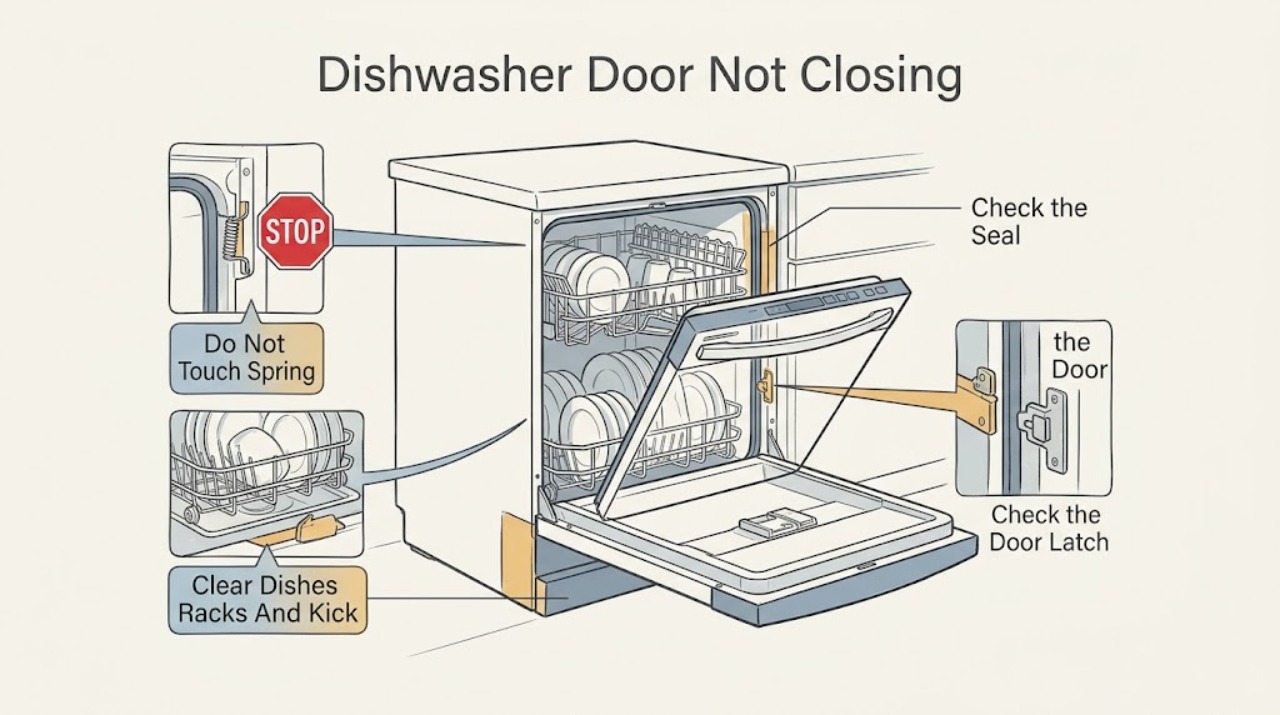
Do not force a Frigidaire dishwasher door closed. First remove any dish, rack, utensil, tray, or kick plate that is physically stopping the door, then inspect the door gasket for a visible fold, debris, displacement, or damage. If the door rubs one side, the dishwasher moves in the cabinet, or the gap changed after installation, treat it as an alignment or cabinet-fixing issue and use the exact installation guide or installer rather than twisting the door. The door must close and latch securely for the dishwasher to start; CL or Cd means the door was not successfully closed and latched, while Close the door is a model-dependent start reminder. After opening a running cycle, Frigidaire says to press Start and close the door firmly to latch and resume. If the door closes physically but the display still reports open, flashes a door pattern, or needs force, the latch, switch, hinge, or control path needs qualified service. Check model-specific control-lock behavior before interpreting a locked control as a mechanical door failure.
Before you begin
Safety first
- This article covers model identification, external loading and kick-plate clearance, visible gasket inspection, normal door closure, display interpretation, model-guide lock checks, and safe external power observations. Hinge springs, latch and switch internals, door wiring, cabinet mounting, leveling, connected services, control panels, and energized testing require qualified service.
Work through in order
Diagnostic checks
Use only checks that match the exact appliance or system and its official guide.
-
Check 1
With the dishwasher idle, note the model number and determine whether the door physically stops before the frame, reaches the frame but will not latch, latches but the display says CL/Cd or Close the door, or closes but leaves an uneven gap. Check whether the controls are integrated on the door lip or mounted on the front.
Expected result: The door is blocked, mechanically reaches the frame but does not catch, the display reports an open door, or the cabinet/door is visibly out of alignment.
Next step: Follow the matching external checks below and keep the exact model guide available; do not start by ordering a generic latch or gasket.
Stop if: If the door, glass, hinge, latch, cabinet, or wiring is damaged, or the unit leaks when the door is moved, stop and arrange service.
Why this matters
Why: These are different paths: loading or clearance, latch/hinge geometry, door sensing or controls, and installation alignment. Integrated and front-control models can present the same symptom differently.
-
Check 2
Open the door only as far as it moves freely, pull each rack forward, and inspect for a tall dish, pan handle, utensil, tray, loose item, or rack that projects into the door path. Check the lower front kick plate for a position that contacts the door. Remove or reposition only an obvious obstruction, then test the door gently without slamming.
Expected result: The door closes and latches after an item, rack position, or kick plate obstruction is corrected; or the door still stops at the same location with the tub empty.
Next step: Reload using the exact model's clearance guidance. If the empty door still cannot reach or latch, do not force it; continue to the gasket and alignment checks and prepare for service.
Stop if: Do not use the door to push a rack home, bend rack parts, pry the kick plate, or run a cycle with the door held shut by hand.
Why this matters
Why: A repeatable stop that disappears when loading or front clearance changes is physical interference. A stop with racks removed and no front-panel contact shifts concern toward gasket, hinge, frame, alignment, or latch hardware.
-
Check 3
With the door open and the appliance not running, inspect the gasket and the mating door/tub edges for food soil, a folded or rolled section, a gasket pulled out of its channel, a foreign object, or a torn or hardened area. Wipe loose surface soil with a soft damp cloth and reseat only an obviously displaced edge if the exact guide permits it; do not heat, stretch, glue, or cut the seal.
Expected result: The gasket or edge was visibly obstructed and the door now closes evenly, or the seal looks correct but the door still leaves a gap or will not latch.
Next step: Close the door gently and check for an even contact pattern. Escalate a damaged seal, persistent gap, or need to remove the inner door or hinge hardware to qualified service.
Stop if: Do not stretch the gasket into a new shape, remove hinge springs, or place hands near a pinch point while the door is unsupported.
Why this matters
Why: A visible seal or edge obstruction can hold the door away from the latch. A clean, correctly seated seal with a persistent gap makes alignment, hinge, latch, or cabinet position more likely; a gasket replacement is not justified without model fitment and diagnosis.
-
Check 4
From the front, compare the gap at both sides and the top while moving the door through its normal travel. Observe whether the door rubs one side, drops, twists, or changes position when the dishwasher cabinet moves in the opening. If the problem began after installation or cabinet work, compare the current position with the installation guide without pulling the unit out.
Expected result: The gap is even and the cabinet is stable; the door rubs or drops on one side; the cabinet shifts; or the symptom began immediately after installation or a kick-plate/cabinet change.
Next step: Use the exact model installation instructions or return the issue to the installer/service provider. Do not adjust leveling legs, cabinet fasteners, hinges, or connected services based on a generic procedure.
Stop if: Do not pull out a built-in dishwasher, loosen mounting hardware, disconnect water/drain/power connections, or support a heavy door while working alone.
Why this matters
Why: A stable, even frame with a door that reaches the latch points away from gross installation alignment. Side rubbing, cabinet movement, or a post-installation change makes leveling, fastening, hinge geometry, or clearance more likely than a control fault.
-
Check 5
Once the door is empty and aligned as far as can be checked externally, close it with normal hand pressure and listen or feel for consistent latch engagement. If the controls show CL, Cd, Close the door, or door-related flashing, note the exact message and whether it clears when the door is closed; never press or tape the latch switch manually.
Expected result: The door latches and the message clears; the door reaches the frame but never catches; the latch catches but the message remains; or the latch is loose, cracked, intermittent, or requires force.
Next step: If the message remains or the latch is inconsistent, leave the dishwasher unused and arrange qualified service with the exact model and message. If the latch works, continue only with model-specific start or lock checks.
Stop if: Do not defeat the latch, operate with an open-door indication, or dismantle the inner door to reach a switch or wiring.
Why this matters
Why: A cleared message after normal closure is consistent with a previously open or unlatched door. A physical non-catch suggests latch/strike/hinge alignment. A caught latch with a persistent message suggests the door sensor, wiring, or control path, which is not an owner bypass or adjustment.
-
Check 6
If the door closes and latches but the dishwasher does not start, check the exact model guide for CHILD LOCK, LOC, DELAY START, START/CANCEL, and the required close-door timing. Use only the documented unlock or start sequence for that model; do not interpret an unresponsive keypad as proof that the door hardware is bad.
Expected result: A lock or delay indication clears with the model-specific sequence, the cycle resumes after pressing Start and closing the door, or the controls remain locked/unresponsive despite a physically latched door.
Next step: Use the model guide once, then stop if the state returns or the keypad remains unresponsive. Arrange service rather than repeating resets or opening the console.
Stop if: Do not guess a button combination from another Frigidaire series, bypass a child lock, or remove the control panel.
Why this matters
Why: Frigidaire documents model-dependent lock behavior and says an interrupted cycle may require Start again after closing. A persistent LOC/open-door state with a sound latch can be a control, keypad, or door-sensing issue.
-
Check 7
If the display is dark or the door symptom appeared with a power interruption, check the breaker or fuse from outside the appliance and confirm the cord or isolator is not visibly damaged, wet, or hot. Reset a breaker only once when there is no hazard; do not perform a live test or move the dishwasher.
Expected result: Power returns and the door/status indication behaves normally; the breaker trips again; the cord, outlet, or wiring is damaged; or the display remains dead despite external power.
Next step: Leave the dishwasher disconnected after a repeat trip or any electrical damage and arrange qualified appliance service. Provide the door position, exact display state, and model number.
Stop if: Do not repeatedly reset the breaker, use an extension cord, touch wet electrical parts, or remove panels for access.
Why this matters
Why: A supply interruption can explain a reset state, but repeated trips or damaged electrical hardware require isolation and service. A dead display with sound supply is not a reason to force the door or bypass its interlock.
Use your observations
Decision map
Find the observation that best matches what you see, then follow the next safe action.
-
PATH 01Next step
What you see
The door stops before reaching the frame or closes only after the racks or front panel are changed.
Do this next
Reload to the model's clearance limits or correct only an obvious external panel position. If the empty door still stops, escalate rather than forcing it.
Why this path and its safety boundary
Why it matters: The symptom is a physical clearance issue rather than proof of a bad latch or control.
-
PATH 02Next step
What you see
The door reaches the frame but leaves a gap or springs away from one area.
Do this next
Clean the visible seal surface and follow the exact guide for any owner-approved seating. Do not reshape or remove a damaged gasket; arrange service.
Why this path and its safety boundary
Why it matters: A visible seal obstruction can hold the door out of position. A sound seal with an uneven gap makes hinge, frame, cabinet alignment, or latch geometry more likely.
-
PATH 03Next step
What you see
The door rubs one side, drops, the cabinet shifts, or the problem began after installation or cabinet work.
Do this next
Use the model installation guide or return the issue to the installer/qualified service. Do not pull out the unit or loosen mounting and connected services as a home test.
Why this path and its safety boundary
Why it matters: Movement and uneven geometry make installation, leveling, mounting, or hinge alignment more likely. A stable, aligned opening with a non-catching latch points more toward latch/strike hardware.
-
PATH 04Next step
What you see
The door reaches the frame but does not latch, or it latches while the dishwasher still says the door is open.
Do this next
Do not bypass the latch or run the dishwasher with the message present. Record the exact code and arrange qualified diagnosis if it persists.
Why this path and its safety boundary
Why it matters: A cleared indication is consistent with an unlatched door. A persistent indication with a sound latch makes the latch sensor, switch, wiring, keypad, or control path more likely and requires service.
-
PATH 05Next step
What you see
The door is physically closed but controls do not start a cycle.
Do this next
Follow the exact model sequence once and check external power safely. Escalate a persistent state; do not force the door or repeatedly reset power.
Why this path and its safety boundary
Why it matters: A documented lock, delay, or power state can prevent a start without a door geometry failure. A normal display and secure latch with no response points toward keypad, door sensing, or control service.
Helpful context
Understand the symptom
Separate a physical obstruction from a latch report
A door that stops at the same point, springs back, or leaves a visible gap has a physical path problem: loading, rack height, a utensil, the kick plate, gasket, hinge, or cabinet alignment. A door that reaches the frame but the dishwasher reports CL, Cd, Close the door, or a door-open pattern has a latching or door-sensing path to investigate. Frigidaire says the door must be securely shut and latched before starting, so do not hold the door in place or bypass the latch to make a cycle run.
Loading and installation are model-dependent
Pull the racks out and look for a tall plate, pan handle, utensil, loose item, or rack that is not fully home. A rack can appear fully inserted while a dish projects into the door sweep. Rack adjustment, tub construction, gasket seating, and mounting details vary by model, so use the exact Owner's Manual and Installation Guide. Remove only an obvious obstruction; do not bend tines, force the rack, or use the door as a clamp.
Installation movement is not a door-adjustment invitation
If the door rubs the frame on one side, the cabinet rocks when the door is pulled, the gap is uneven, or the symptom began after replacement or cabinet work, record the pattern and stop short of pulling the dishwasher out. Leveling, cabinet fastening, hinge geometry, water and drain connections, and model clearances are installation or service work. A dishwasher that cannot be made to close without force should not be run because an incomplete seal can lead to leaks or a false door-open state.
Safety boundary
Stop conditions
- Do not force, slam, tape, or hold the door closed, and never bypass the latch or door-sensing switch.
- Stop for cracked door or glass, loose hinge, damaged latch, exposed wiring, water near electrical parts, or a cabinet that moves when the door is opened.
- Do not pull out the built-in dishwasher, loosen mounting hardware, disconnect water/drain/power services, remove hinge springs, or open the door panel as an owner test.
- A door that remains physically closed but shows CL, Cd, Close the door, or a door-open flashing pattern after external checks requires qualified service.
Only after diagnosis
Potential parts
- door gasket
Consider only when the exact model guide and inspection confirm a torn, hardened, displaced, or otherwise failed gasket after loading and alignment causes are excluded.
Confirm the complete Frigidaire model and the manufacturer's fit information; gasket profiles vary by tub and door design. - door latch or strike
Consider only when the door reaches the frame with no obstruction but cannot catch or the latch is visibly damaged and qualified diagnosis identifies the latch path.
Do not bypass the latch or select a generic latch; confirm model-specific fitment and service procedure. - hinge or door-support hardware
Consider only when the door drops, rubs one side, or has abnormal travel and a qualified technician confirms hinge or support hardware rather than cabinet alignment.
Door weight, springs, cables, and hinge arrangements vary; internal door-support work requires model-specific service. - door switch or sensing assembly
Consider only when the door latches normally but CL/Cd, Close the door, or a door-open pattern persists and qualified diagnosis confirms the sensing path.
Confirm the complete model and diagnostic result; do not replace or bridge a switch based only on a symptom.
When checks do not resolve it
Need a professional?
Arrange Frigidaire or qualified dishwasher service when the door will not latch with the racks removed and no visible obstruction, the gasket is damaged, the door rubs or drops, the cabinet moves, the latch is loose or intermittent, CL/Cd or a door-open indication persists after normal closure, or a control-lock/power state remains after the exact model procedure. Use the installer for a post-installation alignment or cabinet-fixing issue.
Safety scope: This article covers model identification, external loading and kick-plate clearance, visible gasket inspection, normal door closure, display interpretation, model-guide lock checks, and safe external power observations. Hinge springs, latch and switch internals, door wiring, cabinet mounting, leveling, connected services, control panels, and energized testing require qualified service.
Common questions
FAQ
Why will my Frigidaire dishwasher door not close all the way?
Remove racks and check for a tall dish, utensil, pan handle, loose item, or kick plate touching the door path. Then inspect the gasket for a fold or displaced section. If the empty door still rubs, drops, or leaves an uneven gap, suspect alignment, hinge, cabinet position, or latch hardware and do not force it.
What do CL or Cd mean on a Frigidaire dishwasher?
Frigidaire says CL or Cd means the door has not been successfully closed and latched. Close it completely; if the indication does not clear even though the latch engages normally, stop using the dishwasher and arrange service for the latch or door-sensing path.
The door is closed but the dishwasher still says Close the door. What should I do?
Confirm the door reaches the frame without an obstruction and latches with normal pressure. If the exact display remains, check the model guide for its door-status meaning, but do not tape or press the latch switch. A persistent open-door indication with a sound latch needs qualified service.
Can I adjust the Frigidaire dishwasher hinges or level it so the door closes?
Do not use a generic adjustment procedure. If the cabinet moves, the door rubs one side, or the problem began after installation, use the exact installation instructions or have the installer/qualified service correct the alignment. Pulling out a built-in dishwasher can disturb water, drain, and power connections.
Why does the dishwasher not start after I open and close the door?
Frigidaire says an interrupted cycle may require pressing Start again after the door is closed, and the door must be firmly latched. If Start does not work, check only the model-specific lock or delay state. If the door is latched but the door message, flashing pattern, or no-start symptom returns, arrange service rather than bypassing the latch.
Read the exact guide
Official sources
- Dishwasher Error Code CL or Cd - Door is openFrigidaire · Official explanation of CL/Cd door-open status and successful latching.
- What do I do if my dishwasher is showing a message code?Frigidaire · Official message meanings for Close the door, CL, LOC, delay hours, and cycle minutes.
- Dishwashers - Forgot to load an item to a wash cycle that is in process?Frigidaire · Official procedure for opening an in-process cycle and resuming after the door is latched.
- Dishwasher Not StartingFrigidaire · Official statement that the dishwasher requires a securely shut and latched door and external power checks.
- Dishwashers: How do I set the child lock feature?Frigidaire · Official model-family-specific child-lock behavior for plastic-tub and stainless-steel dishwashers.
- Dishwashers Flashing LightsFrigidaire · Official interpretation of a door-not-closed flashing pattern and possible keypad service state.
- What is the difference between integrated controls and controls that are on the front of the dishwasher?Frigidaire · Official distinction between integrated top-lip controls and front controls.
- Dishwasher - Water LeakingFrigidaire · Official external door-closure and kick-plate clearance note, plus installation/use-and-care referral.
- Delivery and Installation Guide - DishwasherFrigidaire · Official installation-context guidance for dishwasher location and connected home services.
- What should I do if my dishwasher is not starting?Frigidaire · Official general start troubleshooting including door, lock, delay, Start, water, and breaker checks.
Community feedback
Share a repair observation
Share a plain-text repair observation. Accepted observations are published automatically; this page may take a moment to update.