
On this page
Start here
Quick answer
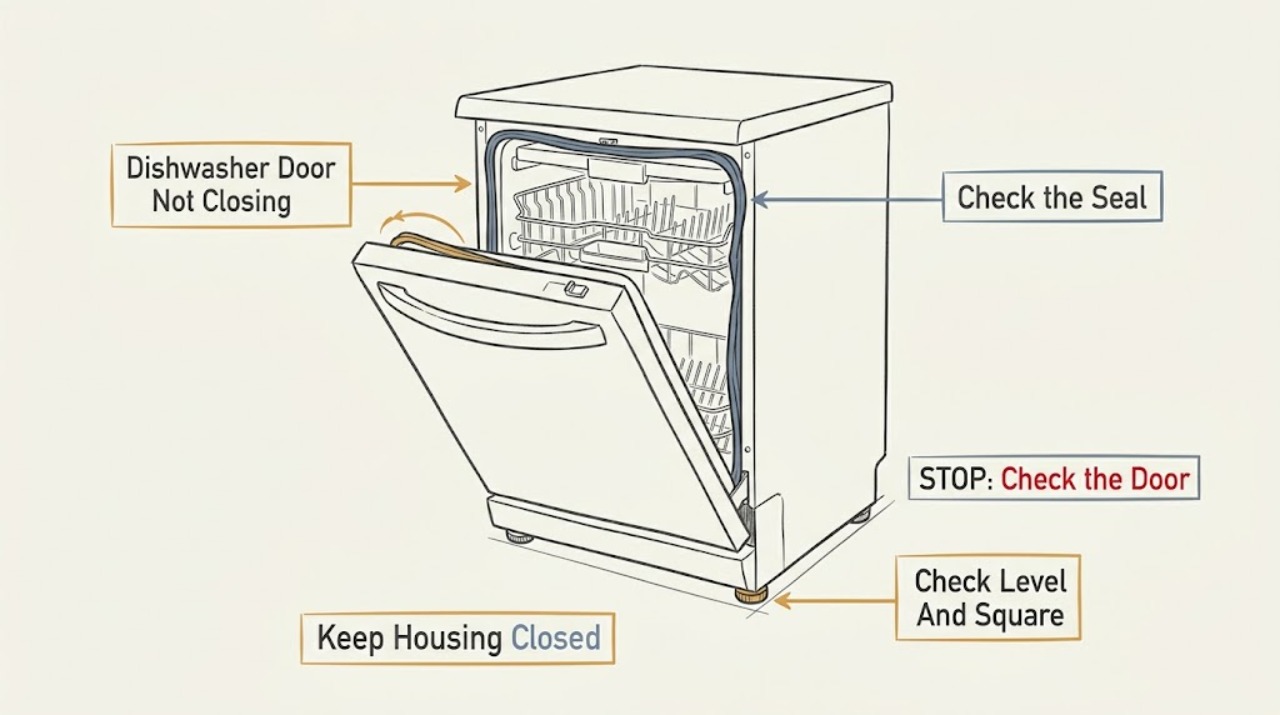
Start with the simple mechanical causes: remove any silverware, large food particles, or rack items protruding into the door seal, then check whether the dishwasher is level and square in its cabinet. KitchenAid says an out-of-square tub opening can prevent the door from sealing, and a damaged latch can keep the door from opening or closing properly. If the door opened automatically after a cycle and your model has Open Door Drying, press it closed and cycle power for about one minute as KitchenAid describes for that feature. Do not force the door, bypass the latch, or remove panels; if the door still will not close or the latch, tub, seal, or installation needs adjustment, use the exact model instructions or arrange service.
Before you begin
Safety first
- Owner checks stop at accessible clearance and visible alignment observations plus the model-conditioned Open Door Drying power cycle. Built-in removal, leveling adjustment without the installation procedure, latch/interlock access, inner-door work, electrical testing, and part replacement require qualified service.
Work through in order
Diagnostic checks
Use only checks that match the exact appliance or system and its official guide.
-
Check 1
With the dishwasher off, inspect the full door seal, tub lip, and both racks for silverware, large food particles, or dishes and utensils protruding into the closing path. Remove only objects that are loose and accessible, and slide each rack back into its normal position without force.
Expected result: An object is caught at the seal, a rack item projects beyond the rack, large debris is on the seal, or the closing path is clear.
Next step: Close the door gently once after clearing the path. If it still stops at the same point or the latch will not engage, continue to the alignment and latch checks.
Stop if: Do not force the door against an object, reach into a sharp or damaged area, or continue if the seal, tub edge, or rack is visibly broken.
Why this matters
Why: An obstruction is a supported mechanical explanation for a door that cannot shut or seal. A clear path makes alignment, latch, or model-specific door-system issues more likely but does not identify a failed part.
-
Check 2
Observe whether the dishwasher sits flat and square in the cabinet. Check for an obvious tilt, a gap that changes along the door, movement at the front, or a tub opening that appears out of square; do not remove the built-in unit to inspect hidden supports.
Expected result: The unit is visibly tilted or unsupported, the tub opening is not square, the door gap is uneven, or the installation appears level and square.
Next step: If installation is visibly misaligned, use the exact model's installation instructions or an installer/service professional to correct it. If it appears square, continue without adjusting unknown parts.
Stop if: Do not loosen mounting hardware, pull out the dishwasher, or place hands under an unsupported unit without the exact installation procedure and safe support.
Why this matters
Why: KitchenAid says the dishwasher must be supported by its leveling legs and rear wheels and remain square in the cabinet; an out-of-square tub opening can prevent proper sealing. A level-looking installation does not rule out a damaged latch or seal.
-
Check 3
Determine whether the door opened by itself at the end of a completed cycle and whether the exact model has the Open Door Drying option. If both are true and the door is otherwise free of obstructions, press the door closed and disconnect dishwasher power for one minute before restoring it, as KitchenAid describes for that system.
Expected result: The door opened after a cycle and the model has Open Door Drying, the door is blocked or the model lacks that option, or the door remains closed but will not latch during ordinary loading.
Next step: Use the one-minute power cycle only for the matching Open Door Drying symptom. Otherwise skip this branch and continue with the mechanical checks or exact model support.
Stop if: Do not force a damaged latch, bypass the door interlock, or cycle power repeatedly to overcome a mechanical obstruction.
Why this matters
Why: The first pattern can indicate the model's door-opening system needs the documented reset. The other patterns are not evidence for that reset and point back to clearance, installation, latch, or seal checks.
-
Check 4
From the outside, inspect the visible latch and strike area for a crack, looseness, displacement, or an object preventing engagement. Do not remove the inner door, probe the interlock, or order a latch by appearance.
Expected result: The latch or strike is visibly damaged or displaced, the latch appears normal but will not engage, or the door closes and latches after the earlier checks.
Next step: If the door now latches, do not run a cycle until the seal closes evenly and the model instructions permit use. If it still will not latch or the latch is damaged, keep the dishwasher off and arrange model-specific service.
Stop if: Do not bypass the latch, hold it closed with a tool, operate with a damaged seal or door, or access electrical components with power connected.
Why this matters
Why: KitchenAid identifies a broken or damaged latch as a cause of a door that will not open or close properly. A normal-looking latch that will not engage can still reflect alignment, seal, tub, or hidden latch damage.
Use your observations
Decision map
Find the observation that best matches what you see, then follow the next safe action.
-
PATH 01Safety boundary
What you see
Silverware, a rack item, or large debris is caught between the seal and tub or projects beyond a rack.
Do this next
Remove the accessible obstruction, reseat the rack, and close the door gently once. If it still binds, stop forcing it and check alignment.
Why this path and its safety boundary
Why it matters: The closing path is mechanically blocked, which is more likely than a failed latch while the obstruction is present.
Safety stop: Stop for a cracked rack, torn seal, sharp broken item, or any obstruction that cannot be removed without disassembly.
-
PATH 02Safety boundary
What you see
The unit is tilted or the cabinet/tub opening is visibly out of square, with an uneven door gap or poor seal.
Do this next
Use the exact installation instructions or an installer/service professional to correct leveling and squareness, then verify that the door closes evenly.
Why this path and its safety boundary
Why it matters: Installation alignment is more likely than a proven latch failure; KitchenAid says the unit must be level, supported, and square in the cabinet.
Safety stop: Do not pull out or adjust a built-in dishwasher without safe support and the model-specific installation procedure.
-
PATH 03Safety boundary
What you see
The door opened after a completed cycle, the model has Open Door Drying, and no rack or seal obstruction is present.
Do this next
Press the door closed, turn power off for one minute, restore power, and reassess the door. If the system repeats the issue, use model-specific service.
Why this path and its safety boundary
Why it matters: This matches KitchenAid's documented Open Door Drying recovery path rather than an ordinary loading obstruction.
Safety stop: Do not use this reset for a damaged latch or unknown door-opening feature, and do not keep cycling power.
-
PATH 04Safety boundary
What you see
The path is clear and the unit appears aligned, but the latch will not engage, the latch/strike is damaged, or the door/seal remains distorted.
Do this next
Keep the dishwasher out of service and contact KitchenAid or a qualified appliance technician with the exact model and the observed binding or latch behavior.
Why this path and its safety boundary
Why it matters: A latch, strike, seal, door, tub, or hidden installation issue is possible, but the visible symptom does not establish a compatible part or authorize disassembly.
Safety stop: Do not bypass the interlock, force the door, run a cycle with an unsealed door, or perform inner-door or electrical work yourself.
Helpful context
Understand the symptom
Clear the seal and rack path first
Open the door only as far as it moves normally and look along the seal and tub opening. KitchenAid specifically calls out silverware or other items caught between the seal and tub, items protruding from either rack, and large food particles around the seal. Remove only an accessible obstruction and check that the racks are fully seated; do not force the door against a dish or utensil.
Check installation alignment
A dishwasher can appear to have a latch problem when the cabinet opening is not square. KitchenAid says the unit must be supported by its leveling legs and rear wheels, sit flat on the floor, and remain square in the cabinet; an out-of-square tub opening can keep the door from sealing. Treat leveling or cabinet adjustment as an installation task, and do not pull out a built-in dishwasher unless the exact installation instructions and safe support method are available.
Use the Open Door Drying reset only when it matches the symptom
Some KitchenAid models open the door automatically after a cycle. If the door then will not close and the model has the Open Door Drying system, KitchenAid's model-conditioned recovery is to push the door closed, even if a noise is heard, and turn power off for one minute before restoring it. Do not apply this sequence to a door blocked by dishes, a damaged latch, or an unknown model without first removing the mechanical obstruction and checking the model guide.
Stop when the latch or structure is damaged
A broken or damaged latch can prevent normal opening or closing, but the official guidance does not authorize forcing it, bypassing the interlock, or selecting a replacement latch by appearance. If the latch is cracked, loose, displaced, or still will not engage after the clearance and alignment checks, keep the dishwasher out of service and use the exact model manual or KitchenAid service.
Safety boundary
Stop conditions
- Stop using the dishwasher if the door, seal, tub edge, rack, latch, or strike is cracked, loose, distorted, or cannot close without force.
- Do not bypass or hold the door latch/interlock closed, run a cycle with an unsealed door, or operate after water can escape toward electrical parts.
- Do not pull out a built-in dishwasher, adjust mounting or leveling hardware, remove the inner door, probe wiring, or replace a latch without the exact model procedure and safe support.
- Disconnect power before any model-approved accessible inspection or the Open Door Drying reset; stop for smoke, sparks, burning odor, abnormal heat, or a breaker trip.
When checks do not resolve it
Need a professional?
Arrange KitchenAid or qualified appliance service when the door path is clear but the dishwasher remains out of square, the latch or strike is damaged, the seal or tub is distorted, the Open Door Drying issue returns after the documented one-minute power cycle, or any repair would require built-in removal, inner-door access, interlock work, or electrical disassembly.
Safety scope: Owner checks stop at accessible clearance and visible alignment observations plus the model-conditioned Open Door Drying power cycle. Built-in removal, leveling adjustment without the installation procedure, latch/interlock access, inner-door work, electrical testing, and part replacement require qualified service.
Common questions
FAQ
Why will my KitchenAid dishwasher door not close?
Check for silverware, large food particles, or rack items protruding into the seal and tub opening. Then check whether the dishwasher is level and square in the cabinet. If the latch or strike is damaged, or the door still will not close after those checks, use the exact model instructions or arrange service.
Can a dish in the rack keep a KitchenAid dishwasher door from closing?
Yes. KitchenAid specifically says items protruding from either rack, silverware caught between the seal and tub, and large food particles around the seal can prevent the door from shutting or sealing. Remove only an accessible obstruction and do not force the door.
What if the dishwasher door opened by itself after the cycle?
If the exact model has Open Door Drying and the door will not close after the cycle, KitchenAid's documented recovery is to push the door closed and turn power off for one minute before restoring it. Do not use this reset for a blocked or visibly damaged door.
Can an unlevel KitchenAid dishwasher cause a door problem?
It can. KitchenAid says the dishwasher must be supported by its leveling legs and rear wheels, sit flat, and be square in the cabinet. An out-of-square tub opening can prevent the door from sealing. Use the model installation instructions or an installer for adjustment.
Should I replace the KitchenAid dishwasher door latch?
Not from the symptom alone. KitchenAid identifies a broken or damaged latch as one possible cause, but latch and strike compatibility are model-specific. Keep the dishwasher off if the latch is damaged and arrange diagnosis using the complete model information.
Can I bypass the latch so the dishwasher will run?
No. A dishwasher that is not fully latched may not start or resume, and bypassing the interlock can allow operation with an unsealed door. Do not hold the latch closed with a tool or perform inner-door electrical work.
Read the exact guide
Official sources
- Door ConcernsKitchenAid Product Help · KitchenAid's door-concern index; it confirms separate ordinary-door, detergent-door, and Open Door Drying topics and directs owners to model-specific manuals.
- Door Hard to Open - DishwasherKitchenAid Product Help · KitchenAid dishwasher door guidance; it supports latch and installation reasoning but not a universal replacement-part fit.
- Dishwasher Not Starting or Not OperatingKitchenAid Product Help · KitchenAid dishwasher operating guidance; used only to explain why a door that does not latch can prevent operation, not to diagnose a latch part.
- Door Will Not Close - Door Open SystemKitchenAid Product Help · KitchenAid dishwasher guidance; the power-cycle step is limited to models with Open Door Drying and a door that will not close after the cycle.
Community feedback
Share a repair observation
Share a plain-text repair observation. Accepted observations are published automatically; this page may take a moment to update.