
On this page
Start here
Quick answer
First determine whether the dryer is completely dead, starts with a hum but the drum stays still, or tumbles briefly and then stops. Confirm the door, cycle selector, Start control, and direct wall connection; remove an overloaded or tangled load and allow an overheated motor to cool once. Frigidaire notes that overloading can overheat the motor and that thermal protection may turn it off. If the drum still will not turn with a correctly closed door and manageable load, or if it stops again after cooling, leave the dryer off: a belt, motor, drum support, control, or thermal-protection diagnosis requires authorized service. [Source: frigidaire-stops-operating; frigidaire-does-not-start; frigidaire-laundry-center-start]
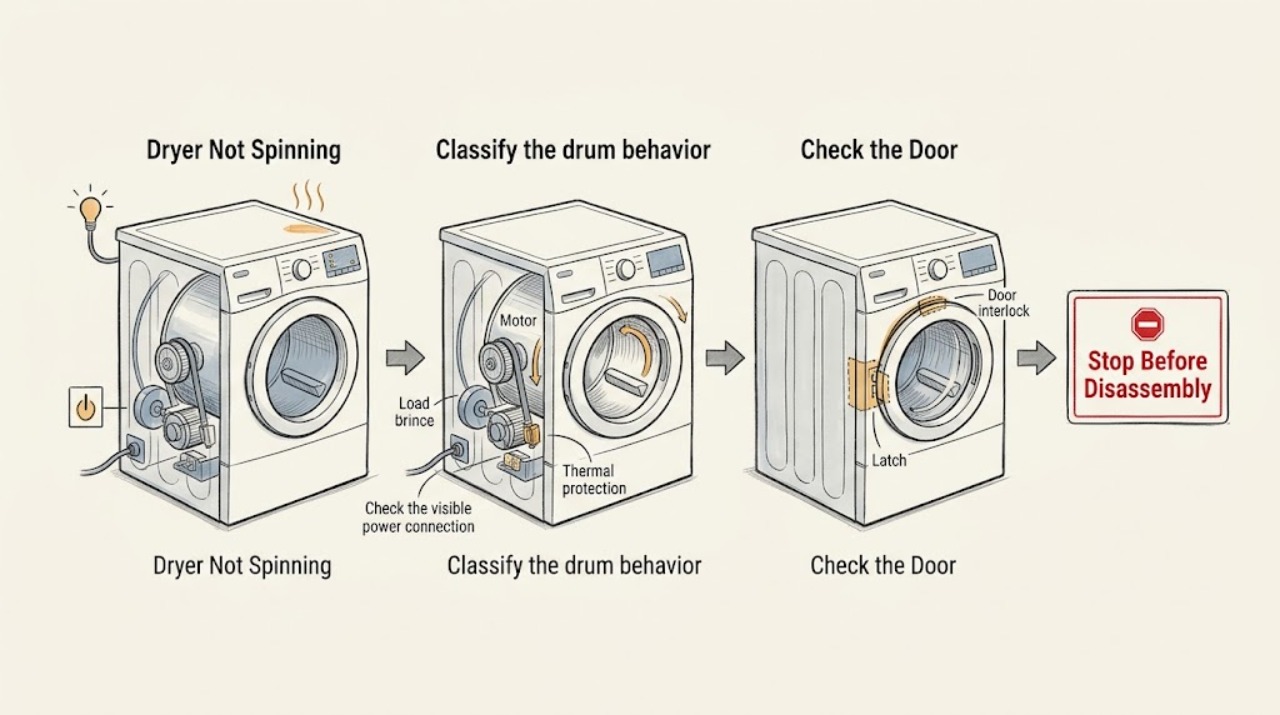
Work through in order
Diagnostic checks
Use only checks that match the exact appliance or system and its official guide.
-
Classify the drum behavior
Empty the drum and select a familiar cycle. Close the dryer door fully, hold or press Start as the control requires, and observe the display, motor sound, drum movement, and whether the cycle remains active for the first minute.
Expected result: The panel is dark; the panel is lit but Start does nothing; the motor hums while the drum stays still; or the drum starts and then stops.
Next step: Use the control and power checks for no-start behavior, then use the load and cooling check for a drum that starts and stops. Persistent hum or no movement requires service without cabinet access.
Why this matters
Why: A dark panel suggests a supply or power-entry issue. A lit panel with no response suggests a door, selector, or Start condition. A hum without movement or a repeat stop after starting points toward a mechanical drive, motor, or thermal condition rather than a simple cycle selection.
-
Confirm door, selector, and Start conditions
Close the door firmly without slamming it, place the selector at the beginning of the intended cycle, and hold Start for the model’s required time. Remove any item caught at the door edge. If the unit is a laundry center, confirm the washer lid and dryer door are both closed and press Start/Pause after selecting the cycle.
Expected result: The drum begins after a door, selector, or Start correction, or the controls respond but the drum remains still.
Next step: If the drum still does not move, continue with accessible power and load checks. If a door indicator stays on despite correct closure, stop and request service for the door-sensing path.
Why this matters
Why: Frigidaire identifies a not-quite-start position, an open door, or an insufficient Start action as reasons a dryer may not begin. A corrected start condition does not explain a drum that remains still after a confirmed running cycle.
-
Check the visible power connection once
From a dry, safe position, confirm that the plug fits tightly in its wall outlet and that the household circuit has not tripped. Reset a tripped breaker once only when safe; do not use an extension cord or increase fuse capacity. Stop if the plug, cord, outlet, or surrounding wall is hot or damaged.
Expected result: The display returns and the drum starts after the circuit is restored, the panel works but the drum remains still, or the breaker trips again.
Next step: For a repeated trip or damaged connection, call a qualified electrician or authorized appliance service. If power is stable, continue with load size and motor-cooling checks.
Why this matters
Why: A stable control panel with no drum motion points away from a total power loss. A repeated trip or damaged connection is an electrical fault boundary and can make further spin testing unsafe.
-
Remove overload and allow one cooling period
Remove bulky or tangled items until the drum has room to tumble, redistribute the remaining load, and leave the dryer off for 30 minutes if the motor stopped after running or the cabinet feels unusually warm. Perform one supervised retest with a smaller load only after the dryer is cool.
Expected result: The drum spins with the smaller load, or it remains still or stops again after the cooling period.
Next step: Keep loads moderate if the retest succeeds. If the drum remains still or stops again, leave the dryer off and arrange authorized service; do not bypass thermal protection.
Why this matters
Why: Frigidaire states that overloading can overheat the motor and that thermal limiter protection can turn the motor off. A successful smaller-load test supports load or heat buildup; a repeat stop means the protective condition or its cause needs diagnosis.
-
Rule out a heat or airflow symptom masquerading as a spin fault
If the drum does turn intermittently, check the lint filter and the accessible exhaust path while the dryer is off and cool. Confirm that the selected cycle is intended to tumble, not a special paused or no-heat option, and note whether heat is present before the drum stops. Do not operate with a blocked, missing, or damaged lint filter.
Expected result: The filter or exhaust is restricted, the dryer becomes hot before stopping, or the drum never moves even with clear airflow and a normal cycle.
Next step: Clean only accessible lint and correct a visible restriction. If the path is inaccessible, heat is excessive, or spin remains absent, request service and do not open the cabinet.
Why this matters
Why: Restricted airflow and heat buildup can trigger protective behavior and reduce reliable operation. If airflow is clear but the drum never moves, the more likely path is the drive or control system, not the vent alone.
-
Stop before internal drive work
After one controlled test with correct door closure, stable power, a manageable load, and a cool motor, leave the dryer off if the drum still does not spin, only hums, scrapes, or repeatedly stops. Record the sound, timing, heat state, and any code; do not remove the cabinet or attempt to reach a belt, motor, pulley, drum support, fuse, or control.
Expected result: The drum remains motionless or the same abnormal sound/stop repeats, or the dryer completes a normal test cycle.
Next step: Request authorized appliance service with the model and symptom record. If the test completes normally, monitor one ordinary load and stop if the no-spin symptom returns.
Why this matters
Why: Persistent no-spin behavior after external checks is consistent with an internal mechanical, motor, control, or safety-component fault, but the symptom alone cannot identify the replaceable part.
Use your observations
Decision map
Find the observation that best matches what you see, then follow the next safe action.
-
PATH 01Safety boundary
What you see
The dryer is completely dark or does not respond to Start.
Do this next
Check the visible plug, outlet, breaker, door, selector, and Start action once. Persistent no-start or a repeated trip needs electrical or authorized appliance service.
Why this path and its safety boundary
Safety stop: Continue with motor, load, and drum-motion checks.
-
PATH 02Safety boundary
What you see
The motor hums but the drum does not move.
Do this next
Stop after the controlled check and arrange service for an internal drive or motor diagnosis. Do not remove the cabinet or reach through the drum opening for belt work.
Why this path and its safety boundary
Safety stop: Continue with load and cooling checks for a drum that stops after running.
-
PATH 03Safety boundary
What you see
The drum starts and then stops after the dryer warms up.
Do this next
Remove excess load, let the motor cool for 30 minutes, and perform one smaller-load retest. A repeat stop requires service for overheating or thermal protection.
Why this path and its safety boundary
Safety stop: Continue with airflow and visible mechanical-symptom checks.
-
PATH 04Safety boundary
What you see
The unit is a laundry center and seems paused at the beginning of a cycle.
Do this next
Confirm the washer lid and dryer door are closed, press Start/Pause, and allow the model’s load-sensing stage to complete. If the drum never begins, record the display and request service.
Why this path and its safety boundary
Safety stop: Use the standalone dryer start and drive branches.
-
PATH 05Safety boundary
What you see
There is smoke, a burning smell, arcing, a hot cord, exposed wiring, or a breaker that trips again.
Do this next
Stop immediately, keep clear, and use the appropriate electrical, emergency, or authorized appliance-service channel. Do not restore power for more testing.
Why this path and its safety boundary
Safety stop: Complete only one external controlled retest; persistent no-spin behavior needs service.
Helpful context
Understand the symptom
A silent drum and a drum that turns briefly are different failures. Note whether the display responds, whether the motor hums, whether the drum can be heard moving at all, and whether the dryer becomes hot before stopping. Do not infer a broken belt from silence alone.
The safe checks here stay outside the cabinet: controls, door, load size, accessible power, and one cooling retest. Do not remove panels, bypass the door switch or thermal protection, or work around energized wiring.
If this is a laundry center, remember that its washer lid and dryer door both affect starting, and some cycles pause briefly while sensing load conditions. Use the exact model guide for any model-specific indicator or code.
Safety boundary
Stop conditions
- Stop immediately for smoke, burning odor, arcing, a hot or damaged plug/cord, exposed wiring, unusual cabinet heat, or a breaker that trips again.
- Do not bypass the door switch, thermal limiter, fuse, or another safety device.
- Do not remove the cabinet or attempt belt, motor, pulley, drum-support, control, or internal wiring work as an owner-level check.
- If the drum stops again after the 30-minute cooling test, leave the dryer off and request authorized service.
When checks do not resolve it
Need a professional?
Request authorized Frigidaire appliance service when the drum remains still after the door, Start, power, and load checks; the motor hums, scrapes, or stops again after cooling; the dryer repeatedly trips power; or internal drive, motor, control, or thermal testing is needed. Use a qualified electrician for outlet, cord, wiring, or recurring circuit concerns.
Have this ready
- Exact Frigidaire model and serial
- Whether the display is dark, lit but unresponsive, or running
- Whether the motor hums, the drum starts briefly, or it stops after warming
- Selected cycle, load size, and whether one smaller load was tested
- Whether the lint filter and accessible exhaust path were clear
- Any displayed code, unusual sound, odor, smoke, heat, or breaker trip
Common questions
FAQ
Why is my Frigidaire dryer not spinning?
Confirm the door, selector, Start action, and stable power, then remove an overloaded or tangled load and allow one cooling period if it stopped warm. A drum that still hums or remains still needs service rather than cabinet disassembly.
Why does my Frigidaire dryer spin and then stop?
Overload or heat buildup can stop the motor. Let it cool for 30 minutes, try one smaller load, and stop if the symptom returns because thermal protection or the motor needs diagnosis.
Should I remove the dryer panel to check the belt?
No. A no-spin symptom does not identify the belt, motor, pulley, or control, and internal work can expose electrical and thermal hazards. Provide the sound and timing to authorized service.
Read the exact guide
Official sources
- What should I do if my dryer stops operating?Frigidaire · Frigidaire dryers; manufacturer guidance for motor overheating, load size, cooling, and thermal limiter service
- What should I do if my Frigidaire Laundry Center is not starting?Frigidaire · Frigidaire laundry centers; manufacturer guidance for power, lid/door, Start/Pause, load sensing, and pause stages
- What should I do if my dryer does not start?Frigidaire · Frigidaire dryers; manufacturer guidance for Start control, selector, door, cord, breaker, and extension-cord boundaries
- What should I do if my Frigidaire Laundry Center is not properly heating or drying?Frigidaire · Frigidaire laundry centers; manufacturer guidance for lint filter, ventilation, exhaust restriction, load room, and gas/electric drying
Community feedback
Share a repair observation
Share a plain-text repair observation. Accepted observations are published automatically; this page may take a moment to update.