
On this page
Start here
Quick answer
First decide whether the Frigidaire range is completely dead, whether the display works but the oven will not start, or whether the oven starts a preheat cycle without producing heat. If you smell unburned gas, see smoke or flames outside the oven, hear unusual sparking, see a damaged power connection, or the breaker trips again, leave the appliance off, ventilate without operating switches, and use qualified gas or electrical help. From a cool, dry position, confirm the range has power, the gas supply has not been deliberately shut off, the controls are not locked or in a special mode, and both the oven function and temperature setting are selected as the model manual requires. If the surface burners also fail to light, use only the visible burner-cap, port, and power checks Frigidaire describes; do not infer that a working surface burner proves the concealed oven igniter is good. For an error code, photograph it and follow the exact model guide; Frigidaire says a single 30-second power reset can clear some codes, but a returning code, thermal warning, failed ignition, or oven that remains cold needs service. Never manually light a concealed oven burner, open the gas valve assembly, test live wiring, or bypass an ignition or safety device.
Before you begin
Safety first
- A user may check visible controls, the accessible household breaker, surface-burner cap and port condition, and the visible power connection when safe. Gas fittings, concealed oven ignition, safety valves, live wiring, sensors, locks, and control boards require qualified service.
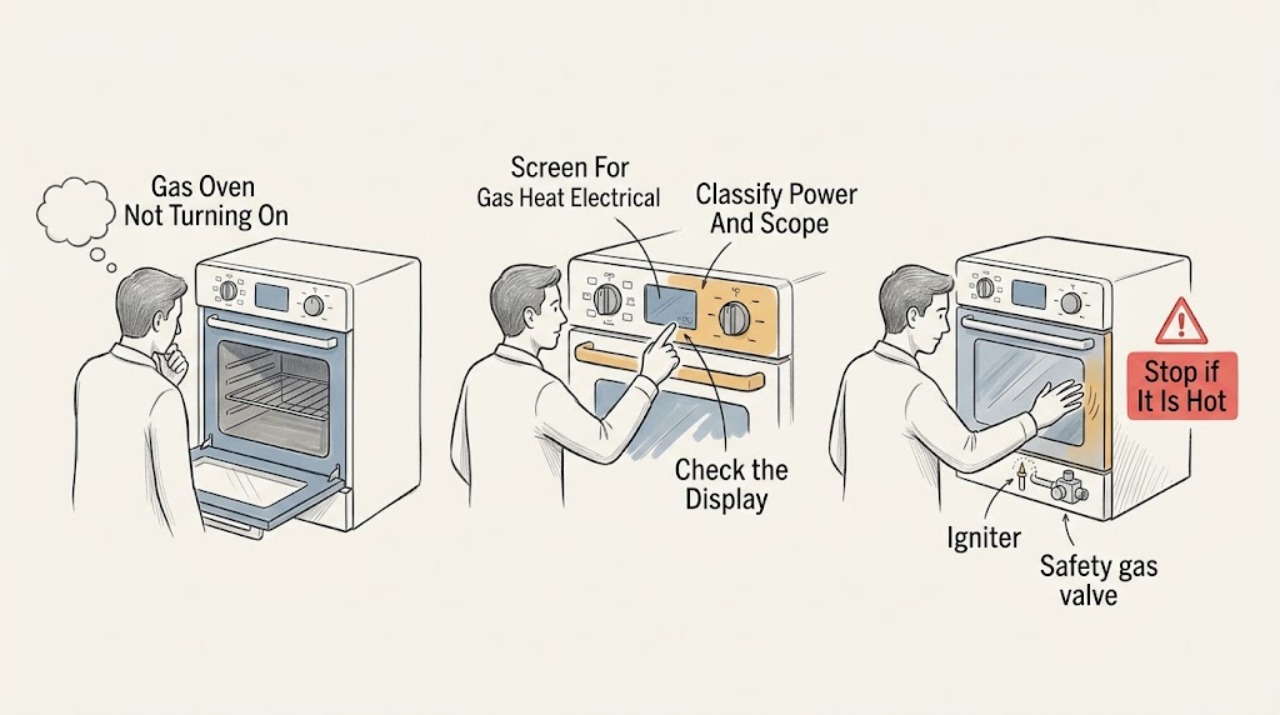
Work through in order
Diagnostic checks
Use only checks that match the exact appliance or system and its official guide.
-
Check 1
Turn the oven controls to Off and look and listen from a safe position for an unburned-gas odor, smoke, flames outside the cavity, repeated clicking or sparking, a burning electrical odor, a hot or damaged cord or connection, or a breaker that opens again; do not operate switches if gas odor is present.
Expected result: Record whether the odor is gas-like or electrical, whether any flame is contained in the intended burner area, whether the control panel stays on, and whether the hazard continues after the appliance is set to Off.
Next step: If gas odor is present, avoid flames and electrical switches, leave the area, and contact the gas emergency service or qualified professional from a safe location. For smoke, sparking, or electrical heat, keep away and arrange qualified electrical or appliance service.
Stop if: Stop immediately for unburned gas odor, smoke, uncontrolled flame, sparking, a hot connection, or repeated protection trips.
Why this matters
Why: Gas odor, uncontrolled flame, smoke, sparking, heat damage, or repeated electrical trips is a safety event rather than a normal no-start symptom. The oven should not be tested until the hazard has been assessed.
-
Check 2
With the range cool and dry, check whether the display, interior light, surface controls, and oven controls respond, and compare the oven symptom with the surface burners without repeatedly attempting ignition.
Expected result: Note whether the entire appliance is blank, whether only the oven function fails, whether the display accepts a setting, whether surface burners light normally, and whether a breaker or outlet protection has opened.
Next step: For a broad power loss, check the home's accessible breaker once without opening the appliance and follow the installation manual. For an oven-only failure, continue with control and gas-supply checks; persistent failure needs service.
Stop if: Do not remove the rear cover, probe the outlet or wiring, or repeatedly reset a breaker that opens again.
Why this matters
Why: A blank or broadly unresponsive range points first toward household power, connection, or shared control behavior. A responsive display with a cold oven narrows the symptom toward the oven control sequence, ignition, gas valve, sensor, or heating path. Surface-burner behavior is context only.
-
Check 3
Use the exact Frigidaire Use and Care guide to confirm the oven mode, temperature setting, Start or equivalent confirmation, clock or demo state, and control-lock state; keep the door closed during a normal start attempt.
Expected result: Record whether the display accepts the mode and temperature, whether a preheat indicator or expected relay/click sequence appears, whether a lock or demo indication remains, and whether the setting cancels immediately.
Next step: Correct only a clearly incorrect user setting, then make one normal start attempt. If the controls still reject the setting or the oven stays cold after accepting it, preserve the display information and arrange qualified service.
Stop if: Do not enter hidden diagnostic modes, defeat a lock, or continue pressing controls while a gas or heat hazard is present.
Why this matters
Why: A control that was not fully started, a locked panel, or a special mode can look like a dead oven without proving a gas or igniter fault. A normally accepted setting with no heating response points beyond simple control selection.
-
Check 4
If the surface burners are also affected and there is no gas odor, check the visible burner control position, cap seating, port cleanliness, and power-cord connection as Frigidaire describes; do not remove or manually ignite the concealed oven burner.
Expected result: Note whether all surface burners fail, one burner fails, caps sit level, ports show visible debris, and the power cord is connected without damage. Do not use a surface flame as a prolonged oven test.
Next step: Correct only a clearly displaced cap or accessible surface-port issue using the model instructions. If the oven still will not start or any gas symptom appears, keep the oven off and arrange service.
Stop if: Do not use matches, bypass ignition, open gas fittings, remove burner assemblies beyond the manual's user cleaning instructions, or continue if gas odor develops.
Why this matters
Why: All surface burners failing can support a broader gas-supply or power issue, while one surface burner failing can be a local cap or port issue. Neither result confirms the oven igniter or safety valve, which require qualified diagnosis.
-
Check 5
If an error code is displayed or the oven stopped after abnormal heat, photograph the complete code, turn the oven off, allow it to cool, and follow the exact model guide; perform no more than the guide's single power reset when the appliance is safe.
Expected result: Record whether the code is F10, F30, F90-F94, another code, or an unclear character, whether the door is locked, and whether the code returns immediately or only after a heating attempt.
Next step: Use the model-specific instructions for the captured code. If it returns, the oven remains cold, the door stays locked, or the unit overheats, keep it off and arrange qualified service.
Stop if: Do not repeatedly reset a thermal or door fault, force a locked door, or use the oven while an overheat or gas warning remains.
Why this matters
Why: Frigidaire identifies F10 as a higher-than-normal-temperature alert on standard range ovens, F30 as an open-probe indication, and F90-F94 as door-lock issues. Other codes remain model-specific; a reset that clears once does not prove the fault is gone.
-
Check 6
After the safe external checks, make one normal preheat attempt with the door closed while observing from outside; stop at the first gas odor, abnormal flame, smoke, sparking, unusual heat, error, or repeat failure.
Expected result: Record whether the control accepts the setting, whether the oven begins its expected preheat behavior, whether heat is produced, how long the symptom takes to appear, and whether the display changes.
Next step: Keep the appliance off and arrange qualified Frigidaire appliance or gas service. Provide the exact model and serial information, display photo, control sequence, surface-burner comparison, power history, and safety observations.
Stop if: Do not remove the oven bottom, manually light the burner, test live wiring, bypass an igniter or safety valve, or continue preheating to reproduce the fault.
Why this matters
Why: A normal control response with no heat suggests a concealed ignition, gas-valve, sensor, wiring, or control problem rather than a setting issue. A failure affecting the whole range suggests power or gas supply, while a returning code identifies a model-specific fault path.
Use your observations
Decision map
Find the observation that best matches what you see, then follow the next safe action.
-
PATH 01Safety boundary
What you see
There is unburned-gas odor, smoke, uncontrolled flame, sparking, a burning electrical odor, or a hot or damaged power connection.
Do this next
Leave the appliance off, avoid flames and electrical switches when gas odor is present, ventilate only from a safe position, and contact the appropriate emergency or qualified service provider.
Why this path and its safety boundary
Safety stop: Do not relight, reset, or operate the range to test it.
-
PATH 02Safety boundary
What you see
The display and most or all range functions are blank or unresponsive.
Do this next
Check the accessible household breaker once and the visible power connection according to the installation instructions.
Why this path and its safety boundary
Safety stop: If protection opens again or the connection is damaged, keep the range off and arrange qualified electrical service.
-
PATH 03Safety boundary
What you see
The display works but the oven does not accept Bake or another mode, or a lock/demo state remains.
Do this next
Use the exact model guide to set the mode, temperature, Start control, clock, and lock state, then make one normal attempt.
Why this path and its safety boundary
Safety stop: A persistent control failure needs service; do not access hidden diagnostics or bypass the lock.
-
PATH 04Safety boundary
What you see
Surface burners also fail to light and there is no gas odor.
Do this next
Check only visible cap seating, port condition, control position, and the power connection as the owner guidance permits.
Why this path and its safety boundary
Safety stop: Do not manually light the oven burner or open gas fittings; persistent failure needs qualified service.
-
PATH 05Safety boundary
What you see
An error code appears or the oven stopped after abnormal heat.
Do this next
Capture the code, turn the oven off, let it cool, and follow the model guide's one-time reset instruction if safe.
Why this path and its safety boundary
Safety stop: A returning code, thermal warning, locked door, or cold oven needs service.
-
PATH 06Safety boundary
What you see
The display accepts the mode and temperature but the oven remains cold or fails during ignition.
Do this next
Stop testing and arrange qualified diagnosis of the concealed ignition, gas-valve, sensor, wiring, or control path.
Why this path and its safety boundary
Safety stop: Do not remove the oven floor, manually ignite gas, probe live wiring, or bypass safety devices.
Helpful context
Understand the symptom
Separate a dead range from a gas-oven ignition failure
A Frigidaire gas oven needs both electrical control power and a gas-and-ignition sequence. A blank display or no response from any control is a different starting point from a display that accepts Bake but never heats. Surface burners can provide useful context, but a lit surface burner does not prove the oven's concealed igniter, safety valve, sensor, or control circuit is healthy.
Use the exact control sequence for the model
Frigidaire gas ranges vary in knobs, touch controls, lock functions, and display behavior. Confirm that the oven mode is set, a temperature has been selected, and the start or equivalent control has been accepted according to the Use and Care guide. Do not treat a clock, demo behavior, or an illuminated display as proof that the oven is heating.
Surface-burner checks are context, not an oven repair
If the range has surface burners, Frigidaire says to check that the control is in the Lite position, caps are present and seated level, ports are not blocked, and the power cord is connected. These visible checks can show a broader gas or power problem. The oven burner and igniter are concealed; never remove the oven floor or attempt to light the burner by hand.
When a reset is not enough
An error guide may provide a one-time power reset, but repeated resets can hide a fault and are inappropriate around gas odor, heat damage, or an electrical trip. If the oven remains cold, fails to ignite, displays the same code, overheats, or loses power again, keep it off and provide service with the exact model, code, and observed sequence.
Only after diagnosis
Potential parts
- oven igniter
Consider only when the control accepts a bake or preheat command but the oven remains cold and the safe external checks pass.
Igniter fit and diagnosis are model-specific; the concealed burner area requires qualified service. - safety gas valve
Consider only after qualified diagnosis separates gas-valve behavior from ignition, supply, and control faults.
Do not open gas fittings or bypass the safety valve; confirm the exact model. - temperature sensor or probe
Consider only when the exact model code or measured behavior supports a sensor path, especially for a documented probe error.
Use the model manual and qualified testing; do not infer a sensor fault from no heat alone. - control board or touch-control assembly
Consider only when the display or control sequence fails after the documented user settings and safe reset.
Control revisions are model-specific and require qualified electrical diagnosis. - door switch or lock assembly
Consider only when the exact model reports a door-lock condition or the door state prevents the oven sequence.
Never force or bypass a lock; verify the model and mechanism during service.
When checks do not resolve it
Need a professional?
Arrange qualified Frigidaire appliance or gas service for gas odor, uncontrolled flame, smoke, sparking, damaged power parts, repeated breaker trips, a returning error code, a persistent locked door, a display that accepts an oven setting but produces no heat, or any fault requiring access to the igniter, gas valve, sensor, wiring, or control board.
Safety scope: A user may check visible controls, the accessible household breaker, surface-burner cap and port condition, and the visible power connection when safe. Gas fittings, concealed oven ignition, safety valves, live wiring, sensors, locks, and control boards require qualified service.
Have this ready
- Provide the exact model and serial information, display code or photo, selected mode and temperature, whether Start was accepted, surface-burner behavior, power or breaker history, gas odor or flame observations, and the safe checks already completed.
Common questions
FAQ
Why is my Frigidaire gas oven not turning on even though the display works?
Confirm the model's mode, temperature, Start control, and lock or special-mode state. If the setting is accepted but the oven stays cold, the concealed igniter, gas valve, sensor, wiring, or control path needs qualified diagnosis.
If the surface burners light, why will the Frigidaire oven not start?
A working surface burner only shows that one gas-and-ignition path is operating. The oven has its own concealed ignition and control sequence, so do not manually light it; arrange service if a normal preheat command produces no heat.
Can I reset a Frigidaire gas oven that will not start?
For some error conditions, Frigidaire describes disconnecting power for 30 seconds and restoring it. Do this no more than once when the range is safe and cool; a returning code or no-heat condition needs service.
What should I do if I smell gas when the Frigidaire oven will not turn on?
Do not operate switches, light flames, or attempt another ignition. Leave the area, avoid creating an ignition source, and contact the gas emergency service or a qualified professional from a safe location.
When should I stop troubleshooting a Frigidaire gas oven?
Stop for gas odor, smoke, uncontrolled flame, sparking, a hot connection, repeated electrical trips, a thermal warning, a returning error code, or any need to open the cabinet or access the burner, igniter, gas valve, or wiring.
Read the exact guide
Official sources
- What should I do if some or all of my burners are not lighting?Frigidaire Owner Support · The guide covers visible surface-burner checks and is used here only to compare whole-range gas or power symptoms; it does not authorize access to the concealed oven burner.
- Oven Error Codes and Alarms GuideFrigidaire Owner Support · Error meanings and control sequences vary by model; the guide's reset, cool-down, and escalation advice must be reconciled with the installed gas range manual.
- What To Do If Your Gas Range Won't StartFrigidaire Owner Support · The support article applies to gas ranges; use the installed range's Use and Care manual for the exact control sequence and safety instructions.
- Owner Center Resource LibraryFrigidaire · Use the owner center to locate the exact model's support and manual resources before interpreting a control or error symptom.
Community feedback
Share a repair observation
Share a plain-text repair observation. Accepted observations are published automatically; this page may take a moment to update.