
On this page
Start here
Quick answer
First decide whether the Samsung gas oven has no display, has a display but will not start, or starts its sequence but does not ignite. Check the range's power connection and display, then look for Control Lock, Demo mode, a required Start or Bake selection, and a displayed code. For a gas model, an oven that does not ignite while the cooktop burners also fail to light points to the household gas supply; do not troubleshoot a gas line yourself. If the burners work but the oven still will not start or ignite, or if a code returns after the one permitted reset, arrange qualified Samsung service. Stop immediately for gas odor, delayed ignition or a boom, abnormal flame, smoke, sparks, a hot or damaged cord or outlet, repeated breaker trips, or an oven that keeps heating after controls are turned off.
Before you begin
Safety first
- This article covers external observation and model-documented control steps only. A qualified professional must handle gas-path, ignition, internal electrical, interlock, burner, valve, sensor, wiring, and damaged-door work.
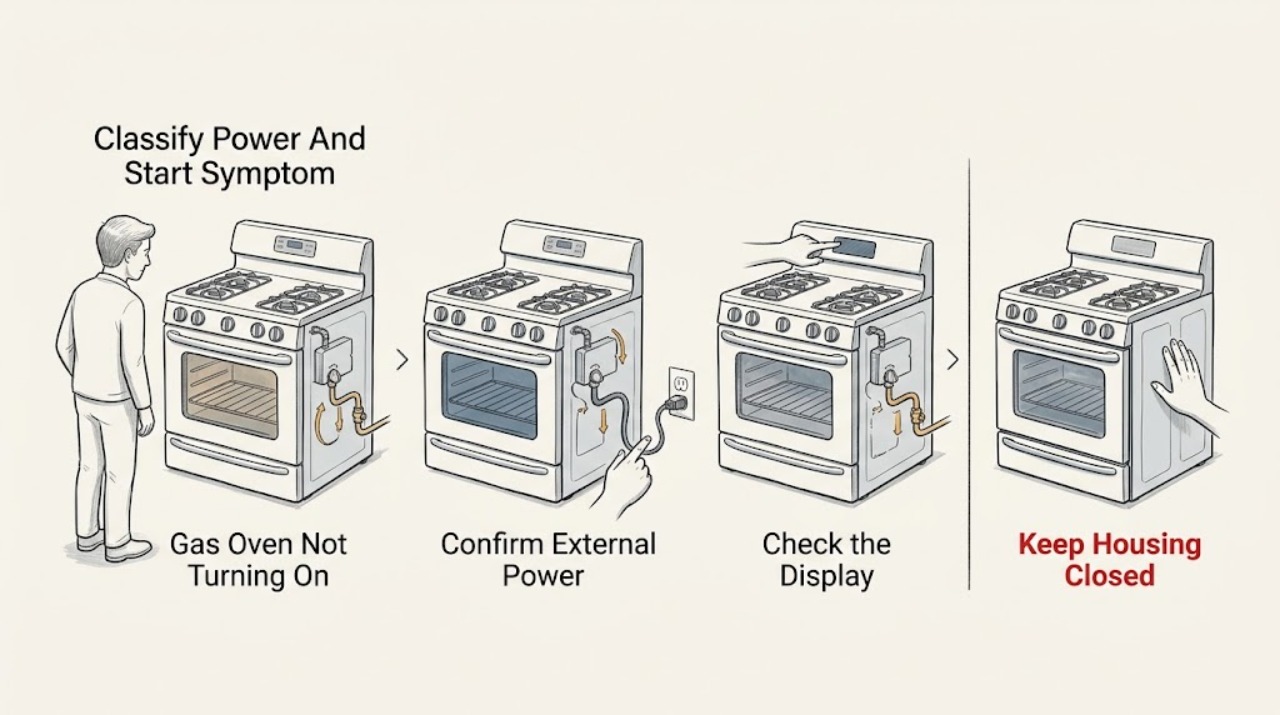
Work through in order
Diagnostic checks
Use only checks that match the exact appliance or system and its official guide.
-
Check 1
From a dry, safe standing position, observe the display, interior light, control response, and any response when Bake is selected and Start is pressed; do not remove covers or reach behind the range.
Expected result: Record one state: no display or light, display present but controls ignore input, display shows Loc or another state, a code appears, the sequence starts but no flame appears, or the burner ignites and then goes out.
Next step: Use the matching action below and record the exact model and display text; do not treat a no-display symptom as proof that the gas supply is defective.
Stop if: Stop for gas odor, smoke, sparks, abnormal flame, a hot or damaged connection, water near electrical parts, or repeated breaker trips.
Why this matters
Why: No display points first to power or control supply. A live display with no start points to a lock, mode, door/interlock, setting, or control issue. A sequence with no flame moves the diagnosis toward gas delivery or ignition, while a flame that drops out needs model-specific gas-safety diagnosis.
-
Check 2
Check only the external plug and the appliance circuit from a dry, safe position: look for a tripped kitchen breaker or fuse and confirm that the range is connected as described by the installation guide; do not open the control area or electrical enclosure.
Expected result: The display returns after the breaker is restored, the breaker immediately trips again, the outlet or cord shows heat or damage, or the display remains blank with no visible external issue.
Next step: If there is no hazard and Samsung's model guide permits it, perform one power cycle and observe the display; otherwise leave the range unused and arrange qualified appliance or electrical service.
Stop if: Do not reset a breaker repeatedly. Stop for a warm or damaged plug, outlet, cord, exposed conductor, smoke, water, arc, or a breaker that trips again.
Why this matters
Why: A restored display supports a supply interruption or control reset. An immediate trip, heat mark, damaged cord, or persistent blank panel indicates an electrical fault or installation issue rather than a gas-ignition adjustment.
-
Check 3
With the oven cool and the panel dry, read the display for Loc, a padlock, Hot, tESt, tE 5t, DEMO, a D indicator, or another code; select the normal Bake mode and follow only the exact model manual for unlocking or leaving Demo mode.
Expected result: The panel shows a lock or heat state, shows Demo mode, accepts input after the documented unlock or mode change, or remains unresponsive.
Next step: After a successful model-specific change, select Bake, set a temperature, press Start, and record whether the sequence begins; if the code or lock returns, stop normal troubleshooting and request service.
Stop if: Do not force a button, defeat a lock, hold an interlock, or attempt to alter control wiring. Stop if the panel is hot, cracked, wet, or emits smoke or sparks.
Why this matters
Why: A lock, high-heat state, or Demo mode can make the controls appear not to work even though the appliance has power. If the correct mode and manual procedure do not restore normal controls, the panel or control system needs service.
-
Check 4
Look at the closed oven door and record any door, dE, dC, or other displayed code; confirm that nothing visible in the opening prevents normal closure and that the door is not being held open, without forcing the handle or removing the door.
Expected result: The door closes normally and the code clears, the door will not close fully, the door code remains, or another exact code returns.
Next step: Use the model manual for the recorded code and request service if the door, plunger, latch, or code remains abnormal; include a photo of the display and door alignment.
Stop if: Do not bypass, tape, wedge, or hold the door interlock. Stop for broken glass, a bent frame, a loose hinge, a sharp edge, or a door that falls or cannot be supported safely.
Why this matters
Why: Samsung describes a door code as a door or plunger/interlock state, and some gas models use partition or door conditions to control oven operation. A door that cannot close or a persistent code cannot be safely solved by bypassing the interlock.
-
Check 5
Only if there is no gas odor or other hazard, observe whether an existing cooktop burner operates normally using the ordinary control; do not loosen a gas connection, adjust pressure, or repeatedly attempt oven ignition.
Expected result: The cooktop burners also fail to light, the cooktop works but the oven does not begin ignition, or the oven makes ignition attempts but produces no stable flame.
Next step: For a supply concern, follow local gas-emergency guidance from a safe location. For an oven-only ignition concern, stop repeated attempts and arrange qualified Samsung appliance service with the model and symptom record.
Stop if: Do not continue if there is gas odor, delayed ignition, a boom, yellow or unstable flame, soot, smoke, or any need to test or alter the gas path.
Why this matters
Why: If all gas burners fail, a household gas-supply interruption is plausible and the gas provider or qualified professional should be contacted. If the cooktop works but the oven does not ignite, the oven's control, igniter, burner, valve, sensor, or model-specific safety circuit requires qualified diagnosis; this observation does not identify a replaceable part.
-
Check 6
If the appliance is cool and there is no gas, smoke, water, spark, heat, or visible electrical hazard, follow the exact Samsung model guide to turn the range circuit off once, wait the manual's stated interval, restore it, and retry one normal Bake start.
Expected result: The display and Bake sequence return normally, an error or blank panel returns, the breaker trips again, or the oven still does not ignite.
Next step: Stop testing after this single controlled retry. Provide the model, exact code, power symptom, door state, cooktop comparison, and whether ignition was attempted to the service technician.
Stop if: Do not repeat the reset, bypass a safety device, or continue a start attempt after gas odor, smoke, sparks, abnormal flame, overheating, or a breaker trip.
Why this matters
Why: A successful one-time reset supports a temporary control state. A returning error, repeated trip, persistent no-start, or no-ignition condition points to a fault requiring service, not more resets.
-
Check 7
Stop the troubleshooting sequence and document the symptom whenever the oven has a gas, flame, heat, smoke, or electrical warning, or whenever the safe checks fail; do not open the appliance or attempt an internal repair.
Expected result: The hazard is gas-related, fire or smoke-related, electrical, mechanical/door-related, or simply a persistent no-start with no visible hazard.
Next step: Keep people away, use the safe emergency path appropriate to the hazard, and provide the technician with the exact display code, model, recent installation or service history, and the result of each safe observation.
Stop if: Do not relight, run another test, reset a tripped breaker again, or work on live, hot, pressurized, or gas-connected components.
Why this matters
Why: Gas and fire symptoms require immediate safety action and qualified emergency or gas assistance. Electrical, door, ignition, control, and persistent no-start symptoms require a qualified appliance technician who can identify the exact model and circuit safely.
Use your observations
Decision map
Find the observation that best matches what you see, then follow the next safe action.
-
PATH 01Safety boundary
What you see
The display and normal indicators remain blank after the external power check and one permitted reset, with no visible connection damage.
Do this next
Leave the appliance unused and request qualified appliance or electrical service with the model and installation history.
Why this path and its safety boundary
Why it matters: The range may have an installation, supply, control, or internal electrical fault; the gas supply is not a safe first assumption.
Safety stop: Stop immediately for a tripped breaker that will not stay on, heat or damage at the outlet, smoke, water, or exposed wiring.
-
PATH 02Safety boundary
What you see
The display is present but shows Loc, a padlock, Hot, Demo indicators, or ignores the normal Bake and Start sequence.
Do this next
Use the exact model manual to clear only the documented state; request service if the state persists or returns.
Why this path and its safety boundary
Why it matters: A control lock, high-heat state, Demo mode, unavailable function, or panel fault can prevent an apparent start.
Safety stop: Do not force controls, defeat a lock, or manipulate internal wiring.
-
PATH 03Safety boundary
What you see
A door-related code remains, the door will not close fully, or the oven appears to start only when the door is moved.
Do this next
Stop using the oven and arrange model-specific service; do not bypass or hold the interlock.
Why this path and its safety boundary
Why it matters: The door, plunger, latch, hinge, frame, or interlock may not be reporting a safe closed state.
Safety stop: Stop for broken glass, unstable hinges, sharp metal, heat escaping through a gap, or a door that cannot be supported.
-
PATH 04Safety boundary
What you see
The cooktop burners also fail to light during the single safe comparison and there is no gas odor or other immediate hazard.
Do this next
Do not adjust the regulator or gas piping; use the gas provider or qualified service path for the supply issue.
Why this path and its safety boundary
Why it matters: A household gas-supply interruption is more plausible than an oven-only igniter fault.
Safety stop: For gas odor or suspected leakage, do not operate electrical switches or continue testing; leave by the safest route and follow local emergency guidance from a safe location.
-
PATH 05Safety boundary
What you see
The cooktop operates normally but the gas oven does not begin ignition or cannot sustain a flame.
Do this next
Stop repeated ignition attempts and request qualified Samsung appliance service with the model and exact sequence.
Why this path and its safety boundary
Why it matters: The fault is more likely within the oven's model-specific control, ignition, burner, valve, sensor, or safety circuit; the observation does not identify which component failed.
Safety stop: Stop for delayed ignition, a boom, gas odor, soot, yellow or unstable flame, smoke, or abnormal heat.
-
PATH 06Safety boundary
What you see
A code, blank panel, no-start state, or breaker trip returns after the one safe reset.
Do this next
Leave the range unused and arrange qualified service; preserve the exact code and the operating stage when it returned.
Why this path and its safety boundary
Why it matters: The reset did not remove the underlying fault; repeating it can increase risk and erase useful symptom timing.
Safety stop: Do not repeatedly reset, run self-diagnosis without the model instructions, or attempt internal repair.
-
PATH 07Safety boundary
What you see
There is gas odor, delayed ignition, a boom, abnormal flame, smoke, sparks, a hot connection, repeated breaker trips, or heating that continues after controls are off.
Do this next
Stop using the range, keep clear, and follow the appropriate local emergency, gas, fire, or qualified electrical-service path from a safe location.
Why this path and its safety boundary
Why it matters: This is no longer a routine no-start check; fire, gas, burn, or electrical risk takes priority over diagnosis.
Safety stop: Do not switch electrical controls, relight, run another cycle, reset a breaker, or open the appliance while the hazard is present.
Helpful context
Understand the symptom
Start with the symptom, not the gas components
Write down what happens when you select Bake and press Start: no display, a display with no response, a code, a start sequence with no flame, or a flame that goes out. A Samsung gas oven still needs electrical power for its controls and ignition system, so a gas appliance can have a supply problem, a control-state problem, or an ignition problem. Keep the model number and exact display text for the manual and service request.
Use one safe reset only when there is no hazard
If there is no gas odor, smoke, spark, unusual heat, water exposure, or visible electrical damage, follow the model guide for a single power reset. Samsung describes turning the range circuit off for about 30 to 60 seconds in its troubleshooting material, but the model installation and user manuals control. A reset cannot repair a failed igniter, gas control, interlock, wiring fault, or damaged connection.
Safety boundary
Stop conditions
- For gas odor, delayed ignition, a boom, abnormal flame, soot, or suspected leakage, stop using the range, avoid electrical switches and flames, leave by the safest route, and follow local gas-emergency guidance from a safe location.
- For smoke, fire, sparks, arcing, a hot or damaged cord or outlet, water near electrical parts, repeated breaker trips, or heating that continues after controls are off, stop and use the appropriate emergency or qualified electrical-service path; do not reset or retest.
- Do not bypass, tape, wedge, or hold a door, latch, plunger, or other safety interlock; do not open covers, alter wiring, adjust gas pressure, loosen gas connections, or work on hot or live components.
- Do not force a door or handle, remove the door without the exact model procedure, or run the oven with a damaged door, broken glass, unstable hinge, or visible frame gap.
- Stop after one safe, model-approved power reset when a no-start, code, blank display, or breaker trip returns; arrange qualified service instead of repeating tests.
Only after diagnosis
Potential parts
- oven igniter
Consider this category only if qualified diagnosis confirms that the oven has the correct power and gas conditions but the model-specific igniter does not perform within its documented sequence.
Confirm the exact model, fuel configuration, connector, mounting, and manufacturer fit information before ordering; do not use a part search phrase as proof of compatibility. - oven door or interlock component
Consider this category only if the exact model's persistent door or interlock symptom is confirmed by qualified service after the door closes normally and no obstruction is present.
Confirm the exact model and service procedure; never replace or defeat a safety interlock based only on a symptom. - oven control or power component
Consider this category only when qualified diagnosis confirms a persistent no-display, control, or error condition after safe external checks and one documented reset.
Confirm exact model and revision with Samsung or a qualified technician; do not infer board fit from a similar-looking range.
When checks do not resolve it
Need a professional?
Request qualified Samsung appliance service when the display stays blank, the panel remains locked or unresponsive, a door or interlock code persists, the cooktop works but the oven will not ignite, an error returns after one safe reset, or the oven cannot be started without forcing a control. Use the gas provider or local emergency path for suspected gas-supply or gas-leak conditions, and qualified electrical service for damaged or repeatedly tripping power connections.
Safety scope: This article covers external observation and model-documented control steps only. A qualified professional must handle gas-path, ignition, internal electrical, interlock, burner, valve, sensor, wiring, and damaged-door work.
Common questions
FAQ
Why does my Samsung gas oven have power but not start?
A display with no start can reflect Control Lock, Demo mode, an unavailable function, a door or interlock condition, a returned code, or a control fault. Record the display state, use the exact model manual for the documented control step, and request service if the condition persists.
What should I check when the Samsung oven display is completely blank?
From a dry, safe position, check the external plug and the appliance circuit for an obvious interruption, without opening the range. Samsung recommends a single circuit-breaker restart in its panel guide when there is no hazard. A blank panel that remains blank, or a breaker that trips again, needs qualified service.
Can a Samsung gas oven fail to start if the cooktop burners also will not light?
Yes. If the existing cooktop burners also fail during a safe, ordinary comparison, a household gas-supply interruption is plausible. Do not adjust gas piping or keep trying ignition; use the gas provider or qualified service path, and treat any gas odor as an emergency safety issue.
Is Demo mode the same as a broken Samsung gas oven?
No. Samsung says Demo mode can prevent the oven from heating even though a gas cooktop may still ignite. If the display shows tESt, tE 5t, DEMO, or a D indicator, follow the exact model manual. If the oven still will not start after the documented change, request service.
Should I keep resetting the Samsung oven if it will not turn on?
No. When there is no hazard, one model-documented power reset can clear a temporary control state. If the no-start, code, blank display, or breaker trip returns, stop resetting and provide the exact symptom and code to qualified service.
When is a Samsung gas oven not turning on an emergency?
Stop immediately for gas odor, delayed ignition or a boom, abnormal flame, soot, smoke, sparks, a hot or damaged cord or outlet, water near electrical parts, repeated breaker trips, or heating that continues after controls are turned off. Do not relight or retest; leave by the safest route and use the appropriate local emergency or qualified service path from a safe location.
Read the exact guide
Official sources
- Samsung Range FAQsSamsung Support US · Samsung range FAQ covering gas, electric, induction, and dual-fuel range behavior; exact model instructions control.
- Samsung oven temperature issuesSamsung Support US · Samsung oven temperature troubleshooting with a gas-range branch; exact model manual and safe service boundaries control.
- Samsung range or wall oven panel is blank, blinking, or incorrectSamsung Support US · Samsung range and wall-oven panel troubleshooting; model installation instructions control wiring and supply work.
- Self Clean or other buttons do not light up or respond, or panel is locked on Samsung ovenSamsung Support US · Samsung range and wall-oven control-state guidance; lock behavior and button sequences vary by model.
- Samsung range or wall oven error codesSamsung Support US · Samsung error-code guide; codes and procedures vary by model and fuel configuration.
Community feedback
Share a repair observation
Share a plain-text repair observation. Accepted observations are published automatically; this page may take a moment to update.