
On this page
Start here
Quick answer
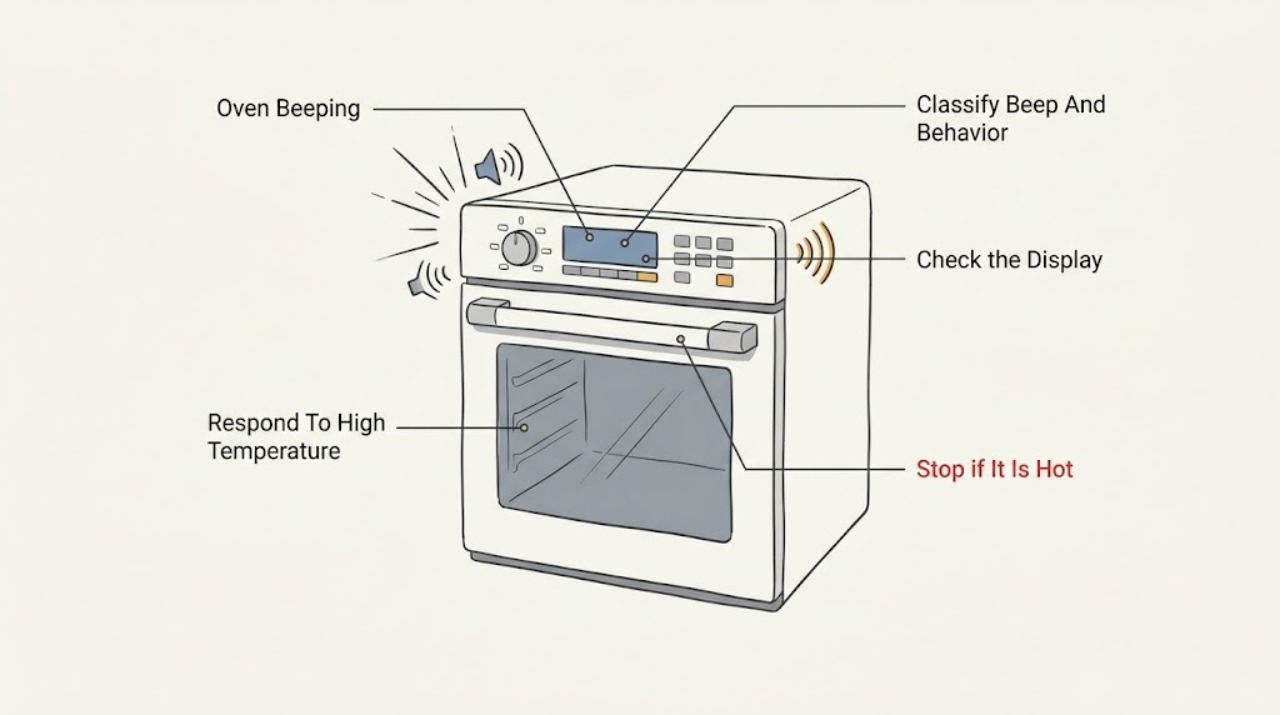
A Frigidaire oven can beep normally when preheating reaches the set temperature, when a timer or cycle ends, or when a key press is accepted. Repeated beeping is more useful as a symptom than as a diagnosis: first note exactly what appears on the display, then check for an error code, an active control lock or Sabbath mode, and whether the oven is heating normally. Turn the oven off and let it cool if it is unusually hot or shows F10; stop using it for smoke, a burning smell, uncontrolled heating, a door that will not unlock, or a beeping fault that returns after the model-specific reset and arrange qualified service.
Work through in order
Diagnostic checks
Use only checks that match the exact appliance or system and its official guide.
-
Check 1
From a safe position, listen to one complete event and record whether the sound is a single tone at preheat completion, a key-press or timer tone, a repeated alarm, or a tone that continues while the controls do not respond; note whether the oven is heating, idle, or cooling.
Expected result: Record the number and timing of tones, the selected function, the display text, and whether the oven reaches and holds the selected temperature without unusual heat or odor.
Next step: Continue to the display and safety checks when the tone repeats or the oven behavior is abnormal; if the tone is only a normal completion signal and the oven works correctly, use the model manual to identify the sound setting.
Stop if: Stop using the oven immediately for smoke, a burning smell, visible damage, uncontrolled heating, or heat that remains abnormal after the oven is turned off.
Why this matters
Why: A tone that occurs once when the set temperature is reached can be normal. Repeated tones, no response, a code, uncontrolled heating, or a new odor indicate that the sound is a symptom requiring a more specific check.
-
Check 2
Read and photograph the complete display, including any letter-number code, lock message, dash, demo indication, or flashing setting, before clearing it; match the wording to the Frigidaire alarm guide and the exact Use & Care manual.
Expected result: Classify the display as no code, F10, F30, F90-F94, a lock indication, demo mode, or another model-specific message, and record whether the door is closed and the controls accept input.
Next step: Follow only the matching Frigidaire guidance and provide the exact code and model when requesting service; do not substitute a code from a different oven family.
Stop if: Do not continue a cooking cycle while an F10 alert, uncontrolled heat, smoke, or a door-lock fault prevents safe operation.
Why this matters
Why: The code changes the diagnosis. F10 is a high-temperature or thermal-runaway alert; F30 relates to an open probe; F90-F94 indicate a door-lock issue. A lock or demo indication can make normal button presses appear ineffective, while an unlisted code needs model-specific support.
-
Check 3
If the display shows F10 or the oven is clearly hotter than the selected setting, cancel the oven from the normal control if it responds, turn it off, and allow it to cool without opening panels or touching hot elements.
Expected result: After cooling, note whether the alert clears and whether the oven still heats or beeps with no cooking function selected; do not restart it merely to prove the fault if abnormal heat remains.
Next step: Leave the oven out of service and arrange qualified appliance service when F10 returns, the oven heats while off, or safe cooling cannot be confirmed.
Stop if: Stop immediately for smoke, flames, a burning odor, exposed damage, or any need to reach inside a hot or energized oven.
Why this matters
Why: Frigidaire identifies F10 on standard range and wall ovens as detection of higher-than-normal temperature and treats it as a built-in safety alert. A returning alert or continued heating is not a nuisance-tone problem and may involve temperature sensing or control circuitry.
-
Check 4
If the display shows a lock, dash, or an otherwise unresponsive control, compare it with the exact manual's control-lock and Sabbath-mode descriptions; use only the documented front-panel command for that model and do not force the door or repeatedly press random keys.
Expected result: Record whether the lock indicator clears, the controls become responsive, the door remains locked, or the beeping continues despite the documented unlock or mode-exit procedure.
Next step: If the control becomes responsive and the oven otherwise behaves normally, continue with a brief supervised function check; if not, keep the oven off and give the model, display message, and sequence to service.
Stop if: Never pry the door, bypass a lock, remove the control panel, or work inside the appliance to silence the beeping.
Why this matters
Why: A locked control or Sabbath mode can suppress or change tones and restrict available functions, so an apparently dead panel may be an intentional mode rather than a failed buzzer. A door that remains locked or a fault that persists after the documented procedure needs service.
-
Check 5
When there is no safety alert and the oven heats normally, inspect the displayed timer, clock, selected function, and sound setting using the exact model manual; cancel or change only the setting that the manual identifies as the source of the tone.
Expected result: Check whether the tone stops when a completed timer is acknowledged, whether it returns only at the selected temperature or cycle end, and whether the oven responds normally to the documented control command.
Next step: Use the model's sound option only to manage a normal tone; arrange service for unexplained repeated beeps or any failure to accept the documented setting change.
Stop if: Stop if changing a setting causes heating to begin unexpectedly, the display becomes erratic, or a safety code appears.
Why this matters
Why: A completed timer or normal preheat notification can explain a beep without a hardware failure. If the sound occurs with no timer or cycle event, controls lag, or the display changes on its own, a control or sensor problem remains possible.
-
Check 6
If the oven is cool, no smoke or odor is present, and the manual or Frigidaire alarm guide permits a reset, perform the model-appropriate power reset from a safe position; do not open the cabinet or disconnect wiring.
Expected result: After power is restored, record whether the display returns normally, the beeping stops, the code returns immediately, or the oven begins heating without a selected cycle.
Next step: Keep the oven off and request qualified service when the symptom returns; provide the model, code, reset result, and any heat or odor observations.
Stop if: Do not reset a hot, smoking, burning-smelling, or actively malfunctioning oven, and do not repeatedly cycle power to suppress a recurring safety alert.
Why this matters
Why: A reset can clear a transient control indication, but it does not prove that the cause is repaired. An immediate recurring code, repeated alarm, or unexpected heating points to a persistent fault.
-
Check 7
Only after the display is clear and the oven is cool and otherwise normal, run one short, supervised test using the manual's ordinary bake or preheat procedure with the oven empty and the door closed during preheat.
Expected result: Record whether the oven reaches the selected temperature, emits only the expected completion tone, maintains normal heat, and stays free of codes, smoke, or abnormal odor.
Next step: Stop testing and arrange qualified service if the beep returns without a normal cycle event or any safety symptom appears; retain the display photo and event sequence.
Stop if: Do not leave the test unattended and do not continue when heat, odor, smoke, door behavior, or controls are abnormal.
Why this matters
Why: A normal supervised cycle supports a setting or transient-alert explanation but does not justify ignoring a recurring beep. A repeated alarm, inaccurate or uncontrolled heat, or new code indicates that the appliance needs further diagnosis.
Use your observations
Decision map
Find the observation that best matches what you see, then follow the next safe action.
-
PATH 01Safety boundary
What you see
The oven beeps once as the set temperature is reached and otherwise heats and controls normally.
Do this next
Use the exact model manual if you need to identify or change the sound setting, and monitor for a new code or abnormal heat.
Why this path and its safety boundary
Why it matters: This matches a normal preheat notification rather than an unexplained failure.
Safety stop: Stop and seek service if the tone becomes repetitive or the oven behavior changes.
-
PATH 02Safety boundary
What you see
F10 appears, the oven stays unusually hot, or it heats with no selected cycle.
Do this next
Turn the oven off, allow it to cool, and arrange qualified service if the alert or abnormal heating returns.
Why this path and its safety boundary
Why it matters: This is a safety-related temperature symptom, not merely a sound preference.
Safety stop: Do not restart or open the appliance while heat, smoke, burning odor, or uncontrolled heating is present.
-
PATH 03Safety boundary
What you see
A lock, dash, Sabbath-mode indication, or lack of control response accompanies the beep without smoke or abnormal heat.
Do this next
Follow the exact model manual's unlock or mode-exit procedure once; do not force the door or bypass the lock.
Why this path and its safety boundary
Why it matters: An intentional mode can restrict controls or alter tones, but a locked door or persistent failure after the documented procedure needs service.
Safety stop: Stop when the door will not unlock as documented or the controls remain unresponsive.
-
PATH 04Safety boundary
What you see
The display is normal, the oven is heating correctly, and the tone coincides with a timer, key press, preheat, or cycle event.
Do this next
Acknowledge the timer or consult the manual for the supported sound setting, then confirm that no error or heat symptom remains.
Why this path and its safety boundary
Why it matters: The audible event is likely an operating notification; silencing it is a model-specific preference rather than a repair.
Safety stop: Seek service for tones with no corresponding event, erratic controls, or a code that returns.
-
PATH 05Safety boundary
What you see
The beep returns after the documented reset, has no normal timer or preheat cause, or is accompanied by an unlisted code or abnormal operation.
Do this next
Leave the oven off and request qualified appliance service with the model, display photo, event sequence, and reset result.
Why this path and its safety boundary
Why it matters: The remaining possibilities include a control, sensor, or door-lock fault that cannot be safely diagnosed by silencing the tone.
Safety stop: Do not remove panels, probe wiring, bypass a lock, or repeatedly cycle power.
Helpful context
Understand the symptom
Start by separating a normal tone from a fault alarm
A single tone at the end of preheating is expected on supported Frigidaire models, and key or timer tones can also be normal. The useful distinction is what the oven is doing at the same time: a working oven that beeps once at the set temperature is different from an oven that beeps repeatedly, stops responding, displays a code, stays hot after being turned off, or locks its door. Write down the display message and the sequence before pressing buttons so a technician can reproduce the symptom.
The display and model manual determine the next control check
Frigidaire control layouts and settings vary by model. Timer, temperature, child-lock, sound, and Sabbath controls should therefore be identified from the exact Use & Care manual rather than from a button sequence borrowed from another oven. A silent-tone setting can quiet an otherwise correctly operating appliance, but it cannot correct an error code, abnormal heat, or a failed control.
Treat heat, smoke, and door-lock behavior as stop conditions
An F10 alert on a standard range oven or wall oven means the appliance detects a higher-than-normal temperature; Frigidaire instructs the owner to turn the oven off and let it cool before using it again. Do not remove panels or probe live wiring to chase a beep. If the oven is smoking, smells burned, heats without a selected cycle, or cannot safely cool or unlock, leave it off and arrange qualified appliance service.
Safety boundary
Stop conditions
- Stop using the oven for smoke, flames, burning odor, visible damage, uncontrolled heating, or an oven that remains abnormally hot after being turned off.
- Do not force a locked door, bypass a control lock, remove panels, probe wiring, or continue a cooking cycle with F10 or another unresolved safety alert.
- Arrange qualified appliance service when the beeping returns after the documented reset, the display shows an unlisted code, or the oven cannot complete a safe supervised test.
When checks do not resolve it
Need a professional?
Request qualified appliance service if the beep is unexplained or recurring, an error code returns, the oven heats incorrectly, the door will not unlock as documented, or any smoke, burning odor, uncontrolled heating, or visible damage is present.
Have this ready
- Give the technician the exact model, display photo, beep pattern, selected function, temperature behavior, door state, and result of any permitted reset.
Common questions
FAQ
Why does my Frigidaire oven beep after preheating?
Frigidaire says the oven beeps when the set temperature is reached. If it is a single expected tone and the oven heats normally, check the model manual for the sound setting; repeated tones or abnormal heat need diagnosis.
What should I do if my Frigidaire oven beeps and shows F10?
Turn the oven off and allow it to cool. Frigidaire identifies F10 on standard range and wall ovens as detection of higher-than-normal temperature. Do not resume use if the alert or abnormal heating returns; arrange qualified service.
Can I mute the beeping on a Frigidaire oven?
Some Frigidaire models support silent audible tones, but the control sequence varies by model. Use the exact Owner's Manual only after confirming that the oven has no error, overheating, smoke, odor, or control fault.
Read the exact guide
Official sources
- Ovens - What is Sabbath mode and how do I use it?Frigidaire · Frigidaire Sabbath-mode behavior and model-specific controls
- What does it mean if my display shows a – (dash)?Frigidaire · Frigidaire locked-control display indication
- Oven - Is too HotFrigidaire · Frigidaire oven preheating, temperature, and service guidance
- Oven Error Codes and Alarms GuideFrigidaire · Frigidaire oven error-code and alarm guidance
- Ranges - Can I "mute" the audible tones on my appliance?Frigidaire · Model-dependent audible-tone settings
- How do I use my display or controls?Frigidaire · Frigidaire model-dependent display and control functions
Community feedback
Share a repair observation
Share a plain-text repair observation. Accepted observations are published automatically; this page may take a moment to update.