
On this page
Start here
Quick answer
An oven that beeps may be announcing a timer or preheat/end-of-cycle event, rejecting a keypad entry, reporting a control lock, warning about a door state, or displaying a fault. Record the exact model, display text, beep pattern, and the stage when it starts: idle, while pressing a key, during preheat, at timer end, during cooking, or after the oven is turned off. Check only the model's ordinary control, timer, lock, and mode settings, and clear visible liquid or objects from the panel while the oven is cool. If beeping accompanies uncontrolled heat, gas odor, smoke, sparking, a hot panel, a damaged door, a carbon-monoxide alarm, or a breaker trip, stop using the oven and use the appropriate emergency or professional service path. A repeating beep with an error or a beep that continues after the documented user checks needs qualified appliance service.
Before you begin
Safety first
- This article supports exact symptom recording, ordinary user-state checks, safe external panel care while cool, and a model-authorized reset when no hazard exists. It does not authorize live electrical work, panel or burner access, lock bypass, repeated ignition, self-clean testing, or operation during gas, smoke, heat, or electrical danger.
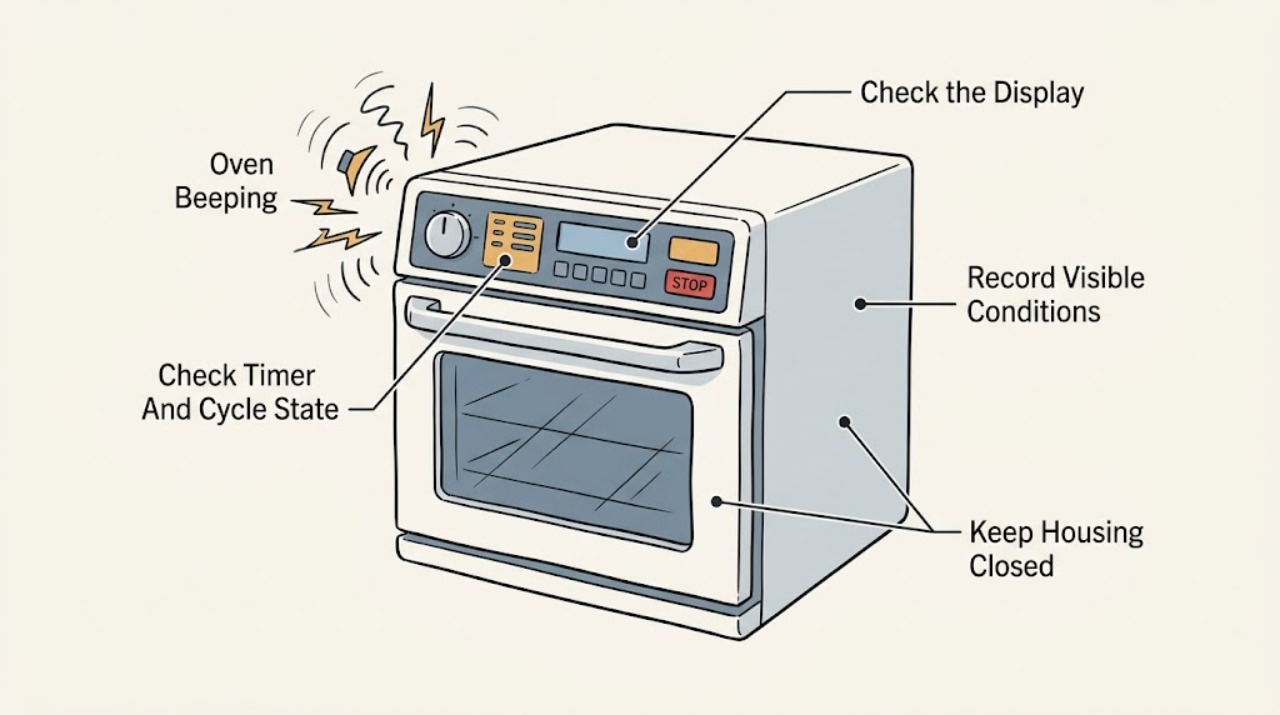
Work through in order
Diagnostic checks
Use only checks that match the exact appliance or system and its official guide.
-
Check 1
From a safe position, record the oven model, exact display, number and rhythm of tones, and the stage when the sound starts: idle, key press, preheat, timer end, cooking, door movement, or after cancellation. Do not press keys repeatedly to reproduce an unexplained alarm.
Expected result: The tone is tied to a timer or completion, occurs on every key press, repeats with a message, occurs when idle, or appears with heat, gas, smoke, or electrical symptoms.
Next step: Keep the record and follow the matching branch; if an unsafe symptom is present, stop using the oven and use emergency or professional service.
Stop if: Stop for gas odor, smoke, abnormal flame, uncontrolled heat, sparking, burning odor, a hot panel, a damaged door, a carbon-monoxide alarm or symptoms, or a breaker trip.
Why this matters
Why: Timing separates a user-notification tone from keypad rejection, door/lock feedback, or a fault. A repeating tone with a message or unsafe symptom needs escalation rather than a generic beep explanation.
-
Check 2
With the oven cool and no hazard present, read the timer, end-of-cycle indicator, selected mode, temperature, delay-start state, and cancel status. Use only the normal keys named by the exact owner's guide; do not start a new hot cycle just to see whether a tone changes.
Expected result: The timer is ending, a cycle is complete, delayed start is active, the oven is still in a mode, the display is waiting for a confirmation, or no cycle state explains the beeping.
Next step: Acknowledge or cancel the timer only as the model guide describes. If the sound persists with no timer or cycle state, record it and continue to the lock and panel checks.
Stop if: Do not bypass a lock, operate a damaged door, reach into a hot cavity, or continue if the oven heats when it should be off.
Why this matters
Why: A timer or cycle notification can be normal, while a delayed-start or incomplete cancel state can make the control appear unresponsive. An unexplained repeating sound moves toward lock, keypad, door, or fault diagnosis.
-
Check 3
Check the display for a lock symbol or lock text and compare the control response with the exact model guide. With the oven and timer off, use only the documented unlock control if the guide supports it; do not force keys or bypass the lock.
Expected result: A lock is displayed, tones occur on every key press with no function, the unlock command works, or the lock state is absent while beeping continues.
Next step: Follow the exact manual for the lock state. If the lock returns unexpectedly, the panel remains unresponsive, or the beeping continues, leave the oven unused and arrange appliance service.
Stop if: Do not pry a locked door, defeat an interlock, remove the control panel, or continue if heat, smoke, gas odor, sparking, or a breaker trip accompanies the tone.
Why this matters
Why: A control lock can intentionally reject keypad input and make tones. If no lock is shown or the documented unlock does not work, the keypad, control, or a model-specific state may need service.
-
Check 4
When the oven is cool, remove loose utensils or objects from the control area, wipe visible moisture or soil from the exterior with the method allowed by the owner's guide, and check that the door closes normally without forcing it. Do not spray into the panel or disassemble the door.
Expected result: The tone stops after an external object or moisture is removed, the panel remains pressed or erratic, the door is obstructed or damaged, or the sound is unchanged.
Next step: Leave the oven off and arrange service for an erratic panel, damaged door, repeated tone, or a beep that returns with no visible cause.
Stop if: Stop for cracked glass, a loose latch, heat escaping abnormally, water entering the panel, smoke, electrical odor, or any need to open the control or door assembly.
Why this matters
Why: An object, liquid, or soil can put pressure on a control panel, while a door or latch condition can affect oven states. A persistent beep after safe surface care is not proof that a panel or latch part is the cause.
-
Check 5
Photograph or transcribe any error code, fault text, flashing clock, Sabbath or control state, and the exact moment it appears. Check only the normal user-visible power status; use a reset only when the exact model guide authorizes one and no hazard exists.
Expected result: The message clears, returns, changes, appears with a power interruption, or remains while the oven beeps and controls do not respond.
Next step: If the guide authorizes one normal reset, perform only that documented step and monitor for recurrence. Leave the oven unused and arrange service if the message or beeping returns.
Stop if: Do not repeatedly reset a breaker, open panels, defeat a safety state, or continue when the message accompanies smoke, gas, uncontrolled heat, sparking, or a hot panel.
Why this matters
Why: A message can be evidence of a detected control or supply fault, and a returning message is more useful to service than a guessed code interpretation. Model-specific lock and Sabbath states must come from the owner's guide.
-
Check 6
From a safe distance, determine whether the oven is cool, heating normally under a valid cycle, or continuing to heat after cancellation; note smoke, gas odor, abnormal flame, electrical crackle, burning smell, hot controls, or a carbon-monoxide alarm. Do not touch hot surfaces or open the door to investigate smoke.
Expected result: The beep is only a normal notification, or it accompanies uncontrolled heat, gas or combustion symptoms, smoke, electrical symptoms, or a carbon-monoxide warning.
Next step: For any unsafe sign, stop using the oven and leave the area when appropriate; contact emergency, gas, electrical, or appliance service from a safe location.
Stop if: Stop immediately for gas odor or escaping gas, smoke or fire, abnormal flame, sparking, burning odor, carbon-monoxide alarm or symptoms, hot panel, shock, or repeated breaker trips.
Why this matters
Why: An audio notification can wait for model-specific interpretation, but unsafe heat, combustion, or electrical behavior is an immediate stop boundary regardless of the displayed message.
-
Check 7
Prepare a service record with model and serial information, exact display and lock text, tone pattern, stage, timer and mode state, door behavior, panel condition, power/reset result, and any heat, gas, smoke, or electrical symptom. Do not perform another test once a service trigger is present.
Expected result: The record identifies a timer or end tone, keypad or lock feedback, panel contamination, door issue, recurring fault, or an unsafe behavior.
Next step: Keep the oven out of service when the beeping is persistent, unexplained, or unsafe and provide the record to a qualified appliance professional; use emergency response for immediate danger.
Stop if: Do not open panels, bypass locks, touch hot wiring, operate a gas oven with odor, or restore a breaker that trips with the appliance.
Why this matters
Why: A precise record lets a technician distinguish a user notification from control, keypad, lock, door, supply, or heating fault without guessing across models.
Use your observations
Decision map
Find the observation that best matches what you see, then follow the next safe action.
-
PATH 01Safety boundary
What you see
The tone occurs at timer end, cycle completion, or a documented preheat event and the display and oven behavior are otherwise normal.
Do this next
Acknowledge or cancel it using the model guide and record the setting if the sound returns unexpectedly.
Why this path and its safety boundary
Why it matters: This is consistent with a user notification, but the exact sound and acknowledgment controls vary by model.
Safety stop: Stop if the tone continues after the documented acknowledgment or accompanies an error, uncontrolled heat, gas odor, smoke, or electrical symptom.
-
PATH 02Safety boundary
What you see
A tone occurs when keys are pressed, the lock symbol or lock text is shown, and no command is accepted.
Do this next
Use the exact owner's guide to clear the lock with the oven and timer off. Arrange service if the lock is absent, returns without explanation, or will not clear as documented.
Why this path and its safety boundary
Why it matters: A control lock can intentionally reject key input and produce tones; the exact unlock procedure is model-specific.
Safety stop: Do not pry the door, bypass the interlock, remove the control panel, or continue if heat, smoke, gas odor, or sparking is present.
-
PATH 03Safety boundary
What you see
The tone begins after a spill, cleaning, object on the control area, door movement, or an erratic touch response.
Do this next
With the oven cool, remove only loose objects and dry the exterior according to the manual; leave it off and request service if the panel or door remains erratic.
Why this path and its safety boundary
Why it matters: An object, liquid, soil, or door-state issue can create unintended input or prevent a command, but persistent behavior may be a control or latch fault.
Safety stop: Do not spray into the panel, disassemble the door, force a latch, or use the oven with cracked glass, water in controls, smoke, or electrical odor.
-
PATH 04Safety boundary
What you see
The oven beeps with an error, fault text, flashing time, lock/Sabbath state, or a message that returns after a documented reset.
Do this next
Record the exact text and model, follow only the owner's guide, and arrange appliance service when the message returns or cannot be identified.
Why this path and its safety boundary
Why it matters: The message is model-specific evidence and should not be replaced with a generic beep interpretation.
Safety stop: Do not repeatedly reset, run a hot or self-clean cycle to test it, or continue when the error accompanies smoke, gas, uncontrolled heating, sparking, or a breaker trip.
-
PATH 05Safety boundary
What you see
Beeping accompanies gas odor, heard gas escape, delayed or abnormal flame, smoke, uncontrolled heating, electrical arc, burning odor, a hot panel, carbon-monoxide alarm or symptoms, or a repeated breaker trip.
Do this next
Leave the area when appropriate, avoid flames and electrical controls near suspected gas, and contact emergency, gas, electrical, or appliance service from a safe location.
Why this path and its safety boundary
Why it matters: This is a safety boundary, not a timer, keypad, or reset branch.
Safety stop: Do not light the oven, operate lights or electronics near gas odor, open panels, touch hot equipment, reset a breaker, or re-enter while danger persists.
Helpful context
Understand the symptom
The timing and rhythm are more useful than the word “beeping”
Write down whether the sound is one tone, a pair of tones, a repeating alarm, or a tone on every key press. Note whether it occurs at timer or end-of-cycle, during preheat, when the door moves, while a key is pressed, or with no interaction. A timer or completion tone is a different branch from a keypad rejection or an error message. Without the model and display, do not assign a universal meaning to a beep pattern.
Start with controls, lock, and the panel surface
Whirlpool's official audio-tone guidance lists a control lock and an object, liquid, or soil on the control area as possible causes on applicable models. A lock can make command pads appear not to work, while a wet or pressed panel can create unexpected input. With the oven cool, remove only loose objects and dry the outside of the control area according to the owner's guide; do not spray cleaner into the panel or open it.
Treat a message or unsafe oven behavior as more than an audio nuisance
Photograph an exact code, text, lock symbol, or flashing time before clearing it. Whirlpool describes some control messages as faults detected while programming a cycle and gives model-specific reset directions. A beep with smoke, gas odor, abnormal flame, uncontrolled heating, sparking, a hot panel, or a carbon-monoxide alarm is a stop condition, not a reason to keep pressing buttons.
Safety boundary
Stop conditions
- If gas odor remains or gas is heard escaping, leave immediately and contact local gas authorities or emergency services from outside; do not operate lights, electronics, or phones before leaving.
- Stop for smoke, fire, abnormal flame, uncontrolled heating, sparking, burning odor, hot controls, a carbon-monoxide alarm or symptoms, shock, or a breaker that trips again.
- Do not open control or door panels, bypass a lock or safety device, touch hot wiring, run self-clean to test a beep, or repeatedly reset power.
- Keep the oven out of service for a repeating unexplained beep, an error that returns, a lock or keypad that will not respond, a damaged door, or any tone joined by abnormal appliance behavior.
- Use the exact owner's guide for timer, preheat, keypad, lock, Sabbath, demo, error, and reset behavior; do not apply another model's code or beep pattern.
When checks do not resolve it
Need a professional?
Arrange qualified appliance service when the beeping is persistent or unexplained, an error or lock returns, the keypad or door behaves abnormally, or a documented reset does not resolve it. For uncontrolled heat, gas odor or escaping gas, abnormal flame, smoke, sparking, burning odor, carbon-monoxide alarm or symptoms, hot controls, shock, or repeated breaker trips, stop immediately and use the appropriate emergency, gas, electrical, or appliance response from a safe location.
Safety scope: This article supports exact symptom recording, ordinary user-state checks, safe external panel care while cool, and a model-authorized reset when no hazard exists. It does not authorize live electrical work, panel or burner access, lock bypass, repeated ignition, self-clean testing, or operation during gas, smoke, heat, or electrical danger.
Common questions
FAQ
Why is my oven beeping when I am not pressing anything?
It may be announcing a timer or cycle event, or reporting a lock, door state, or fault. Record the timing, rhythm, display, and stage, then use the exact model guide. A repeating unexplained tone, especially with an error or unsafe oven behavior, needs service rather than repeated key presses.
Can a control lock cause oven beeping?
Yes, on applicable models a control lock can produce tones and make keypads reject commands. Check for the lock display and follow only the exact model's unlock procedure with the oven and timer off. Do not pry the door or bypass the lock.
What should I do when the oven beeps with an error code?
Photograph or transcribe the complete message with the model and operating stage. Use only the owner's guide for that model; a single documented power reset may be appropriate when no hazard exists, but a returning code needs service. Do not use another model's code explanation or run a hot cycle to test it.
When is oven beeping an emergency?
Treat beeping as an emergency when it accompanies gas odor or heard escaping gas, smoke, fire, abnormal flame, uncontrolled heating, sparking, burning odor, a hot panel, carbon-monoxide alarm or symptoms, shock, or repeated breaker trips. Leave when appropriate, avoid electrical controls near gas odor, and contact emergency or gas assistance from a safe location.
Read the exact guide
Official sources
- Certain Older Gas Connectors May Be DangerousU.S. Consumer Product Safety Commission · U.S. CPSC general safety guidance; local emergency and gas-utility procedures may differ.
- Error Codes for Cooking AppliancesWhirlpool Product Help · Whirlpool official error reference; codes and resolutions vary by appliance model and exact manual.
- Feature Not Available or Fault Detected - Wall OvenWhirlpool Product Help · Whirlpool official wall-oven support; exact model display and owner's guide control the message meaning.
- Beeping or Audio Tones - Electric RangeWhirlpool Product Help · Whirlpool official support for applicable range controls; exact model owner's manual controls the sound and unlock behavior.
- Locked, Lock or Loc - RangeWhirlpool Product Help · Whirlpool official support for applicable ranges; exact model guide controls lock and unlock input.
Community feedback
Share a repair observation
Share a plain-text repair observation. Accepted observations are published automatically; this page may take a moment to update.