
On this page
Start here
Quick answer
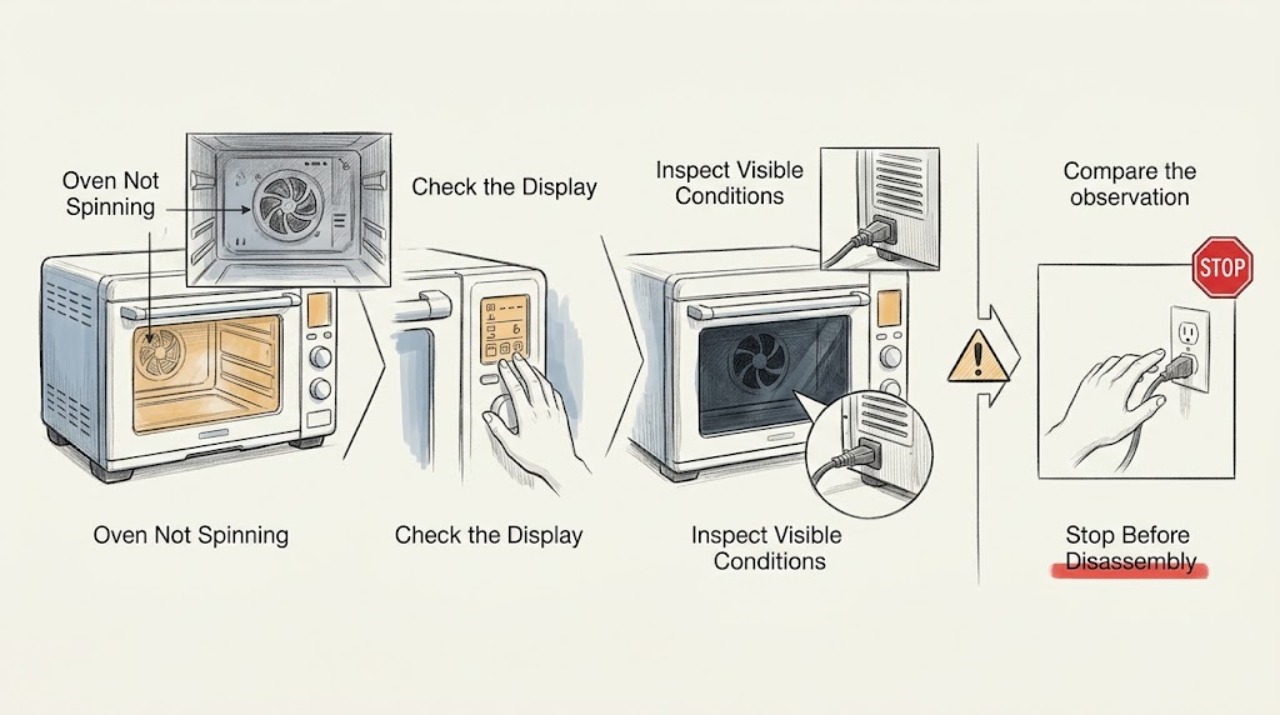
A Frigidaire oven does not normally have a rotating turntable or drum, so first identify what you expected to spin. In a model with Convection Cook, the relevant rotating component is the convection fan; Frigidaire says convection is not available on all models and that the fan circulates heat. A conventional bake mode may not run that fan, and a fan can cycle rather than spin continuously. Select a model-supported convection mode and observe only through the closed door. If the fan never starts in the documented mode, the fan is noisy or obstructed, the oven overheats, or the issue involves a gas or electrical component, turn the oven off and arrange qualified service. Do not reach into the cavity or try to turn the fan by hand while hot or powered.
Work through in order
Diagnostic checks
Use only checks that match the exact appliance or system and its official guide.
-
Check 1
Read the control panel and model documentation to confirm whether the Frigidaire oven has a Convection Cook mode; do not assume every oven includes a convection fan or any other rotating component.
Expected result: Convection Cook is available; only conventional Bake or Broil is available; or the appliance is actually a microwave, toaster oven, or another combination product.
Next step: Continue only when the model's documentation identifies convection. If the product identity is different or the mode is absent, stop and use the correct product guide rather than inventing a fan or turntable diagnosis.
Stop if: Stop if the model number is missing and selecting a control could start an unfamiliar gas, steam, or combination function.
Why this matters
Why: A listed Convection Cook mode establishes that a fan may be used for that mode. A conventional-only oven has no supported fan-spin test from this topic, while a microwave or toaster-oven turntable is a different appliance architecture.
-
Check 2
With the oven empty and the door closed, select the exact model-supported Convection Cook mode and observe through the window during the documented preheat or cooking period; do not put hands or tools near the fan.
Expected result: Airflow or fan sound is present, the fan starts and stops during the mode, or no airflow or fan movement is observed throughout the supported convection operation.
Next step: If convection operates, the original observation may have been a normal off-cycle or a non-convection mode. If it never operates, turn the oven off and arrange model-specific service rather than removing the fan cover.
Stop if: Stop immediately for smoke, burning smell, unusual grinding, exposed wiring, gas odor, or excessive heat at the controls or door.
Why this matters
Why: Airflow or cycling is consistent with a working convection function. No fan activity in a mode that specifically calls for convection makes the fan motor, control, wiring, or a safety interlock more likely, but it does not identify which component failed.
-
Check 3
Compare the observation with the selected mode: note whether the oven was on conventional Bake, Broil, Convection Cook, preheat, or cooling after shutdown, and whether the fan stopped only after the cavity cooled.
Expected result: The fan is absent only in Bake or Broil, cycles during Convection Cook, continues briefly after shutdown, or remains absent in every convection-capable state.
Next step: Treat mode-specific cycling as normal unless cooking results are also poor. For a persistent no-fan condition in the documented convection mode, keep the oven off and request service.
Why this matters
Why: Frigidaire says the fan can cycle during baking and can continue while the oven cools. A mode-specific or post-cycle pattern may be normal. Absence in every mode that should use convection is more consistent with a service issue.
-
Check 4
If the fan is audible but food cooks unevenly, record rack position, mode, load arrangement, and whether the oven reaches the selected temperature; do not cover the rack or block airflow with foil.
Expected result: The fan runs but browning is uneven, the oven is not hot enough, the door gasket is visibly compromised, or the oven reaches temperature with normal results.
Next step: Use the exact model's cooking and temperature guidance. If the gasket, heating behavior, or power supply appears abnormal, stop at visible checks and call qualified service; do not test live electrical parts.
Why this matters
Why: A running fan does not rule out a separate circulation, sealing, power, or heating problem. Frigidaire advises leaving space for air circulation and identifies power, gasket sealing, and heating elements as possible temperature concerns. Normal results make a failed spinning component less likely.
-
Check 5
Check the display for an oven error code or alarm before resetting anything, and record the code, selected mode, and whether the fan or heat changed when it appeared.
Expected result: A door-lock, thermal, probe, or other code appears; the code clears after the model-approved reset; or no code appears and only the fan observation remains.
Next step: Follow only the exact model's code instructions. If the code returns or the oven behaves unsafely, turn it off and arrange service with the recorded code.
Why this matters
Why: Frigidaire's code guide assigns different meanings and actions to door-lock, thermal, probe, and other conditions. A persistent code is a service signal, not proof that the fan motor is the failed part; no code leaves the mode-specific fan diagnosis as the relevant branch.
-
Check 6
Record the full model number, fuel type, mode, fan sound or airflow, temperature result, error code, and whether the symptom occurs during preheat, cooking, or cool-down before contacting Frigidaire.
Expected result: The model identifies a conventional or convection oven and the symptom can be reproduced in a supported mode, or the appliance type and expected motion remain uncertain.
Next step: Use the model-specific manual or qualified Frigidaire service. Do not order a fan motor, blade, sensor, or control component until the exact model and failed mechanism are confirmed.
Why this matters
Why: Frigidaire's support and manuals are model-specific, and convection is not universal across ovens. A precise model and mode record prevents a fan diagnosis from being applied to an oven that has no such feature.
Use your observations
Decision map
Find the observation that best matches what you see, then follow the next safe action.
-
PATH 01Next step
What you see
Do this next
Use the exact mode and manual expectations. If cooking results are normal, no fan repair is indicated from this observation alone.
-
PATH 02Next step
What you see
Do this next
Turn the oven off and request model-specific service. Do not remove covers, reach into the cavity, or try to spin the blade by hand.
-
PATH 03Next step
What you see
Do this next
Stop this troubleshooting path and identify the exact product and model before selecting another problem category or part.
-
PATH 04Next step
What you see
Do this next
Turn the oven off, leave it isolated as safely possible, and arrange qualified service; for gas odor or smoke, follow emergency safety procedures and do not operate switches or appliances.
Helpful context
Understand the symptom
Confirm the rotating component
A conventional Frigidaire oven is not a microwave and does not use a turntable for ordinary baking. The component that may rotate is the convection fan, and Frigidaire says convection is not offered on every model. If the complaint is actually about a microwave turntable, a rack, or a separate countertop toaster oven, this oven diagnosis does not apply. Use the exact model's control labels and manual to identify whether Convection Cook is present.
A fan may be intermittent by design
Frigidaire explains that the oven fan can come on and off during baking and may continue after the oven is turned off until the internal temperature cools. A still fan during a mode that does not call for convection is therefore not proof of a failed motor. Judge the fan only in the model-supported convection mode and do not open the hot door to inspect it.
Separate fan motion from heating performance
If the oven also cooks unevenly, fails to reach temperature, or shows a fault code, do not infer that the fan alone is the cause. Frigidaire lists power, door-gasket sealing, heating elements, and model-specific error conditions as separate service paths. Record the mode, temperature behavior, and code before contacting service, and leave electrical and gas checks to qualified professionals.
Safety boundary
Stop conditions
- Do not reach into a hot or powered oven or try to turn the fan blade by hand.
- Do not remove fan covers, panels, wiring, or heating components as an ordinary-user check.
- Do not treat a conventional-only Frigidaire oven as if it has a convection fan or microwave turntable.
- Do not continue operating after smoke, gas odor, burning smell, a returning error code, or unsafe overheating.
Only after diagnosis
Potential parts
- convection fan motor or blade
Consider this only after the exact model confirms a convection function and a qualified diagnosis finds that the fan assembly is not operating in the supported mode.
Confirm the complete Frigidaire model and manufacturer's fit information; convection parts are not universal and may not apply to a conventional-only oven. - oven control or fan-switch component
Consider this only if the fan assembly is confirmed mechanically sound and service diagnosis identifies the control or switching path as the failure.
Confirm the exact model, fuel type, and service diagnosis before ordering; do not infer a control part from no visible fan motion alone.
When checks do not resolve it
Need a professional?
Call qualified Frigidaire service if the convection fan never operates in a mode that the exact model documents as using it, the fan is grinding or obstructed, temperature or cooking results are abnormal, a code returns, or the model's expected rotating component is uncertain. Stop immediately for smoke, gas odor, burning smell, exposed wiring, a damaged door or gasket, or excessive heat; do not open the cabinet or test live electrical parts.
Common questions
FAQ
Does a Frigidaire oven normally have a spinning turntable?
Not as a standard oven function. The relevant rotating component in a model with Convection Cook is the convection fan, and Frigidaire says convection is not available on every model. A turntable points to a different product type, such as a microwave.
Why does my Frigidaire convection fan stop and start?
Frigidaire says the oven fan can cycle during baking and may continue after shutdown while the oven cools. Judge it in the exact model-supported convection mode rather than expecting constant motion in every mode.
What if there is no fan sound in Convection Cook?
Confirm that the exact model supports Convection Cook and observe only through the closed door during the documented mode. If the fan never operates, turn the oven off and arrange model-specific service; do not remove covers or reach into the cavity.
Could a Frigidaire oven's no-spin symptom really be a heating problem?
Possibly, but no fan motion does not identify a failed heater. Frigidaire treats power, door-gasket sealing, heating elements, and error codes as separate diagnostic paths. Record the mode and temperature result and use qualified service for persistent problems.
Read the exact guide
Official sources
- Owner Center Resource LibraryFrigidaire · Frigidaire model-specific owner support, manuals, troubleshooting, and product identification
- Ovens - What is convection?Frigidaire · Frigidaire oven convection availability and fan heat-circulation behavior
- Ovens - Why isn’t my food cooked evenly?Frigidaire · Frigidaire oven air circulation and even-cooking guidance
- Oven Error Codes and Alarms GuideFrigidaire · Frigidaire oven error-code categories, reset boundaries, and service escalation
- Ranges - Is it normal for a fan to come on while using my range and when does it stop running?Frigidaire · Frigidaire range-oven fan cycling during baking and cool-down
- Oven - Is Not Hot EnoughFrigidaire · Frigidaire oven temperature, power, gasket, heating-element, and service guidance
Community feedback
Share a repair observation
Share a plain-text repair observation. Accepted observations are published automatically; this page may take a moment to update.