
On this page
Start here
Quick answer
First determine whether the Frigidaire refrigerator truly has no power or has power but is not cooling. If neither the interior light nor the control display responds, check the plug, the dedicated grounded outlet, any GFCI reset, and the home's breaker or fuse from the outside of the appliance. If a light or display works, the refrigerator is energized and the issue belongs to a cooling, setting, alarm, or model-specific control path. Do not remove covers or perform live electrical tests; if a known-good outlet and breaker leave the refrigerator with no response, arrange qualified service.
Before you begin
Safety first
- Limit user checks to the plug, receptacle/GFCI, breaker or fuse, visible lights/display, and visible temperature or airflow conditions. Do not open the refrigerator cabinet, bypass grounding or protective devices, or perform live electrical measurements.
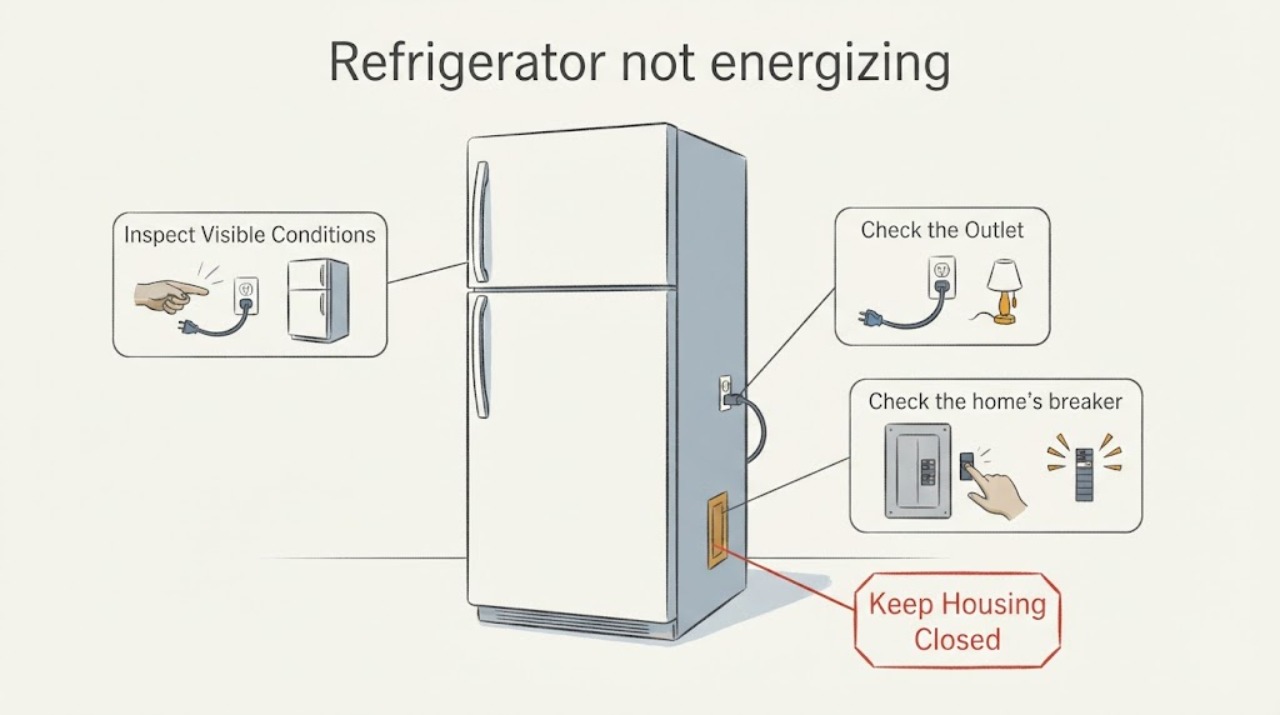
Work through in order
Diagnostic checks
Use only checks that match the exact appliance or system and its official guide.
-
Check 1
Check the refrigerator without moving or opening it: look for an interior light, a control-panel display, an audible response, or any normal operating indication.
Expected result: There is no light or display response at all, or a light/display is active even though the refrigerator is warm.
Next step: Use the external supply checks below when there is no response; use the cooling or alarm branch when the controls or lights work.
Stop if: Do not diagnose an internal component from temperature alone; continue with the outlet and breaker checks.
Why this matters
Why: No visible response supports a true power-path problem; an active light or display means the refrigerator is energized and the symptom is not simply loss of power.
-
Check 2
From outside the appliance, confirm that the plug is fully seated in its dedicated grounded wall outlet and that the outlet has not tripped at a GFCI device.
Expected result: The plug is loose, the outlet has a tripped reset, or the outlet appears to have no power; alternatively, a known-working appliance operates from that outlet.
Next step: Correct only the accessible plug or reset condition, then observe the refrigerator without opening its cabinet. If the outlet remains dead, stop and have the electrical supply evaluated.
Stop if: Continue to the home's breaker or fuse check; do not use an extension cord or bypass grounding.
Why this matters
Why: A loose connection, tripped GFCI, or dead receptacle can remove power before it reaches the refrigerator; a working receptacle makes the household outlet less likely to be the cause.
-
Check 3
Check the home's breaker or fuse box for the refrigerator circuit, especially if there was a recent outage or surge.
Expected result: The refrigerator breaker is tripped, its fuse is blown, or the breaker immediately trips again after a reset.
Next step: After one normal reset only, stop if the breaker trips again or the fuse fails and arrange qualified electrical or appliance service.
Stop if: If the outlet is known good but the refrigerator still has no light or display, stop external testing and arrange qualified appliance service.
Why this matters
Why: Frigidaire identifies a tripped breaker, blown fuse, and recent outage as external causes of no power; a repeat trip is not evidence that the refrigerator should be repeatedly reset.
-
Check 4
If the display shows an explicit state such as PF, Sb, or 77 77, record the exact text and compare it with the refrigerator's model-specific Use & Care manual.
Expected result: PF is shown, Sb is shown, or 77 77 is shown; there may instead be no message at all.
Next step: Use only the exact manual for the model to exit a documented mode; do not guess a button combination. Treat an unresolved PF or repeated loss of power as a service issue.
Stop if: Return to the outlet and breaker branch rather than inventing an error-code meaning.
Why this matters
Why: PF indicates a power outage or surge; Sb is Sabbath Mode, which can disable the lights, dispenser, and display on applicable models; 77 77 is Demo Mode, which is intended to disable functional components. These meanings are not interchangeable and control sequences vary by model.
-
Check 5
When a light or display works, distinguish loss of cooling from loss of electrical power and check only visible conditions: the selected temperature, blocked interior vents, door closure, and whether the unit was recently installed or powered back on.
Expected result: The controls respond but the cabinet is warm, vents are blocked, a door is not sealing, or the unit has just been installed or restored after an outage.
Next step: Clear only visible obstructions, close the door, and allow the documented stabilization period where applicable; use qualified service if cooling does not return.
Stop if: Do not open the sealed system or electrical cabinet; provide the exact model and observations to service.
Why this matters
Why: The refrigerator is energized, so the no-power path does not explain the symptom; Frigidaire identifies airflow, door sealing, settings, and stabilization time as cooling checks.
Use your observations
Decision map
Find the observation that best matches what you see, then follow the next safe action.
-
PATH 01Next step
What you see
Neither the interior light nor the control display responds and the refrigerator outlet is also dead
Do this next
Stop appliance testing and have the outlet, GFCI, breaker, or fuse evaluated safely; do not use an extension cord or bypass grounding.
Why this path and its safety boundary
Why it matters: The fault is upstream of the refrigerator or at the household receptacle, rather than a confirmed refrigerator component failure.
-
PATH 02Next step
What you see
The outlet is known good, the plug is secure, and the refrigerator still has no light or display
Do this next
Stop before removing panels or making live measurements and arrange qualified Frigidaire appliance service with the exact model number.
Why this path and its safety boundary
Why it matters: The external supply checks do not identify the internal cause, and the evidence does not justify naming a control board, cord, or other part.
-
PATH 03Next step
What you see
A light or display works but the refrigerator is warm
Do this next
Follow the visible checks in Frigidaire's not-cooling guidance and use service if cooling does not return; do not continue under the assumption that the appliance has no power.
Why this path and its safety boundary
Why it matters: The refrigerator is energized; the symptom is a cooling, airflow, door-seal, setting, stabilization, or model-specific control issue rather than a simple no-power condition.
-
PATH 04Next step
What you see
The display shows PF, Sb, or 77 77
Do this next
Use the exact model manual for the documented control sequence, and arrange service if the message persists, power repeatedly drops, or the refrigerator cannot maintain a safe temperature.
Why this path and its safety boundary
Why it matters: The message identifies a power-failure history or a model feature mode, but it does not provide a universal repair instruction; Sb and 77 77 have different effects.
Helpful context
Understand the symptom
“Not energizing” should mean that the refrigerator has no visible electrical response: no interior light, no control display, and no response from the controls. A dark display by itself is not enough to identify the fault, because Frigidaire documents model-specific modes such as Sabbath Mode that can disable portions of the controls and lights while the cabinet remains cold. Start with observations that do not require opening the cabinet.
If the outlet and breaker are good but the refrigerator remains completely unresponsive, the public checks cannot identify an internal cord, control, or power-entry fault. Stop there and provide the exact model number and the results of the outlet, breaker, light, and display checks to qualified service.
When checks do not resolve it
Need a professional?
Use qualified electrical service for a dead or repeatedly tripping household circuit and qualified appliance service for a known-good supply with a completely unresponsive refrigerator or persistent loss of cooling.
Safety scope: Limit user checks to the plug, receptacle/GFCI, breaker or fuse, visible lights/display, and visible temperature or airflow conditions. Do not open the refrigerator cabinet, bypass grounding or protective devices, or perform live electrical measurements.
Common questions
FAQ
How can I tell whether my Frigidaire refrigerator has no power or is simply not cooling?
Check for an interior light or control-panel display. No visible response supports a power-path problem; a working light or display means the refrigerator is energized and the next checks should address cooling, settings, airflow, door sealing, or a model-specific mode.
What should I check first if the Frigidaire refrigerator is completely dark?
Confirm the plug is secure in its dedicated grounded outlet, check a GFCI reset if present, and inspect the refrigerator breaker or fuse after an outage. If a known-good outlet and breaker still leave no light or display, stop before opening the appliance and arrange qualified service.
Could a Frigidaire mode make the lights or display appear dead?
On applicable models, Sabbath Mode can disable the lights, dispenser, and display while the refrigerator remains cold. Frigidaire also identifies 77 77 as Demo Mode and PF as a power-outage or surge indication. Record the exact message and use the model-specific manual instead of guessing a button sequence.
Read the exact guide
Official sources
- Refrigerator Error Code PF or Power Failure LightFrigidaire · PF power-outage or power-surge indication and escalation boundary
- Refrigerators - Not CoolingFrigidaire · All-refrigerator distinction between having power and not cooling; GFCI, indicator-light, stabilization, airflow, and door checks
- Refrigerator Error Codes and Alarms GuideFrigidaire · Model-qualified interpretation of PF, 77 77 Demo Mode, and general error/reset guidance
- Refrigerators - How do I set Sabbath mode on my refrigerator?Frigidaire · Sabbath Mode behavior and model-specific control instructions when lights/display appear unavailable
- Refrigerator No PowerFrigidaire · All-refrigerator external power, dedicated outlet, breaker/fuse, and outlet checks for a no-power symptom
Community feedback
Share a repair observation
Share a plain-text repair observation. Accepted observations are published automatically; this page may take a moment to update.