
On this page
Start here
Quick answer
A Frigidaire refrigerator that seems not to turn off is not automatically faulty: Frigidaire says every compressor cycles, and many French-door models use variable-speed compressors designed to run continuously except during defrost. First check whether the cabinet is actually maintaining temperature, whether the unit was recently installed or had a power interruption, and whether a Quick Freeze/fast-cooling or other model-specific mode is active. Long running is more likely to be normal after loading warm food, frequent door openings, a warm room, or recovery from defrost or an outage. Check the recommended model setting, clear blocked interior vents, confirm the doors close and gaskets seal, and inspect the rear vent/airflow only as the exact Care and Cleaning guide permits. Do not lower the setting repeatedly or pull a built-in refrigerator out. If the refrigerator is warm, has heavy frost, a fan or compressor runs continuously without maintaining temperature, or the compressor is clicking, overheating, leaking, or accompanied by a burning odor or repeated breaker trip, stop repeated testing and arrange qualified service. Isolate power only from a safe dry location for smoke, exposed wiring, a hot/damaged cord or outlet, water near electricity, or another electrical hazard.
Before you begin
Safety first
- The user may observe temperature and run context, check documented settings, inspect door seals and interior vents, and clean accessible areas as the manual permits. Qualified personnel must handle rear/evaporator covers, fans, defrost parts, controls, compressor/start devices, sealed systems, internal wiring, live testing, and appliance movement.
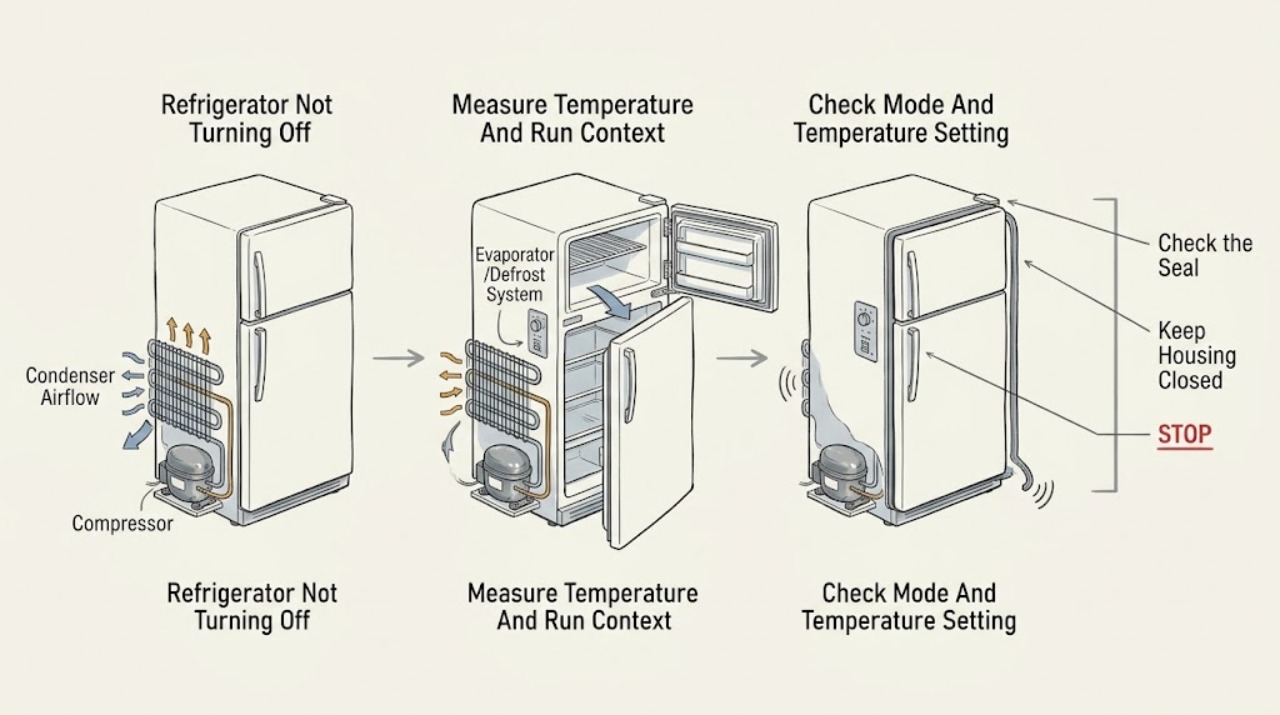
Work through in order
Diagnostic checks
Use only checks that match the exact appliance or system and its official guide.
-
Check 1
Record the exact model and note whether food is staying cold, whether the compressor is a steady low sound or repeatedly starting/stopping, and whether the long run began after installation, a power outage, defrost, warm groceries, cleaning, or frequent door opening. Use a model-appropriate thermometer if already available; do not dismantle anything to measure temperature.
Expected result: Temperatures are stable and the refrigerator is otherwise normal; it is newly installed or recovering from power loss; warm food/door openings occurred; or the cabinet is warm despite continuous running.
Next step: Use the normal-long-run branch when temperature is stable and a documented recovery/load explains the run. Use the warm-or-no-cooling branch when temperature is not recovering, and stop repeated testing if safety symptoms appear.
Stop if: Do not keep operating a refrigerator that is warm enough to threaten food, has smoke/burning odor, overheats, leaks, or repeatedly trips protection.
Why this matters
Why: Stable temperature with a known load or recovery event supports normal extended operation. A warm cabinet despite continuous compressor/fan operation makes airflow, door sealing, frost, control, fan, or sealed-system trouble more likely.
-
Check 2
Read the exact model's display and Use and Care manual. Check the refrigerator and freezer setpoints and whether a Quick Freeze, fast-cooling, shopping, vacation, Demo, Sabbath, or other model-specific mode is active. Return only an accidentally selected temporary mode to its documented normal state; do not copy a button sequence from another refrigerator style.
Expected result: A temporary accelerated-cooling mode is active; the freezer is set unusually cold; a model-specific mode is displayed; settings are normal; or the display is unresponsive or repeatedly changes.
Next step: Clear only the documented mode or restore the documented setting once, then allow the model's stabilization period. If settings cannot be changed, return unexpectedly, or temperature remains poor, arrange service.
Stop if: Do not enter undocumented service menus, repeatedly change setpoints, or hard-reset a refrigerator with a heat, odor, electrical, or food-safety hazard.
Why this matters
Why: A temporary mode or extra-cold setting can intentionally increase run time. Normal settings with an unstable display or warm cabinet shift suspicion toward control, supply, sensor, airflow, or cooling faults; a display label alone does not identify a failed part.
-
Check 3
Close every refrigerator and freezer door/drawer normally and inspect the visible gasket, door edge, shelves, ice chute flap, and nearby items for anything preventing a full seal. Clean a visibly dirty gasket with the model-approved method and look for gaps, warping, frost, or a door that rebounds instead of closing. Do not adjust hinges or remove trim unless the exact manual permits it.
Expected result: A package blocks the door; the gasket is dirty, torn, warped, or gapped; the ice chute is not closing; frost interferes with the seal; or doors and gaskets appear normal.
Next step: Remove only an obvious obstruction and clean the gasket as documented, then reassess after stabilization. If the gasket/door is damaged or the run remains excessive with stable seals, arrange service.
Stop if: Do not force a door, cut or glue a gasket, adjust hinges with improvised tools, or run the refrigerator with a door that cannot seal.
Why this matters
Why: A door or chute leak lets warm air in and can make the compressor run longer and create frost. A normal visible seal does not rule out a hidden hinge, sensor, defrost, or cooling fault.
-
Check 4
Check interior vents for packages blocking airflow and look for visible frost on accessible walls or around the freezer vents. From a safe position, check whether the refrigerator is pressed against the wall or whether the rear vent cover is visibly dust-clogged, following the exact Care and Cleaning guide. Do not pull a built-in or heavy refrigerator, remove a rear cover, or chip ice.
Expected result: Interior vents are blocked; frost is heavy; the rear vent is visibly dusty; wall clearance is restricted; or accessible airflow and frost appear normal.
Next step: Move only loose food away from vents and clean only the accessible area allowed by the manual. If heavy frost, a hidden fan, rear access, or defrost work is involved, stop and arrange service rather than chipping or disassembling.
Stop if: Do not chip frost, use a heat gun, remove evaporator or rear covers, reach into a fan, or move a heavy/built-in unit unsafely.
Why this matters
Why: Blocked airflow or frost can reduce cooling efficiency and make the compressor run longer. A clear accessible path with persistent long running makes a fan, defrost, sensor, control, or sealed-system issue more likely but does not select a part.
-
Check 5
After the safe setting, door, airflow, and frost checks, record whether the compressor/fan runs without temperature recovery, clicks and retries, becomes unusually hot, stops cooling, or produces an abnormal sound. Do not touch the compressor, fan, refrigerant tubing, electrical terminals, or control compartment.
Expected result: Temperature recovers and the run decreases; the compressor remains on with a warm cabinet; a fan is silent or rubbing; the compressor clicks/retries; frost returns; or smoke, burning odor, oil/refrigerant signs, or electrical protection trips occur.
Next step: Keep the appliance out of service when cooling is not adequate or an abnormal/electrical symptom appears, and arrange model-specific qualified appliance service. Provide the complete run history and safe-check results.
Stop if: Do not perform live tests, open the sealed system, remove covers, manually force a fan, repeatedly restart a clicking compressor, or continue after smoke, odor, overheating, or a repeat trip.
Why this matters
Why: Recovery supports a normal load, setting, door, airflow, or defrost explanation. Persistent poor cooling with continuous or abnormal operation makes an internal fan, defrost, control, compressor, or sealed-system fault more likely; sound alone cannot identify the component.
Use your observations
Decision map
Find the observation that best matches what you see, then follow the next safe action.
-
PATH 01Safety boundary
What you see
The refrigerator maintains temperature, the compressor is a steady low sound, and the long run follows installation, outage recovery, defrost, warm groceries, frequent door openings, or a warm room.
Do this next
Keep doors closed, use the exact recommended settings, and allow the model's stabilization period. Reassess temperature and run behavior rather than judging by sound alone.
Why this path and its safety boundary
Why it matters: Extended operation is more likely normal for the model or current heat load than a stuck compressor.
Safety stop: Escalate if temperature fails to recover, the compressor overheats/clicks, frost becomes heavy, or electrical/odor symptoms appear.
-
PATH 02Safety boundary
What you see
A model-specific Quick Freeze/fast-cooling or other temporary mode is active, or the freezer setting is colder than the documented recommendation, while temperatures are otherwise controlled.
Do this next
Use the exact manual to return the temporary mode or setting to normal once, then allow stabilization. If the mode returns by itself or temperature remains poor, arrange service.
Why this path and its safety boundary
Why it matters: The setting can intentionally increase cooling demand and run time; it does not by itself prove a compressor fault.
Safety stop: Do not use undocumented menus, repeatedly change settings, or assume a mode from another refrigerator style.
-
PATH 03Safety boundary
What you see
A door/drawer does not seal, a gasket is dirty or warped, the ice chute is open, food blocks vents, frost is visible, or rear airflow is restricted.
Do this next
Remove only visible obstructions, clean the gasket, restore safe interior airflow, and follow the model's cleaning guidance. Arrange service for a damaged seal, heavy frost, rear access, or persistent run time.
Why this path and its safety boundary
Why it matters: Warm-air infiltration or restricted airflow is more likely making the compressor work longer than an immediately proven sealed-system failure.
Safety stop: Do not force doors, chip ice, move a built-in unit, remove covers, or reach into fans.
-
PATH 04Safety boundary
What you see
The compressor or fan runs nearly continuously but the cabinet remains warm, temperature does not recover after the documented stabilization period, frost is heavy, or a fan is silent/rubbing.
Do this next
Protect food and arrange model-specific qualified service. Provide temperature observations, frost location, door/gasket result, settings, run history, and any sound or code.
Why this path and its safety boundary
Why it matters: A defrost, fan, sensor, control, airflow, compressor, or sealed-system problem is more likely; continuous running is now a symptom of inadequate cooling rather than a normal operating explanation.
Safety stop: Do not open sealed-system tubing, remove panels, force fans, chip frost, or replace a compressor/thermostat from run time alone.
-
PATH 05Safety boundary
What you see
The compressor clicks/retries, becomes abnormally hot, a cord/outlet is hot or damaged, a breaker trips repeatedly, or smoke, burning odor, sparks, water, or exposed wiring is present.
Do this next
Stop repeated starts and isolate power only from a safe dry location. Arrange qualified appliance service or an electrician for the household supply, and keep food safe using another cold source.
Why this path and its safety boundary
Why it matters: An electrical, compressor-start, control, or other internal fault is possible and the appliance has reached the professional-service boundary.
Safety stop: Do not reset repeatedly, touch the compressor or terminals, remove covers, bypass protection, or continue operating to compare sounds.
Helpful context
Understand the symptom
Continuous sound can be normal on some Frigidaire models
Frigidaire distinguishes a normal compressor cycle from the longer operation of variable-speed French-door models. A steady low compressor sound by itself does not prove that the refrigerator is stuck on. Start with food temperature, the control setting, and recent events: a new installation, outage recovery, warm groceries, long door openings, a hot room, or a defrost recovery can all increase run time. Use the exact model's Use and Care manual before changing a setting or interpreting a fan sound.
Door sealing, airflow, and frost create a different branch
Warm air entering through a door that is blocked, misaligned, or poorly sealed makes the compressor work harder. Frigidaire also links excess frost to a warped gasket or door, an ice-chute flap that does not close, very cold settings, or blocked airflow. Check the gasket, door closure, vents, and visible frost without removing panels. A dirty rear vent or refrigerator pushed too close to the wall can also restrict condenser airflow; use the model's cleaning instructions and do not move a heavy or built-in unit unsafely.
Modes and settings must be identified by model
Some Frigidaire models expose a Quick Freeze or other accelerated-cooling setting, while displays and available features differ by refrigerator style. A fast-cooling mode can make a longer run expected for that model, but an assumed mode cannot explain a refrigerator that is warm or repeatedly alarms. Check the displayed setting and exact manual, return only a documented temporary mode to its normal state, and allow the model's stabilization period before judging the result. Internal defrost, fan, control, sealed-system, and compressor faults are professional diagnoses.
Safety boundary
Stop conditions
- Stop immediately for smoke, burning odor, sparks, overheating, water near electricity, exposed wiring, a hot/damaged cord or outlet, or a repeat breaker trip; isolate power only from a safe dry location.
- Do not remove evaporator, rear, control, or compressor covers; perform live tests; open refrigerant tubing; or access internal wiring.
- Do not chip frost, use a heat gun, force a fan, move a heavy/built-in refrigerator, or adjust hinges/door hardware beyond the exact model manual.
- Do not repeatedly change temperature settings, repeatedly restart a clicking compressor, or assume Quick Freeze/defrost behavior from another model.
- If temperature remains unsafe or poor after the documented setting, door, airflow, and stabilization checks, protect food and arrange qualified service rather than continuing operation.
Only after diagnosis
Potential parts
- model-matched door gasket, hinge, or door-closure component
Consider this category only when the exact model has a documented sealing/closure defect and qualified diagnosis confirms that the gasket, hinge, or closure component is the cause of the extended run.
Door hardware and gasket profiles vary by refrigerator style and model. Confirm exact fitment; do not cut, glue, or force a seal. - model-matched condenser or evaporator fan assembly
Consider this category only when a qualified technician confirms a silent, rubbing, stalled, or failed fan after accessible airflow and frost checks are normal.
Fan assemblies, blades, and harnesses are model-specific and require internal access; a long run alone does not establish a fan failure. - model-matched defrost sensor, heater, or control assembly
Consider this category only when persistent frost, temperature instability, or diagnostic information leads a qualified technician to a defrost/control fault.
Defrost components and controls vary by model and involve internal electrical access; do not select or replace them from frost or run time alone. - model-matched compressor start or sealed-system component
Consider this category only after qualified diagnosis confirms a compressor-start or sealed-system fault when safe external checks do not restore temperature.
Compressor, start device, refrigerant, and sealed-system work is professional service; continuous running alone does not identify a replacement component.
When checks do not resolve it
Need a professional?
Arrange Frigidaire or qualified appliance service when the refrigerator remains warm despite continuous running, heavy frost returns, a fan is inaccessible or abnormal, a door/gasket cannot seal, the display or mode behaves unexpectedly, or the compressor clicks, overheats, or appears to run without cooling. Use an electrician for a hot, damaged, wet, or repeatedly tripping outlet, breaker, cord, or household supply. Stop immediately for smoke, burning odor, sparks, water near electricity, exposed wiring, or another electrical hazard; isolate power only from a safe dry location.
Safety scope: The user may observe temperature and run context, check documented settings, inspect door seals and interior vents, and clean accessible areas as the manual permits. Qualified personnel must handle rear/evaporator covers, fans, defrost parts, controls, compressor/start devices, sealed systems, internal wiring, live testing, and appliance movement.
Common questions
FAQ
Is it normal for a Frigidaire refrigerator to run continuously?
Sometimes. Frigidaire says every compressor cycles and many French-door models use variable-speed compressors designed to run continuously except during defrost. Continuous running is more concerning when the cabinet is warm, frost is heavy, the compressor clicks/overheats, or the run does not follow a load or recovery event.
Can Quick Freeze make my Frigidaire refrigerator run longer?
A model that provides Quick Freeze or another accelerated-cooling option can intentionally increase cooling demand. Check the exact model display and Use and Care manual, then return only a documented temporary mode to normal once. If the mode returns or cooling remains poor, arrange service.
How do I know whether a door gasket is making the refrigerator run too much?
Look for a blocked door, dirty or warped gasket, visible gap, frost near the seal, or an ice-chute flap that does not close. Frigidaire links poor sealing and frost to longer compressor operation. Clean only as the model guide permits and arrange service for damage or a persistent gap.
Should I turn the temperature colder if the refrigerator will not turn off?
No. First check the exact model's recommended settings and whether a temporary mode is active. Frigidaire says an extra-cold freezer setting can increase compressor operation; repeatedly lowering the setting can make the symptom harder to interpret. If temperatures are poor at the documented setting, arrange service.
When is continuous refrigerator operation a service issue?
Call when the refrigerator remains warm despite continuous running, heavy frost returns, a fan is silent/rubbing, the compressor clicks or overheats, or safe door/setting/airflow checks do not restore temperature. Stop immediately for smoke, burning odor, sparks, water near electricity, exposed wiring, or repeated breaker trips.
Read the exact guide
Official sources
- Refrigerator Door IssuesFrigidaire · Directly supports the accessible door-seal inspection; it does not authorize hinge adjustment or internal door-sensor work.
- Refrigerators / Freezer - Frost Build UpFrigidaire · Directly supports the frost/door/airflow branch when long running occurs with visible frost.
- Refrigerators - Not CoolingFrigidaire · Supports escalation when continuous operation does not restore cooling; use the exact model guide for local settings and installation.
- Refrigerators - What is the recommended temperature settings for my refrigerator?Frigidaire · Supports using the exact model setting and stabilization period rather than repeatedly changing controls.
- Refrigerator Runs Too MuchFrigidaire · Directly supports the normal-versus-fault branch; exact stabilization and recommended settings remain model-specific.
- Refrigerators - Why does my refrigerator run most of the time? Is this normal?Frigidaire · Directly applies to Frigidaire refrigerators and distinguishes normal continuous/long operation from factors that increase run time.
- Service & RepairFrigidaire · Supports qualified service for persistent cooling, compressor, fan, defrost, control, and electrical faults.
- Refrigerator Error Codes and Alarms GuideFrigidaire · Supports distinguishing a displayed mode or power event from a mechanical run fault; codes and controls remain model-specific.
- Refrigerators - How do I use the features and functions on my Side-by-Side refrigerator display?Frigidaire · Supports checking the exact model's display and available modes; do not transfer a feature sequence to another refrigerator style.
Community feedback
Share a repair observation
Share a plain-text repair observation. Accepted observations are published automatically; this page may take a moment to update.