
On this page
Start here
Quick answer
First separate a completely dead Frigidaire washing machine from a washer that has power but will not begin a cycle. Check that the cord is firmly seated in a working wall outlet, look for a tripped breaker or blown fuse, and do not use an extension cord. If the display or indicators work, select a cycle, cancel any unintended Delay Start or pause, close the lid or door completely, and press START or START/PAUSE. Frigidaire also says the washer may take up to the first two minutes to sense a load before water enters. If the outlet is dead, the breaker will not hold, the cord or receptacle is damaged, the lid will not latch, or the washer remains unresponsive after these external checks, stop and arrange qualified electrical or appliance service rather than opening the cabinet or bypassing a safety lock.
Work through in order
Diagnostic checks
Use only checks that match the exact appliance or system and its official guide.
-
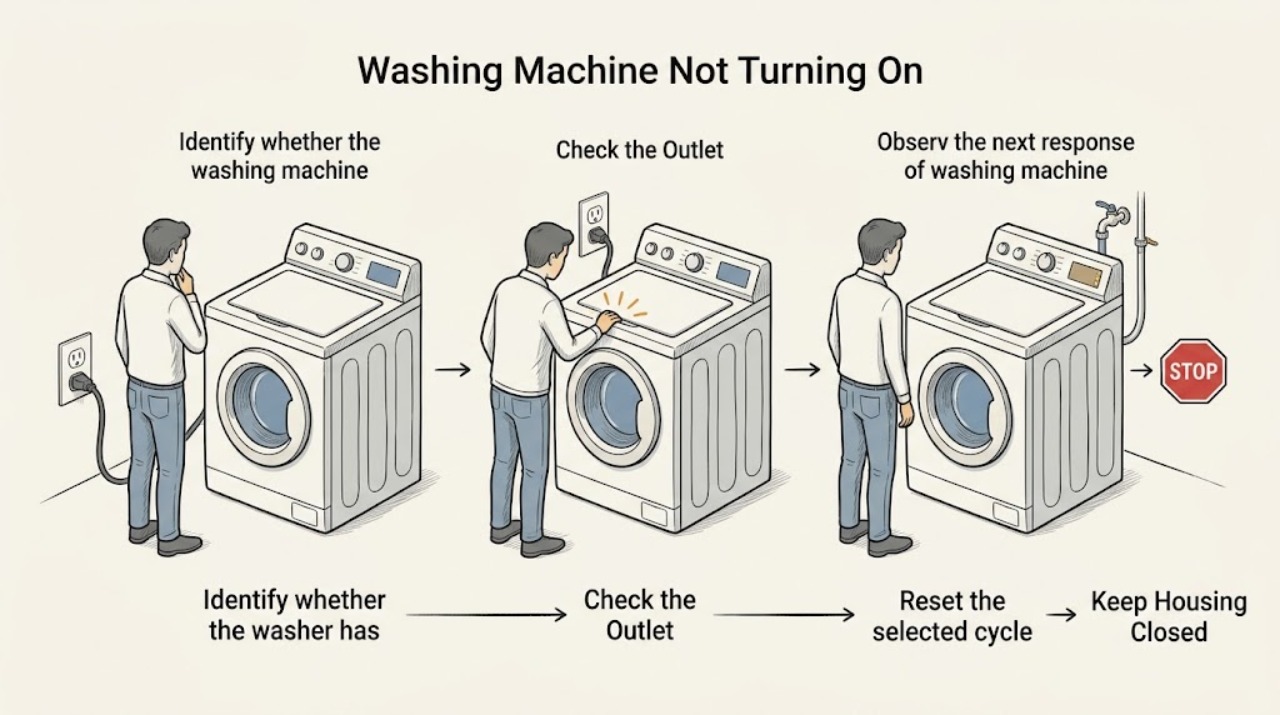
Identify whether the washer has any power
Stand clear of wet areas and look at the Frigidaire control panel, indicator lights, and any response when you press a normal control. Inspect the plug and cord visually for looseness, cuts, scorching, or moisture without pulling on the cord. Do not open the console or touch exposed wiring.
Expected result: The panel is completely dark, the panel lights or beeps respond, the plug is loose, or the cord/receptacle shows damage or moisture.
Next step: For a normal-looking connection, continue to the outlet and breaker check. If the cord or receptacle is damaged or wet, leave the washer disconnected and arrange qualified electrical service.
Stop if: Do not plug in a washer with a damaged, hot, scorched, wet, or loose cord or receptacle, and do not remove covers to trace power.
Why this matters
Why: A dark panel points first to the supply path rather than a cycle setting. A responding panel means the washer is receiving at least some power and the next checks should address cycle selection and safety interlocks. Damage or moisture is a safety stop.
-
Verify the wall outlet and household circuit
With the washer disconnected, check whether the wall outlet can safely power a small known-working appliance. Inspect the household breaker or fuse for the washer circuit and make only one normal reset or fuse check following household safety instructions; do not increase fuse capacity. If the laundry center has a dedicated circuit, confirm it is not intentionally shared with another appliance.
Expected result: The outlet is dead, the breaker trips again or will not reset, the outlet works but the washer remains dark, or the outlet and circuit appear normal.
Next step: Have a qualified electrician address a dead or unstable circuit. If the outlet is normal and the washer remains dark, keep it unplugged and arrange Frigidaire appliance service.
Stop if: Stop after one unsuccessful reset, and never bypass a breaker, use a higher-rated fuse, use an extension cord, or make live voltage measurements.
Why this matters
Why: A dead outlet or breaker that will not hold indicates a household electrical problem. A working outlet with a dark washer shifts suspicion to the cord, inlet connection, internal power path, or controls, none of which should be opened by a user. A shared or overloaded circuit can prevent reliable operation.
-
Reset the selected cycle and start command
If the controls light up, select a normal cycle according to the model manual, cancel an unintended Delay Start, and press START or START/PAUSE once. If the washer has been left on without starting, make the selections again because Frigidaire says it can automatically turn off after more than 10 minutes without START.
Expected result: The washer starts, a delayed-start or pause indicator remains, the controls time out again, or the panel responds but will not accept the start command.
Next step: Use the normal cycle if it starts. If the panel repeatedly returns to an idle state or will not accept START with power present, record the indicators and arrange service.
Stop if: Do not enter an unverified diagnostic mode, repeatedly force buttons, or disassemble the console to bypass a control.
Why this matters
Why: Starting after a fresh selection points to a state or option rather than loss of power. A delay, pause, repeated timeout, or unresponsive start control indicates a control-state or interface issue that may require model-specific guidance.
-
Check the lid or door closure without bypassing the lock
Close the washer lid or front door normally and inspect the visible strike, latch area, and gasket for clothing, a displaced item, or obvious damage. Keep fingers clear of the latch and do not tape, hold, or bypass the safety lock. Press START once after the closure is secure.
Expected result: The lid or door closes fully and the washer begins its start sequence, it will not close, it closes but never locks, or a lid-related indicator or beep appears.
Next step: Remove only an accessible obstruction and retry once. If the latch will not engage, the lid or door is damaged, or a lid-related code or beep persists, leave the safety system intact and arrange service.
Stop if: Never operate the washer with a missing, damaged, or bypassed lid or door lock, and do not reach into a moving or locked tub.
Why this matters
Why: Frigidaire states that the washer will not operate when the lid is not closed properly; its laundry-center guidance says a closed lid or door is required and the washer should lock after START. Failure to latch changes the path to a lock, alignment, or control diagnosis.
-
Allow for sensing and verify water availability
After a valid START command and a securely closed lid or door, wait through the initial sensing period without repeatedly opening the lid or changing programs. Confirm the hot and cold supply faucets are open and that the inlet hoses are not visibly kinked or pinched. Do not disconnect hoses or open the water inlet system while the washer is energized.
Expected result: The washer begins filling within the expected sensing period, the controls remain active but no water enters, a faucet is closed, or a hose is kinked or pinched.
Next step: Open both faucets and restore only a visibly accessible hose path, then try the cycle once. If the panel is powered but the washer still will not start or fill, save the observed lights or code and arrange model-specific service.
Stop if: Stop for a leak, burst hose, wet electrical area, or any need to remove a hose, panel, or valve cover; shut off water and obtain qualified help.
Why this matters
Why: Frigidaire says many laundry centers spend the first two minutes sensing the load before water enters. The water guide says the unit will not function properly when water is not turned on and identifies kinked or incorrectly connected hoses as checks, but these conditions do not explain a completely dead control panel.
-
Capture the exact symptom for a service handoff
Record the complete model number, whether the display is dark or lit, outlet and breaker result, cord condition, selected cycle, delay or pause indicators, lid or door-latch behavior, water-faucet and hose observations, and any code, click, odor, heat, leak, or unusual sound. Disconnect power only when safe and leave the washer unused if an electrical or water hazard is present.
Expected result: The washer works after an external correction, remains dark with a confirmed working outlet, has power but will not latch or accept START, or shows a hazard or recurring failure.
Next step: Keep the washer disconnected when the supply path or appliance is unsafe and arrange qualified electrical or Frigidaire appliance service with the recorded observations and model information.
Stop if: Do not continue testing through smoke, burning odor, sparks, overheating, exposed wiring, repeated breaker trips, a water leak near electricity, or a safety lock that does not function.
Why this matters
Why: A repeatable split between power loss, a start-state issue, a lid or door interlock, and a water or control symptom gives service a useful diagnostic path. The external checks cannot identify an internal board, power-cord, lock, motor, or wiring failure safely.
Use your observations
Decision map
Find the observation that best matches what you see, then follow the next safe action.
-
PATH 01Next step
What you see
The control panel is dark and the outlet is dead or the breaker will not hold.
Do this next
Leave the washer disconnected and have a qualified electrician inspect the outlet, circuit, breaker, or fuse.
Why this path and its safety boundary
Why it matters: The fault is on the household supply side or circuit, not yet proven to be the washer.
-
PATH 02Next step
What you see
The outlet works, but the Frigidaire washer remains completely dark.
Do this next
Do not open the washer; arrange qualified Frigidaire appliance service.
Why this path and its safety boundary
Why it matters: An appliance-side power cord, connection, internal power path, or control fault is possible.
-
PATH 03Next step
What you see
The panel lights up, but the washer does not respond after a fresh cycle selection and one START command.
Do this next
Record the indicators and model number, then use model-specific support or arrange service if it remains unresponsive.
Why this path and its safety boundary
Why it matters: A delay, pause, interface, or control-state issue is more likely than a completely missing power supply.
-
PATH 04Next step
What you see
The lid or door does not close or lock, or a lid-related indicator or beep persists.
Do this next
Do not bypass the lock; remove only an accessible obstruction and arrange qualified appliance service for persistent failure.
Why this path and its safety boundary
Why it matters: The safety interlock, latch alignment, or related control may be preventing operation.
-
PATH 05Next step
What you see
The washer starts the sensing sequence but does not fill immediately.
Do this next
Allow the documented sensing period, verify both faucets and visible hose routing, and request service if no fill or no start persists.
Why this path and its safety boundary
Why it matters: A short delay may be normal, while closed faucets or a kinked hose can prevent water entry.
-
PATH 06Next step
What you see
There is smoke, a burning smell, sparking, heat, exposed wiring, water near electricity, a damaged cord, or repeated breaker operation.
Do this next
Keep people away, disconnect power only if safe without touching damaged or wet parts, shut off water for a leak, and obtain urgent qualified electrical or appliance help.
Why this path and its safety boundary
Why it matters: This is an immediate electrical, fire, or water-safety stop.
Helpful context
Understand the symptom
No lights is different from no cycle
If the panel is entirely dark, begin with the outlet, plug, cord, breaker, and fuse. If the panel responds but the tub does not run, the issue may be a selected option, a delayed or paused cycle, a lid or door that is not recognized as closed, or a normal sensing period. Those paths require different next checks, so note what the controls do before trying to restart repeatedly.
A washer can be powered without immediately filling
A powered Frigidaire washer may wait while it senses the load, and the water-supply guide says filling can begin within two minutes after START. Verify the hot and cold faucets are open and the hoses are not kinked, but do not treat a short sensing delay as proof that the control board or water valve has failed. Persistent no-fill or no-start behavior after the safe checks belongs with model-specific service information.
Safety boundary
Stop conditions
- Do not open the washer cabinet, console, or wiring compartment, make live electrical measurements, or bypass the lid or door lock.
- Stop immediately for smoke, burning odor, sparks, a hot or damaged cord, exposed wiring, a breaker that repeatedly trips, or water near an electrical connection.
- Do not use an extension cord, increase fuse capacity, force the controls, or continue using a washer with a failed safety latch.
- If the outlet is dead, the breaker will not hold, or the cord or receptacle is damaged, leave the appliance disconnected and use qualified electrical service.
Only after diagnosis
Potential parts
- washer power cord or terminal connection
Consider this category only when a qualified technician confirms that the wall outlet works but the washer's cord or appliance-side connection is damaged or open.
Confirm the complete Frigidaire model and technician diagnosis before ordering; a dark panel can also originate in the household circuit or an internal control path. - washer lid or door lock assembly
Consider this category only when the lid or door will not latch or the washer cannot confirm closure after accessible alignment and obstruction checks.
Confirm the model-specific lock type and fit information before ordering; never bypass or replace a safety interlock based only on a no-start symptom. - washer control or interface component
Consider this category only when power is confirmed, the safety closure is recognized, and the controls still will not accept a valid start command after model-specific diagnosis.
Verify the complete model and technician diagnosis before ordering; do not infer a failed board from a dead outlet, delay setting, or sensing pause.
When checks do not resolve it
Need a professional?
Arrange qualified electrical service when the outlet is dead, the breaker or fuse will not hold, or the circuit appears overloaded. Arrange qualified Frigidaire appliance service when a working outlet leaves the washer dark, the panel will not accept START, the lid or door will not latch, the washer shows a persistent code, or it remains unable to start after the documented external checks. Treat smoke, burning odor, sparks, exposed wiring, water near electricity, overheating, or repeated breaker trips as urgent safety conditions.
Common questions
FAQ
Why is my Frigidaire washer completely dark?
Check the cord connection, wall outlet, and household breaker or fuse without opening the washer. If a known-working outlet is confirmed but the panel remains dark, leave the appliance disconnected and arrange qualified service.
Why does my Frigidaire washer have lights but not start?
Select the cycle again, cancel an unintended Delay Start or pause, close the lid or door completely, and press START or START/PAUSE once. A persistent failure with power present may involve the interface, control, or safety interlock.
Can a closed lid still prevent a Frigidaire washer from starting?
Yes. The lid or door can be physically closed but fail to latch or be recognized by the safety interlock. Do not bypass it; arrange service if the washer will not lock after an accessible obstruction is removed.
How long should a Frigidaire washer wait before filling?
Frigidaire says many laundry centers spend the first two minutes sensing the load before water enters. Verify both faucets are open and visible hoses are not kinked, then seek service if the washer still will not proceed.
Should I use an extension cord to make my Frigidaire washer work?
No. Frigidaire warns that an extension cord can reduce power enough to prevent proper operation. Use the intended wall connection and have a qualified electrician address a missing or overloaded circuit.
Read the exact guide
Official sources
- What should I do if my Frigidaire Laundry Center is not starting?Frigidaire · Frigidaire laundry-center washer controls and start symptoms; the electrical and closure distinctions are useful when the exact washer configuration is unknown
- Laundry Water Supply GuideFrigidaire · Frigidaire washing machines where power is present but a cycle does not proceed to filling
- What should I do if the washer on my Laundry Center beeps twice and won't start?Frigidaire · Frigidaire laundry-center top-load washer start sequence
- Why won’t my Laundry Center turn on?Frigidaire Canada · Frigidaire laundry centers with a no-power or no-start symptom
- What should I do if my washer does not start?Frigidaire · Frigidaire washing machines without a model-specific identity
Community feedback
Share a repair observation
Share a plain-text repair observation. Accepted observations are published automatically; this page may take a moment to update.