
On this page
Start here
Quick answer
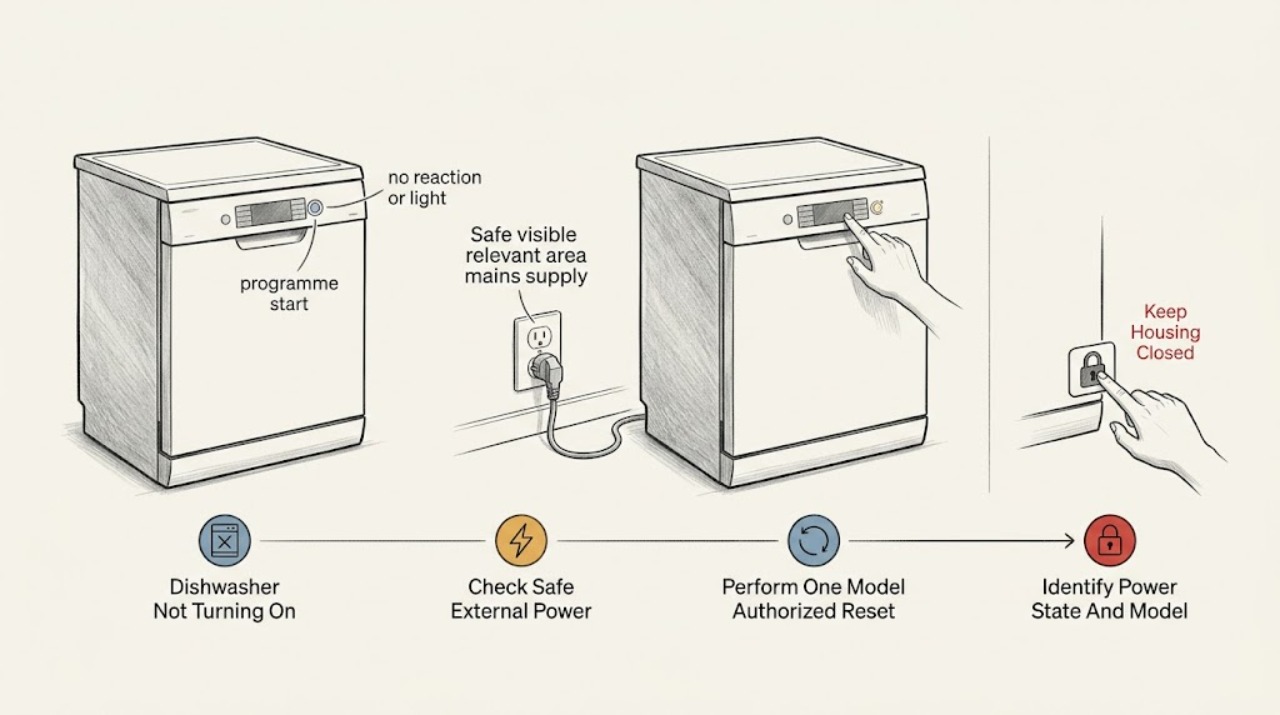
First separate a completely dark dishwasher from one whose display or indicators light but will not start. Use the Gaggenau E-Nr to open the matching manual, then check the accessible power connection, the household fuse or breaker, and whether a safe outlet works. If the controls are responsive but a programme will not begin, select the programme and press the model's Start control, close the door fully, and check that dishes or the upper basket are not preventing the door from latching. Gaggenau manuals also list an unfinished programme, an interrupted power or water supply, and a door that is not closed properly as reasons a cycle may not start or may stop. For a failed appliance function, one model-manual reset is to disconnect power, wait at least two minutes, reconnect, and switch the appliance on; do not repeatedly reset a breaker. If the dishwasher remains dead with a verified supply, the breaker trips again, the cord or outlet is hot or damaged, water reaches electrical parts, or there is smoke or a burning smell, leave it off and arrange qualified appliance or electrical service. Do not remove panels, pull out a built-in dishwasher, test live wiring, or bypass the door interlock.
Before you begin
Safety first
- The user may identify the E-Nr, check an accessible dry connection and household protection, use a safe outlet check, follow the exact manual's normal start and one documented reset, and inspect visible door/loading interference. Control-panel, latch, base, wiring, inlet, pump, live electrical, built-in removal, and internal water work belong to qualified service.
Work through in order
Diagnostic checks
Use only checks that match the exact appliance or system and its official guide.
-
Check 1
Without moving or opening the dishwasher, record the exact E-Nr/model from the rating label or existing paperwork and classify the symptom: no display or indicators at all, display/indicators present but no programme starts, or a programme starts and then stops. Note any displayed text, beeps, recent outage, move, cleaning, or interrupted cycle, then open the matching Gaggenau manual.
Expected result: The appliance is completely dark; the panel responds but the programme does not begin; the cycle begins and stops; or the exact model cannot yet be identified.
Next step: Follow only the branch matching the observed state. If the E-Nr is unavailable, use Gaggenau's manual-download page or arrange model-specific support rather than guessing a control sequence.
Stop if: Do not infer the model from appearance, enter a random service mode, or dismantle the appliance to find the rating label.
Why this matters
Why: An all-dark appliance belongs first to the external power branch. A lit panel belongs to the start, door, programme-state, or supply branch. A stop during a cycle is not the same as a dead control panel, and an unknown model makes button and reset instructions unreliable.
-
Check 2
For a completely dark dishwasher, check from a dry, safe position that the accessible power connection is fully seated and that no accessible switch is off. Inspect the outlet and plug only for visible damage, then check the labelled household fuse or breaker. If the outlet is safe and accessible, confirm it with a known-good low-load appliance; do not open the receptacle or use a damaged test appliance.
Expected result: The connection is loose, the fuse or breaker is open, the outlet does not power the safe test appliance, the breaker trips again, or the supply appears normal while the Gaggenau remains dark.
Next step: Restore only a dry, undamaged accessible connection. Use an electrician for an abnormal outlet or household circuit; arrange appliance service when the verified supply is present but the dishwasher remains dark.
Stop if: Do not repeatedly reset a tripping breaker, replace a fuse with another rating, use an extension cord or multiple socket strip, open the plug, or test live voltage yourself.
Why this matters
Why: A loose connection, failed outlet, or open fuse/breaker can explain a no-display symptom. A repeated trip, heat, damage, or a verified supply with a dead dishwasher points beyond an owner power check and may involve the appliance or household wiring.
-
Check 3
If the appliance function has failed but there is no electrical hazard, use the reset sequence only if it matches the exact manual. The opened DF210100 manual instructs the owner to disconnect the mains plug or switch off the fuse, wait at least two minutes, reconnect the appliance, and switch it on. Do not pull out a built-in appliance to reach a rear connection; use only the safe isolation point available to you.
Expected result: The panel returns after the single reset, the panel remains dead, the breaker trips during reset, or the dishwasher returns with an error or the same unresponsive state.
Next step: If the exact manual does not specify this sequence, skip it and use model-specific support. If one authorized reset does not restore normal control, leave the unit off and arrange service.
Stop if: Do not repeat the reset to chase an intermittent fault, bypass a fuse, or remove an electrical cover.
Why this matters
Why: Recovery after one documented reset is consistent with a temporary control state, but it does not prove the underlying power or control system is healthy. No recovery, a repeat failure, or a trip requires service rather than more cycling.
-
Check 4
For a lit or responsive panel, follow the exact manual's normal start sequence: select a programme, press the model's Start control, and close the door fully. Check that a rack, tall item, detergent lid, decor panel, or dish is not projecting into the door path. Do not force a door that binds against the cabinet; inspect only the visible closure and loading path.
Expected result: The programme starts after Start and firm door closure; the door will not latch; the upper basket or dishes press the inner door; the programme was already running or had not finished; or the panel accepts controls but never starts.
Next step: Rearrange only the visible dish or basket obstruction and retry the documented start once. If the latch, alignment, control, or built-in installation still prevents closure or start, stop and arrange service.
Stop if: Do not defeat the latch, hold the door switch closed, force the door, remove the fascia, or use a guessed key combination.
Why this matters
Why: A door that is not securely closed, an obstructed basket or dish load, or an unfinished programme can prevent a start without proving a failed motor or control. A door that binds against cabinetry or a panel that remains unresponsive after the normal sequence needs model-specific service.
-
Check 5
If the dishwasher starts briefly and then cuts out, or the manual reports a supply condition, record whether household power or water was interrupted. Check only the visible, user-accessible water-control state that the model manual permits; do not disconnect hoses or pull out the appliance. Check for a displayed message and whether the door remains properly closed.
Expected result: The cycle stopped after a power or water interruption, the door opened or no longer seals, a supply message appears, or the cycle stops with normal external conditions.
Next step: Restore only an obvious, safe household supply condition and use the exact manual's documented restart procedure once. If the stop repeats, keep the dishwasher off and arrange qualified service.
Stop if: Do not disconnect the water line, open the base, clear internal pumps, access wiring, or keep restarting a machine that leaks or trips protection.
Why this matters
Why: Gaggenau lists interrupted power or water and an improperly closed door as possible reasons for a programme stopping. A recurring stop with those external conditions normal is not narrowed to a safe replacement part and may involve inlet, control, pump, or other internal circuitry.
-
Check 6
After the one applicable external correction or model-authorized reset, make one supervised start attempt with the door, baskets, and controls in their normal fitted positions. Record whether the display stays on, the programme begins, water enters, and the appliance remains running; retain the exact model and any message for service.
Expected result: Normal operation returns; the panel remains dark; the display is on but start still fails; the dishwasher stops again; or an electrical, heat, smoke, burning, leak, or repeated-breaker symptom appears.
Next step: Leave a repeat-fault dishwasher off and arrange Gaggenau or qualified appliance service. If the household outlet or breaker is abnormal, involve qualified electrical service as well; protect the area from water and preserve the model/message history.
Stop if: Stop immediately for smoke, sparking, burning smell, abnormal heat, a hot or damaged cord/outlet, water near electrical parts, a leak into the base, or repeated breaker trips.
Why this matters
Why: A stable recovery supports a temporary supply, programme-state, or visible loading issue. A persistent dead panel or no-start condition after verified external checks, or a combined stop and supply symptom, points to an internal power, control, latch, inlet, or motor issue that sound and button behavior cannot safely identify.
Use your observations
Decision map
Find the observation that best matches what you see, then follow the next safe action.
-
PATH 01Safety boundary
What you see
The dishwasher has no display or indicators and the outlet, fuse, or breaker is abnormal, hot, damaged, or trips again.
Do this next
Stop using the appliance and arrange qualified electrical service from a safe position; arrange appliance service if the household supply is later verified but the unit remains dead.
Why this path and its safety boundary
Why it matters: The immediate branch is a household electrical or safety problem, not a reason to replace a dishwasher part or keep resetting protection.
Safety stop: Do not open the receptacle, change fuse ratings, use an extension cord, or access live wiring.
-
PATH 02Safety boundary
What you see
The supply is verified by a safe outlet check and the dishwasher remains completely dark after one applicable model-authorized reset.
Do this next
Leave the dishwasher off and provide the model/E-Nr, supply observations, and reset result to qualified Gaggenau appliance service.
Why this path and its safety boundary
Why it matters: An internal power input, control, wiring, or display fault is more likely; the external checks do not identify which component failed.
Safety stop: Do not remove the control panel, kickplate, or rear cover, and do not perform live voltage tests.
-
PATH 03Safety boundary
What you see
The display responds, but Start does nothing and the door is not fully latched, the upper basket or dishes press the door, or the programme has not been terminated.
Do this next
Clear only visible loading interference, close the door normally, terminate an unfinished programme only as the exact manual directs, and make one documented start attempt.
Why this path and its safety boundary
Why it matters: The start inhibit is more consistent with door closure, loading, or programme state than with a proven failed pump or motor.
Safety stop: Do not bypass the latch, force the door, or use a control sequence from another Gaggenau series.
-
PATH 04Safety boundary
What you see
The programme begins but cuts out, with a reported or observed interruption of power or water, a door that reopens, or an accessible supply condition.
Do this next
Correct only an obvious safe household condition, follow the exact manual's restart instruction once, and arrange service for a repeat stop or displayed fault.
Why this path and its safety boundary
Why it matters: A supply or door condition remains plausible. If those conditions are normal and the stop repeats, the symptom moves beyond safe owner checks.
Safety stop: Do not disconnect hoses, open the base, clear internal components, or continue operating through a leak or electrical hazard.
-
PATH 05Safety boundary
What you see
The panel remains unresponsive or Start still fails after the applicable external checks, or the symptom includes smoke, burning odor, sparking, abnormal heat, a damaged cord, water near electrical parts, or repeated breaker trips.
Do this next
Keep the dishwasher off and arrange qualified Gaggenau appliance service; use electrical service too when the outlet or household protection is implicated.
Why this path and its safety boundary
Why it matters: An internal control, latch, wiring, inlet, or power fault may be present, and the hazard symptoms make further operation unsafe.
Safety stop: Do not reopen the cabinet, probe live circuits, bypass safety interlocks, pull out the appliance, or restart it to reproduce the failure.
Helpful context
Understand the symptom
Not turning on has two different starting points
Pressing the power control and seeing no display, interior light, or indicator is an external power or internal power branch. A lit display with no programme activity is a start, door, programme-state, or supply branch. Write down the exact model/E-Nr, what the panel does, whether the dishwasher was recently moved or cleaned, and whether a cycle was interrupted. Gaggenau's downloads page is the correct starting point for the matching manual; series and control layouts are not interchangeable.
Keep the checks external and de-energized
Only inspect the accessible plug or switch, the household fuse or breaker, visible control state, door closure, basket and dish interference, and any model-authorized user control. Never pull a built-in dishwasher forward, remove a kickplate or control cover, probe live terminals, bypass a door switch, or disconnect water or electrical connections. If the cord, plug, receptacle, or cabinet is hot or damaged, if water is near electrical parts, or if there is smoke, a burning smell, sparking, or a breaker that trips again, stop and arrange service from a safe position.
A display that works does not prove that a cycle can start
A responsive display confirms that some controls have power, not that the door latch, water inlet, motor, heater, or control circuit is healthy. After the exact manual's start sequence, a closed door and clear basket path should permit the programme to begin. If the display stays on but the cycle never starts, or the unit starts and cuts out, record the exact message and stop at the model-specific service boundary instead of selecting a random reset sequence.
Safety boundary
Stop conditions
- Do not repeatedly reset a breaker or fuse, change a protective rating, use an extension cord or multiple socket strip, or operate from a hot or damaged outlet.
- Do not remove the control panel, kickplate, rear cover, base, or built-in dishwasher; do not pull it forward to reach wiring or hoses.
- Do not test live voltage, bypass the door interlock, hold a latch switch closed, or use a guessed reset/service mode.
- Do not disconnect water or electrical connections, access internal pumps or controls, or continue restarting a leaking appliance.
- Stop for smoke, burning smell, sparks, abnormal heat, a hot or damaged cord/outlet, water near electrical parts, or repeated breaker trips.
When checks do not resolve it
Need a professional?
Arrange qualified service when a verified safe supply reaches the dishwasher but it remains dark, when Start still fails after the exact manual's normal sequence and visible door/load checks, or when a cycle repeatedly stops. Stop immediately for smoke, sparking, burning odor, abnormal heat, a hot or damaged cord or outlet, water near electrical parts, leaks into the base, or repeated breaker trips; isolate power only from a dry, safe position and do not pull out the built-in appliance.
Safety scope: The user may identify the E-Nr, check an accessible dry connection and household protection, use a safe outlet check, follow the exact manual's normal start and one documented reset, and inspect visible door/loading interference. Control-panel, latch, base, wiring, inlet, pump, live electrical, built-in removal, and internal water work belong to qualified service.
Common questions
FAQ
Why is my Gaggenau dishwasher completely dark?
Start with the accessible plug or switch, the household fuse or breaker, and a safe outlet check. If the outlet and household protection are normal but the dishwasher remains dark after one applicable model-manual reset, an internal power, control, wiring, or display issue is more likely and needs qualified service. Do not open the receptacle or dishwasher.
The display is on, but why will my Gaggenau dishwasher not start?
Use the exact model's normal start sequence, press its Start control, and close the door fully. Check visible basket and dish interference and whether a previous programme is still active. Gaggenau manuals list an unsecured door, an unfinished programme, and loading that prevents secure closure as no-start conditions; persistent failure after one documented check needs service.
Can I reset a Gaggenau dishwasher that will not turn on?
Only use a reset sequence stated for the exact E-Nr. The opened DF210100 manual gives one sequence for a failed appliance function: disconnect power, wait at least two minutes, reconnect, and switch on. Do not repeatedly cycle a tripping breaker or substitute a series-specific key sequence.
Why does the dishwasher start and then stop?
Check whether the door reopened or the visible load prevents secure closure, and whether household power or water was interrupted. Gaggenau lists those conditions as possible causes. If the external conditions are normal and the stop repeats, leave the dishwasher off and arrange model-specific service rather than opening the base or disconnecting hoses.
When should I stop trying to turn on a Gaggenau dishwasher?
Stop for a repeated breaker trip, smoke, burning smell, sparks, abnormal heat, a hot or damaged cord or outlet, water near electrical parts, or a leak into the base. Keep the appliance off and arrange qualified appliance or electrical service from a safe position. Do not pull out a built-in dishwasher, test live wiring, or bypass the door latch.
Read the exact guide
Official sources
- Downloads | GaggenauGaggenau · Supports obtaining the exact dishwasher manual by appliance number/E-Nr; it does not prove any one model's control or fault behavior.
- Gaggenau User manual DF210100Gaggenau · Supports power reset, mains fuse/cable, door closure, interrupted supply, basket/installation interference, and repair safety for the DF210100 family; exact procedures can vary by E-Nr.
- Gaggenau User manual DF250, DF251Gaggenau · Supports the same broad no-start and interruption decision branches for DF250/DF251; button names, features, and exact reset behavior remain model-specific.
Community feedback
Share a repair observation
Share a plain-text repair observation. Accepted observations are published automatically; this page may take a moment to update.