
On this page
Start here
Quick answer
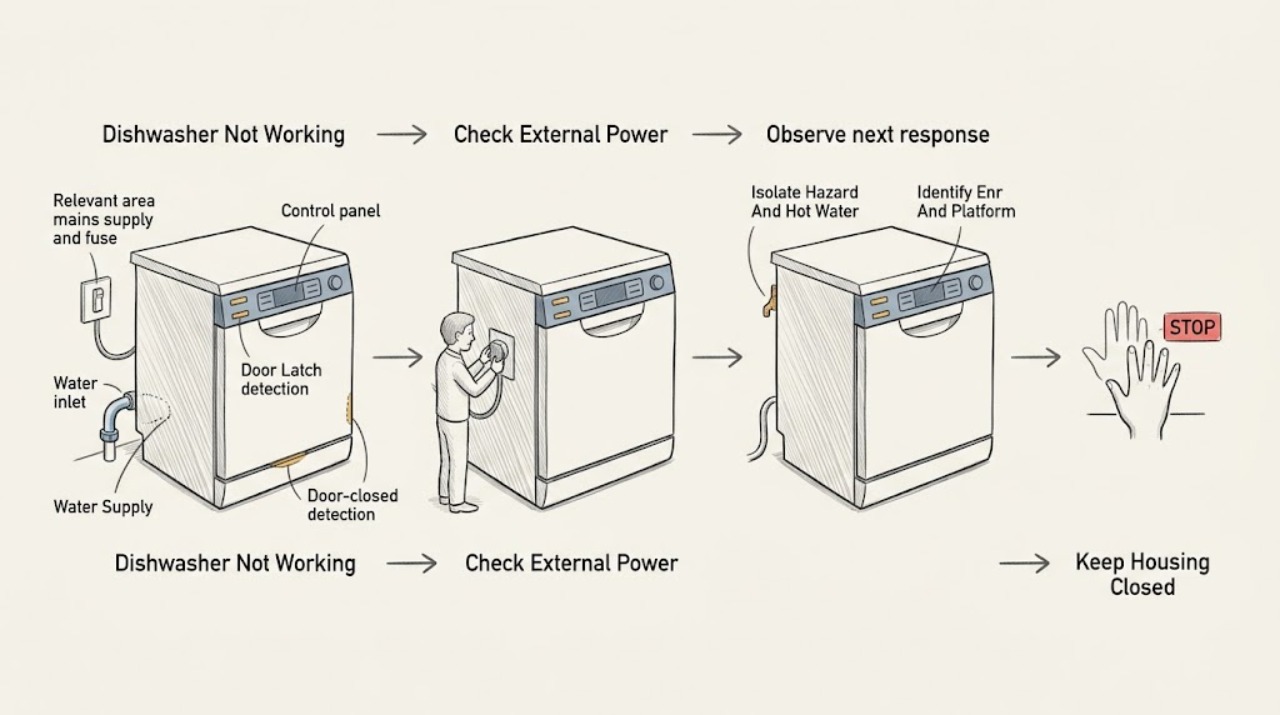
Start by deciding whether the dishwasher is completely without power or has a display that will not start a cycle. From a dry, safe position, check the accessible plug or isolator and the relevant household fuse/breaker; do not open the appliance or perform live voltage tests. Gaggenau manuals list a tripped fuse, an incorrectly inserted mains cable, or an incompletely closed door among causes of an appliance that will not start. Confirm the exact E-Nr/model and use its manual before pressing controls: on one official DF210701 manual, the cycle pauses if the door is not closed within four seconds after Start, a delay-start setting can postpone the cycle, and the appliance can switch off automatically after the cycle ends. If the display is active but no wash begins, check the selected programme, delay indication, door closure, and the manual's Start/Resume sequence. If a running cycle stops, check only accessible power and water conditions; do not pull out a built-in unit or dismantle hoses. Model-specific manuals document water-supply faults and service codes, including water-protection or low-voltage conditions that require turning off the water or contacting an electrician/service. A recurring code, no response after safe external checks, leaking water, a hot or damaged cord, smoke, or a breaker that trips means stop using it and arrange qualified service. Do not bypass the door lock, open panels, probe wiring, or replace an internal pump, heater, valve, board, or motor from the symptom alone.
Before you begin
Safety first
- The user may record the E-Nr and display, use the exact manual's controls, inspect visible door closure, and make safe external observations of power and water. Qualified personnel must handle the mains connection, panels, door lock, wiring, pump, heater, motor, valve, sensors, control boards, base, and any water- or electrically-damaged appliance.
Work through in order
Diagnostic checks
Use only checks that match the exact appliance or system and its official guide.
-
Check 1
Stop the programme normally if the controls respond. Keep the door closed until spray and water noises stop; open it cautiously because hot water or steam may escape. If there is smoke, a burning smell, arcing, a hot or damaged cord, a leak toward electrics, or a tripping breaker, isolate power only from a safe dry location and do not continue testing.
Expected result: The dishwasher is cool and dry with no damage; hot water or steam remains; water is leaking; or an electrical/fire symptom is present.
Next step: For a safe appliance, continue with identification and external checks. For a hazard, keep it out of use, turn off the water tap when safe, and arrange qualified appliance/electrical service.
Stop if: Do not reach into a hot tub, pull out a built-in dishwasher, touch wet electrical parts, or reset a tripping breaker repeatedly.
Why this matters
Why: A hot cycle needs a burn-safe pause, while a leak or electrical symptom is a stop-use condition. Neither can be resolved by repeatedly pressing Start.
-
Check 2
Record the complete Gaggenau E-Nr/model and, if shown, the FD/serial information, series, installation type, display code, and whether the controls are on the front edge or top of the door. Use Gaggenau's appliance-document search to obtain that exact manual.
Expected result: The E-Nr is confirmed; only a partial number is available; or the code appears in a manual for a different series/model.
Next step: Use the confirmed manual. If the identity is uncertain, preserve the display/photo and contact Gaggenau service rather than borrowing a reset sequence from a similar dishwasher.
Stop if: Do not combine 200-series and 400-series instructions, or use a manual for another E-Nr as proof that a part has failed.
Why this matters
Why: Gaggenau's downloads page requires the appliance number/E-Nr for the correct documents, and the manuals show materially different operating and troubleshooting details. A code or button sequence from another model is not a reliable diagnosis.
-
Check 3
For a dark panel, check only the accessible plug, fused spur, isolator, or household fuse/breaker from a safe dry position. If the socket is accessible and intact, confirm it has power using the manual's safe external guidance or a normal appliance; do not use a meter, remove an outlet cover, or reach behind built-in cabinetry.
Expected result: The fuse/breaker is tripped; the plug or isolator is off; the socket has no supply; the dishwasher remains dark on a confirmed working supply; or the cord/isolator is hot or damaged.
Next step: Restore an accessible switch only if there is no hazard and the exact installation permits it. If the breaker trips again, the supply is abnormal, or the appliance remains dark, leave it off and call an electrician or qualified Gaggenau service.
Stop if: Do not repeatedly reset the fuse/breaker, bypass a fuse, use an extension cord, or open a hard-wired connection.
Why this matters
Why: A household supply interruption can explain a dark dishwasher. A working supply with no display shifts concern to the appliance's inlet, fuse, wiring, control, or display, which is not a user repair. Heat or damage raises shock/fire risk.
-
Check 4
If the panel is lit, select the documented programme and press Start once according to the exact manual. Close the door fully without forcing it and check for a visible obstruction at the door edge. On top-control models, pay attention to the manual's required timing between Start and closing the door.
Expected result: The cycle starts; the panel pauses or flashes after the door is closed; the door will not latch; or the controls do not respond.
Next step: Close the door and resume only with the exact model instruction. If the door cannot latch or the control remains unresponsive, stop and arrange service; do not bypass the lock.
Stop if: Do not tape, wedge, defeat, or disassemble the door latch or safety detection.
Why this matters
Why: Gaggenau's DF210100 manual lists an improperly closed door as a no-start cause, and the DF210701 manual says a four-second close requirement can pause a cycle. A door that will not latch or a nonresponsive control can involve alignment, lock, switch, or control electronics.
-
Check 5
Read the display for delay-start, paused, finished, or programme-cancel state. Confirm that a cycle was actually selected and started, rather than only changing an option or leaving a previous programme active. Use the exact manual to cancel or resume; do not press random combinations.
Expected result: A delay time is displayed; the cycle is paused; the display says Finished; the appliance switched off after a completed cycle; or no programme state is visible.
Next step: Cancel the delay or resume/start the programme only as documented for the E-Nr. If the state cannot be cleared or the dishwasher stops before washing, continue to the power/water/code service branches.
Stop if: Do not assume a dark display after a finished programme is a power failure, and do not erase an error before recording it.
Why this matters
Why: On the opened DF210701 manual, delay start can postpone operation, opening the door can pause operation, and automatic switch-off after completion is normal. Other Gaggenau models may use different displays and controls.
-
Check 6
If the dishwasher starts and then stops or reports a water symptom, note whether the accessible water tap is on, the visible supply hose is kinked, and the drain path has an obvious external obstruction. Do not unscrew a water connection, remove a base panel, or reach into the pump while connected.
Expected result: The tap is closed; the hose is visibly kinked; water is leaking; the machine is full of standing water; or the accessible water path looks normal but the cycle still stops.
Next step: Open the tap or remove an obvious external kink only if safe and the exact manual allows it. Turn off the tap and call service for a leak, water-protection indication, standing water that cannot be safely cleared, or recurrence.
Stop if: Do not disassemble hoses, filters, pumps, or the base; do not use chemical drain cleaner in the dishwasher.
Why this matters
Why: Gaggenau manuals associate interrupted water supply with a stopped programme and document model-specific inlet, filter, drain, and water-protection codes. Standing water or a leak can require pump or protection-system service, not a repeated start attempt.
-
Check 7
Photograph and transcribe any exact error code, including punctuation and indicator symbols, then match it to the E-Nr manual. Treat a low-voltage code or water-protection code as a service boundary rather than a reset challenge.
Expected result: No code appears; the code is confirmed in the exact manual; the code is from another model; or the code returns after the manual's permitted reset.
Next step: Follow only the confirmed manual. For low voltage, water protection, recurring code, or code mismatch, leave the dishwasher safe and arrange electrician or qualified Gaggenau service.
Stop if: Do not measure live mains, bridge a code, repeatedly reset, or replace an internal component from the code alone.
Why this matters
Why: The DF260 manual documents E:27 as mains voltage too low and directs the user to an electrician, while its E:15/E:16 examples direct the user to turn off the tap and call customer service. The DF260 manual also uses a technical-fault sequence only as a model-specific instruction.
-
Check 8
Prepare a service record with E-Nr/model, installation type, display state and code, programme and delay setting, whether the door latched, power/fuse observations, water and drain context, when the cycle stopped, and any leak, heat, smell, or previous repair. Do not run another cycle solely to reproduce the failure.
Expected result: The dishwasher remains dark; it will not start with a lit panel; it stops mid-programme; it leaks; or it repeats a code after a documented user step.
Next step: Contact Gaggenau customer service or a qualified dishwasher technician. Keep the water tap off when a leak/protection condition is present and keep power isolated when electrical symptoms are present.
Stop if: Do not buy or install a pump, heater, valve, latch, board, motor, or fuse from the symptom alone.
Why this matters
Why: This record lets service bind the symptom to the right Gaggenau control and manual without guessing between 200/400-series architectures or asking the user to open the appliance.
Use your observations
Decision map
Find the observation that best matches what you see, then follow the next safe action.
-
PATH 01Safety boundary
What you see
The control panel is dark and no interior or status indication responds.
Do this next
Perform only the safe external supply check. If the supply is confirmed but the dishwasher remains dark, arrange qualified service or electrical inspection.
Why this path and its safety boundary
Why it matters: The first possibilities are the accessible mains supply, fuse/breaker, plug/isolator, installation, or the dishwasher's internal power input.
Safety stop: Stop for a hot/damaged cord or isolator, smoke, water near electrics, or a breaker that trips again.
-
PATH 02Safety boundary
What you see
The display is lit but pressing Start does not begin a wash, or the programme pauses as the door closes.
Do this next
Check visible door closure, programme/delay state, and the exact E-Nr manual's Start/Resume steps. Call service if the latch or controls remain unresponsive.
Why this path and its safety boundary
Why it matters: A door latch/closure condition, a model-specific Start sequence, a delay, or a control lock is more likely than total power loss. One Gaggenau manual documents a four-second close requirement after Start.
Safety stop: Do not defeat the door lock or dismantle the latch.
-
PATH 03Safety boundary
What you see
The dishwasher is quiet with a delay indication, paused state, Finished display, or a dark panel immediately after a completed cycle.
Do this next
Use the exact manual to cancel delay, resume, or start a new programme. If the display cannot be controlled or the dishwasher fails before washing, arrange service.
Why this path and its safety boundary
Why it matters: The appliance may be waiting for a programmed start, paused by a door event, or behaving normally after completion; this does not prove a failed part.
Safety stop: Do not reset repeatedly or use an unverified key combination.
-
PATH 04Safety boundary
What you see
A cycle begins but stops or cuts out before completion, with no immediate visible hazard.
Do this next
Check only the accessible door, power, and water conditions and record the point at which the cycle stopped. Call service for recurrence, standing water, or no clear external cause.
Why this path and its safety boundary
Why it matters: Gaggenau documentation identifies interrupted power or water supply and an improperly closed door as possible causes; an internal pump, sensor, heater, or control issue remains possible if external context is normal.
Safety stop: Do not pull out a built-in machine, open the base, or restart repeatedly with a leak or error code.
-
PATH 05Safety boundary
What you see
A water-supply indication appears, water is not entering, a leak is visible, or the exact manual shows a water-protection code.
Do this next
Turn off the water tap for a leak or water-protection indication and arrange service. For a safe accessible tap/hose check, follow the exact manual; do not disconnect plumbing or open the base.
Why this path and its safety boundary
Why it matters: The documented branch can involve tap, hose, inlet filter, water protection, or drain components, but the safe user check depends on the model and installation.
Safety stop: Do not run the dishwasher with a leak, bypass water protection, or pour drain chemicals into it.
-
PATH 06Safety boundary
What you see
The exact manual reports low mains voltage, the breaker trips, or the cord/isolator is hot, damaged, or smells burned.
Do this next
Leave the dishwasher off and arrange qualified electrical/appliance service. Provide the exact code and installation details; do not reset to see whether it runs.
Why this path and its safety boundary
Why it matters: Gaggenau's DF260 manual treats low mains voltage as an electrical-installation issue and directs the user to an electrician. A repeated trip or heat is a stop-use hazard.
Safety stop: Do not measure live voltage, replace a fuse with an improvised rating, or open the wiring compartment.
-
PATH 07Safety boundary
What you see
The display/code is partial or not found for the E-Nr, the appliance remains unresponsive after the documented step, or the same failure returns.
Do this next
Keep the code/photo and service record, stop using the appliance if the fault persists, and contact Gaggenau or qualified service.
Why this path and its safety boundary
Why it matters: Without exact model identity, the visible symptom cannot distinguish a latch, control, pump, valve, heater, sensor, or power fault. Recurrence makes a transient programme state less likely.
Safety stop: Do not splice troubleshooting tables from different Gaggenau manuals or replace a part based on an unconfirmed code.
Helpful context
Understand the symptom
Separate no power, no start, and stops mid-cycle
A dark control panel follows a supply path. A lit panel that does nothing follows a door, programme, delay, lock, or control path. A cycle that begins and then stops adds water supply, drain, protection, or an internal fault to the decision. Gaggenau's own manuals use different controls and code tables across model families, so the E-Nr and exact manual are part of the diagnosis.
A quiet or dark appliance is not always broken
The DF210701 manual says the appliance can switch off automatically after a completed wash, and it can pause when the door is opened or not closed promptly after Start. A delay-start setting can also make a correct selection look inactive. Confirm the display state and programme before assuming that a silent appliance has lost power.
Stop before internal electrical, water-protection, or pump work
Gaggenau's safety instructions say not to operate a damaged appliance and direct trained specialist staff to perform repairs. The user-level boundary is recording the E-Nr and code, checking accessible controls and door closure, and observing a safe external supply or water condition. Turning off a water tap for a documented water-protection condition is different from removing hoses or opening the base; the latter belongs to service.
Safety boundary
Stop conditions
- Stop use for smoke, burning odor, arcing, a hot or damaged cord/isolator, water near electrical parts, cabinet damage, or a breaker that trips again; isolate power only from a safe dry location and arrange qualified service.
- For a leak or water-protection indication, turn off the water tap when safe and call service; do not run the dishwasher to see whether the leak returns.
- Do not open panels, perform live electrical tests, bypass the door lock, handle wiring, or access the heater, pump, motor, valve, control board, or mains connection.
- Do not combine 200-series and 400-series instructions or use an error-code/reset sequence from another E-Nr.
- Do not repeatedly reset a fuse/breaker or buy an internal part from the generic symptom ‘not working’.
When checks do not resolve it
Need a professional?
Safety scope: The user may record the E-Nr and display, use the exact manual's controls, inspect visible door closure, and make safe external observations of power and water. Qualified personnel must handle the mains connection, panels, door lock, wiring, pump, heater, motor, valve, sensors, control boards, base, and any water- or electrically-damaged appliance.
Common questions
FAQ
Why is my Gaggenau dishwasher not starting even though the display is on?
Check the exact model's programme, delay-start, door-closure, control-lock, and Start/Resume instructions. Gaggenau manuals document door timing and delayed or paused cycles on some models. If the door will not latch or the controls remain unresponsive, arrange service rather than bypassing the lock.
What should I check if my Gaggenau dishwasher has no lights?
From a safe dry position, check the accessible plug/isolator and the relevant fuse or breaker. If the supply is confirmed but the dishwasher stays dark, call qualified appliance or electrical service. Do not open a hard-wired connection or perform a live voltage test.
Can a delay setting make a Gaggenau dishwasher look like it is not working?
Yes. The opened DF210701 manual documents electronic delay start, paused cycles after the door opens, and automatic switch-off after a completed cycle. Confirm the display state and use only the exact E-Nr manual to cancel or resume the programme.
What should I do if the dishwasher stops during a programme?
Record the point of interruption and check only the accessible door, power, and water conditions. Gaggenau manuals identify interrupted power or water and door closure as possible causes, but a recurring stop, standing water, leak, or code needs qualified service.
When is a Gaggenau dishwasher fault a service call?
Call for a dead appliance after safe supply checks, an unresponsive or unlatched door, recurring error, water-protection or low-voltage indication, active leak, standing water, smoke, burning odor, hot/damaged wiring, or a tripping breaker. Do not open panels, test live wiring, or replace an internal part from the symptom alone.
Read the exact guide
Official sources
- Use and care videosGaggenau · Supports the existence of separate Gaggenau dishwasher series materials; use the matching manual for operating details.
- Gaggenau User manual DF260..., DF261... DishwasherGaggenau · Use only for the exact DF260/DF261 family or a manual that explicitly shares the same code table; examples are conditional, not a brand-wide diagnosis.
- Downloads | GaggenauGaggenau · Applies to Gaggenau appliances and directs owners to enter the appliance number/E-Nr to retrieve the correct manual.
- Use and Care Manual DF210701Gaggenau · Use only for DF210701 or an exact compatible model family; door timing, delay controls, and automatic switch-off may differ on other models.
- Gaggenau User manual DF210100 DishwasherGaggenau · Use only for DF210100 or the exact compatible E-Nr family; its troubleshooting examples are not a universal code chart for all Gaggenau dishwashers.
Community feedback
Share a repair observation
Share a plain-text repair observation. Accepted observations are published automatically; this page may take a moment to update.