
On this page
Start here
Quick answer
When a GE room air conditioner will not turn on, first identify whether it is a window, built-in, portable, or smart model and whether the display, fan, or any indicator has power. GE's official no-running guidance starts with the plug, selector switch, thermostat setting, and a safely tested outlet; some GE cords have a Test/Reset current-interrupter device. Check that device only as directed while it remains plugged in, and do not use an extension cord, surge protector, or multi-outlet adapter. After a power failure or compressor shutdown, follow the model manual's restart delay rather than rapidly cycling the controls. An error code is model-specific and GE says a trained technician should diagnose it. Stop and disconnect power only when safe for smoke, burning odor, a hot or damaged cord, water near electrical parts, sparking, repeated breaker trips, or exposed wiring. Do not remove the cabinet, access the capacitor or compressor, bypass a current interrupter, or perform live electrical tests; persistent no-start needs qualified service.
Before you begin
Safety first
- Do not remove the cabinet, access capacitors or compressors, probe live terminals, bypass the current interrupter or thermostat, handle refrigerant, use an extension cord or adapter, or order internal parts without qualified model-specific diagnosis. Isolate power only when safe.
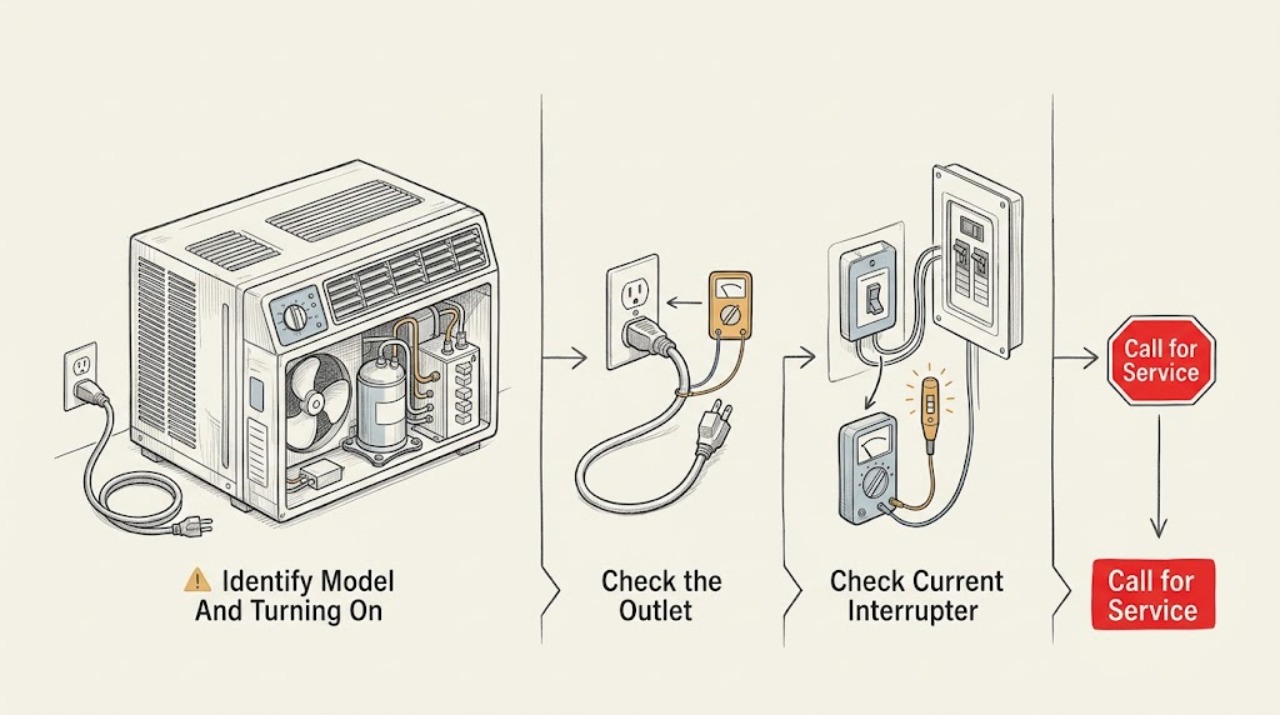
Work through in order
Diagnostic checks
Use only checks that match the exact appliance or system and its official guide.
-
Check 1
Record the complete GE model number and whether the unit is window, built-in, portable, or a GE Profile smart air conditioner. Classify the symptom as no display, display but no fan, fan but no cooling, a fault code, or control/remote response failure.
Expected result: The installation type and symptom class are clear, or the model cannot be read safely and several functions are absent.
Next step: Use the exact model's Owner's Manual and follow the matching external branch below. If identification requires removing the cabinet or moving a built-in unit, leave it in place and provide the missing model information to service.
Stop if: Do not remove trim or covers to locate the model label, and do not run a unit with a hazard symptom just to classify it.
Why this matters
Why: GE's power-cord locations, current-interrupter details, reset instructions, and serviceability vary by model and installation type. A generic reset cannot be assumed from the symptom alone.
-
Check 2
Verify that the plug is fully seated in the model-appropriate, grounded wall outlet. If it can be done without touching damage or moving the air conditioner, check the outlet with another known-good appliance and observe the house breaker or fuse status.
Expected result: The outlet is dead, the plug/cord is loose or damaged, the breaker has tripped, or the outlet and direct connection are normal.
Next step: Correct only a plainly loose accessible plug or have an electrician repair a dead outlet/circuit. If the breaker trips again or the cord is hot/damaged, leave the unit off and arrange service.
Stop if: Do not reset a breaker repeatedly, use an extension cord or adapter, move a built-in unit, or touch a scorched/wet receptacle.
Why this matters
Why: GE's no-running guidance treats a dead outlet or tripped circuit as a power path issue. A normal outlet with a dead air conditioner shifts attention to the cord current interrupter, controls, or internal service diagnosis.
-
Check 3
If the GE power cord has a Test/Reset current-interrupter device, inspect it from outside for damage and use its normal Reset control only while the cord remains plugged in and no hazard is present. Do not bypass or open the device.
Expected result: The Reset control restores an indicator/display, it will not reset, it trips again, or the cord/device shows heat or damage.
Next step: If it resets and the air conditioner operates normally, monitor it. If it will not reset or trips again, unplug only if safe, leave the unit off, and arrange qualified service or electrical evaluation.
Stop if: Do not defeat, tape down, open, or replace the current-interrupter device with an ordinary cord.
Why this matters
Why: A current-interrupter reset can restore a protected cord after a normal interruption. Failure to reset, recurrence, heat, or damage indicates a power or appliance fault and is not a reason to bypass the protection.
-
Check 4
Use the appliance's normal control panel to verify the selector/mode is ON or COOL as the exact manual specifies and the thermostat is set to request operation. For a model with a remote, aim it at the receiver and check fresh, correctly installed batteries without relying on the remote as the only control test.
Expected result: The selector was off, the thermostat was satisfied or mis-set, the remote is not responding, the panel responds but the unit does not run, or the controls are completely dead.
Next step: Correct only the normal user setting or remote batteries, then make one start attempt. If the control remains dead or the unit still will not run, stop cycling the controls and arrange service.
Stop if: Do not enter service mode, remove the control panel, bypass a thermostat, or connect an unapproved remote or battery.
Why this matters
Why: GE identifies the selector and thermostat as first external checks; its remote guidance says signal path and batteries can affect remote operation. A responsive panel with no fan or a dead panel after power checks needs model-specific service diagnosis.
-
Check 5
If the unit was just interrupted or displays a fault/code, turn it off and follow only the exact Owner's Manual's restart or code-reset instruction. Allow any documented compressor protection delay; do not repeatedly unplug, reset, or change modes to force a start.
Expected result: The unit restarts after the documented wait, the code clears but returns, the code remains, or no display/control response returns.
Next step: Monitor a normal hazard-free cycle after a successful model-documented reset. For a recurring/persistent code or no response, leave the unit off and arrange qualified service with the model and code.
Stop if: Do not bypass protection, force a compressor start, open the cabinet, or make live measurements.
Why this matters
Why: A one-time recovery can reflect a protected restart or transient control state. GE says displayed fault codes require trained service, and a recurring code is not a universal part diagnosis.
-
Check 6
Stop troubleshooting and arrange service for a persistent no-start, a fan that never runs after power/control checks, a compressor that will not start, repeated current-interrupter or breaker trips, smoke, burning odor, sparking, unusual heat, water near controls, damaged cord, or exposed wiring.
Expected result: The air conditioner runs normally after a safe external correction with no hazard, or it remains dead/abnormal or has a safety symptom.
Next step: For persistent or hazardous symptoms, keep the unit off, isolate power only if safe, and contact GE service or an appropriately qualified appliance/electrical technician.
Stop if: Do not restore power to test a hazardous unit, remove covers, bypass protection, probe live parts, or handle refrigerant.
Why this matters
Why: A successful external correction supports monitoring. Persistent failure may involve the control, motor, compressor, capacitor, wiring, or refrigeration system; no single part can be selected safely from a brand-level no-start symptom.
Use your observations
Decision map
Find the observation that best matches what you see, then follow the next safe action.
-
PATH 01Safety boundary
What you see
The air conditioner has no display or sound and the direct wall outlet is dead or the house breaker/fuse has tripped.
Do this next
Have the outlet/circuit safely restored by an electrician; reconnect the air conditioner only when the circuit is sound and there is no damage.
Why this path and its safety boundary
Why it matters: The immediate fault is in the outlet, circuit, or house power path rather than a confirmed air-conditioner component.
Safety stop: Do not repeatedly reset the breaker or touch a wet, hot, or scorched receptacle.
-
PATH 02Safety boundary
What you see
The outlet is live, but a cord-mounted current interrupter will not reset, trips again, or shows heat/damage.
Do this next
Leave the unit off and arrange qualified GE service or electrical evaluation. Replace the cord or device only through model-confirmed service guidance.
Why this path and its safety boundary
Why it matters: The cord protection or an appliance fault is preventing operation; bypassing the device would remove a safety feature.
Safety stop: Do not tape, bridge, open, or replace the current interrupter with an ordinary cord.
-
PATH 03Safety boundary
What you see
The outlet and cord are normal, the selector/thermostat was off or mis-set, or the unit was just power-interrupted and restarts after the exact model's normal control/delay procedure.
Do this next
Monitor one normal cycle. If the no-start returns, a code appears, or the fan/compressor remains abnormal, arrange service rather than repeating resets.
Why this path and its safety boundary
Why it matters: A user setting or protected restart state is more likely than an internal failure when normal operation returns without a hazard.
Safety stop: Do not force an immediate restart or enter an undocumented mode.
-
PATH 04Safety boundary
What you see
A fault code remains/returns, the panel stays dead despite a normal outlet and cord, or controls respond but the fan never starts.
Do this next
Record the model, code, display state, and timing, leave the unit off, and arrange qualified service. Do not select a control board, fan motor, or capacitor from the symptom alone.
Why this path and its safety boundary
Why it matters: GE treats fault codes as technician diagnostic information; a persistent dead control or no-fan condition needs model-specific appliance diagnosis.
Safety stop: Do not open the cabinet, bypass a thermostat or interlock, or make live measurements.
-
PATH 05Safety boundary
What you see
Smoke, burning odor, sparking, unusual heat, water near controls, hot/damaged cord, exposed wiring, or repeated breaker trips is present.
Do this next
Keep clear, isolate power only if safe, leave the air conditioner out of service, and contact qualified appliance or electrical help.
Why this path and its safety boundary
Why it matters: This is an immediate stop-use condition, not a thermostat or reset problem; electrical and refrigeration work requires qualified service.
Safety stop: Do not restore power to test, touch wet/damaged parts, remove covers, or bypass protective devices.
Helpful context
Understand the symptom
First separate no power from no cooling
A unit with no display or sound has a different starting path from one whose display works but whose fan or compressor does not start. Record the model, installation type, display/indicator state, whether the outlet works, and whether the selector or thermostat responds. GE's support portal directs owners to model-specific air-conditioner support, and GE's no-running guidance is written for observable external checks rather than cabinet repair.
Check the cord and controls without changing the wiring
GE says to verify the plug, selector switch, and thermostat setting, and to test the outlet with another appliance when possible. Some room air conditioners have a current-interrupter device on the cord with Test and Reset buttons. Use that device only in its normal user-facing manner while plugged in. GE also requires a direct grounded wall connection and advises against extension cords, surge protectors, and multi-outlet adapters. A corrected external connection may restore operation; a repeated trip or dead control needs service.
Allow for mode and compressor protection
A selector set to the wrong position, a thermostat setting that is already satisfied, or a model-specific compressor restart delay can look like a no-start condition. After a power interruption, use the exact Owner's Manual for the restart instruction and wait rather than repeatedly cycling power. If the fan is absent as well as the compressor, focus on power/control observations; if the fan runs but the compressor does not, do not assume the compressor is failed without professional diagnosis.
Leave internal electrical and refrigerant work to service
Turn the air conditioner off and isolate power only when safe for smoke, burning odor, a hot or damaged cord, melted plug, water near controls, sparking, repeated breaker trips, or exposed wiring. Do not remove the cabinet, bypass the current interrupter, access a capacitor or compressor, probe live terminals, handle refrigerant, or force a fan. If a fault code persists or the external checks do not restore operation, arrange qualified GE service; model-specific serviceability varies.
When checks do not resolve it
Need a professional?
Contact GE service or a qualified appliance technician when the air conditioner remains off after the exact model's external power and control checks, a fault code persists, or the fan/compressor needs diagnosis. Call an electrician for a dead or repeatedly tripping circuit. Stop immediately for smoke, burning odor, sparking, unusual heat, water near controls, a hot/damaged cord, or exposed wiring.
Safety scope: Do not remove the cabinet, access capacitors or compressors, probe live terminals, bypass the current interrupter or thermostat, handle refrigerant, use an extension cord or adapter, or order internal parts without qualified model-specific diagnosis. Isolate power only when safe.
Have this ready
- Complete model number and installation type, display/indicator state, outlet and breaker observations, current-interrupter result, selector/thermostat and remote behavior, restart timing, code text, fan/compressor symptoms, and any smoke, odor, heat, water, cord, or sparking symptom.
Common questions
FAQ
Why will my GE air conditioner not turn on even though it is plugged in?
Check the direct wall outlet, the selector switch, thermostat setting, and any cord-mounted current-interrupter Reset control. If the outlet and cord are normal but the display or fan remains dead, arrange qualified service rather than opening the cabinet.
Can I use an extension cord with a GE room air conditioner?
GE says room air conditioners should plug directly into a properly grounded 3-prong wall outlet and should not use an extension cord, surge protector, or multi-outlet adapter. Have the installation checked if the direct connection is unavailable or trips.
What should I do if the GE air-conditioner cord Reset button will not work?
Do not bypass or open the current-interrupter device. Leave the unit off if it will not reset, trips again, or the cord is hot or damaged, and arrange qualified service or electrical evaluation.
Why does my GE air conditioner show an error code and not start?
GE says air-conditioner fault codes are technician diagnostic information and their meanings are not a universal list. Record the complete code and model, follow only the exact Owner's Manual's reset instruction, and call a trained technician if the code remains or returns.
Read the exact guide
Official sources
- Air Conditioner - Remote Control Operation and TroubleshootingGE Appliances · GE built-in, portable, and some window air conditioners equipped with a remote; exact batteries and receiver behavior vary by model.
- Air Conditioner - Not Cooling Well / Running ConstantlyGE Appliances · GE room air conditioners; settings, filter access, and coil access vary by model.
- Support for GE Air ConditionersGE Appliances · GE air conditioners, including room and smart air-conditioner product support; exact model identification is required.
- Air Conditioners Unit Is Not RunningGE Appliances · GE room air conditioners; exact controls, cord devices, and installation access vary by model.
- Air Conditioner - Power CordGE Appliances · GE room air conditioners, with stated exceptions for some Zoneline commercial models; cord type and location vary by application.
- Air Conditioner - Error, Fault or Function CodesGE Appliances · GE air conditioners; code behavior and serviceability vary by model and installation type.
Community feedback
Share a repair observation
Share a plain-text repair observation. Accepted observations are published automatically; this page may take a moment to update.