
On this page
Start here
Quick answer
Identify the sound and when it occurs before calling it a failure. GE says airflow noise, a thermostat click as the compressor cycles, a fan running continuously in Cool or Fan, and some water dripping outside are normal room-air-conditioner sounds. GE also says a ticking or pinging sound can come from the slinger ring, which uses water at the outdoor fan, and can be normal. A rattling noise has a different first path: with the unit off and unplugged when accessible, check the front grille, air filter, exterior debris, movable louvers, and—on a window model—the installation for vibration at the sill. Use the exact Owner's Manual for grille or louver removal and do not reach into the fan or cabinet. A sound that is new, grinding, scraping, electrically buzzing, accompanied by smoke, burning odor, a hot plug/cord, water inside, ice, poor cooling, or a breaker trip is not a normal-noise diagnosis: stop the unit, isolate power from a safe position, and arrange qualified service. Do not open the sealed refrigeration circuit, test live wiring, straighten fan blades, or replace a motor or capacitor from a sound alone.
Before you begin
Safety first
- The user may turn the unit off, isolate accessible power, inspect a safe external grille/filter/louver and window installation, and follow model-approved care instructions. Qualified personnel must handle cabinet panels, fan/motor/capacitor, compressor, wiring, live tests, refrigerant, sealed systems, and heavy or unstable installations.
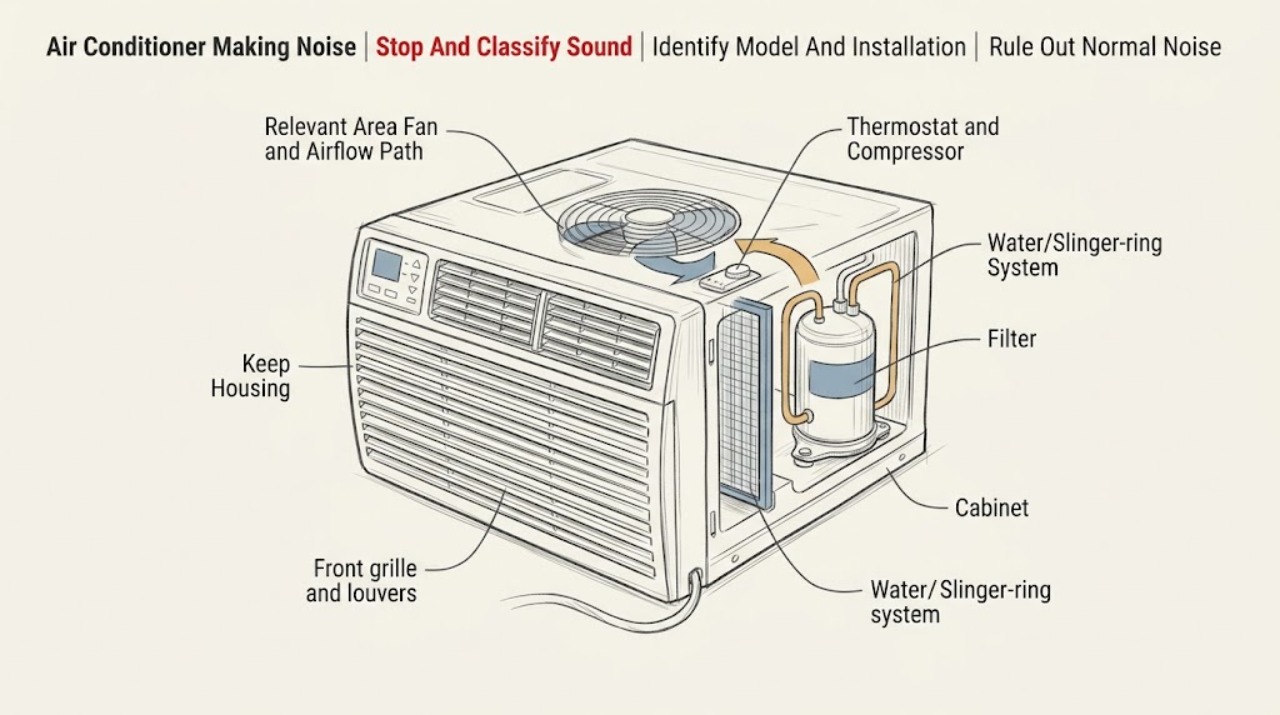
Work through in order
Diagnostic checks
Use only checks that match the exact appliance or system and its official guide.
-
Check 1
Turn the air conditioner off using its normal control and record the sound type, location, operating mode, fan/compressor state, and whether cooling or airflow changes. If there is smoke, burning odor, sparking, a hot/damaged cord or plug, water inside, or a breaker trip, isolate power only from a safe position and stop.
Expected result: The sound is airflow, a click, ping/tick, fan noise, rattle/vibration, scrape/grind, electrical buzz, or accompanied by a hazard.
Next step: Use the normal-noise branch for airflow/click/ping symptoms without a performance change. For rattle, continue with safe grille/filter/louver and installation checks; for hazards or grinding/electrical noise, arrange service.
Stop if: Do not keep running the unit to reproduce a hazardous sound or reach through the grille while the fan can move.
Why this matters
Why: GE documents several normal room-air-conditioner sounds, but a hazard or mechanical scrape is outside a normal-noise check. Sound timing and location separate airflow/water behavior from grille, installation, fan, or electrical concerns.
-
Check 2
Record the exact GE model and serial from the rating label and identify whether the unit is window, built-in, portable, smart, or heat/cool. Retrieve the matching Owner's Manual and Installation Instructions before removing a grille or changing an installation fastener.
Expected result: The model and installation type are confirmed; only a partial model is visible; or the instructions found apply to a different air-conditioner style.
Next step: Use only the confirmed model documentation. If identity is uncertain, limit checks to external sound recording and filter access explicitly allowed by the manual, then contact GE service.
Stop if: Do not copy a window-unit installation or grille procedure to a built-in, portable, or heat-pump model.
Why this matters
Why: GE supports multiple room-air-conditioner constructions and directs owners to model-specific support. A window vibration check, grille procedure, or louver adjustment may not apply to built-in or portable units.
-
Check 3
Compare the sound with the operating state: airflow while the fan runs, a metallic thermostat click as the compressor cycles, a fan running continuously in Cool or Fan, or a tick/ping when humid outdoor water is being handled. Do not assume quiet or loud means failure without checking cooling and hazards.
Expected result: The sound matches airflow, a single cycle click, continuous fan operation in an expected mode, or intermittent pinging with normal cooling and no hazard.
Next step: Monitor a normal sound while confirming cooling remains adequate. If the sound changes, becomes harsh, or affects performance, stop and continue with the service branch.
Stop if: Do not remove covers or insert tools to quiet a normal fan, water, or compressor sound.
Why this matters
Why: GE classifies these patterns as normal room-air-conditioner behavior. A new sound, performance loss, scraping, electrical buzz, or hazard makes a different branch more likely.
-
Check 4
With the air conditioner off and unplugged when the plug is accessible, inspect the front grille, accessible air filter, exterior debris, and movable louvers for looseness, breakage, dirt, or an object touching them. Remove and reinstall the grille only if the exact Owner's Manual permits it; clean the filter by the manual's method.
Expected result: The grille is loose/broken; the filter is dirty; exterior debris is present; a louver is loose/broken; or all accessible parts are clean and secure.
Next step: Re-seat an intact grille or louver only as documented and clean the filter with power isolated. Arrange service for broken parts, persistent rattle, or any sound from inside the cabinet.
Stop if: Do not reach through the grille, straighten a moving fan, remove cabinet panels, or run the unit with a broken grille or loose object.
Why this matters
Why: GE lists grille, filter/debris, and louver conditions as accessible rattling causes. A clean secure front with persistent vibration shifts concern to installation, cabinet, fan, or internal mechanical parts.
-
Check 5
For a window model only, inspect from inside and outside without leaning on the appliance whether the side panels and visible installation supports are secure and whether vibration is being transferred to the window sill. Follow the exact Installation Instructions; do not remove a support or move the heavy unit alone.
Expected result: The rattle changes with cabinet/sill vibration; a side panel or visible fastener is loose; the unit is not supported as documented; or the installation appears secure.
Next step: Have the installer or a qualified technician correct an uncertain or heavy-unit installation. For a secure installation with continued rattle, keep the unit off and arrange service.
Stop if: Do not climb, lift, slide, or dismantle a window air conditioner to chase vibration.
Why this matters
Why: GE identifies improper window installation as a vibration source. A secure installation with a persistent internal rattle points away from the sill and toward a component or cabinet issue.
-
Check 6
Note whether the air conditioner still cools, whether airflow is restricted, whether ice is visible, and whether water is dripping inside or only outside. Do not scrape ice, tilt a mounted unit by force, or use a hose or spray near the electrical controls.
Expected result: Cooling and airflow are normal; cooling is poor or ice blocks airflow; water is outside on a hot/humid day; or water is inside/near controls.
Next step: Follow the exact manual for filter/airflow care. Stop and arrange service for indoor water, ice that does not clear safely, poor cooling, or a sound that accompanies performance loss.
Stop if: Do not open the cabinet, use heat tools to melt ice, or run a wet/damaged unit.
Why this matters
Why: A normal ping or outdoor water can coexist with normal operation, while ice, poor cooling, or indoor water can create fan noise or indicate airflow/installation/drain issues. Water near electrics is a stop-use condition.
-
Check 7
Prepare the GE model/serial, installation type, sound recording, operating mode, sound timing, grille/filter/louver findings, installation observations, cooling/water symptoms, and any hazard or prior repair. Do not open the cabinet or run a new test solely to make the sound recur.
Expected result: The sound remains after accessible checks; it comes from inside the cabinet; it recurs with poor cooling or water; or electrical/mechanical hazard is present.
Next step: Keep the air conditioner off for hazardous or damaging symptoms and arrange GE or qualified HVAC/appliance service. Provide the recording and exact model rather than a generic parts request.
Stop if: Do not open the sealed system, test live wiring, replace capacitors/motors, or disassemble the fan or compressor.
Why this matters
Why: A persistent or internal noise needs model-specific fan, motor, compressor, mounting, sealed-system, or electrical diagnosis. The observed symptom cannot identify a safe user-replaceable part.
Use your observations
Decision map
Find the observation that best matches what you see, then follow the next safe action.
-
PATH 01Safety boundary
What you see
The sound is airflow, a thermostat click, or a fan running in Cool/Fan, with normal cooling and no hazard.
Do this next
Continue normal use while monitoring cooling and sound changes. Use the exact manual for mode behavior if the fan pattern changes.
Why this path and its safety boundary
Why it matters: GE identifies these as normal room-air-conditioner sounds or operation.
Safety stop: Stop if the sound becomes scraping, grinding, electrical, or is accompanied by heat, odor, smoke, water, or loss of cooling.
-
PATH 02Safety boundary
What you see
A periodic tick or ping occurs during humid/outdoor operation while cooling and airflow remain normal.
Do this next
Monitor without inserting tools or opening the cabinet. Call service if the sound becomes harsh or cooling/water behavior changes.
Why this path and its safety boundary
Why it matters: GE says a slinger ring can produce ticking or pinging as part of normal operation, and outdoor water can occur in hot/humid conditions.
Safety stop: Do not block the outdoor fan or try to drain/alter the water-handling system yourself.
-
PATH 03Safety boundary
What you see
The sound is a front-end rattle and an accessible grille, filter, exterior debris, or louver is loose, dirty, or broken.
Do this next
With power safely isolated, clean the filter, remove exterior debris, or re-seat an intact grille/louver only according to the manual. Service a broken component or persistent rattle.
Why this path and its safety boundary
Why it matters: GE lists these as plausible accessible rattle sources, unlike an internal motor diagnosis.
Safety stop: Do not operate with a loose/broken grille, reach toward the fan, or remove cabinet panels.
-
PATH 04Safety boundary
What you see
A window unit vibrates at the sill or visible side-panel/support installation is loose or uncertain.
Do this next
Use the exact Installation Instructions and have an installer or qualified technician correct support/fastening. Keep the unit off if it is unstable.
Why this path and its safety boundary
Why it matters: GE identifies improper window installation as a vibration source; the heavy unit and its support are installation/safety concerns.
Safety stop: Do not lift, slide, climb near, or dismantle the window unit alone.
-
PATH 05Safety boundary
What you see
The noise accompanies weak airflow, poor cooling, visible ice, indoor water, or a filter/vent condition.
Do this next
Follow only the manual's filter and airflow care. Stop for indoor water, persistent ice, or poor cooling and arrange service.
Why this path and its safety boundary
Why it matters: Airflow restriction, icing, installation, fan contact, or another performance fault is more likely than a harmless sound.
Safety stop: Do not scrape ice, use heat tools, or open the refrigeration cabinet.
-
PATH 06Safety boundary
What you see
The sound is a harsh buzz, grinding, scraping, or repeated electrical click, or is accompanied by smoke, odor, a hot/damaged cord/plug, sparking, water near controls, or a breaker trip.
Do this next
Turn the unit off, isolate power from a safe position, keep clear of the hazard, and arrange qualified GE/HVAC service or electrical inspection.
Why this path and its safety boundary
Why it matters: This is a stop-use electrical, fire, water, or internal mechanical condition. A user cannot safely identify a motor, capacitor, compressor, fan, or wiring fault by sound alone.
Safety stop: Do not reset a tripping circuit, open the cabinet, touch wet or hot parts, or run the unit to reproduce the sound.
Helpful context
Understand the symptom
Sound type changes the safe next check
A light airflow sound or thermostat click can be part of normal operation, while a rattle that changes when the grille or louver is touched points to an accessible vibration source. A ping or tick can be the slinger ring moving water. Do not use a generic motor diagnosis until the sound's timing, location, and effect on cooling are recorded.
Window installation is part of the noise path
GE says improper window installation can create vibration at the sill and directs owners to the Installation Instructions. A window unit that vibrates against the sill or side panels needs an installation check with the unit off; a built-in or portable unit must follow its own model documentation rather than window-unit assumptions.
Stop for electrical, water, or mechanical danger
The user boundary ends at accessible grille/filter/louver and installation observations performed with the unit safely off. Smoke, burning odor, a hot or damaged plug/cord, sparking, water inside, repeated breaker trips, a grinding sound, or a fan that appears to strike something requires service. Do not open the cabinet or make a live test to locate the noise.
Safety boundary
Stop conditions
- Stop immediately for smoke, burning odor, sparking, a hot or damaged cord/plug, water near electrical controls, repeated breaker trips, cabinet damage, or an unstable window installation; isolate power only from a safe position and arrange qualified service.
- Do not reach through the grille, straighten fan blades, open cabinet panels, test live wiring, or access the compressor, motor, capacitor, refrigerant, or sealed system.
- Do not lift, slide, or dismantle a window or built-in air conditioner to investigate vibration; use the exact Installation Instructions or a qualified installer.
- Do not scrape ice, use heat tools, spray water near controls, or operate a unit with indoor water or exposed damage.
- Do not infer a replacement motor, fan, capacitor, or compressor from a sound alone or mix instructions between window, portable, built-in, and heat/cool models.
When checks do not resolve it
Need a professional?
Safety scope: The user may turn the unit off, isolate accessible power, inspect a safe external grille/filter/louver and window installation, and follow model-approved care instructions. Qualified personnel must handle cabinet panels, fan/motor/capacitor, compressor, wiring, live tests, refrigerant, sealed systems, and heavy or unstable installations.
Common questions
FAQ
What sounds are normal for a GE air conditioner?
GE identifies airflow noise, a thermostat click as the compressor cycles, a fan running continuously in Cool or Fan, and some water dripping outside in hot/humid conditions as normal. A new harsh, scraping, electrical, or performance-related sound needs a different branch.
Why is my GE air conditioner rattling?
With the unit safely off, check the accessible front grille, filter, exterior debris, movable louvers, and—on window models—the installation at the sill. GE lists these as rattle sources. Use the exact manual and arrange service for broken parts or persistent internal rattling.
Is a pinging or ticking sound from a GE air conditioner normal?
GE says a ticking or pinging sound may come from the slinger ring and can be normal operation. Monitor cooling and water behavior; call service if the sound becomes harsh or is accompanied by poor cooling, indoor water, smoke, odor, or electrical symptoms.
Can a dirty filter or window installation cause noise?
Yes. GE's rattling guidance includes the filter, exterior debris, and window-sill vibration. Clean the filter and inspect the installation only with power safely isolated and according to the exact model instructions; do not lift or dismantle a window unit.
When should I stop using a noisy GE air conditioner?
Stop for smoke, burning odor, sparking, a hot/damaged cord or plug, water near controls, repeated breaker trips, grinding/scraping, unstable installation, indoor water, ice, or poor cooling with persistent noise. Do not open the cabinet, test live wiring, or replace a motor/capacitor/compressor from sound alone.
Read the exact guide
Official sources
- Air Conditioner - Normal NoisesGE Appliances · Applies to GE room-air-conditioner sound interpretation and distinguishes airflow, thermostat clicks, fan operation, water outside, grille, installation, and beeping.
- Support for GE Air ConditionersGE Appliances · Applies to GE air conditioners and directs owners to model-specific support; installation type and accessible procedures vary.
- Air Conditioner - Rattling NoiseGE Appliances · Applies to GE room-air-conditioner rattling symptoms and supports model-specific grille, filter, louver, and window-installation checks.
Community feedback
Share a repair observation
Share a plain-text repair observation. Accepted observations are published automatically; this page may take a moment to update.