
On this page
Start here
Quick answer
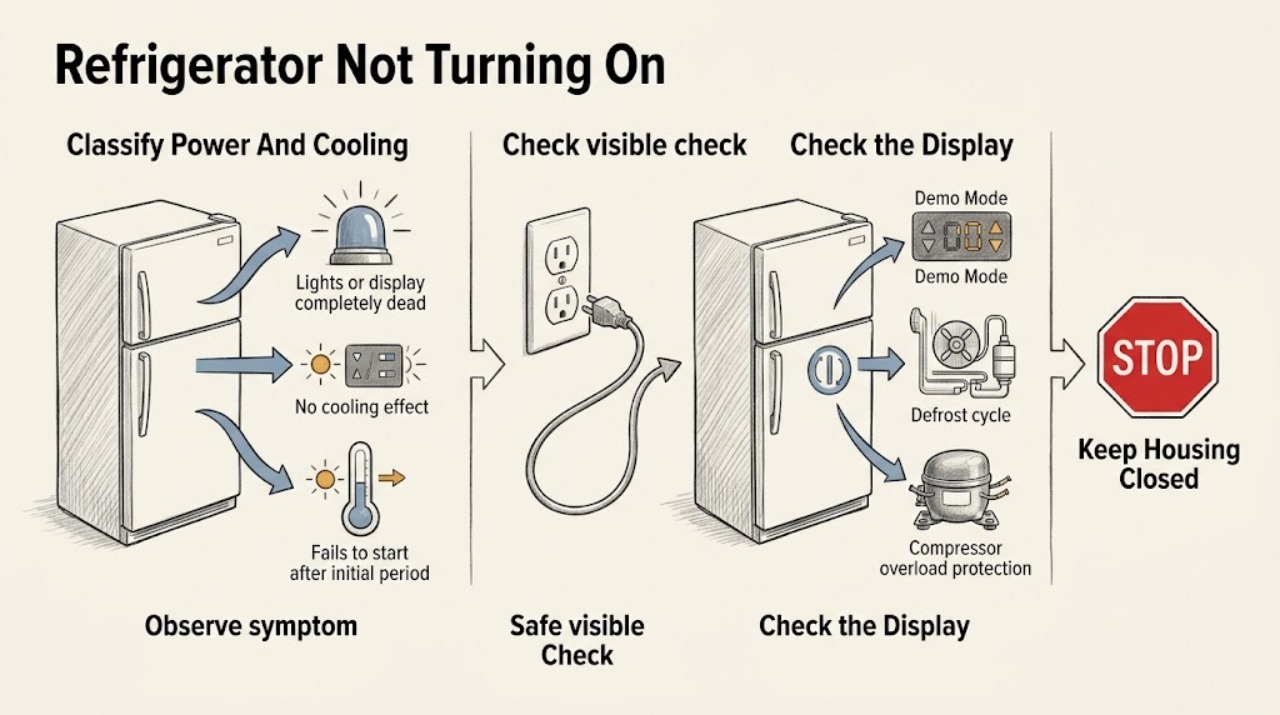
First separate “no power” from “no cooling.” If the fresh-food light and display are both dark, check that the plug is secure and the outlet has power, then check the household breaker or fuse without opening electrical covers. If lights or the display work but the compressor and fans are quiet, verify that the temperature controls were not turned off, check whether the refrigerator is in model-specific Demo or Showroom Mode, and allow for a normal defrost cycle; GE says the compressor and fans stop during defrost and that it can last roughly 25–45 minutes depending on model. After a short outage or immediate unplug/replug, the compressor may wait while the refrigerant system equalizes, so repeated power cycling is not a fix. A newly installed unit may need its exact Demo Mode cleared and about 24 hours to cool and stabilize. Record any exact code such as a power-interruption, Demo Mode, or defrost indication rather than applying a universal code table. If power is present but the refrigerator still will not run or cool after these model-specific checks, keep it powered for diagnosis when safe and arrange service; do not open the control compartment, test live wiring, or replace a start device, control, compressor, or sealed-system part yourself.
Before you begin
Safety first
- This article covers normal user controls, safe outlet observation, model-specific mode identification, and waiting for documented automatic behavior. Do not open electrical covers, test live circuits, bypass protection, access the compressor or sealed system, or replace internal parts.
Work through in order
Diagnostic checks
Use only checks that match the exact appliance or system and its official guide.
-
Check 1
Record the complete GE model and observe from outside or during a brief door opening whether the fresh-food light, display, dispenser panel, compressor, and fans respond. Note whether the complaint is total darkness, lights with no cooling, or a display/control symptom.
Expected result: No interior light or display, interior light and display work, dispenser alone is dark, compressor and fans are quiet, or an exact code or mode label is shown.
Next step: Use the matching power, mode, defrost, or cooling branch below and preserve the exact display text and timing.
Stop if: Stop if there is a burning odor, smoke, sparking, a hot or damaged cord, water near electrical parts, exposed wiring, or a breaker that trips again.
Why this matters
Why: GE separates loss of appliance power from no cooling with power present; a dispenser-only panel issue does not prove the whole refrigerator is off. The symptom pattern determines the next safe check.
-
Check 2
If the interior light and display are dark, confirm that the refrigerator plug is visibly secure and check whether the labeled outlet has power using a safe, ordinary-access method. Check the household breaker or fuse once; do not remove an electrical cover.
Expected result: The plug was loose, the outlet is dead, the breaker is tripped, the breaker trips again, or the outlet and breaker are normal but the refrigerator remains dark.
Next step: Restore only a clearly loose plug or single tripped breaker. If power is absent at the outlet, use an electrician; if the outlet is powered but the refrigerator remains dark, arrange appliance service.
Stop if: Do not reset a repeatedly tripping breaker, replace a fuse with a different rating, use a damaged outlet or cord, or test an outlet while standing in water.
Why this matters
Why: GE says no interior light can indicate no refrigerator power and directs owners to verify the plug and outlet. A repeat breaker trip or powered outlet with a dead refrigerator points beyond a simple user reset.
-
Check 3
If lights or the display work, verify that the refrigerator and freezer temperature controls are not OFF. Record any exact Demo, Showroom, power-interruption, defrost, or other code and use the exact Owner's Manual for the model's mode procedure.
Expected result: The controls were off, a Demo or Showroom label is present, a power or defrost code is shown, the display is normal, or the code is not recognized by the manual.
Next step: Clear only a clearly identified model-specific Demo Mode or restore an accidentally off temperature control according to the manual; if the condition persists, arrange service with the exact code.
Stop if: Do not apply button combinations from another model, enter hidden diagnostics, or treat an unrecognized code as a harmless setting.
Why this matters
Why: GE says Demo Mode can leave lights and controls active while disabling cooling, and its code meanings and clearing steps vary by model. A code that is absent from the manual should not be guessed.
-
Check 4
If the controls are on and the refrigerator recently lost power, was unplugged and reconnected, or has otherwise stopped quietly, note when the event occurred and allow the model's normal defrost or compressor-recovery behavior without repeatedly cycling power.
Expected result: The event was recent, there are no compressor or fan sounds during a possible defrost interval, the unit resumes operation, or it remains quiet well beyond the model's expected interval.
Next step: If cooling resumes, monitor temperatures normally. If the refrigerator remains quiet or warm after the documented model-dependent interval, continue to service escalation rather than power-cycling it repeatedly.
Stop if: Do not force a restart, bypass overload protection, move the compressor, or continue operation if the cabinet is overheating, smoking, or making an electrical burning sound.
Why this matters
Why: GE says defrost stops the compressor and fans and that a short outage can trigger automatic compressor-overload recovery while the refrigerant system equalizes. These behaviors can mimic a no-start condition but should resolve automatically.
-
Check 5
For a new installation or a refrigerator that runs but is warm, confirm the model's controls are set, doors and gaskets close, vents are not blocked by food, and the installation area and clearance match the manual. Allow about 24 hours for a newly installed unit to cool and stabilize before judging cooling performance.
Expected result: The unit is newly installed, controls are off or mis-set, a door or airflow obstruction is visible, the unit is cold but the compressor is quiet, or 24 hours have passed with no normal cooling.
Next step: Correct only an obvious control, door, or airflow condition allowed by the manual and monitor stabilization. If the unit remains warm after the model's start-up period or cannot maintain temperature, arrange service.
Stop if: Do not remove sealed-system covers, clean inaccessible coils, block vents, adjust refrigerant, or use a refrigerator that is overheating or leaking.
Why this matters
Why: GE says new refrigerators need time to cool and that controls, door closure, airflow, condenser condition, and diagnostic mode affect cooling. A warm new unit is not automatically a failed compressor.
-
Check 6
After the safe power, control, mode, defrost, outage, and new-installation checks, document whether the refrigerator is completely dark, has lights but no compressor or fans, runs but stays warm, or has a persistent code.
Expected result: The unit recovers, remains dark with a powered outlet, remains warm after stabilization, repeatedly clicks or attempts to start, or retains a code or diagnostic state.
Next step: Arrange qualified GE appliance service; when safe and practical, leave the refrigerator powered so the technician can observe the symptom, as GE recommends for diagnosis. Protect perishable food separately if cooling is lost.
Stop if: Do not open control covers, test live wiring, replace a start device or control by guesswork, bypass protection, or continue using a smoking, sparking, overheating, or water-damaged refrigerator.
Why this matters
Why: The unresolved possibilities include an internal control, start circuit, compressor, fan, wiring, defrost system, or sealed-system fault. The symptom pattern is useful to a technician but does not identify a safe user-replaceable part.
Use your observations
Decision map
Find the observation that best matches what you see, then follow the next safe action.
-
PATH 01Safety boundary
What you see
The fresh-food light and display are dark, and the plug, outlet, and breaker have not been confirmed powered.
Do this next
Restore a clearly loose plug or single tripped breaker; call an electrician for a dead outlet and appliance service for a powered outlet with a dark refrigerator.
Why this path and its safety boundary
Why it matters: GE says no interior light can indicate no refrigerator power and recommends checking the plug and outlet before service.
Safety stop: Do not reset a breaker that trips again or work on a wet, damaged, or hardwired electrical connection.
-
PATH 02Safety boundary
What you see
Interior lights or display work, but the compressor and fans are quiet and the refrigerator is not cooling.
Do this next
Check the exact manual and allow the applicable defrost or recovery interval; arrange service if the unit remains warm or quiet afterward.
Why this path and its safety boundary
Why it matters: Power reaches at least some controls. GE directs owners to check temperature controls, Demo Mode, and whether the refrigerator is in defrost or automatic post-outage recovery.
Safety stop: Do not open electrical compartments or repeatedly cycle power to force the compressor to start.
-
PATH 03Safety boundary
What you see
The display shows a Demo or Showroom label, a power or defrost code, or another exact code while lights and controls remain active.
Do this next
Record the code and model, follow only the exact manual's clearing procedure, and contact service if the code persists or is not recognized.
Why this path and its safety boundary
Why it matters: GE documents model-dependent Demo Mode and code meanings; Demo Mode can disable cooling while leaving normal lights and controls working, and not every code is listed in the general article.
Safety stop: Do not use a code-clearing sequence from another GE model or assume an unrecognized code is harmless.
-
PATH 04Safety boundary
What you see
The refrigerator was just installed, recently lost power, or was unplugged and immediately reconnected.
Do this next
Use the model manual to clear Demo Mode if indicated, allow stabilization without repeated cycling, and arrange service if normal operation does not return.
Why this path and its safety boundary
Why it matters: GE says new units may need about 24 hours to cool and that post-outage compressor overload recovery is automatic while the refrigerant system equalizes.
Safety stop: Do not dismantle the unit or repeatedly unplug and reconnect it to bypass the automatic recovery behavior.
-
PATH 05Safety boundary
What you see
The outlet is powered, controls and modes are correct, defrost or recovery has passed, and the refrigerator remains dark, quiet, warm, or coded.
Do this next
Arrange qualified GE appliance service and provide the complete model, outlet result, display or light state, code, timing, temperatures, and any clicking, odor, heat, or prior repair.
Why this path and its safety boundary
Why it matters: An internal control, start circuit, compressor, fan, wiring, defrost, or sealed-system problem is more likely than a user setting, but no part can be identified safely without the model and diagnosis.
Safety stop: Do not open covers, perform live tests, bypass protection, or replace internal parts yourself.
Helpful context
Understand the symptom
No light is a power symptom; light with no cooling is different
Open the fresh-food door briefly and note whether the interior light and display respond. GE uses the light as an initial clue: no light can mean the refrigerator is not receiving power, while lights with no cooling shift attention to the temperature controls, Demo Mode, defrost cycle, or compressor start behavior. Do not confuse a dark dispenser panel with a dead refrigerator when the interior light and cooling system still operate.
Defrost and outage recovery can look like a failure
GE says the compressor and fans do not run during automatic defrost, which can make a refrigerator sound as if it quit. GE also says a short power outage or immediate unplug/replug can make the compressor wait while the refrigerant system equalizes. These are automatic behaviors; repeatedly unplugging the refrigerator can obscure the symptom rather than repair it.
Demo Mode and codes require the exact model
A newly installed or recently serviced refrigerator may be in Demo or Showroom Mode. GE documents several possible display labels and different button combinations by control layout, and its code page warns that not every possible code is listed. Record the exact text, capitalization, and whether the unit has lights, controls, or dispenser response; use the model manual instead of copying a sequence from another GE refrigerator.
Temperature and stabilization come after power and mode
If the refrigerator runs but is warm, confirm the temperature controls are on and set according to the model manual. GE says a newly installed refrigerator may need about 24 hours to cool and stabilize. Check door closure, airflow, and any model-specific diagnostic state only from the manual; do not infer a compressor or sealed-system failure from a short quiet period.
Internal electrical diagnosis is a service boundary
If the outlet is powered, the controls are on, Demo Mode is not indicated, the defrost or outage-recovery interval has passed, and the refrigerator still will not run or cool, the remaining fault may be inside the control, start circuit, compressor, fan, wiring, or sealed system. GE recommends service for an unresolved no-run or no-cool symptom. Do not remove covers or perform live tests.
Safety boundary
Stop conditions
- Stop and disconnect power only when safe if there is smoke, sparking, burning odor, abnormal heat, water near electrical parts, a damaged cord, or a breaker that trips again.
- Do not repeatedly power-cycle the refrigerator to force a compressor start; GE describes automatic defrost and post-outage compressor recovery as model-controlled behavior.
- Do not apply Demo Mode or fault-code sequences from another GE model; record the exact code and use the exact Owner's Manual.
- Do not open electrical covers, test live wiring, bypass overload or control protection, access the compressor or sealed system, or replace internal parts without qualified diagnosis.
- Do not move a heavy refrigerator across water or reach behind it when the floor, outlet, cord, or connection is wet or damaged.
When checks do not resolve it
Need a professional?
Call an electrician for a dead outlet, uncertain household wiring, or a breaker that trips again. Arrange qualified GE appliance service when the refrigerator remains dark with a powered outlet, has lights or display but no cooling after controls, Demo Mode, defrost, outage-recovery, and stabilization checks, or retains an unexplained code. Keep the unit powered for diagnosis when safe, as GE recommends, but disconnect it for smoke, sparking, burning odor, abnormal heat, water near electricity, or damaged wiring.
Safety scope: This article covers normal user controls, safe outlet observation, model-specific mode identification, and waiting for documented automatic behavior. Do not open electrical covers, test live circuits, bypass protection, access the compressor or sealed system, or replace internal parts.
Read the exact guide
Official sources
- Refrigerator - Does Not Run or CoolGE Appliances · GE Appliances general refrigerator troubleshooting; exact controls, defrost timing, display, and compressor behavior vary by model.
- Refrigerator - Not Cooling EnoughGE Appliances · GE Appliances general refrigerator cooling guidance; temperature controls, clearances, coils, lights, and diagnostic modes vary by model.
- Refrigerator - Not RunningGE Appliances · GE Appliances refrigerator guidance; Demo Mode labels, button combinations, control locations, and defrost timing are model-dependent.
- Refrigerator - No Power to the DispenserGE Appliances · GE Appliances refrigerators equipped with an electronic dispenser; dispenser panels and door harnesses vary by model.
- Refrigerator - Error, Fault or Function CodesGE Appliances · GE Appliances guidance for refrigerators with electronic dispenser controls; displayed codes and clearing procedures vary by model, and the general list is not exhaustive.
Community feedback
Share a repair observation
Share a plain-text repair observation. Accepted observations are published automatically; this page may take a moment to update.