
On this page
Start here
Quick answer
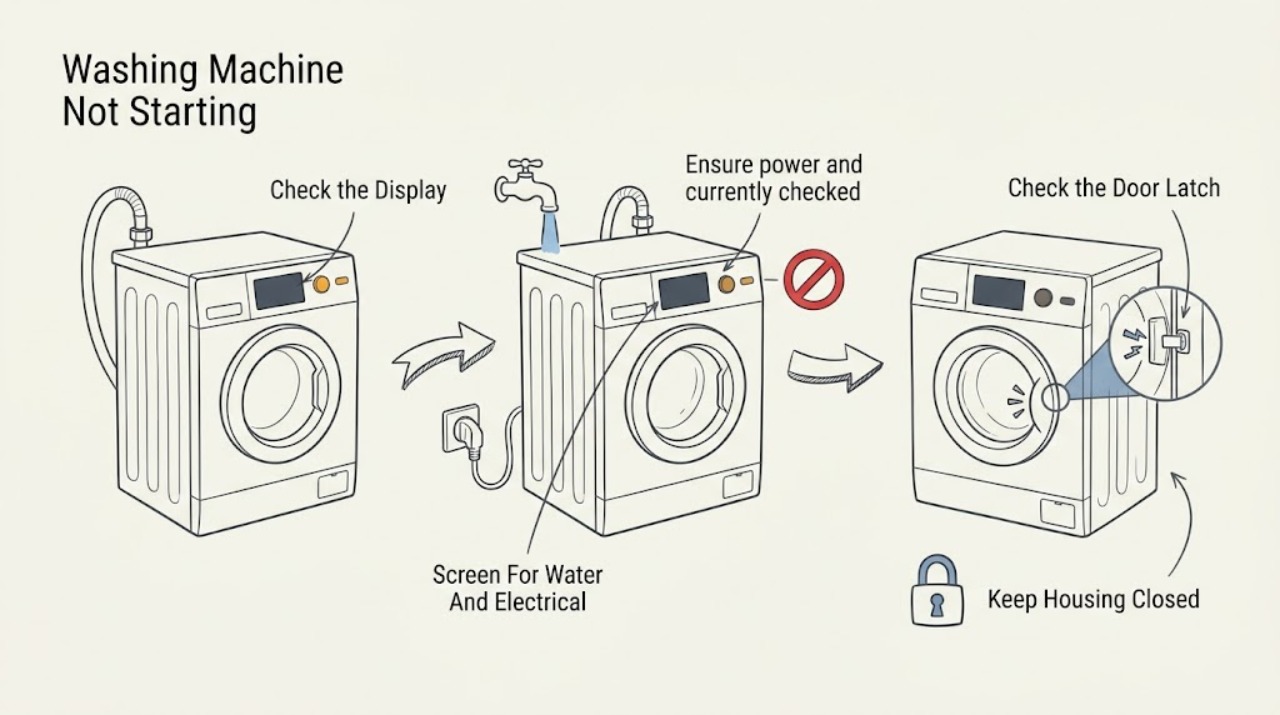
If a Gorenje washing machine will not start, first check that the area is dry and there is no leak, burning smell, spark, smoke, or repeated breaker trip. Keep the washer unused and obtain qualified help for those hazards. Otherwise confirm that the appliance has power, the control lock is not active, the door is fully closed and the latch is not blocked, and the selected program has actually been confirmed with Start/Pause. Check whether a delay-start or pause state is selected and read the exact display code. A water-inlet or drain problem can also prevent a cycle from proceeding. Gorenje manuals show model-specific start confirmation, door-lock behavior, and error responses; use the manual for the exact model before attempting a reset. Do not force the door, bypass the lock, open the cabinet, or work on wet or energized parts.
Work through in order
Diagnostic checks
Use only checks that match the exact appliance or system and its official guide.
-
Check 1
Before pressing controls again, inspect from a dry, safe position for a leak, standing water, a wet cord or receptacle, damaged plug, burning smell, smoke, spark, unusual heat, or a breaker or residual-current device that has tripped.
Expected result: Record whether the area is dry and stable, whether water is entering or pooling, whether electrical protection has operated, and whether any odor, smoke, heat, or spark remains.
Next step: Keep the washer unused and seek qualified appliance, electrical, or plumbing help for the hazard; close the water tap only if it can be reached without approaching electrical danger.
Stop if: Do not stand in water, touch a wet plug or receptacle, restore a repeatedly tripped breaker, move the washer, or open a panel.
Why this matters
Why: Water near electricity, a damaged power connection, smoke, burning odor, a spark, or repeated protection operation is a stop condition and not a normal no-start diagnosis. A dry area with no hazard permits only the low-risk checks below.
-
Check 2
From the dry, safe front of the washer, check whether the display or indicator lamps respond, whether the main switch is on, whether the outlet is visibly intact, and whether a lock or child-lock symbol is shown; use only the model manual's control-lock procedure.
Expected result: Classify the panel as completely dark, powered with a lock symbol, powered but unresponsive, or powered and accepting selections; note any power-failure or protection indication.
Next step: Use the exact Gorenje manual to clear the control lock or identify the correct supply check; arrange electrical or appliance service if the panel stays dark or unresponsive.
Stop if: Do not remove the outlet cover, change breaker size, use an extension cord as a test, probe live voltage, or open the washer controls.
Why this matters
Why: A dark panel points toward the supply, outlet, switch, or internal power path. A lock symbol can disable selections without a failed component. A powered but frozen panel or repeated power failure needs a model-specific reset or service assessment.
-
Check 3
With the washer stopped, check that no laundry is caught in the door seal, the door closes evenly, and nothing blocks the visible latch area; close it normally and observe the door-lock indication without forcing the handle.
Expected result: Record whether the door closes and locks, springs back open, shows a door-lock error, or remains locked with water in the drum; note any torn seal or damaged latch that is visible without disassembly.
Next step: Remove only an obvious piece of laundry from the seal, follow the manual's safe stop or drain instruction, and arrange service if the door will not lock or release normally.
Stop if: Do not force the door, insert a tool into the latch, bypass the lock, or open it while water could flow out or the drum may be hot.
Why this matters
Why: A door that cannot close or lock can prevent a program from starting. Water or high temperature can also keep a door locked after a stop. A damaged latch, repeated lock code, or a locked full drum needs model-specific service rather than a bypass.
-
Check 4
Read the selected program and display carefully, then follow the exact model sequence for Start/Pause, confirmation, delay start, pause, cancel, and control lock; do not repeatedly press buttons or change settings while an error or unsafe symptom is present.
Expected result: Record whether the program is waiting for confirmation, paused, delayed, locked, in a soak or special phase, cancelled, or showing a code; note whether the remaining-time display changes after the correct documented command.
Next step: Use the manual's documented command once and observe the door lock and water entry; escalate when the same code or no-start state returns.
Stop if: Do not defeat the control lock, force a program while the door is locked, or continue if water, heat, smoke, odor, sparks, or a protection trip appears.
Why this matters
Why: A missed confirmation, delay state, active lock, or paused program can look like a no-start condition. A code that returns after the documented selection is a fault signal, not evidence that a different program will repair the washer.
-
Check 5
From safe access, check that the water tap is open, the inlet hose is not visibly kinked, the drain hose has not fallen out or been blocked, and the washer is not displaying a fill, overflow, or drain-related message; do not loosen a pressurized connection.
Expected result: Record whether water enters, no water enters, water is present in the drum, water is leaking, the drain pump runs, or the display identifies a water-level or overflow condition.
Next step: Correct only an obvious tap or hose-routing issue allowed by the manual; keep the tap closed and arrange service for a leak, overflow, blocked drain, repeated fill code, or water that will not leave the drum.
Stop if: Do not open a filter or hose with water under pressure, reach behind a wet washer, use chemical drain cleaner, or manually open a full door.
Why this matters
Why: No inlet flow can prevent the program from proceeding, while an overflow or leak requires the water supply to be controlled and service. Water left in the drum can keep the door locked and can make manual opening unsafe.
-
Check 6
Only when the area is dry, the washer has no leak or electrical symptom, and the exact Gorenje manual documents it, perform the model-specific power or program reset once; then record the result without starting repeated test cycles.
Expected result: Record whether the panel returns, the code clears, the door locks, water enters, the program begins, or the same no-start condition or code returns.
Next step: Keep the washer unused and arrange authorized or qualified service when the reset fails, a code returns, the door cannot lock, or diagnosis would need internal electrical or mechanical access; provide the model, code, and observations.
Stop if: Do not repeat resets, run another cycle to reproduce the fault, remove panels, bypass the lock, test live wiring, or continue with any water, odor, heat, spark, smoke, or breaker symptom.
Why this matters
Why: A successful documented reset can clear a temporary control state, but a repeated door, fill, overflow, motor, sensor, communication, or electronics error indicates an underlying fault. A reset cannot validate a part or make unsafe operation acceptable.
Use your observations
Decision map
Find the observation that best matches what you see, then follow the next safe action.
-
PATH 01Safety boundary
What you see
The display is dark, a control-lock symbol is active, or the controls do not respond although the area is dry.
Do this next
Follow the exact manual for the visible lock indicator and safe supply check; arrange electrical or appliance service when power is absent or the panel remains frozen.
Why this path and its safety boundary
Why it matters: The washer may have a supply, switch, control-lock, or electronics issue rather than a door or water problem.
Safety stop: Do not open the control panel, probe the outlet or wiring, change a fuse or breaker rating, or use another circuit as a test.
-
PATH 02Safety boundary
What you see
The door will not close or lock, a door-lock code appears, or laundry is caught in the seal.
Do this next
Remove only visible laundry from the seal, close the door normally, and follow the model manual; arrange service for a repeated code, damaged latch, or door that remains unlocked.
Why this path and its safety boundary
Why it matters: The safety interlock can prevent a cycle from starting, and a damaged lock or door needs professional diagnosis.
Safety stop: Do not force the door, bypass the interlock, insert tools, or manually open a door while water or hot laundry could escape.
-
PATH 03Safety boundary
What you see
The selected program is waiting for confirmation, delayed, paused, locked, cancelled, or otherwise shows no active start state.
Do this next
Use the exact model's Start/Pause, confirmation, delay, unlock, or cancel sequence once, then observe the display and door-lock state.
Why this path and its safety boundary
Why it matters: The no-start symptom can be a program-state or user-interface condition rather than a failed motor.
Safety stop: Do not keep pressing controls, bypass a lock, or continue if the display shows an error or any water, heat, smoke, odor, spark, or breaker symptom.
-
PATH 04Safety boundary
What you see
No water enters, water leaks, the drum is overfilled, an overflow code appears, or water remains and the door stays locked.
Do this next
Close the water tap only if safely reachable, keep clear of wet electrical equipment, and arrange qualified appliance or plumbing service; use the manual's safe drain method only when the area and appliance are safe.
Why this path and its safety boundary
Why it matters: A supply, inlet, water-level, drain, or overflow condition can stop the program and create a flood or door-opening hazard.
Safety stop: Do not open a wet filter or pressurized hose, use drain chemicals, pull the washer forward, or force a full door open.
-
PATH 05Safety boundary
What you see
A door, fill, temperature, motor, communication, sensor, overflow, or electronics code returns after the documented model-specific action.
Do this next
Keep the washer out of service, record the exact code and model, and contact an authorized or qualified service provider.
Why this path and its safety boundary
Why it matters: The washer has not recovered from the underlying fault, and a generic restart or part order cannot establish the cause.
Safety stop: Do not repeat the reset, run another cycle, remove panels, or bypass a lock or sensor.
-
PATH 06Safety boundary
What you see
There is standing or spraying water near electricity, a burning smell, smoke, a spark, unusual heat, a damaged cord, or a breaker that keeps tripping.
Do this next
Leave the area when smoke, fire, or active electrical danger is present; keep the washer unused and obtain the appropriate emergency, electrical, plumbing, or appliance professional.
Why this path and its safety boundary
Why it matters: This is an immediate electrical, fire, or flood safety event, not a routine no-start problem.
Safety stop: Do not touch wet equipment, restore a repeatedly tripped breaker, operate the washer, or approach a fire or arc to identify its source.
Helpful context
Understand the symptom
Make the washer safe before checking why it will not start
Do not troubleshoot through standing water, an active leak, a wet plug or receptacle, a damaged cord, smoke, a burning smell, a spark, or a breaker that keeps tripping. Close the water tap only if it can be reached safely, keep clear of wet electrical equipment, and arrange qualified appliance or electrical service. A locked door can contain water or hot laundry; do not force it open. Gorenje's instructions require the appliance to be disconnected before manual emergency door opening and warn that water may flow out if the drum is full.
A start command may need a confirmation or a clear door state
On some Gorenje models, pressing Start/Pause is followed by an on-screen confirmation within a limited window; if it is missed, the start sequence is cancelled. Other models use a longer Start/Pause press to stop a program or show a lock indicator when controls are disabled. The exact control behavior varies by model, so a silent panel, a beep, or a door-lock message should be matched to the model manual rather than treated as a failed motor.
Use codes and water observations to choose the next step
Gorenje manuals use model-dependent codes for incorrect settings, temperature sensing, door locking, water filling, overflow, motor or communication faults, and imbalance. A code is a decision point: a door or fill code calls for a safe visible check, while a repeated electronics, motor, overflow, or lock code calls for service. Do not order a part from a code alone and do not open the machine to test live wiring.
Only after diagnosis
Potential parts
- door lock or door switch
Consider this only when the exact model shows a persistent door-lock fault after visible closure checks and qualified diagnosis identifies the interlock.
Confirm the exact Gorenje model and manufacturer fit information before ordering; never bypass the lock. - water inlet valve
Consider this only when water does not enter despite a safe open supply and hose path and service diagnosis identifies the inlet valve.
Verify the model-specific component fit through qualified service before replacement. - electronic control module
Consider this only when the panel, communication, or repeated no-start fault is traced to the control by qualified diagnosis after supply and lock checks.
Do not assume compatibility across Gorenje families; confirm exact model fit before ordering.
When checks do not resolve it
Need a professional?
Arrange qualified appliance service when the display remains dark or frozen, the door will not lock, an error returns, water will not enter or drain, the washer overflows, or a reset does not restore starting. Stop immediately for standing or spraying water near electrical equipment, a burning smell, smoke, spark, abnormal heat, damaged cord, or repeated breaker trips; use the appropriate emergency or electrical path. Do not bypass the door lock or work inside the washer.
Common questions
FAQ
Why does my Gorenje washer have power but not start?
Check the control lock, door closure and lock indicator, selected program, delay or pause state, and any start confirmation prompt. If a code returns after the model-specific action, arrange service.
Can a locked Gorenje washer door prevent starting?
Yes. Laundry caught in the seal, a door-lock fault, water in the drum, or high temperature can prevent normal start or release. Do not force or bypass the lock.
What should I do if my Gorenje washer shows an overflow or fill error?
Control the water supply only if it is safe, stay clear of wet electrical equipment, and use the exact model manual. A leak, overflow, repeated fill code, or water that will not drain requires qualified service.
When should I stop troubleshooting a Gorenje washer?
Stop for water near electricity, a burning smell, smoke, sparks, unusual heat, a damaged cord, or repeated breaker trips. Do not run another cycle or open the washer until qualified help has inspected it.
Read the exact guide
Official sources
- User ManualGorenje · Gorenje washing machine program start, confirmation, pause, and installation instructions
- USER MANUALGorenje · Gorenje washing machine error display, door lock, fill, overflow, motor, and electronics guidance
- USER MANUALGorenje · Gorenje washing machine starting, stopping, control lock, and safety instructions
- User ManualGorenje · Gorenje washing machine door lock, safe manual opening, and start troubleshooting
Community feedback
Share a repair observation
Share a plain-text repair observation. Accepted observations are published automatically; this page may take a moment to update.