
On this page
Start here
Quick answer
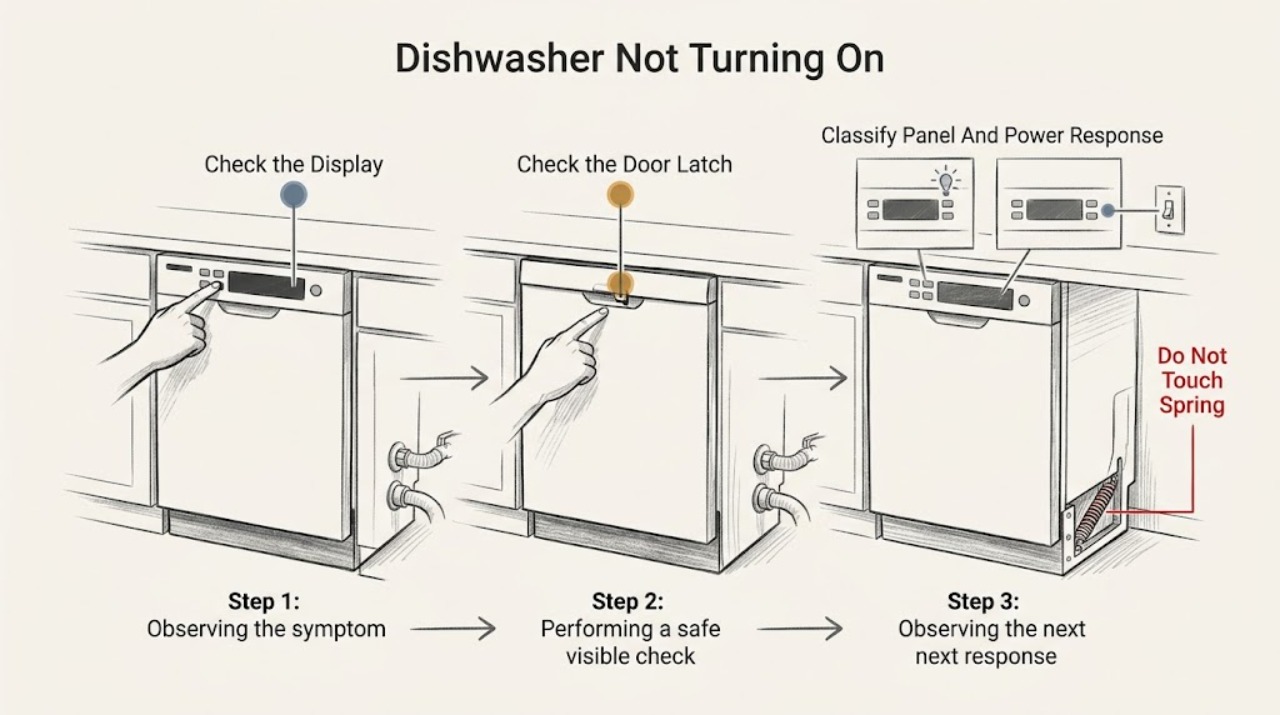
When a Haier dishwasher will not turn on, first decide whether the whole appliance is dark or whether the panel lights but Start does nothing. With dry hands, check the accessible plug or wall switch and the dishwasher breaker or fuse once; do not remove panels or test a hardwired supply. If the panel works, select a valid cycle, cancel Delay Start or a control lock if the exact manual shows one, and close the door firmly until the latch engages. Haier also identifies a water-supply valve, kinked inlet line, residual water, and model-specific reset or error conditions as reasons a cycle may not start. A dishwasher that remains unresponsive after these external checks, repeatedly trips power, has a damaged latch or wiring, or shows a persistent fault needs qualified service.
Before you begin
Safety first
- The user may identify the exact model, observe the display and latch, select the documented cycle, perform the model-specific reset when applicable, and check an accessible dry plug, switch, breaker, fuse, water valve, or visible hose. Qualified personnel must handle hardwired power, live testing, panels, latch and control replacement, pumps, valves, wiring, and any water-side repair near energized parts.
Work through in order
Diagnostic checks
Use only checks that match the exact appliance or system and its official guide.
-
Check 1
With dry hands and no water near electrical parts, note whether the display, status lights, beeps, or interior light respond. Inspect only the accessible plug, cord, wall switch, and receptacle for visible damage, and check the dishwasher breaker or fuse once. Do not remove covers or test a hardwired connection.
Expected result: The panel and lights are completely dark; the receptacle or switch is dead; the breaker has tripped; the cord is damaged; or the panel responds normally.
Next step: Restore an accessible supply only when the cord, plug, and receptacle are cool and undamaged and the breaker resets normally. If the dishwasher stays dark with power present, or the breaker trips again, leave it off and arrange qualified electrical or Haier service.
Stop if: Stop immediately for smoke, sparks, burning odor, scorching, a hot or damaged cord or receptacle, exposed wiring, water near electrical parts, or repeated breaker trips.
Why this matters
Why: A dark appliance makes the household supply, switch, fuse or breaker, cord, or internal power path more likely than a latch or water-only issue. A lit panel shows that some power reaches the controls but does not prove the latch, inlet, pump, or control output is healthy.
-
Check 2
Use the exact model's Owner's Manual to select a normal wash cycle and the documented Start or Power sequence. Look for Delay Start, Control Lock, Pause, a lock icon, a countdown, or an error code. Do not apply the QDT125SSL 999 reset or another model's button combination unless the model number matches that procedure.
Expected result: The dishwasher was off, paused, delayed, locked, set to a non-wash option, or showing a model-specific code; or the controls remain unresponsive after the documented sequence.
Next step: Cancel the delay, unlock, resume, or clear a code only using the exact manual. For QDT125SSL only, follow Haier's published 999 procedure. If the display remains unresponsive or the code returns, stop and contact qualified service.
Stop if: Stop if the control heats, smells burnt, sparks, accepts random inputs, or requires panel removal or bypassing a lock or safety device.
Why this matters
Why: A control state or selected delay can make a working dishwasher appear not to turn on. A persistent code or dead control after the correct model sequence points toward a control, keypad, or power-circuit fault rather than an incorrect cycle.
-
Check 3
Open the door and check that no tall dish, rack, utensil, or detergent item prevents the door from meeting the frame. Close it normally until the model's latch engages; do not slam, force, or hold the latch switch closed by hand.
Expected result: The door bounces back, will not align, does not produce the normal latch response, a rack or dish is in the way, or the door closes and latches normally.
Next step: Reposition the obstruction and retry the documented start sequence once. If the door still cannot latch, leave the dishwasher off and arrange service for the latch, hinge, alignment, or sensing circuit.
Stop if: Stop for a cracked door, loose hinge, damaged latch, sharp broken glass, exposed wiring, or any need to defeat or bypass the latch.
Why this matters
Why: Haier identifies an improperly latched door as a direct reason a dishwasher will not start. A visible loading obstruction can be corrected externally; a door that cannot latch after the obstruction is removed makes the latch, hinge, alignment, or control sensing circuit more likely.
-
Check 4
If the panel accepts a cycle but no fill or wash action follows, inspect only the visible water-supply valve under the sink and the accessible inlet hose for a closed valve, kink, or obvious blockage. Look for standing water in the tub only from the doorway; do not remove the filter, pump cover, or hose while connected to power.
Expected result: The supply valve is closed, the inlet hose is kinked, household water is off, the tub contains residual water, or the supply and tub appear normal.
Next step: Open the accessible supply valve or straighten the hose only when safe, then retry the model's start sequence. If water remains, the hose is blocked, the dishwasher still will not fill, or a leak is present, turn off the water supply and arrange service.
Stop if: Stop for a leak, damaged hose, water near electrical parts, an inaccessible valve, or any need to disconnect plumbing or access the pump while powered.
Why this matters
Why: Haier lists an unavailable or restricted water supply as a reason a dishwasher may not start or fill. Residual water can also keep a control from advancing, but a normal supply and empty tub make an inlet valve, drain, pump, control, or other internal issue more likely.
-
Check 5
After the safe checks, start one documented cycle and observe whether the dishwasher shows a countdown or status light, makes a normal fill or circulation sound, pauses briefly, or remains unchanged. Allow the model's documented pause behavior to complete; do not keep restarting the cycle.
Expected result: A countdown or status light progresses after a short pause; the cycle never accepts Start; the cycle accepts Start but never fills or circulates; or it stops with a persistent code or abnormal sound.
Next step: If the cycle progresses, let it complete and reassess. If it remains inactive, shows a recurring fault, leaks, trips power, or needs internal access, cancel if the manual permits, disconnect power when safe, and arrange qualified service.
Stop if: Stop immediately for smoke, burning odor, sparks, a leak, unusual electrical or grinding noise, exposed wiring, abnormal heat, or a breaker trip.
Why this matters
Why: A progressing status indicator or model-described pause is evidence that the controls accepted the cycle, not proof of a no-power failure. No acceptance after correct power, control, and latch checks points to controls or latch sensing; accepted but inactive cycles point toward water, drain, pump, valve, or control output diagnosis.
Use your observations
Decision map
Find the observation that best matches what you see, then follow the next safe action.
-
PATH 01Safety boundary
What you see
The panel, indicators, and interior light are all dark, or the accessible receptacle or switch is dead.
Do this next
Check the accessible supply once when dry and safe. If power is present but the dishwasher remains dark, or a breaker trips again, leave it off and use qualified electrical or Haier service.
Why this path and its safety boundary
Why it matters: Household power, breaker or fuse, switch, cord, or the dishwasher's internal power path is more likely than a cycle-selection or water-supply problem.
Safety stop: Do not reset repeatedly or touch wiring; stop for heat, smoke, sparks, odor, water, or damaged power hardware.
-
PATH 02Safety boundary
What you see
The panel lights, but Start is ignored or the display shows a delay, lock, pause, non-wash selection, or a model-specific code.
Do this next
Follow the exact manual's unlock, cancel, cycle, or reset instructions. Use Haier's 999 sequence only when the dishwasher is the specified QDT125SSL model; escalate a recurring code or unresponsive control.
Why this path and its safety boundary
Why it matters: A control state or model-specific reset condition is more likely than a total power failure.
Safety stop: Do not guess a button combination, bypass a lock, remove the console, or continue if the control is hot, scorched, or erratic.
-
PATH 03Safety boundary
What you see
A dish or rack obstructs closure, the door bounces or misaligns, or the normal latch response never occurs.
Do this next
Remove only the visible obstruction and retry once. If the door still cannot latch, leave the machine off and arrange service rather than forcing or bypassing the latch.
Why this path and its safety boundary
Why it matters: Door closure, latch, hinge, alignment, or latch sensing is more likely than a water-inlet failure; Haier requires the door to latch before starting.
Safety stop: Stop for damaged glass, door, hinge, latch, cabinet, wiring, or any need to hold the safety switch closed.
-
PATH 04Safety boundary
What you see
The panel accepts the cycle and shows progress, but the dishwasher does not fill or begin washing; the water valve is closed, the inlet hose is kinked, or residual water is visible.
Do this next
Open the accessible valve or straighten the visible hose if safe and check the exact manual for a user-accessible drain or filter procedure with power disconnected. Escalate leaks, persistent water, or no fill after those checks.
Why this path and its safety boundary
Why it matters: Water supply, inlet restriction, drain or residual-water detection, valve, pump, or control output is more likely than a Start-button problem.
Safety stop: Do not disconnect hoses, access the pump, or work near water and electrical parts while powered.
-
PATH 05Safety boundary
What you see
Power, documented controls, door closure, and visible water checks are normal, but Start remains unresponsive, a code returns, the dishwasher stops, trips power, leaks, or produces abnormal electrical or mechanical behavior.
Do this next
Cancel or disconnect power only as the exact manual permits, protect the area from water, and arrange qualified Haier service. Provide the model, display code, control response, latch behavior, water state, power history, and the checks already completed.
Why this path and its safety boundary
Why it matters: A latch sensor, keypad, control board, inlet valve, drain or circulation pump, wiring, or other internal fault is more likely; the symptom does not identify a safe replacement part.
Safety stop: Do not perform live measurements, remove panels, replace internal parts, bypass safety switches, or repeatedly reset power.
Helpful context
Understand the symptom
A dark panel and a non-starting cycle are different faults
Note whether the display, status lights, beeps, or interior light respond at all. A completely dark dishwasher points first to the household supply, switch, fuse or breaker, cord, or appliance power circuit. A lit panel with no wash action instead calls for the model's cycle, Start, latch, lockout, delay, water, and reset checks.
Do not mistake a programmed pause for a dead dishwasher
Haier says some models pause for several minutes near the start of a cycle to let dishes soak, and some cycles pause briefly during the main wash. Record whether the dishwasher accepted the cycle, shows a countdown or status light, and eventually resumes. Do not repeatedly press Start or change cycles while it is operating unless the exact manual directs a cancellation.
Model-specific codes and resets matter
Haier's published 999 reset applies to the QDT125SSL model family, not every Haier dishwasher. Other models can use different pads, lock indicators, error codes, or reset behavior. Use the exact model number and Owner's Manual before holding buttons or interpreting a blank display.
Keep electrical and latch repairs out of user checks
The safe user boundary is an accessible dry power check, visible door and rack inspection, documented control sequence, and visible water-supply check under the sink. Haier states that products powered by electricity should be repaired only by qualified personnel. Do not defeat the latch, remove the toe-kick or control panel, bypass a safety switch, or probe live wiring.
Safety boundary
Stop conditions
- Stop immediately for smoke, burning odor, sparks, scorching, a hot or damaged cord, plug or receptacle, exposed wiring, water near electrical parts, a leak, abnormal heat or noise, or repeated breaker trips.
- Check or reset an accessible breaker or fuse only once when dry and safe. Do not repeatedly reset power or use a damaged cord, plug, receptacle, or hardwired connection.
- Do not remove the toe-kick, door panel, control console, pump cover, inlet valve, wiring, or latch; do not perform live measurements or bypass a safety switch.
- Do not force or slam the door, hold the latch closed by hand, disconnect hoses, or access a pump while the dishwasher is energized or water is present.
- If the exact model's external checks and documented reset do not restore a normal cycle, leave the dishwasher off and arrange qualified service.
Only after diagnosis
Potential parts
- model-matched door latch or latch sensor
Consider only after a visible obstruction is removed and the exact model still cannot latch or report a closed door during a qualified diagnosis.
Confirm the complete Haier model and latch design; do not infer fit from dishwasher width or a similar-looking latch. - model-matched inlet valve or water-supply component
Consider only when the valve is open, the visible hose is sound and unrestricted, and service diagnosis confirms an inlet or fill fault.
Verify the exact Haier model, electrical rating, connector, and plumbing fit through authorized parts information; a no-start symptom alone is not proof of a valve failure. - model-matched keypad, control board, drain pump, or circulation pump
These parts are relevant only after qualified diagnosis of a persistent unresponsive control, recurring code, accepted cycle with no fill or wash, or internal pump fault after safe external checks.
Do not choose an internal electrical or pump part from the symptom or a generic listing; confirm the complete model and service diagnosis.
When checks do not resolve it
Need a professional?
Arrange qualified Haier dishwasher service when the panel remains dead after one safe accessible power check, Start remains unresponsive after the exact model's cycle and lock procedure, a door cannot latch, a model-specific code returns after its documented reset, the dishwasher accepts a cycle but will not fill or wash after the visible water checks, or an internal latch, control, valve, pump, wiring, or hardwired supply fault is suspected. Use a qualified electrician for the household branch circuit or hardwired connection. Stop immediately for smoke, burning odor, sparks, scorching, a hot or damaged cord or receptacle, water near electrical parts, a leak, abnormal heat or noise, exposed wiring, or repeated breaker trips. Give the technician the exact model and serial information, display or status behavior, cycle and delay setting, latch response, water and drain observations, power history, and the safe checks already performed.
Safety scope: The user may identify the exact model, observe the display and latch, select the documented cycle, perform the model-specific reset when applicable, and check an accessible dry plug, switch, breaker, fuse, water valve, or visible hose. Qualified personnel must handle hardwired power, live testing, panels, latch and control replacement, pumps, valves, wiring, and any water-side repair near energized parts.
Common questions
FAQ
Why is my Haier dishwasher completely dark?
Check the accessible plug, wall switch, and breaker or fuse once when dry and safe. If the receptacle has power but the dishwasher remains dark, or the breaker trips again, leave it off and arrange qualified electrical or Haier service rather than removing panels.
Why does my Haier dishwasher light up but not start?
Confirm the exact cycle and Start sequence, cancel a displayed delay or unlock the controls if the manual documents those states, and close the door until the latch engages. If the panel still ignores Start, a latch sensor, keypad, or control fault needs service.
Can a Haier dishwasher pause at the beginning and still be working?
Yes. Haier says some models pause for about five minutes near the start for soaking and some cycles pause briefly during the main wash. A countdown or status indicator that progresses supports normal operation; an unchanged panel or recurring fault does not.
Could the water supply keep a Haier dishwasher from starting?
Yes. Haier directs owners to check whether the supply valve is open, the inlet line is kinked or blocked, and whether the household water supply is available. Check only visible, accessible parts; leaks, residual water, or persistent no-fill symptoms need service.
How do I reset a Haier dishwasher that shows 999?
Haier's published 999 procedure is for the QDT125SSL dishwasher: hold Cycle Select and Start for five seconds, then press any button as directed. Confirm the exact model first; do not use this sequence on another Haier dishwasher, and seek service if the code returns.
Read the exact guide
Official sources
- Haier - Service Manual RequestsHaier Appliances · Applies to Haier electrical products, including dishwashers; exact service access and repair procedures remain model-specific.
- Haier - Dishwasher Does Not StartHaier Appliances · Applies to Haier dishwashers covered by the support article; exact controls, pauses, latch designs, and installation vary by model.
- Haier Dishwasher - 999 Error Code Appears in DisplayHaier Appliances · Applies only to the QDT125SSL dishwasher identified on this support page; do not generalize the code or button sequence to other Haier models.
- Owner's Manual & Installation InstructionsHaier Appliances · Use to retrieve the exact manual after identifying the dishwasher model; the page does not establish a universal control sequence.
- Haier - Dishwasher Not Filling With WaterHaier Appliances · Applies to Haier dishwasher fill symptoms; exact inlet routing and control behavior vary by model.
- Haier - Dishwasher Electrical Requirements and Breaker SizeHaier Appliances · Applies to Haier built-in and portable dishwashers; the exact installation instructions control the model and jurisdiction-specific details.
Community feedback
Share a repair observation
Share a plain-text repair observation. Accepted observations are published automatically; this page may take a moment to update.