
On this page
Start here
Quick answer
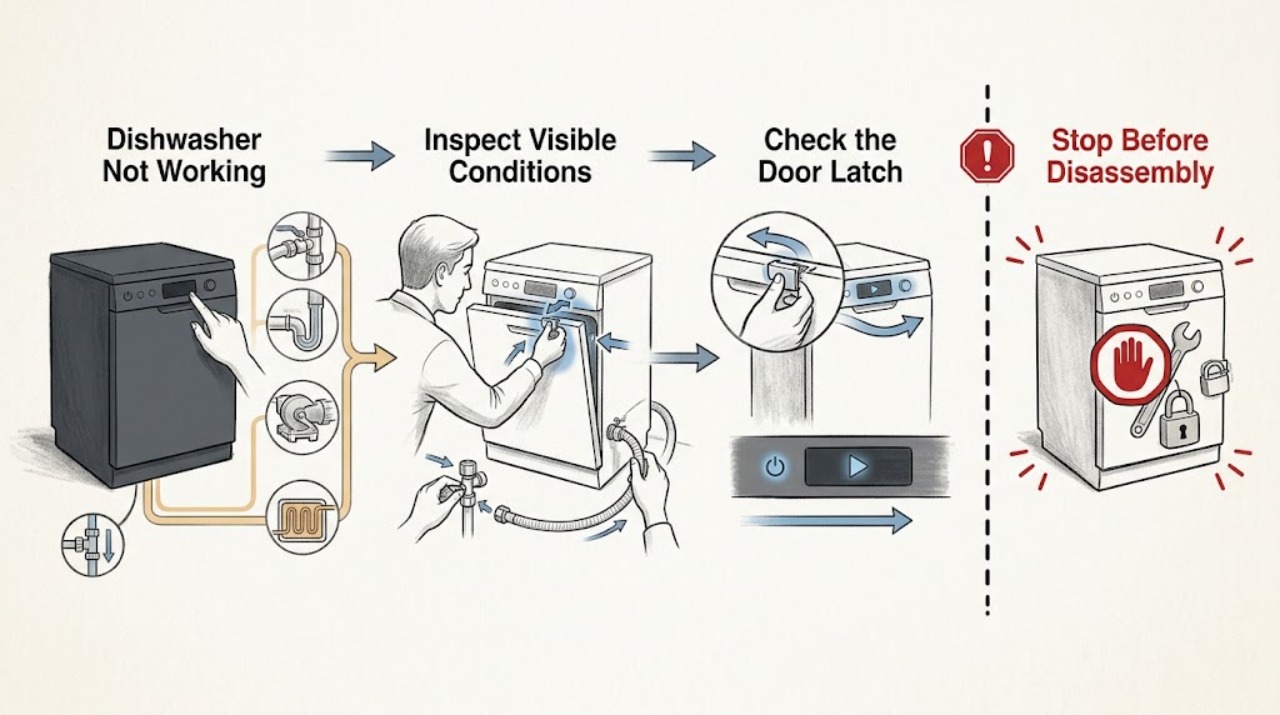
If a Haier dishwasher is not working, first separate a completely dead control panel from a powered dishwasher that will not start, pauses normally, does not fill, stops with water inside, or runs without heating or cleaning. Check the accessible power switch or breaker, close the door until the latch engages, cancel any delay or lock state shown by the exact model, and verify the under-sink water valve is open and the supply line is not kinked. Haier says some cycles pause for several minutes near the start or briefly during the main wash, so a pause alone is not proof of failure. Do not bypass the door latch, reach into a running or energized machine, remove panels, or test pumps, valves, heaters, or wiring. If the breaker trips again, the door or seal is damaged, water is leaking or near electrical parts, a persistent error remains, or the unit still will not start after safe external checks, stop using it and arrange qualified service.
Work through in order
Diagnostic checks
Use only checks that match the exact appliance or system and its official guide.
-
Check 1
Stop and inspect the dishwasher and surrounding floor without opening panels. Look for a damaged cord, hot or scorched outlet, smoke, burning odor, active leak, water near electrical parts, or a breaker that has opened more than once. If water or electrical damage is present, do not touch the appliance or reach into the tub.
Expected result: There is smoke, heat damage, a burning odor, an active leak, water near electrical parts, a damaged cord, or repeated protective-device operation; or the exterior is dry and intact.
Next step: For a hazard, isolate power from a safe dry location and arrange qualified electrical or appliance service. For an intact dry unit, continue without removing panels or reaching into energized equipment.
Why this matters
Why: The first pattern is an immediate shock, fire, or water-damage boundary, not a user-level cycle problem. A dry exterior only permits the limited external checks below; it does not clear internal components.
-
Check 2
Check the accessible main switch, plug or isolator, and household breaker. If the panel is dark and the area is dry with no damage, restore power only by the normal user control or one normal breaker reset; do not change breaker size, use an extension cord, or repeatedly reset a breaker that trips.
Expected result: The control panel remains dark, the breaker or switch is off, the breaker trips again, or the dishwasher powers up normally.
Next step: Use an electrician for the outlet, circuit, switch, or repeated trip. If power is confirmed but the panel stays dark, leave the dishwasher off and arrange qualified appliance service; do not open the control area.
Why this matters
Why: A no-display symptom is more consistent with absent supply or an internal power/control fault than with a water valve or wash setting. A repeat trip is an electrical fault signal, not a nuisance to bypass.
-
Check 3
If the panel is on, check the door closure and visible latch area. Remove only an item that prevents the racks or door from closing, close the door firmly until the model's latch engages, and check the exact manual for a control lock, Delay Start, paused program, or required Start confirmation. Never hold the latch or door switch closed by hand.
Expected result: The dishwasher starts after a clear latch and valid program, the door will not latch, the lock/delay remains active, or the controls stay unresponsive with a valid program.
Next step: Use only the exact model's user-level unlock, cancel, delay, and start sequence once. Arrange qualified service for a damaged door/latch, persistent lock, or unresponsive controls; do not bypass the interlock.
Why this matters
Why: A door-latch or control-state condition is more likely when the panel is alive but no cycle begins. A door that needs force or a control that remains unresponsive can involve the latch, switch, console, or control system.
-
Check 4
If a cycle starts but no water enters, check the visible under-sink water-supply valve and the accessible supply hose for a closed valve, kink, or obvious blockage. Check whether Delay Start is active. Do not disconnect a pressurized hose, remove the inlet valve, or reach into the dishwasher while it is powered.
Expected result: The valve is closed, the hose is kinked, Delay Start is selected, household water is off, or the visible supply is correct but the dishwasher remains dry.
Next step: Open or correct only the visible supply condition and cancel delay as the exact manual allows. If the unit still does not fill, stop and arrange qualified service rather than testing the inlet valve or control circuit.
Why this matters
Why: A closed valve, restricted line, delayed program, or household water interruption can explain a dry tub. Correct visible setup issues first; a correct supply with no fill makes an inlet valve, float, control, or wiring fault more likely.
-
Check 5
If the cycle stops with water in the bottom, turn the dishwasher off and keep hands out of the tub until it is safe. Check only the visible drain hose for a kink and the sink air gap or garbage-disposal connection for an obvious blockage, following the installation instructions; do not remove the pump, filter housing, or wiring unless the exact manual explicitly permits that user maintenance.
Expected result: The drain hose is kinked, the sink air gap or disposal connection is blocked, a small amount of water remains as described by the model, or the bottom is full and the visible drain path is clear.
Next step: Correct only the visible sink-side or hose issue and run no more than one model-approved drain check. If water remains, a leak is present, or the unit stops again, isolate power safely and arrange service.
Why this matters
Why: A kink or sink-side blockage can prevent draining. A full tub with a clear external path points toward the drain pump, internal filter, hose routing, float, or control and should not be diagnosed by reaching into the pump.
-
Check 6
Record any displayed code exactly and match it to the dishwasher's model manual. Only if the label identifies the exact QDT125SSL model and the display shows 999, use Haier's published model-specific reset sequence; do not apply that sequence to another model. For a persistent code, no heat, poor circulation, unusual pump sound, or repeated mid-cycle stop, do not open the machine.
Expected result: The code clears only under the exact model condition, another code remains, or the dishwasher runs but does not heat, circulate, or complete the cycle.
Next step: Use the exact manual only for the matching user-level reset. Arrange qualified service for any persistent code, no-heat, circulation, pump, valve, sensor, or control symptom; do not repeat resets or perform live tests.
Why this matters
Why: A model-specific code can have a model-specific reset, while an unknown or persistent code needs technical diagnosis. Heating, circulation, pump, valve, sensor, and control faults cannot be identified safely from a broad “not working” symptom.
Use your observations
Decision map
Find the observation that best matches what you see, then follow the next safe action.
-
PATH 01Next step
What you see
The dishwasher is completely dark or loses power.
Do this next
Use an electrician for the supply or repeated trip and qualified appliance service for a dark unit with confirmed power. Do not change breaker size or open the dishwasher.
Why this path and its safety boundary
Why it matters: A house-supply or internal power/control issue is more likely than a water-fill or drain issue; repeated trips require an electrical stop boundary.
-
PATH 02Next step
What you see
The panel is on but no cycle starts.
Do this next
Clear only visible obstruction and use the exact manual's unlock/cancel/start sequence once. Arrange service for a damaged latch or persistent no-start; never bypass the interlock.
Why this path and its safety boundary
Why it matters: Door closure and control state are more likely when the panel is alive. A persistent no-start can involve the latch, switch, console, or control.
-
PATH 03Next step
What you see
The cycle starts but does not fill or does not drain.
Do this next
Correct only visible valve, hose, air-gap, or disposal conditions and make one model-approved check. Stop and arrange service for persistent fill/drain failure or standing water.
Why this path and its safety boundary
Why it matters: Visible supply or sink-side drain restrictions are more likely in the first pattern. Correct setup with persistent no-fill/no-drain makes an inlet valve, float, pump, hose routing, or control fault more likely.
-
PATH 04Next step
What you see
The dishwasher runs or pauses but does not clean, heat, or complete the cycle.
Do this next
Allow only the model-described pause, then stop using the dishwasher for persistent symptoms and arrange qualified service. Do not remove panels or perform live tests.
Why this path and its safety boundary
Why it matters: A normal soak or main-wash pause can be expected. Repeated abnormal stopping or no heat/circulation points toward pump, heater, sensor, valve, or control service rather than a simple start setting.
-
PATH 05Next step
What you see
There is a leak, water near electrical parts, smoke, burning odor, damaged cord, or repeated breaker operation.
Do this next
Keep clear, isolate power only from a safe dry location, and contact qualified appliance/electrical service. Do not reach into the tub or operate the dishwasher until inspected.
Why this path and its safety boundary
Why it matters: This is a shock, fire, or property-damage risk and cannot safely be resolved by a cycle reset or latch workaround.
Helpful context
Understand the symptom
“Not working” is a symptom tree
A dark panel, an unlatched door, a normal soak pause, no water entering, standing water after a cycle, and poor cleaning do not point to one part. Haier's own support pages separate start, fill, drain, and cleaning concerns. Record what the display does, whether the pump or inlet is audible, where the cycle stops, and whether water is present before choosing the next safe check.
A pause can be part of the selected cycle
Haier says some cycles pause near the beginning to let dishes soak and some repeatedly pause briefly during the main wash. Delay Start, a locked control, or a door that is not fully latched can also look like a no-start. Wait only through the model-described pause, then use the exact manual's cancel, unlock, and start controls; do not repeatedly open the door or interrupt the machine to force progress.
Water and electrical safety set the stop boundary
A dishwasher combines mains power with water. Do not reach into standing water near electrical parts, keep the door closed if a leak is active, and isolate power only from a safe dry location. External hose, valve, air-gap, and disposal checks can be model-appropriate; pumps, inlet valves, heaters, wiring, control boards, and any live measurement require qualified service.
When checks do not resolve it
Need a professional?
Arrange qualified Haier dishwasher service if the panel stays dark with confirmed power, a door or latch will not engage, controls remain unresponsive, the unit will not fill or drain after visible supply and hose checks, a persistent code remains, the dishwasher runs without heating or circulation, or a pump, inlet valve, heater, sensor, or control may be involved. Use an electrician for the outlet, switch, breaker, or repeated trip. Stop immediately for smoke, burning odor, a damaged cord, active leak, water near electrical parts, or a damaged door. Do not bypass the latch, reach into an energized or running machine, remove panels, open the pump or control area, perform a live test, or repeatedly reset a breaker or error.
Common questions
FAQ
Why is my Haier dishwasher not working?
First determine whether the panel is dark, the door will not latch, the program is delayed or paused, the dishwasher does not fill, it leaves water behind, or it runs without heat or cleaning. Haier lists power, door latch, main switch, breaker, water supply, and normal cycle pauses as separate start concerns. Use the exact model manual and arrange service for a persistent no-start or internal pump, valve, heater, sensor, or control symptom.
Can a Haier dishwasher pause and still be working normally?
Yes. Haier says some cycles pause for several minutes near the start to let dishes soak and some pause briefly during the main wash. A pause that exceeds the model's described behavior, repeats with a code, or leaves the machine without filling, draining, heating, or completing the cycle needs further diagnosis and possibly service.
What should I check if my Haier dishwasher has power but does not start?
Close the door fully until the latch engages, check the exact model for a control lock or Delay Start, and confirm a valid cycle and Start command. If the door needs force, the latch is damaged, or the controls remain unresponsive, do not bypass the interlock; arrange qualified service. If the cycle starts but no water enters, check the visible under-sink valve and hose for a closed valve or kink before calling service.
Read the exact guide
Official sources
- Haier - Dishwasher Does Not StartHaier Appliances · Haier dishwasher no-start power, door latch, breaker, water supply, and normal pause checks
- Haier - Dishwasher Will Not DrainHaier Appliances · Haier dishwasher standing-water, drain hose, disposal, and sink air-gap checks
- Haier - Dishes Not Getting Clean in DishwasherHaier Appliances · Haier dishwasher circulation, spray-arm, loading, and cleaning-symptom boundaries
- Haier - Dishwasher Not Filling With WaterHaier Appliances · Haier dishwasher Delay Start, water-valve, supply-line, and household-water checks
- Haier Dishwasher - 999 Error Code Appears in DisplayHaier Appliances · Haier QDT125SSL model-specific 999 display reset
Community feedback
Share a repair observation
Share a plain-text repair observation. Accepted observations are published automatically; this page may take a moment to update.