
On this page
Start here
Quick answer
When a Haier dryer will not turn on, first separate a completely dark control panel from a dryer that powers up but will not start. Check the wall outlet and household protection device safely, make sure the door is fully closed, clear any load that prevents closure, and check whether Pause, Delay, Key Lock, or a displayed warning is holding the cycle. Clean and correctly replace the lint filter if the model uses a filter warning. After a power interruption, press Power and select a cycle again as the model manual directs. If the panel stays dark with a confirmed supply, the door is latched but Start still does nothing, a fault code appears, or there is a burning smell, damaged cord, heat damage, or repeated breaker trip, stop user checks and arrange qualified Haier service.
Before you begin
Safety first
- Stop using the dryer for damaged or hot electrical parts, smoke, burning odor, sparking, water near electrical connections, or repeated trips. Do not open the cabinet or bypass the door interlock.
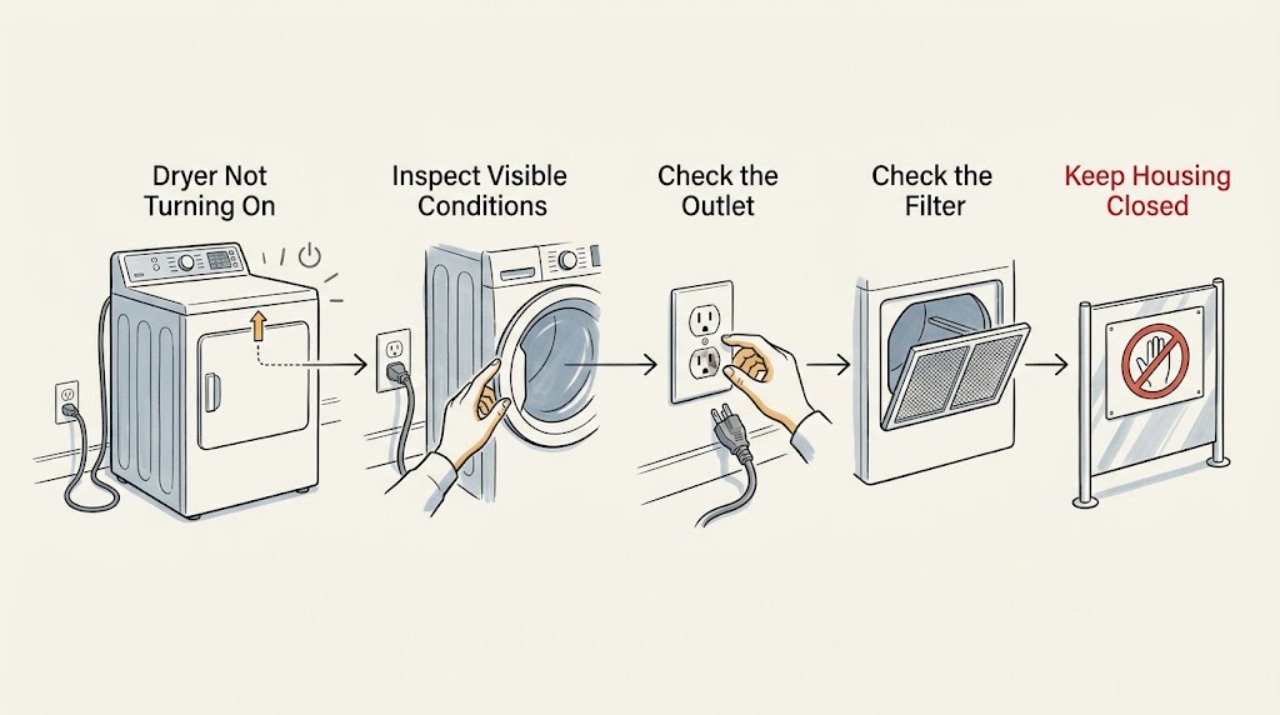
Work through in order
Diagnostic checks
Use only checks that match the exact appliance or system and its official guide.
-
Check 1
Press Power once and observe the control panel without repeatedly pressing buttons. Record whether it remains completely dark, lights up but shows a warning or lock indicator, or lights up normally but does not respond to Start/Pause.
Expected result: The panel is dark; the panel lights with a lock, delay, pause, door, or fault indication; or the panel appears normal but Start/Pause does not begin the cycle.
Next step: Use the dark-panel branch for the outlet and protection-device check. Use the lit-panel branch for door, controls, lint-filter warning, and fault-code checks; do not open the cabinet to investigate power internally.
Why this matters
Why: A dark panel makes the household supply, plug, cord, or internal power path the first distinction. A lit warning or control state can prevent a cycle without a failed power supply. A normal panel with no start response moves attention to door recognition, selected controls, and model-specific fault guidance.
-
Check 2
For a dark panel, confirm the plug is fully seated and inspect the plug and visible cord for looseness, scorching, cuts, crushed insulation, or moisture. Check the dryer outlet by plugging in a small appliance that is known to work, and check the household breaker or fuse position without removing covers or touching wiring.
Expected result: The test appliance also has no power; the dryer cord or plug is damaged or hot; the protection device trips again; or the outlet works and the dryer cord looks normal.
Next step: If the household supply is out, resolve that supply issue with a qualified electrician when needed. If the cord is damaged, the outlet is hot, or the breaker trips again, stop using the dryer and arrange service. If supply is confirmed, continue with door and control checks.
Why this matters
Why: No power to the test appliance points to the household supply or protection device. Damage, heat, or a repeated trip indicates an unsafe electrical condition. A working outlet with an intact visible cord makes an internal dryer fault more likely and is not a reason to test live components.
-
Check 3
Open the door and remove any item protruding into the seal or caught at the opening. Check that the lint filter is present and correctly seated if your model has one, then close the door firmly and press Start/Pause once. Keep hands out of the drum if the dryer begins operating.
Expected result: The door closes and the dryer starts; the door will not align or latch; a door warning remains; or the dryer still does not respond with the door closed.
Next step: If an obstruction caused the issue, run one normal test cycle. If the door cannot close or the warning remains, stop and request service; do not tape, hold, or bypass the door interlock.
Why this matters
Why: Haier identifies an open or incompletely latched door and a load preventing closure as reasons a cycle will not start. A correctly seated lint filter is also a stated operating requirement on the documented model. Persistent failure to recognize closure can involve the latch or interlock rather than the cycle selection.
-
Check 4
Review the active controls and display. Cancel or wait out Delay only as the model manual directs, release Key Lock using the documented control sequence if it is enabled, and press Start/Pause once if the dryer is paused. If a continuous beep or fault number appears, record the exact display before turning the dryer off.
Expected result: Delay, Key Lock, Pause, a door warning, or a fault code is present; the control state clears and the dryer starts; or no indication changes.
Next step: Use only the model-specific manual to clear a control state. Give the recorded fault code to Haier service if it returns; do not erase it by repeated resets or remove the control panel.
Why this matters
Why: A delay or pause intentionally prevents immediate drum movement, while Key Lock can make button presses appear ineffective. A fault code is diagnostic information, not an invitation to guess at a part. If the controls are clear but Start still does nothing, the door interlock, control, or another internal fault needs service diagnosis.
-
Check 5
If the dryer powers on but stops or refuses to start with a load, remove some items and ensure the drum is not overfilled. Clean the user-accessible lint filter and replace it correctly. Check that the front of the dryer and the visible exhaust path are not blocked, but do not dismantle the exhaust or cabinet for this check.
Expected result: The load was heavy or overfilled, the lint filter was blocked or missing, the front or exhaust path was obstructed, or the dryer remains inactive with a small load and clear filter.
Next step: Run one appropriate small load only after the filter is correctly fitted and airflow is unobstructed. If the dryer still will not turn on or repeatedly stops, stop cycling it and arrange qualified service.
Why this matters
Why: Haier says heavy loads can make the drive belt slip and that a blocked lint filter or blocked front can affect operation and overheating. A smaller load and clean filter that restore operation support a load or airflow cause. Persistent inactivity after those checks points to a control, motor, belt, thermal, or electrical diagnosis.
-
Check 6
Consider whether the symptom began immediately after a power outage or a mid-cycle stop. Once safe power is restored and the panel is responsive, press Power, select the desired cycle, and press Start/Pause once according to the model manual. Observe whether the cycle begins normally or the same no-start condition returns.
Expected result: The dryer restarts after the documented power recovery; it remains off after the outage; or it stops again with a warning, fault code, odor, or unusual sound.
Next step: If the recovery works, monitor one normal cycle. If it does not, or if a fault, odor, heat damage, or abnormal noise returns, stop user diagnosis and provide the model number and recorded observations to qualified service.
Why this matters
Why: The documented Haier guide says the dryer remains off after a power outage until Power is pressed and a cycle is selected again. A successful restart supports an interrupted-cycle condition. A repeated failure after supply, door, controls, load, and filter checks is not safely distinguishable as a belt, motor, thermal device, control, or wiring fault from the outside.
Use your observations
Decision map
Find the observation that best matches what you see, then follow the next safe action.
-
PATH 01Next step
What you see
The control panel is completely dark and the test appliance also has no power
Do this next
Treat the issue as a household supply or protection-device problem and obtain qualified electrical help if the supply cannot be safely restored.
-
PATH 02Next step
What you see
The outlet works but the dryer cord is damaged, hot, wet, or the breaker trips again
Do this next
Stop using the dryer and arrange qualified service; do not open the plug, outlet, or dryer cabinet.
-
PATH 03Next step
What you see
The panel is lit but shows Door, Pause, Delay, Key Lock, or a similar control state
Do this next
Follow the exact model manual to close the door, resume, or clear the control state once. If it remains, request service.
-
PATH 04Next step
What you see
The dryer starts with a smaller load and a clean, correctly seated lint filter
Do this next
Keep loads within the model's limit and clean the filter after each cycle; arrange service if stopping returns with normal loads.
-
PATH 05Next step
What you see
Power, door closure, controls, load, lint filter, and visible airflow checks are normal but the dryer still will not turn on
Do this next
Stop repeated start attempts and request qualified diagnosis for the internal power path, control, thermal protection, motor, belt, or related component.
Helpful context
Understand the symptom
First identify what “not turning on” means
A control panel that is completely dark is a power-path symptom. A lit panel that will not begin a cycle is more often a door, pause, delay, key-lock, warning, or selected-control condition. A dryer that starts and then stops is a separate branch involving power interruption, airflow or overheating protection, a door opening, or a fault. Note which state you have before changing several controls at once.
Model and market differences matter
Haier has different dryer controls and manuals by model and market. The Haier Australia user guide used here documents a specific family and is useful for its Power, Start/Pause, Delay, door, lint-filter, and fault-code behavior, but it is not a substitute for the manual for your dryer. Use the model number to locate the correct instructions before removing anything other than a user-removable lint filter.
Safety boundary
Stop conditions
- Stop immediately for smoke, a burning smell, sparking, a hot or damaged plug or cord, water near electrical parts, a repeated breaker trip, or a cabinet that shows heat damage; do not continue testing.
- Do not remove cabinet panels, probe live electrical parts, bypass the door interlock, or attempt to repair a motor, belt, thermal device, control, or wiring fault as an external user check.
- Do not operate the dryer without its correctly fitted lint filter or with lint accumulating around the appliance; lint can create a fire hazard.
- If a fault code returns, the door cannot latch, or the dryer remains inactive after the safe checks, stop and arrange qualified Haier service.
Only after diagnosis
Potential parts
- door latch or interlock assembly
Only consider this part class if the door closes normally but the dryer still reports an open door and a technician confirms the latch or interlock is the cause.
Confirm the exact Haier model and approved assembly before ordering; never bypass the interlock. - drive belt or drum-drive component
Only consider this class if the dryer has confirmed power and door closure but the drum does not turn, and a technician confirms a loose, broken, or failed drive component.
Confirm the exact model and the diagnosed component; a freely turning drum or a heavy-load symptom alone does not establish part fit. - control or thermal protection component
Only consider this class after a qualified diagnosis of a repeat no-start or stop condition has ruled out household power, door closure, control state, load, lint, and visible airflow causes.
Use the exact model documentation and technician diagnosis; do not substitute a component based only on a generic symptom.
When checks do not resolve it
Need a professional?
Call qualified Haier appliance service when a confirmed working outlet does not restore a dark panel, the cord or plug is damaged, the door is not recognized as closed, a fault code returns, the dryer repeatedly stops, the drum will not turn with a normal load, or the appliance remains inactive after the power, control, door, load, lint-filter, and visible airflow checks.
Safety scope: Stop using the dryer for damaged or hot electrical parts, smoke, burning odor, sparking, water near electrical connections, or repeated trips. Do not open the cabinet or bypass the door interlock.
Have this ready
- Haier model number and market
- whether the control panel is dark or lit
- result of the safe outlet test
- whether a breaker or fuse trips
- door, Pause, Delay, Key Lock, or fault-code indication
- whether the lint filter was present and clean
- whether a small load changes the behavior
- any odor, heat damage, sparking, unusual noise, or power interruption
Common questions
FAQ
Why is my Haier dryer completely dark?
Check the plug, visible cord condition, outlet, and household protection device safely. Test the outlet with a known-working small appliance. If the outlet works but the dryer remains dark, or the cord is damaged or hot, stop using it and arrange qualified service.
Why does my Haier dryer have power but not start?
Check that the door is fully closed, the lint filter is correctly seated if your model uses one, and the controls are not paused, delayed, or key-locked. Record any door warning or fault code. If Start/Pause still does nothing, request service rather than bypassing the door interlock.
Can an overloaded Haier dryer fail to turn?
Yes. Haier says an overfilled or heavy wet load can make the drive belt slip or prevent normal operation. Remove items, clean and refit the lint filter, and test one appropriate smaller load. If the drum still does not turn, arrange service.
What should I do after a power outage if my Haier dryer will not start?
Once safe power is restored, press Power, select the desired cycle, and press Start/Pause once according to the model manual. If the dryer remains off or the fault returns, stop repeated resets and provide the model and display information to qualified service.
Read the exact guide
Official sources
- Product Support for DryersHaier Appliances · Official Haier Appliances dryer support hub; exact troubleshooting and manuals depend on the model number.
- Haier Dryer - Stops Mid-CycleHaier Appliances · Official Haier dryer support article for mid-cycle stops; exact electrical configuration and controls vary by model.
- Haier Dryer - Drum Not TurningHaier Appliances · Official Haier dryer support article for drum-not-turning symptoms; model features vary.
- HDV60E1 and HDV50E1 user guideHaier · Official Haier Australia user guide for specified HDV models; use the exact local model manual for other dryers.
Community feedback
Share a repair observation
Share a plain-text repair observation. Accepted observations are published automatically; this page may take a moment to update.