
On this page
Start here
Quick answer
If a Hisense washing machine will not turn on, first stop for a leak near electrical parts, wet plug or controls, burning smell, smoke, sparks, unusual heat, damaged cord or outlet, or a breaker that trips again. With no hazard, check the accessible power connection and dedicated supply, then distinguish a completely dark machine from a lit display that will not start. Use the exact model manual to press Power and Start/Pause, cancel Delay End, release Child Lock, and confirm the door closes and locks. If water remains, check only the model-approved inlet, drain, and pump-filter conditions with power safely disconnected. Perform one documented reset only when safe; a persistent dark display, lock or water error, or recurring no-start needs Hisense or qualified appliance service.
Before you begin
Safety first
- This article supports only external checks and a cool, ordinary-access pump-filter procedure explicitly permitted by the exact Hisense manual. Do not open panels, test live circuits, access the lock, pump, motor, water-level system, wiring, or control, force the door, or re-energize a hazardous appliance.
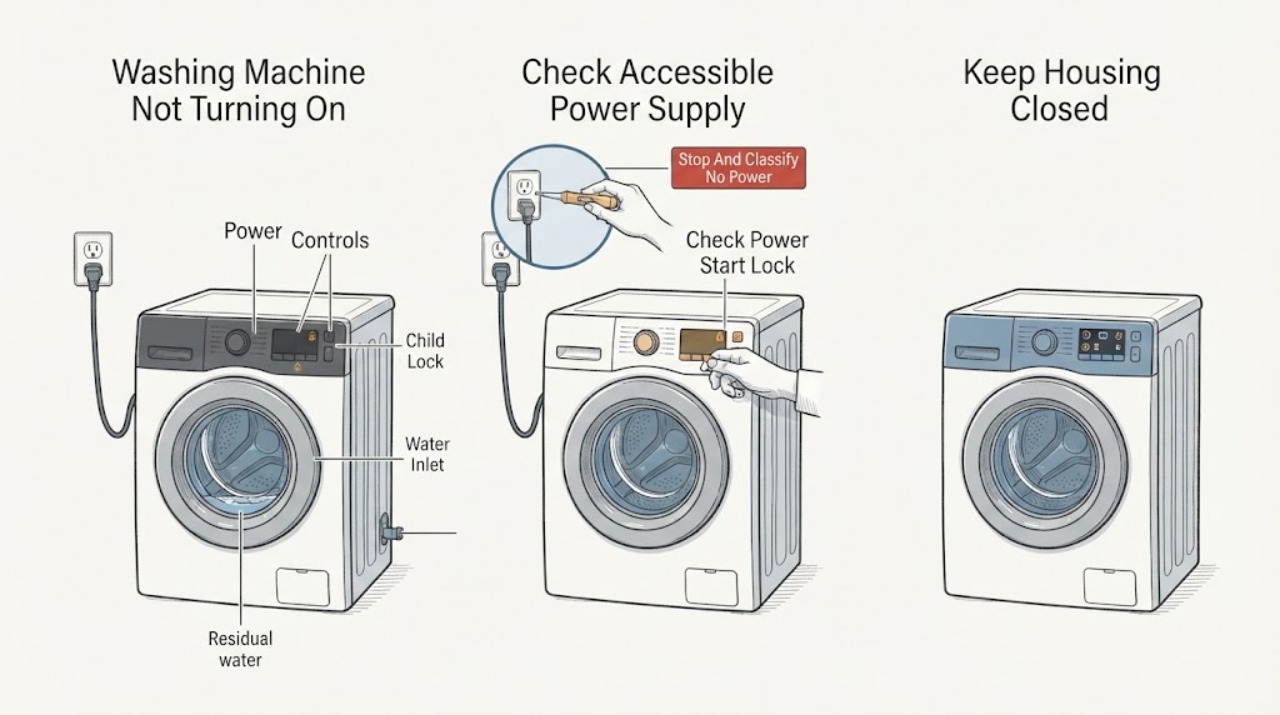
Work through in order
Diagnostic checks
Use only checks that match the exact appliance or system and its official guide.
-
Check 1
Do not start another cycle yet. Observe the washer from outside and check the display, indicator lights, drum light if fitted, door position, visible floor, cord, plug, outlet, hoses, and controls without touching wet electrical equipment.
Expected result: Record a completely dark machine, a lit display with no response, a door-lock or other code, water in the drum, a leak, wet plug or controls, burning smell, smoke, sparks, unusual heat, damaged electrical parts, or a breaker trip.
Next step: Keep the washer off and isolate power and water only from a safe accessible position for any hazard. If there is no hazard, record the exact display and continue with the supply and control checks.
Stop if: Do not touch wet or damaged electrical equipment, force the door, reset a breaker repeatedly, or restart after smoke, burning smell, sparks, abnormal heat, or a leak.
Why this matters
Why: A dark machine suggests supply or internal power; a lit but unresponsive machine suggests controls, lock, delay, or a fault state. Water, door, inlet, and drain states can prevent operation. A leak near electrics, burning, smoke, sparks, abnormal heat, damaged supply, or a repeated trip is an immediate safety stop.
-
Check 2
If there is no water or fire hazard, check the accessible plug, wall switch if present, and dedicated breaker once, without opening the washer or changing the protection rating. Confirm the plug is seated and the outlet is not visibly hot, loose, scorched, or wet; do not use an extension lead or overloaded adapter.
Expected result: Record a known-good supply with the washer still dark, a tripped breaker, a dead outlet, a loose or damaged plug or cord, partial or intermittent power, or a display that returns after restoring a safe supply.
Next step: Leave the machine off and request qualified electrical inspection for a dead, hot, damaged, or repeatedly tripping supply. If the supply is stable and the machine has a display, continue to the Power, Start, lock, and delay checks.
Stop if: Do not increase a fuse or breaker, use an extension or power strip, bypass protection, touch a hot outlet, or open the terminal or control area.
Why this matters
Why: Hisense support directs users to check power connections for a no-spin or no-start symptom. A stable external supply with a dark machine points to internal power or control diagnosis; a recurring breaker or damaged outlet points to an electrical safety issue rather than a control setting.
-
Check 3
With the washer dry and safe, read the exact model manual and select a normal program in standby. Press the model's Power and Start/Pause controls as documented, check for Child Lock, cancel Delay End if it is active, and close the door without laundry caught in the seal so the lock can engage. Do not force a lock or use a control combination from another model.
Expected result: Record a responding panel, a Child Lock indicator, a flashing Delay End icon, a door-lock alarm, a display that lights but ignores Power or Start, or a normal response that still does not begin the cycle.
Next step: Use the exact model's documented Child Lock and Delay End cancellation once, then request service for an unresolved door lock, unresponsive panel, or recurring no-start. Continue to water and residual checks only if the machine is safe and the door state permits.
Stop if: Do not defeat the door interlock, pry the door, spray liquid on controls, hold Start repeatedly, or open a locked door with water still inside.
Why this matters
Why: Hisense manuals show that Power and Start/Pause are separate controls, Child Lock can shield controls, Delay End can postpone the cycle, and the program cannot start when the door is not locked. A responsive panel with correct settings but no start suggests a lock, control, water, or internal fault.
-
Check 4
If the panel responds but the cycle will not begin, inspect the water tap and visible inlet hose for an obvious closed tap or kink, and note whether water remains in the drum. If the exact manual permits pump-filter access, disconnect power, let water cool, prepare a container, and follow its emergency-drain and filter instructions; do not remove a filter from a full, hot, or pressurized machine.
Expected result: Record no water entry, a pinched inlet hose, an F01-type inflow indication, standing water, an F03-type drainage indication, a pump-filter obstruction, an overflow indication, or clear water and drain paths.
Next step: Correct only an accessible kink or manual-permitted filter condition, keep the washer off for overflow, leak, standing water, or recurring code, and arrange service when the machine still will not start.
Stop if: Do not open a hot or full filter, run with a loose filter, operate while leaking, or reach into wet electrical areas.
Why this matters
Why: Hisense associates water-inlet faults with the tap, pressure, hose, and inlet filter and drainage faults with the drain hose or filter. Residual water can prevent safe door access. An unobstructed path with a persistent no-start shifts attention to the lock, pump, water-level system, or control.
-
Check 5
Only when there is no leak, odor, smoke, spark, abnormal heat, damaged supply, or recurring trip, use the exact manual's documented Power-off and restart or cancel procedure once. Restore power once from a safe position and observe the display and door without opening the cabinet or testing live parts.
Expected result: Record normal startup, a temporary recovery followed by recurrence, a display that remains dark, an unresolved door or water error, an electronic fault, or a breaker that trips again.
Next step: Leave the washer off and provide Hisense or qualified appliance service with the model, display behavior, supply result, button and lock observations, water level, codes, and reset result. Use qualified electrical or emergency help for a supply or fire hazard.
Stop if: Do not repeat resets, re-energize after smoke, burning, sparks, heat, or a trip, test live voltage, open the cabinet, or bypass a safety device.
Why this matters
Why: A one-time recovery can clear a temporary control or supply state but does not prove the internal power path, lock, pump, motor, or control is safe. A persistent or recurring no-start needs service, and a renewed electrical or physical hazard requires immediate stop.
Use your observations
Decision map
Find the observation that best matches what you see, then follow the next safe action.
-
PATH 01Safety boundary
What you see
The display and indicators remain dark, with no smoke, heat, odor, sparks, water, or visible electrical damage.
Do this next
Check the accessible supply once and request qualified electrical or Hisense service if a stable supply does not restore the machine.
Why this path and its safety boundary
Why it matters: A wall supply, plug, breaker, cord, internal power path, or control fault may prevent startup.
Safety stop: Do not use a damaged supply, extension lead, larger protection rating, or repeated breaker reset.
-
PATH 02Safety boundary
What you see
The display is lit but Power or Start is ignored, Child Lock is indicated, or Delay End is active.
Do this next
Use the exact model manual to release Child Lock, cancel Delay End, select a cycle, and press Start/Pause once. Request service if the panel remains unresponsive.
Why this path and its safety boundary
Why it matters: A control state can look like a failed washer even though the appliance has power.
Safety stop: Do not guess a key combination, force controls, or open the panel.
-
PATH 03Safety boundary
What you see
The door is closed but the machine reports that it cannot lock or unlock, or the cycle will not start at the lock step.
Do this next
Remove only visible laundry or seal obstruction when safe, use the model's documented restart once, and request service if the lock indication returns.
Why this path and its safety boundary
Why it matters: The safety lock or its recognition circuit can block operation.
Safety stop: Do not bypass or bridge the lock, force the door, or access lock wiring.
-
PATH 04Safety boundary
What you see
The panel responds but water does not enter, water remains, an F01/F03-type code appears, or an overflow indication is present.
Do this next
Keep the washer safe, check only visible hose conditions, and follow the cool, disconnected filter procedure if the exact manual allows it. Request service for a leak, overflow, recurring code, or clear path that still will not start.
Why this path and its safety boundary
Why it matters: A tap, hose, inlet filter, drain hose, pump filter, water-level, or overflow condition may block the program.
Safety stop: Do not open a hot/full filter or operate with standing water, overflow, or a leaking connection.
-
PATH 05Safety boundary
What you see
A single model-documented restart restores the display and the washer starts without any abnormal sound, water, odor, heat, or electrical event.
Do this next
Monitor the next normal use without opening the cabinet and request service if no-start, a code, lock problem, water fault, or electrical symptom returns.
Why this path and its safety boundary
Why it matters: A temporary control or supply state may have caused the no-start, but this is not proof of a repaired appliance.
Safety stop: Do not repeat the restart or continue after smoke, burning, sparks, abnormal heat, a leak, or a trip.
-
PATH 06Safety boundary
What you see
Supply, controls, lock, inlet, residual water, and one safe restart do not restore operation, or a hazard recurs.
Do this next
Keep the washer off and arrange qualified Hisense appliance, electrical, or emergency help according to the observed risk.
Why this path and its safety boundary
Why it matters: An internal power, control, door-lock, pump, water-level, motor, wiring, or other model-specific fault is possible; a hazard may also involve the household supply.
Safety stop: Do not open the cabinet, test live circuits, bypass protection, or re-energize a leaking or electrically hazardous machine.
Helpful context
Understand the symptom
First separate no power from no start
A dark display and drum light suggest a supply, outlet, plug, breaker, or internal power path problem. A lit display with no cycle often points instead to Power or Start/Pause use, Child Lock, Delay End, a door that is not recognized, or an error state. Check from outside the appliance and record the exact display and button response before attempting a restart.
Water and door states can block operation
Hisense manuals describe door-lock, water-inlet, drainage, overflow, and electronic fault conditions that can stop a program. Residual water also changes the safe way to access the door or pump filter. Do not force a locked door or open a filter with hot or trapped water; follow the exact model manual or use service.
A reset is a single diagnostic step, not a repair
A model-documented Power or restart action may clear a temporary control state, but it cannot prove that the supply, door lock, pump, control, or wiring is sound. If the symptom returns, or if a leak, odor, smoke, heat, sparks, or trip occurred, keep the washer off and escalate.
Safety boundary
Stop conditions
- Stop immediately for a leak near electrical parts, wet plug or controls, burning smell, smoke, sparks, unusual heat, damaged cord or outlet, severe grinding, or a breaker that trips again.
- Do not force or bypass the door lock, open a locked door with residual water, or reach into a moving or water-filled pump area.
- Do not use an extension lead, overloaded adapter, larger fuse or breaker, or repeated reset to make the washer start.
- Do not open the cabinet, test live circuits, access internal wiring, pump, motor, water-level system, or control, or re-energize after a hazard.
- Do not open a hot or full pump filter; disconnect power and follow the exact manual only for a cool, safe, model-permitted filter procedure.
Only after diagnosis
Potential parts
- washing-machine power cord or supply component
Consider this category only when qualified inspection confirms a damaged cord or appliance-side supply component after the household supply is verified.
Confirm the exact Hisense model and electrical specification with qualified service; do not access terminals or substitute protection. - washing-machine door-lock assembly
Consider this category only when the door closes correctly but qualified diagnosis confirms that the safety lock is not recognized.
Confirm exact model fit and safety function; never bypass the interlock. - washing-machine drain pump or pump-filter seal
Consider this category only when qualified diagnosis confirms a pump or seal fault after the visible drain path and manual-permitted filter check.
Confirm exact model and water-handling configuration; keep the machine off if the filter or hose leaks. - washing-machine main control or user-interface component
Consider this category only after stable supply, control-state, lock, inlet, and residual-water checks are complete and service identifies an internal control fault.
Confirm the exact model and revision through Hisense or qualified service; do not replace internal electronics as a household step.
When checks do not resolve it
Need a professional?
Request Hisense or qualified appliance service when a stable supply is present but the washer remains dark; Power, Start, Child Lock, Delay End, or door-lock checks do not restore startup; water-inlet, drainage, overflow, or electronic errors recur; or one safe documented restart fails. Use qualified electrical help for a dead, hot, damaged, or repeatedly tripping supply. Treat leaks near electrics, burning smell, smoke, sparks, unusual heat, or fire as stop-now or emergency conditions.
Safety scope: This article supports only external checks and a cool, ordinary-access pump-filter procedure explicitly permitted by the exact Hisense manual. Do not open panels, test live circuits, access the lock, pump, motor, water-level system, wiring, or control, force the door, or re-energize a hazardous appliance.
Common questions
FAQ
Why is my Hisense washing machine completely dark?
Check the accessible plug, outlet, wall switch, and dedicated breaker once if there is no hazard. A stable supply with a dark display suggests an internal power or control fault and needs qualified service; do not keep resetting protection.
The display is on but my Hisense washer will not start. What should I check?
Read the exact model manual, select a program, use Power and Start/Pause as documented, release Child Lock, cancel Delay End, and make sure the door is recognized as locked. If the panel, lock, or display remains abnormal, keep the washer off and request service.
Can water left in the drum prevent startup?
Yes. A drainage or pump-filter condition can leave residual water and prevent a safe door or program state. Use only the exact manual's cool, disconnected emergency-drain and filter procedure; keep the washer off for a leak, overflow, hot water, or inaccessible blockage.
How many times should I reset a Hisense washer that will not turn on?
Use one model-documented Power-off or restart procedure only when there is no leak, odor, smoke, spark, abnormal heat, damaged supply, or recurring breaker trip. A temporary recovery is not proof of repair; recurrence needs service.
When should I stop using the washer immediately?
Stop for a leak near electrical parts, wet plug or controls, burning smell, smoke, sparks, unusual heat, severe grinding, damaged cord or outlet, or a breaker that trips again. Keep the washer off and obtain qualified appliance, electrical, or emergency help as appropriate.
Read the exact guide
Official sources
- BEFORE THE FIRST USE and safety informationHisense Australia Pty Ltd · Hisense Australia manual for HWFS1214PB; exact appliance and regional electrical requirements vary.
- Support LaundryHisense UK · Hisense UK laundry support page; local controls and service procedures vary by model.
- CLEANING THE PUMP FILTERHisense Australia Pty Ltd · Hisense Australia manual for HWFS7514S; access points and emergency-drain hardware vary by model.
- ERROR CODES AND TROUBLESHOOTINGHisense Australia Pty Ltd · Hisense Australia manual for HWFS1214PB; error labels and reset behavior vary by model.
- CONTROL UNITHisense Australia Pty Ltd · Hisense Australia manual for HWFS7514S; exact button combinations and displays vary by model.
Community feedback
Share a repair observation
Share a plain-text repair observation. Accepted observations are published automatically; this page may take a moment to update.