
On this page
Start here
Quick answer
First note whether the Hoover washing machine stops while filling, washing, draining, or spinning, and whether water remains in the drum. A delay-start or rinse-hold option can make a cycle appear unfinished; a small or uneven load can also end without a final spin. If the machine is full of water, inspect the model-approved drain path only after disconnecting it and only where the floor and electrical area are dry. Do not force a locked door, keep resetting a tripped breaker, or operate through a leak, wet electrical area, burning smell, smoke, sparks, unusual heat, or repeated trip. Record any exact display code and use the model manual before one safe reset or a service call.
Before you begin
Safety first
- Do not force or bypass the door lock, reach into a moving drum, dismantle the pump or inlet, loosen pressurized hoses, remove electrical covers, probe live wiring, or keep operating after a leak near electrics, wet plug or outlet, burning smell, smoke, sparks, arcing, abnormal heat, or repeated trip.
Work through in order
Diagnostic checks
Use only checks that match the exact appliance or system and its official guide.
-
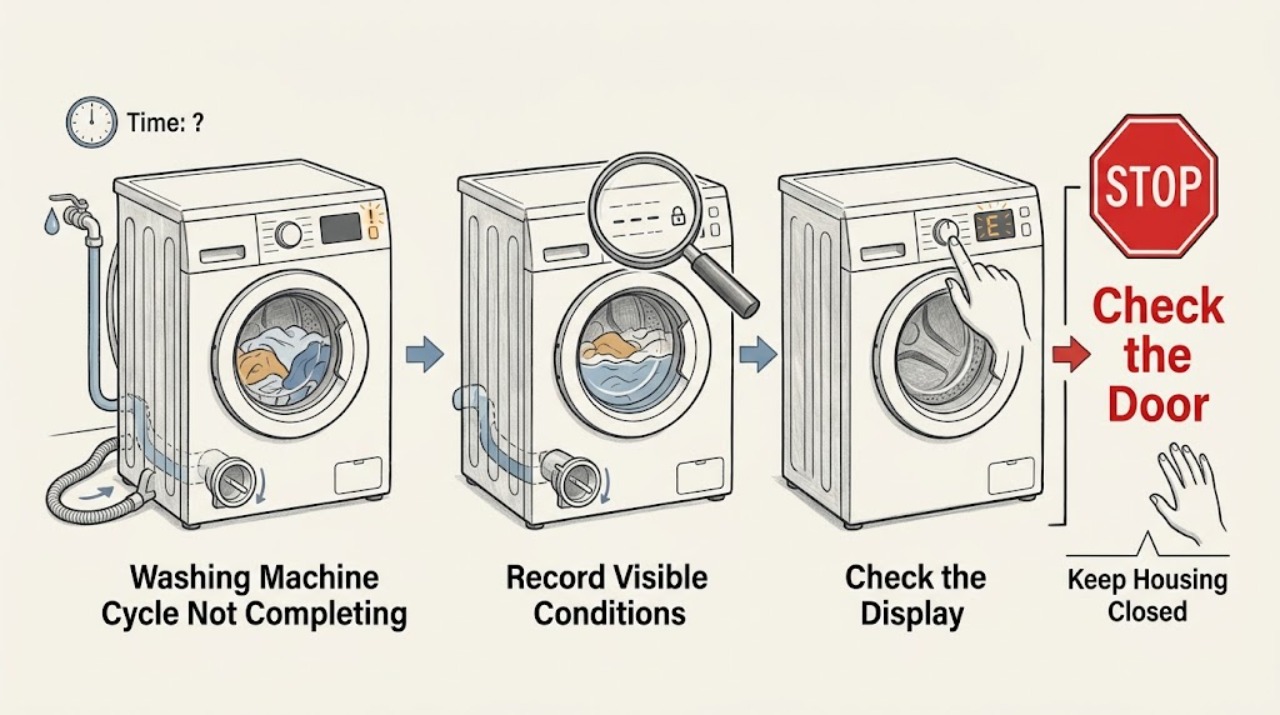
Make the area safe and record the exact stop point
Stop the controls and look at the floor, plug area, hose connections, drum window, and display without opening panels. Note whether there is no water, clean water, or dirty water in the drum; whether the machine stopped during fill, wash, drain, rinse, or spin; and whether an indicator or code is flashing. If water is near an electrical connection, do not touch the appliance or plug; isolate power only if it can be done without contacting water.
Expected result: The appliance is dry and has no hazard; or there is a leak, standing water near electrics, hot or discolored wiring or plug, burning smell, smoke, spark, arcing, unusual heat, or a repeated breaker trip.
Next step: If the area is safe, continue to the display and stage checks. If any hazard is present, leave the machine off and arrange qualified appliance or electrical service; do not perform another test.
Stop if: Stop immediately for a leak reaching electrics, wet plug or outlet, burning smell, smoke, sparks, arcing, abnormal heat, or a repeated trip.
Why this matters
Why: A safe stage and water observation separates a control or option pause from a fill, drain, or spin branch. A wet electrical area or other hazard can make even a routine filter or hose check unsafe.
-
Check delay, pause, rinse hold, lock, and the exact code
With the area dry and the machine safely stopped, photograph the complete display and note any lock, pause, delay, or rinse-hold symbol. Check the selected program and the exact model manual for the meaning of that option or code. Do not substitute a guessed code or a generic button sequence for the model instructions.
Expected result: A Hoover display shows an H-style delay indication, a pause or rinse-hold state, a door-lock symbol, or a specific error code; or there is no option or code.
Next step: Cancel delay or release rinse hold only with the model's documented control sequence, then make one observation of the result. For a code, perform only the safe external check named in the exact manual; if it returns, go to service. If there is no indicator, continue to the door and water-state checks.
Stop if: Do not bypass a lock or attempt an internal repair. Stop for water near electrics, smoke, sparks, overheating, burning smell, or a repeated trip.
Why this matters
Why: Hoover's support pages describe delay start as a programmed future start and list model-specific branches for low fill, blocked drain, excess soap, overload, and reset codes. A rinse-hold option can intentionally leave water until the user selects the documented drain or spin action. The code and model decide which branch is valid.
-
Interpret the locked door without forcing it
If the door is locked, keep hands clear of the latch and wait for the drum to stop and the model's safety delay to finish. Check through the window whether the drum is still full of water or visibly hot, and note whether the machine was unplugged or lost power mid-cycle. Do not pull the handle, insert a tool, or use an emergency release unless the exact model manual gives a safe procedure.
Expected result: The door unlocks after the safety delay; it remains locked with water in the drum; it was unplugged mid-cycle; or it remains locked after the drum is stopped and the drum is empty.
Next step: If the door unlocks, continue by the observed stop stage. If power was interrupted and the area is safe, restore power once and switch the appliance off from its control panel as Hoover documents for applicable AXI models. If water remains or the lock does not release normally, leave it closed and request service after the safe drain guidance has been checked.
Stop if: Never force or bypass the door. Stop if the drum is hot, there is a leak, water is near electrics, or smoke, burning smell, sparks, overheating, or a repeated trip occurs.
Why this matters
Why: Hoover fits a safety delay so the door cannot open while the drum is turning, and its AXI guidance says an unplugged mid-cycle machine can keep the door locked until power is restored and the control-panel shutdown is completed. Water remaining in the drum points to the drain branch rather than a door repair.
-
Check the drain path when water remains
If water remains and the floor and electrical area are dry, disconnect the washing machine from mains before examining anything. Follow the exact Hoover model procedure for its pump filter, emergency drain hose, rear drain hose, and sink-waste connection. Use a low container and towels only where the model procedure permits it; remove visible debris from an accessible filter without reaching into powered parts, and refit the filter as instructed.
Expected result: The machine drains normally, the filter or sink connection is visibly blocked, the drain hose is kinked or incorrectly routed, no water can be drained safely, or the machine stops full of water again.
Next step: Correct only a visible, accessible blockage or hose position covered by the model instructions, refit the filter, and make one supervised drain or cancel-cycle attempt. If water cannot be drained safely, a leak appears, or the drum fills again, keep the appliance off and arrange service.
Stop if: Stop before opening the filter if water may reach electrics, the machine is unstable, the drain is hot, or there is a leak, smoke, burning smell, spark, overheating, or repeated trip. Do not dismantle the pump.
Why this matters
Why: Hoover identifies inability to drain, a blocked pump filter, and a blocked waste arrangement as causes of a mid-cycle stop with water in the drum. A repeat after a safe, model-approved external check indicates a pump, hose, sensor, or other fault that should not be inferred from the water alone.
-
Check fill supply, inlet hose, and detergent condition
For a stop while filling or a low-water code, check that the household water valve is open and the visible fill hose is not kinked or trapped. Check the model's accessible inlet-filter guidance only with power disconnected. Look for excessive suds and confirm that the detergent type and dose match the product and load; do not add more detergent to force the program to continue.
Expected result: The valve is closed, the hose is kinked, the machine has little or no incoming water, the display indicates a fill problem, or the drum contains excessive foam; or the supply and dose appear normal.
Next step: Correct one visible valve, hose, or dosing issue covered by the manual, then make one supervised attempt. If the fill error or excessive suds returns with a known-good supply and correct dose, stop and provide the exact code and observations to service.
Stop if: Do not loosen pressurized connections or open covers. Stop for a hose leak, water near electrics, smoke, sparks, burning smell, overheating, or a repeated trip.
Why this matters
Why: Hoover's model support lists water turned off, a trapped or twisted fill pipe, low water pressure, and excess soap among cycle-start and error branches. Suds or a fill restriction can change the machine's sensed stage, but they do not prove that a particular valve, sensor, or control board has failed.
-
Check load size and balance when it stops before spin
If the drum is not full of water and the machine reaches rinse or spin but does not finish, wait until motion has stopped and the door is released normally. Check whether one heavy item or a very small load is gathered on one side. Redistribute the existing load evenly; do not add a random heavy item to an already full drum, and do not exceed the model's load guidance.
Expected result: A single bulky item or very small load is present, the load is visibly uneven, the machine resumes spin after redistribution, or it still ends without spinning.
Next step: Make one supervised drain/spin or normal-cycle attempt after redistribution. If the machine still will not spin, water remains, an error returns, or it vibrates violently, stop and arrange service; do not keep repeating high-speed tests.
Stop if: Stop for violent movement, a damaged door or hose, scraping with heat or burning smell, smoke, sparks, water near electrics, or a repeated trip.
Why this matters
Why: Hoover explains that a balance sensor may stop the spin when it cannot distribute a single bulky item or a very small load, and the cycle can end without spinning dry. If a reasonably distributed load still fails repeatedly, the balance safeguard is not evidence that a drive part should be replaced.
-
Use one model-documented reset, then hand off the evidence
Only when the machine is cool, dry, empty of unsafe standing water, and free of hazard, use the exact reset or power-cycle procedure in the Hoover manual for the recorded model and code. Do not invent a factory reset or repeat a breaker reset. Record whether the same stage, symbol, code, door state, or water level returns.
Expected result: The cycle completes once, the same stop returns, the machine remains locked or full of water, or the household protection device trips again.
Next step: If the fault returns, leave the washer off and request qualified appliance service. Provide the exact model, program, stop stage, water state, display code, door behavior, supply and drain observations, detergent/load details, and breaker behavior.
Stop if: Do not reset again after a leak, wet electrical area, burning smell, smoke, sparks, arcing, abnormal heat, or a repeated trip.
Why this matters
Why: Hoover lists a brief unplug reset for some model-specific error guidance, but a reset only clears a possible transient state; it does not prove that the inlet, pump, lock, sensor, motor, or control is sound. A repeated failure needs evidence-led service rather than repeated resets.
Use your observations
Decision map
Find the observation that best matches what you see, then follow the next safe action.
-
PATH 01Next step
What you see
Leak or standing water reaches electrics, or there is a hot or damaged connection, burning smell, smoke, spark, arcing, abnormal heat, or repeated trip
Do this next
Leave the appliance off, avoid touching wet electrical parts or repeatedly switching protection back on, and arrange qualified appliance or electrical service.
-
PATH 02Next step
What you see
A delay indicator, pause state, or rinse-hold option is shown and there is no safety hazard
Do this next
Use the exact model instructions to cancel the delay or release the hold, then make one supervised observation; if the state returns, request service.
-
PATH 03Next step
What you see
The door remains locked after the drum stops, especially after mid-cycle power loss or with water visible
Do this next
Do not force it. Follow the applicable model safety-delay and power-restoration instructions; water visible moves to the drain/service branch.
-
PATH 04Next step
What you see
Dirty or clean water remains when the cycle stops
Do this next
With the appliance disconnected and the area dry, follow the model-approved pump-filter, drain-hose, and sink-waste checks once; a repeat, leak, or unsafe drain requires service.
-
PATH 05Next step
What you see
The machine stops while filling, reports a low-fill condition, or has excessive foam
Do this next
Check the visible water valve, non-kinked fill hose, model-approved inlet screen, and correct detergent dose; persistent errors need service.
-
PATH 06Next step
What you see
The machine reaches spin but ends without spinning or repeatedly redistributes a small or uneven load
Do this next
Redistribute the load within the model guidance and make one supervised attempt; repeat failure or violent movement needs service.
-
PATH 07Next step
What you see
An exact code returns, the same stop remains after one documented check or reset, or the door never releases normally
Do this next
Leave the washer off and give qualified service the model, code, stage, water level, door state, and results of the safe checks.
Helpful context
Understand the symptom
The point where it stops is the useful clue
A cycle that stops full of water points toward the drain path, while a machine that never takes in water points toward the supply or inlet path. A stop at the final spin can be a deliberate response to an uneven or very small load. If the display shows a delay indicator, pause state, rinse hold, or an error, record it before changing settings. Cycle time can also change as the machine balances a load or applies an option, so a longer estimate is not by itself a failure.
Keep the checks external and dry
Use only visible controls, the door opening, accessible hoses, and the model's documented filter or drain access. Disconnect the appliance before examining a filter or hose. Do not reach into a moving drum, force a locked door, remove electrical covers, bypass a door lock, or repeatedly restore a breaker. Water near a plug or outlet, a leak that reaches electrics, overheating, a burning smell, smoke, sparks, arcing, or a recurring trip ends the home checks.
When checks do not resolve it
Need a professional?
Request qualified appliance service when the safe stage-specific checks and one model-documented reset do not restore a complete cycle. Use qualified electrical service for a damaged connection, outlet, breaker, or household-supply concern.
Safety scope: Do not force or bypass the door lock, reach into a moving drum, dismantle the pump or inlet, loosen pressurized hoses, remove electrical covers, probe live wiring, or keep operating after a leak near electrics, wet plug or outlet, burning smell, smoke, sparks, arcing, abnormal heat, or repeated trip.
Have this ready
- Provide the exact model and product code, selected program, stop stage, clean or dirty water level, complete display code or symbol, door behavior, delay or rinse-hold state, fill and drain observations, detergent and load details, and any breaker behavior.
Common questions
FAQ
Why did my Hoover washing machine stop with water inside?
Hoover identifies an inability to drain, a blocked pump filter, or a blocked sink-waste arrangement as possible causes. Disconnect the washer only when the floor and electrical area are dry, follow the exact model drain and filter procedure once, and leave it off if the water cannot be drained safely or returns.
Why is the Hoover door still locked when the cycle has stopped?
The safety lock can remain engaged briefly after the drum stops. Hoover also says an AXI washer unplugged mid-cycle can keep the door locked until power is restored and the appliance is switched off from its controls. Never force the door; visible water, heat, a damaged latch, or a lock that does not release normally needs service.
Why does the cycle end without a final spin?
A very small load or one bulky item may remain unbalanced, so Hoover's balance sensor can end the cycle without spinning dry. Redistribute the load within the model's guidance and make one supervised attempt. Persistent no-spin, violent movement, or an error needs service.
Could delay start make a Hoover washer seem stuck?
Yes. Hoover describes an H-style display with a number as delay start on supported models; the number represents the planned delay. Use the exact model control sequence to return the setting to its inactive state, then press Start once.
Read the exact guide
Official sources
- AXI AWMPD610LH8 - Washing Machine Help and Advice from HooverHoover Service · Hoover AXI AWMPD610LH8 index; use the exact model manual for controls and codes
- I cant open the door on my Hoover AXI washing machineHoover Service · Hoover AXI models listed on the page; do not generalize the control sequence to another model
- The washing machine will not start the cycleHoover Service · Hoover models listed on the page; display and button sequence vary by model
- Is it stopping full of water? - Check the pump filter or drain connectionHoover Service · Hoover washing machines; confirm the drain procedure for the exact model
- The wash load size may be too smallHoover Service · Hoover models covered by the page; load and spin behavior varies by model
- Door won't open - Hoover Advice CentreHoover Service · Hoover washing machines and washer dryers; model behavior varies
Community feedback
Share a repair observation
Share a plain-text repair observation. Accepted observations are published automatically; this page may take a moment to update.