
On this page
Start here
Quick answer
Do not pry the door open, pull the handle, or bypass the lock. First check through the glass for moving parts, water, steam, or an unsafe temperature, and stop if there is a leak, water near electrical parts, burning smell, smoke, a spark, a hot cord, or a repeated breaker trip. If the drum has stopped and the lock indicator is still on, wait for the safety delay to finish. When no water or heat remains, use the exact model's normal cancel or drain control; a mid-cycle power interruption may require restoring power safely and switching the machine off with its control panel. Check child lock, delay start, demo mode, and visible door-seal obstructions. If the door remains locked, water cannot drain, or any hazard is present, leave the lock untouched and arrange qualified service.
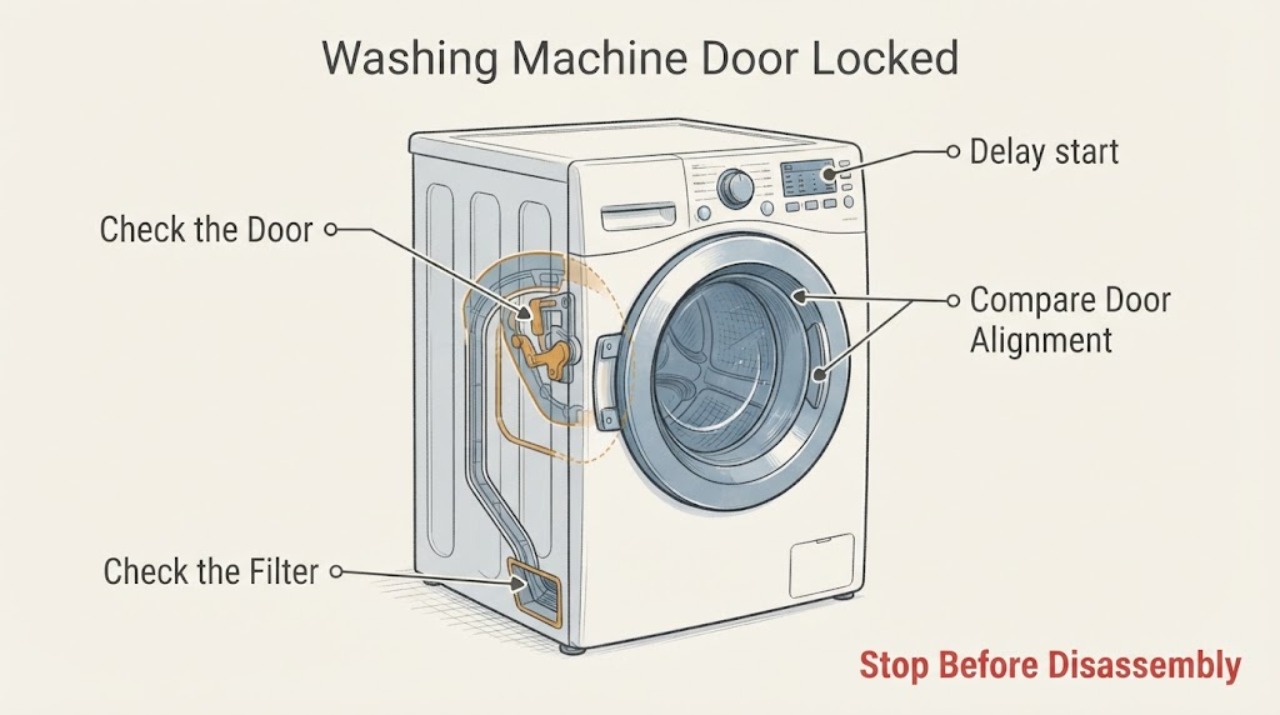
Work through in order
Diagnostic checks
Use only checks that match the exact appliance or system and its official guide.
-
Check 1
Without opening the door, look through the glass and around the outside of the appliance. Note whether the drum is moving, water is visible, the glass or door area is hot, steam is present, or water has reached the floor or an electrical connection. Also stop immediately for smoke, a burning smell, a spark, a hot cord, or a breaker that trips again.
Expected result: The drum is moving, water or heat is present, or a leak/electrical hazard is visible; or the drum is still and the interior appears empty and cool.
Next step: If any hazard is present, stop using the machine, keep clear of water and exposed electrical areas, isolate power only from a safe dry position if possible, and arrange qualified help. Otherwise continue to the indicator and safety-delay check.
Why this matters
Why: Motion, water, and heat explain why the interlock may still be protecting the user. A leak or electrical symptom is a safety fault, not a reason to test the lock again. An empty, cool, still drum permits only the normal control checks that follow.
-
Check 2
Use the normal Pause or Cancel control for the current programme, then wait without pulling the handle until the drum has stopped and the door-lock indicator goes out. Keep hands away from the door gap while the machine is finishing its safety sequence.
Expected result: The lock indicator turns off after the drum stops and the door area is safe, or it remains on after the normal delay.
Next step: If the indicator turns off, open the door gently. If it stays on, do not pry or bypass the interlock; check for water in the drum and continue with the appropriate branch below.
Why this matters
Why: An indicator that turns off confirms a normal safety delay rather than a broken handle. A persistent indicator means the machine still detects an unsafe state, an incomplete programme, or an interlock/control fault.
-
Check 3
Check through the glass for standing water. If water is present, use only the exact model's normal Drain, Spin, Cancel, or programme-finish control; do not open the door or disturb a low filter or hose while water could spill. If the washer will not drain through its controls, turn off the water tap and seek service.
Expected result: The water drains and the lock releases, or water remains and the programme cannot complete drainage.
Next step: After controlled drainage, wait for the lock indicator to go out. If water remains, avoid manual door opening and arrange qualified service; if water is leaking toward electrical parts, follow the immediate stop guidance.
Why this matters
Why: Water remaining below the locked door is a reason for the interlock to stay engaged. Successful controlled drainage may clear the safety condition; failed drainage points to a drain-path or pump problem that needs model-specific service.
-
Check 4
With the machine dry and safe to operate, check the display and button behavior for a child/key lock, Delay Start, or demo mode. Compare the symbols and the clearing sequence with the exact Hoover manual. If the washer was unplugged or its supply was switched off mid-cycle, restore power only if there is no hazard and then switch the appliance off using its control-panel button.
Expected result: A lock symbol, delayed start, demo state, or interrupted-cycle state is shown; or no such state is shown and the door remains locked.
Next step: Clear only the identified control state using the model instructions, then perform one normal cancel and wait for the lock indicator. If no state explains the lock, stop repeating resets and prepare service details.
Why this matters
Why: A control lock or delayed programme can prevent a cycle from ending normally without a mechanical door fault. Hoover also documents a mid-cycle power interruption as a situation where the door can remain locked until normal panel shutdown. If none applies, an interlock, drain, or control fault becomes more likely.
-
Check 5
Once the drum is empty and cool, inspect only the visible door glass, gasket, and door edge for a trapped garment, foreign object, dirt, torn seal, or misalignment. Remove a loose visible obstruction gently and close the door normally; do not force the handle, insert tools, or defeat the latch.
Expected result: A loose visible obstruction is removed and the door closes normally, or the seal/door is damaged or the lock still will not release.
Next step: If the obstruction is cleared, use one normal programme cancellation and wait for the indicator. If the seal, glass, hinge, or latch looks damaged, leave the washer unused and arrange qualified repair.
Why this matters
Why: An obstruction can prevent the door from seating and the interlock from recognizing a safe closure. Damage or a persistent lock after the visible area is clear indicates a condition that cannot be safely diagnosed by forcing the door.
-
Check 6
If there is no water, heat, leak, smell, smoke, spark, or repeated trip, perform one safe reset using the model's normal controls: cancel the programme, switch the appliance off from the panel, and disconnect it only as described in the manual. Reconnect and test only the normal control response, without trying to open the door by force.
Expected result: After the single reset, the washer starts or cancels normally and the lock releases, or the same locked state returns.
Next step: If the lock returns, record the model, programme, display symbols, whether water was present, and what happened immediately before the lock, then stop troubleshooting and arrange qualified service.
Why this matters
Why: A one-time reset can clear a transient control state, but recurrence is evidence of an unresolved drain, interlock, control, or programme problem. Repeated power cycling does not make a locked door safe to open.
Use your observations
Decision map
Find the observation that best matches what you see, then follow the next safe action.
-
PATH 01Next step
What you see
The cycle has ended, the drum is stopped, and the lock indicator goes out after the safety delay.
Do this next
Open the door gently. No repair is indicated by the delay alone.
-
PATH 02Next step
What you see
Water is visible or the washer did not finish draining.
Do this next
Use the exact model's normal drain or cancel control. If it cannot drain, turn off the water tap, do not manually open the door, and arrange qualified service.
-
PATH 03Next step
What you see
The washer lost power or was unplugged during the cycle, and no hazard is present.
Do this next
Restore power only when safe, then switch off using the control-panel button and wait for the lock indicator to clear. If it remains locked, stop and call for service.
-
PATH 04Next step
What you see
A child/key lock, delay start, or demo mode is active.
Do this next
Use the exact model manual to clear that state, then cancel normally once and wait. Do not pull the door or bypass the lock.
-
PATH 05Next step
What you see
A visible loose obstruction prevents the door from seating, but the seal and glass are intact.
Do this next
Remove only the loose visible obstruction, close the door gently, and retry one normal cancellation. Damage or persistent locking requires service.
-
PATH 06Next step
What you see
There is a leak near electrical parts, exposed water, smoke, burning smell, a spark, hot wiring or cord, repeated breaker trip, or uncontrolled hot water/steam.
Do this next
Stop using the washer. Do not touch wet electrical areas or operate switches from an unsafe position; leave the area if smoke or fire is present and use appropriate emergency help. Arrange qualified appliance service and do not attempt a locked-door override.
Helpful context
Understand the symptom
Why a locked Hoover washer door is often a safety state
The interlock is designed to keep the door closed while the drum is moving and while water or heat could make opening unsafe. A short delay after the cycle is expected on some Hoover models. The exact indicator names and cancellation sequence vary by model, so use the instructions for the model shown on the appliance rather than forcing the latch.
Treat a locked door with standing water, a failed drain, or a power interruption as an incomplete cycle. The useful question is whether the machine can safely finish or cancel through its controls; it is not whether the lock can be defeated manually.
When checks do not resolve it
Need a professional?
Call a qualified appliance technician if the door stays locked after the drum is empty, cool, stopped, and the normal safety delay and cancellation have completed., Arrange service if water remains, the washer cannot drain, the door seal/glass/hinge/latch is damaged, or the same lock returns after one safe reset., Stop immediately for leaking water near electrical parts, smoke, burning smell, sparks, a hot cord, repeated breaker trips, or uncontrolled heat; use emergency help for fire or immediate danger.
Common questions
FAQ
Why is my Hoover washing machine door still locked after the cycle?
The safety interlock may be waiting for the drum to stop, water to drain, or the temperature to become safe. Wait for the lock indicator to go out, then use the model's normal cancel or drain control. Never force the door.
How long should I wait before trying the door?
Hoover documents a safety delay after a cycle, and the exact time varies by model and state. Wait until the drum is stopped and the door-lock indicator is off rather than relying on a fixed time.
What if there is water inside the locked washer?
Keep the door closed and use only the exact model's normal drain or cancel controls. If it will not drain, turn off the water tap and arrange service; do not open a water-filled door manually.
Can a power cut cause a Hoover washer door to stay locked?
Yes. A mid-cycle interruption can leave the lock engaged. If the area is safe, restore power and switch the machine off with its control panel; if it remains locked, stop and arrange service.
Could child lock or Delay Start be responsible?
They can prevent normal programme control. Check the displayed symbol and use the exact model manual to clear the state, then cancel normally once. Do not bypass the physical interlock.
When should I stop troubleshooting and call for help?
Stop if water cannot drain, the lock persists after safe cancellation, or the door/seal is damaged. Stop immediately for a leak near electrical parts, smoke, burning smell, sparks, a hot cord, repeated breaker trips, or uncontrolled heat.
Read the exact guide
Official sources
- Has it been unplugged mid - cycle?Hoover Service · Hoover AXI washing machines; verify the exact model procedure
- Link Washing Machine Help and Advice from HooverHoover Service · Hoover Link washing-machine support; select the exact model and symptom where available
- There is a safety time delay fittedHoover Service · Hoover models covered by the support article; exact model and indicator behavior must be checked
- Opening the doorHoover · Hoover washing-machine manual represented by this document; exact model controls and indicator names vary
Community feedback
Share a repair observation
Share a plain-text repair observation. Accepted observations are published automatically; this page may take a moment to update.