
On this page
Start here
Quick answer
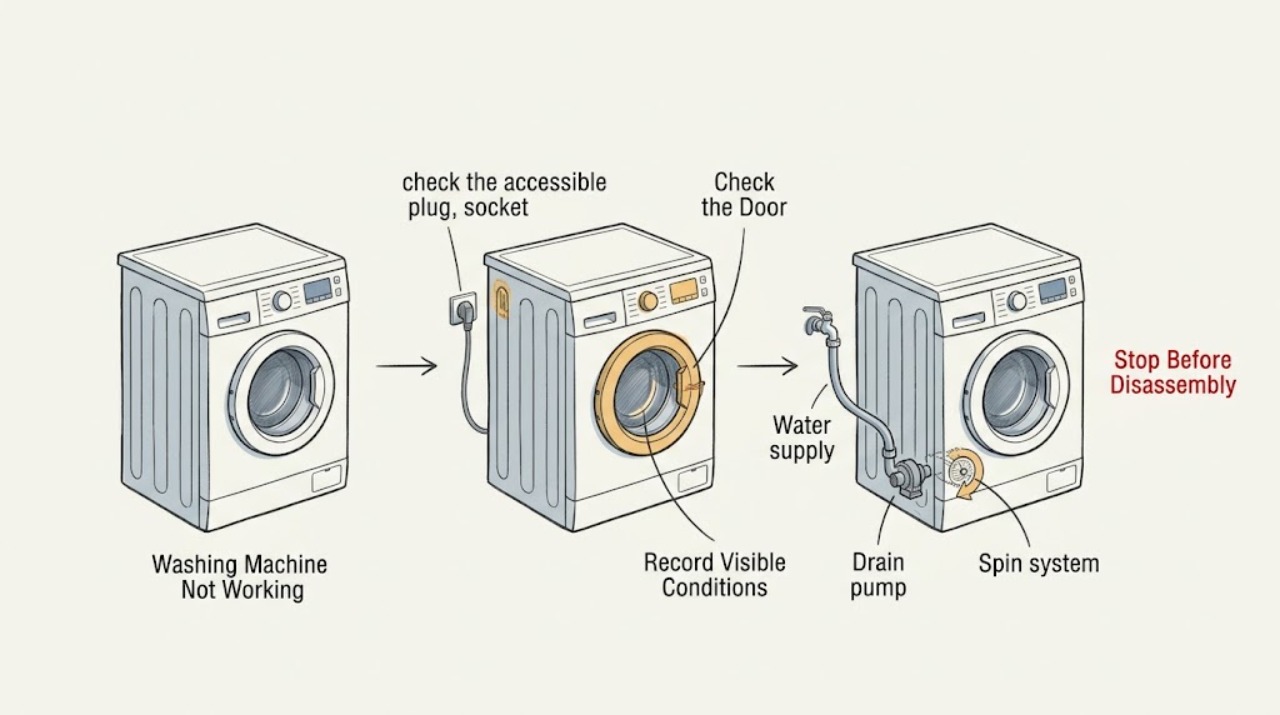
Define what “not working” means before trying a reset: no display or lights, buttons that do not respond, a programme that will not start, no water entering, water left in the drum, or a washer that will not spin. Record the full Hoover product code and any exact display message, then check the accessible socket, plug, isolator, and breaker from a dry position. If the controls work, confirm the door is firmly shut, the child lock or demo mode is not active, and the selected programme has a water supply. If water remains, keep the machine off and use only the model's safe drain and pump-filter instructions. Do not force the door, reach into standing water, open panels, or keep testing after a leak, wet electrical area, burning odor, smoke, abnormal heat, sparking, or repeated breaker trip. Make one model-approved confirmation only; a persistent fault needs qualified service.
Work through in order
Diagnostic checks
Use only checks that match the exact appliance or system and its official guide.
-
Check 1
Write down the complete Hoover model or product code, the exact display code or message, and what “not working” means: no power, no start, no fill, no drain, no spin, unusual noise, locked door, leak, or poor washing. Note whether the drum contains water and whether the fault began after a move, outage, cleaning, or plumbing change.
Expected result: The display is blank or active; a code is present; the door is locked or open; the drum is empty or full; or only one stage or function fails.
Next step: Keep the exact manual and recorded sequence available. If the display code is not explained for the exact model or the symptom involves water and power together, stop at external observations and arrange service.
Why this matters
Why: Hoover's guide index treats electrical power, cycle controls, filling, draining, spinning, door, and error messages as different paths. A code or product symptom cannot safely be generalized across model families.
-
Check 2
If the washer has no display or lights, check the accessible plug, socket, isolator, and household breaker from a dry position. Test the socket with a known-safe appliance rather than opening the washer. If the exact plug design and local guidance permit a fuse check, use only the specified fuse and never keep replacing a fuse that blows again.
Expected result: The socket or isolator is off, the supply is absent, the plug fuse is open, the breaker has tripped, the cord or outlet is damaged, or supply appears normal while the washer remains dead.
Next step: Restore only an obviously switched-off supply once if safe. If the breaker or fuse trips again, the outlet or cord is damaged, or the washer stays dead with a normal supply, leave it off and use a qualified electrician or appliance technician.
Why this matters
Why: Hoover lists supply, socket, isolator, fuse box, and plug-fuse issues as possible no-power causes. A fuse or breaker that opens again indicates a fault, not a reason to keep resetting or testing.
-
Check 3
If the display works but a programme will not start, close the door firmly without forcing it and check the visible opening for a trapped garment. Confirm the water tap is on, select a documented programme, cancel an unintended delay, and check the child-lock or demo-mode indication using the exact manual. Press START once.
Expected result: The door was not fully closed, a lock or demo indication is present, water is off, the programme starts, or controls remain unresponsive after the documented state is cleared.
Next step: Correct only a clearly identified setting and make one start attempt. Never bypass the door lock; arrange service if the door will not latch, the controls remain unresponsive, or the programme still will not start.
Why this matters
Why: Hoover says the door safety lock can prevent operation and that child lock or model-specific demo mode can make buttons appear unresponsive. A washer that accepts START but does not fill or advance needs the next water or error check.
-
Check 4
If the programme starts but no water enters, keep the washer off and inspect only the accessible supply tap and fill hose. Check that the tap is open and the hose is not trapped, twisted, or visibly damaged; do not disconnect a pressurized hose or reach behind a wet appliance.
Expected result: The tap is closed, the hose is kinked or damaged, the rear filter or supply is model-specific, water enters normally after a safe correction, or the supply appears normal while the washer stays empty.
Next step: Open the tap or correct only a safe visible hose route, then make one approved fill confirmation. Stop if water leaks, the hose is damaged, or no fill occurs with normal supply; request service.
Why this matters
Why: Hoover's guide lists water supply, a trapped fill pipe, and a rear filter as possible fill problems. A clear supply path with no fill can indicate an inlet valve, control, or door-lock fault that requires service.
-
Check 5
If water remains in the drum or the washer stops before draining, disconnect mains power and keep the water contained. Check the visible drain hose and any sink waste connection for a kink, blockage, loose connection, or household backup. Do not force the door and do not open a filter with a full drum unless the exact model manual provides a safe emergency-drain procedure.
Expected result: The drum is full or partly full, the hose is kinked, the sink branch backs up, a drain code appears, or the visible drain path is clear.
Next step: Use only the model's safe drain procedure. Keep water away from electrical parts and stop if it cannot be contained. Arrange service for an inaccessible filter, repeated drain code, internal leak, or a full drum that will not empty.
Why this matters
Why: Hoover connects retained water with a blocked pump filter or waste arrangement, and its guide index separately lists drain warnings and sink connections. A clear external path makes an internal pump, hose, or control fault more likely.
-
Check 6
If the exact manual identifies a user-accessible pump-filter flap, prepare a shallow container and towels, keep mains power disconnected, drain slowly, and remove only visible lint, coins, or other loose debris. Clean and refit the filter exactly as the model instructions show; do not reach into a hidden pump or use force.
Expected result: The filter is blocked, no water flows, the container fills too fast, the filter cannot be seated, the seal is damaged, or the filter is clear and secure.
Next step: Stop if the water cannot be safely contained, the filter is not the documented user-accessible type, or the drum is too full. If the area is dry and the manual permits one short drain check, observe once; otherwise arrange service.
Why this matters
Why: Hoover says a pump filter can block drainage and that residual water remains when the filter is removed. No flow, uncontrolled flow, damaged sealing, or a clear filter with continued failure points beyond routine user cleaning.
-
Check 7
If the washer drains but does not spin or leaves clothes very wet, check the exact programme for a disabled spin option, a small or unbalanced load, and any water-left-in-drum condition. Do not open the cabinet or reach into the drum while it can move.
Expected result: Spin is disabled, the load is very small or unbalanced, water remains, the machine hums without rotating, or the correct programme still will not spin.
Next step: Correct only the documented programme or load condition and make one safe test after the drum is empty and the area is dry. Persistent no-spin, abnormal noise, or movement requires service.
Why this matters
Why: Hoover lists spin selection, load balance, and a blocked drain pump among reasons a washer may not spin normally. A correct programme with clear drainage but no rotation can involve the door lock, motor, drive, or control.
-
Check 8
After recording the fault and only when there is no leak, standing water near electrical parts, odor, smoke, abnormal heat, sparking, or tripped circuit, make one model-approved power confirmation. Restore the appliance using the exact manual and watch one normal stage from a dry position; do not repeatedly reset or run full cycles.
Expected result: The washer returns to normal, the same code or symptom returns, the machine remains dead, water leaks, or the breaker trips again.
Next step: Close the water tap, isolate power from a dry position, and arrange qualified Hoover service for a returning or hidden fault. Use an electrician when the house circuit, outlet, cord, or breaker is involved.
Why this matters
Why: A single approved confirmation can clear a transient control state, but a returning symptom indicates an unresolved fault. A repeated breaker trip or new leak makes further testing unsafe.
Use your observations
Decision map
Find the observation that best matches what you see, then follow the next safe action.
-
PATH 01Next step
What you see
The display and lights are completely dead.
Do this next
Check the power path once from a dry position. If a fuse or breaker opens again, the supply is damaged, or the washer remains dead with normal power, obtain qualified electrical or appliance service.
Why this path and its safety boundary
Why it matters: An accessible supply, socket, isolator, fuse, or breaker issue is the first possibility.
-
PATH 02Next step
What you see
The display works but the programme will not start or buttons do not respond.
Do this next
Use the exact model manual to correct one documented state and close the door firmly. Never bypass the lock; persistent failure needs service.
Why this path and its safety boundary
Why it matters: Door closure, child lock, demo mode, delay, or another control state may be blocking the start.
-
PATH 03Next step
What you see
The programme starts but the washer does not fill.
Do this next
Check only the accessible tap and hose for a safe visible issue. Stop for a leak or damaged hose and request service if normal supply does not restore filling.
Why this path and its safety boundary
Why it matters: The water tap, fill hose, rear filter, door lock, inlet valve, or control path may be involved.
-
PATH 04Next step
What you see
Water remains in the drum or the machine stops before drain.
Do this next
Keep mains power isolated and use the exact model emergency-drain and filter procedure only when water can be contained. Arrange service for a full drum, inaccessible filter, returning code, or internal fault.
Why this path and its safety boundary
Why it matters: A pump filter, drain hose, sink waste, pump, or drain control problem is possible.
-
PATH 05Next step
What you see
The washer drains but does not spin or leaves laundry very wet.
Do this next
Check the documented programme and load condition once. If drainage is clear but no-spin persists, stop user troubleshooting and arrange service.
Why this path and its safety boundary
Why it matters: A spin setting, unbalanced load, residual restriction, door lock, drive, motor, or control issue may be involved.
-
PATH 06Next step
What you see
An exact code appears, or the symptom returns after one approved confirmation.
Do this next
Record the code and sequence and use the exact product manual or qualified service. Do not substitute another model's code meaning or keep resetting.
Why this path and its safety boundary
Why it matters: The model-specific fault is not resolved by a basic setting correction.
-
PATH 07Next step
What you see
There is a leak, standing water near electrical parts, smoke, burning odor, sparking, abnormal heat, visible damage, or a breaker trips again.
Do this next
Close the water tap and isolate power only from a dry, safe position. Do not touch wet electrical areas; leave the machine off and obtain qualified appliance or electrical help. Use emergency assistance for active smoke or fire.
Why this path and its safety boundary
Why it matters: This is a water, shock, fire, or building-electrical safety stop.
Helpful context
Understand the symptom
Translate “not working” into one observable fault
A washer with a blank display has a different first check from one that powers on but will not start, fill, drain, or spin. Record the model or product code, exact display message, selected programme, and whether the door is locked or water remains in the drum. Hoover's advice is model-specific, so do not copy a button sequence or code meaning from another range.
Keep water and power separate
If there is a leak or standing water, close the water tap and isolate mains power only from a dry position. Never touch a plug, socket, control, or wet machine while standing in water. Do not force a locked door; water and the drum may still be unsafe.
Safety boundary
Stop conditions
- Stop the programme, close the water tap, and isolate mains power from a dry position before examining a full drum, hose, filter, or waste connection.
- Do not touch a plug, socket, control, or appliance surface while standing in water, and do not open a filter or hose where water can reach electrical parts.
- Do not force or bypass the door lock, open panels, probe live wiring, reach into the pump, or remove internal hoses, valves, motors, or controls.
- Do not repeatedly reset a fuse, breaker, code, or programme, and do not use another model's button sequence or error-code meaning.
- Stop for a continuing leak, smoke, burning or electrical odor, sparking, abnormal heat, visible damage, or a breaker that trips again; leave the appliance off and obtain qualified help.
Only after diagnosis
Potential parts
- door lock or latch
Consider this only after a qualified diagnosis confirms that the door closes correctly but the lock does not latch or release as the model requires.
Confirm the complete Hoover model or product code and manufacturer's fit information before ordering; never bypass the safety lock. - inlet valve or fill hose
Consider this only when qualified service isolates a water-entry fault after the tap and visible hose route are confirmed clear and safe.
Verify the exact model, connection type, and manufacturer's fit information before ordering; water and electrical work require safe isolation. - drain pump or pump filter seal
Consider this only when a qualified technician confirms a pump, filter housing, or seal fault after the hose, household waste, and accessible filter checks.
Confirm the exact model or product code before ordering; do not infer a pump fault from a generic no-working symptom.
When checks do not resolve it
Need a professional?
Arrange qualified Hoover appliance service when the washer remains dead with a normal power supply; when the door will not latch or unlock safely; when it will not fill, drain, or spin after the exact manual's external checks; when a code returns; or when an internal pump, valve, motor, control, or hose fault is suspected. Use an electrician for an unsafe socket, cord, circuit, or repeated breaker trip and a plumber for a household waste backup. Stop immediately for leaks that cannot be contained, water near electrical parts, smoke, burning odor, sparking, abnormal heat, visible damage, or any repeated electrical trip.
Have this ready
- Provide the full Hoover model or product code, exact display message, selected programme, whether the display and door lock work, water level, fill and drain behavior, pump or motor sound, recent installation or outage, and any leak, odor, smoke, heat, sparking, or breaker event.
Common questions
FAQ
What should I check first when my Hoover washing machine is not working?
Define whether it has no power, will not start, will not fill, leaves water, or will not spin. Record the product code and exact message, then check the accessible power, door, control, water, and drain conditions from a dry, safe position.
Why does my Hoover washer have power but not start?
Check that the door is firmly closed and nothing is trapped, then use the exact manual to check child lock, demo mode, and delay. Correct one documented setting and press START once; do not bypass the door lock.
Why is my Hoover washing machine not filling?
Check the accessible water tap and fill hose for a closed supply, kink, or visible damage. If the supply is normal but the washer remains empty, or a leak appears, keep it off and arrange service.
What if my Hoover washer stops with water in the drum?
Disconnect mains power, keep the water contained, and follow only the exact model's emergency-drain and pump-filter procedure. Hoover lists a blocked filter or waste arrangement as possible causes. Never force the door or open a filter with a full drum unless the manual makes it safe.
Why does my Hoover washer drain but not spin?
Check the exact programme for a disabled spin option and confirm the load is not unusually small or unbalanced. If drainage is clear but the drum still will not spin, stop testing and arrange service for a possible lock, drive, motor, or control fault.
When is a Hoover washing-machine fault unsafe to troubleshoot?
Stop for a leak that cannot be contained, standing water near electrical parts, smoke, burning odor, sparking, abnormal heat, visible damage, or a breaker that trips again. Close the tap, isolate power only from a dry position, and obtain qualified help.
Read the exact guide
Official sources
- The Buttons Are Not Working or the Program Will Not Start - Hoover Advice CentreHoover Advice Centre · Hoover models covered by the page when buttons are unresponsive or a programme will not start
- No Electrical Power - Hoover Advice CentreHoover Advice Centre · Hoover appliances and listed washing-machine models with no electrical power
- Is the Door Shut Firmly? - Hoover Advice CentreHoover Advice Centre · Hoover washing-machine models covered by the page when a programme will not start
- Check the Water Hose Is Not LeakingHoover Advice Centre · Hoover models covered by the page when a supply hose or nearby electrical area may be wet
- Washing Machine Appliance Advice CentreHoover Advice Centre · Hoover washing machines with no-start, no-fill, no-drain, no-spin, error, door, or power symptoms
- What to Check if Your Washer Stops Full of Water - Check the Pump Filter or Drain ConnectionHoover Advice Centre · Hoover washers that stop with water in the drum or fail to drain
- What to Check if the Hoover Washing Machine Does Not Empty the Water OutHoover Advice Centre · Hoover models covered by the page with a blocked pump filter or water left in the drum
Community feedback
Share a repair observation
Share a plain-text repair observation. Accepted observations are published automatically; this page may take a moment to update.