
On this page
Start here
Quick answer
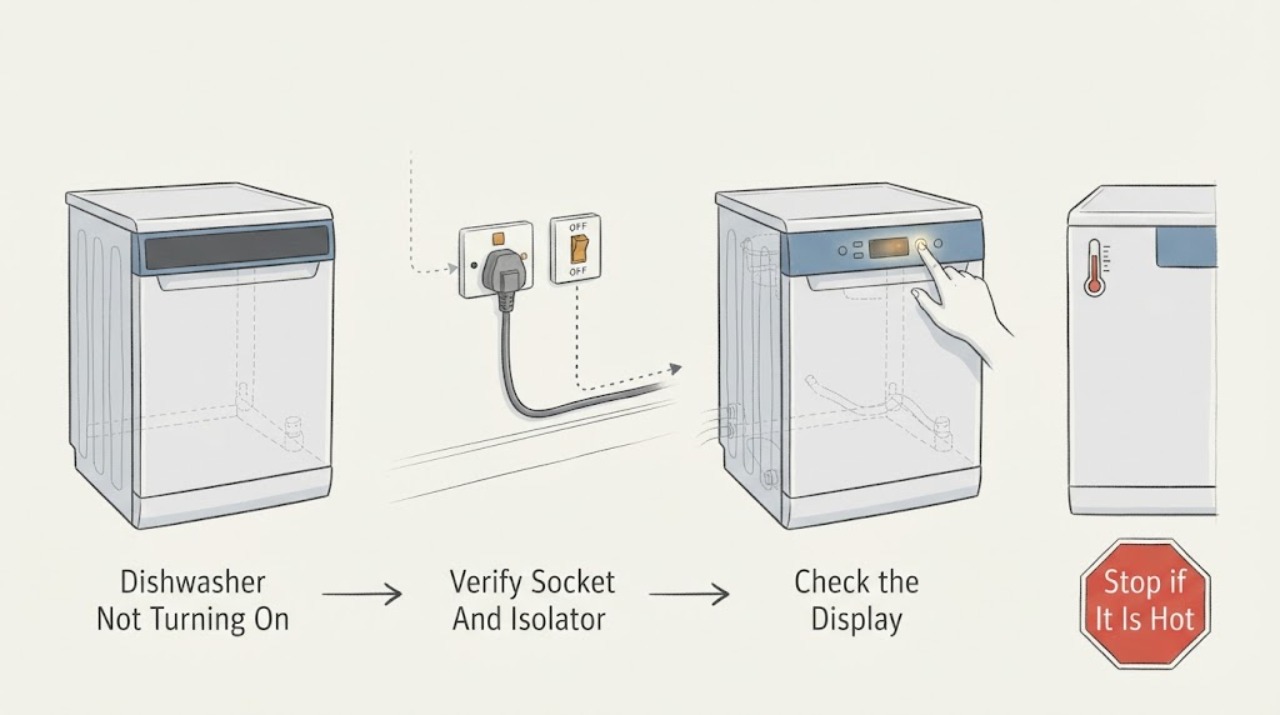
First decide whether the Hotpoint dishwasher is truly without electrical response or has power but will not begin a cycle. A blank display, no LEDs, and no sounds point first to the socket, plug, fuse, power lead, on/off control, or an internal electrical fault. Hotpoint’s official dishwasher troubleshooting guide says to verify that the socket is live with another appliance, check the fitted plug and fuse, avoid relying on an extension lead, and confirm the on/off or start control. If the panel lights or a code appears but Start does not begin a programme, that is a cycle-start, door, water, drain, or error condition rather than a pure no-power diagnosis; use the exact model manual and error-code guide. Disconnect power before any cleaning or part work. Do not remove panels, defeat the door interlock, perform live tests, change internal fuses, or continue after smoke, burning odor, heat, water near electrics, a damaged cord, or repeated breaker trips. A working outlet with a persistently dead dishwasher needs Hotpoint or qualified appliance service.
Before you begin
Safety first
- The user may test the external socket with a suitable appliance, inspect the visible plug and lead, identify the model, operate documented controls, and record codes or LED patterns. Qualified personnel must handle internal wiring, fuses, door interlocks, boards, pumps, valves, heating circuits, anti-flood devices, live testing, and any wet or damaged appliance.
Work through in order
Diagnostic checks
Use only checks that match the exact appliance or system and its official guide.
-
Check 1
Press the visible on/off control once with the dishwasher dry and the door in its normal closed position, then record whether the display, LEDs, beeps, or any other normal response appears. Find the exact model or product code from the rating label or manual before interpreting a light pattern.
Expected result: The panel is completely blank; some LEDs or the display respond; a code or repeated flash pattern appears; the dishwasher hums or drains; or the controls respond but a programme will not begin.
Next step: For a blank panel, continue with the external socket and plug check. For any light, code, sound, or selected programme, photograph the interface and use the exact model troubleshooting or error-code guide; do not repeatedly press Start or apply an unrelated reset.
Stop if: Stop and isolate power when safe for smoke, sparks, burning odor, abnormal heat, water near the plug or controls, a damaged lead, or repeated breaker trips.
Why this matters
Why: A truly blank panel prioritizes the external supply, plug fuse, isolator, on/off control, or internal electrical path. Any panel response means the appliance has at least partial power and belongs in a cycle-start, door, water, drain, or code-specific path rather than a pure no-power diagnosis.
-
Check 2
With the dishwasher switched off and the floor dry, check the external socket or accessible appliance isolator. Test the socket with a known-good appliance of suitable rating, and verify that the dishwasher plug is fully seated and its fuse and lead show no visible damage. Do not pull the plug by its lead, use a damaged extension lead, or open the socket or isolator.
Expected result: The socket or isolator is dead; the dishwasher plug or lead is loose, damaged, hot, or wet; the test appliance also fails; the circuit breaker or fuse has operated; or the socket and visible connection work normally.
Next step: Use a qualified electrician for a dead socket, loose isolator, or circuit that will not hold. If the supply is sound but the dishwasher remains blank, disconnect it and arrange Hotpoint or qualified appliance service; do not open the appliance to continue the power search.
Stop if: Stop immediately for a hot, wet, scorched, cracked, loose, or damaged plug, lead, socket, isolator, sparks, smoke, burning smell, or a breaker that trips again.
Why this matters
Why: A dead socket or circuit points to the household supply, isolator, fuse, or electrician. A damaged or hot lead is unsafe. A working external supply with a blank dishwasher makes an internal power, control, interlock, or protection fault more likely.
-
Check 3
If the panel has power, use only the exact model’s documented on/off, Start, pause, control-lock, and door-closing controls. Check from the outside that the door is fully closed and nothing visible prevents the latch from engaging; do not force the door or remove the inner door panel. Record whether the display changes or the machine emits the normal start response.
Expected result: The panel remains blank; the panel responds but Start is ignored; a lock or delay indicator is present; the door does not latch or sits misaligned; a programme starts; or an error appears.
Next step: Use the model manual for any control lock, delay, door, or code behavior. If the panel is powered but the door or controls remain faulty, stop at external checks and arrange service rather than bypassing the interlock.
Stop if: Do not wedge or bypass the door latch, remove panels, reach into the lock, or continue with water leakage, exposed wiring, heat, odor, or abnormal electrical behavior.
Why this matters
Why: A response with an ignored Start or door indication is a powered no-start condition, not the assigned no-power symptom. A visible lock, delay, door, or code condition needs the exact model procedure. A door that cannot latch can prevent a cycle, while a panel that never responds after a sound supply points toward control or interlock diagnosis.
-
Check 4
When any LED flashes or a display shows letters or numbers, photograph the full control panel and count the repeating pattern without dismantling the dishwasher. Note whether the pattern occurs on power-up, after Start, during draining, or after a door movement; compare it only with the exact model and regional Hotpoint error guide.
Expected result: There is no indicator; the code or LED pattern matches a documented water, drain, anti-flood, heating, pump, communication, or board condition; the pattern is not listed; or different lights flash after each attempt.
Next step: Follow only the exact guide’s low-risk external check, such as a visible supply or drain check when explicitly specified. Otherwise switch off, isolate power when safe, retain the code photo, and arrange Hotpoint or qualified service.
Stop if: Stop for anti-flood or visible water, water near electrical parts, a hot or damaged lead, smoke, burning odor, abnormal heat, repeated trips, or any instruction that would require live measurements or internal access.
Why this matters
Why: A documented pattern supplies a model-specific direction and confirms that the appliance is not simply without power. Hotpoint’s guide assigns different LED combinations to different fault families, so a pattern from another interface can misidentify the problem. An unlisted or changing pattern needs service rather than repeated resets.
-
Check 5
After the socket, plug, isolator, and visible control checks, note whether the dishwasher is completely dead, intermittently loses its panel, or has a powered panel with a persistent no-start. Do not remove the kick plate or control panel, replace an internal fuse, test energized wiring, or continue cycling power to make a fault appear.
Expected result: The external supply is good but the panel remains dead; the panel cuts out intermittently; the dishwasher powers on but Start remains unavailable; or it returns to normal after an external connection or documented control step.
Next step: Disconnect the dishwasher when the panel remains dead or unstable and arrange Hotpoint or qualified appliance service. Give the technician the model, supply result, indicator behavior, code photos, door state, and any smell, heat, water, or breaker history.
Stop if: Do not open the cabinet, perform live tests, bypass the door interlock, replace internal components, or re-energize after smoke, sparks, burning odor, abnormal heat, water ingress, or repeated trips.
Why this matters
Why: A good supply with a dead or intermittent panel makes an internal lead, filter, on/off control, user interface, door interlock, control board, or protection fault more likely. A powered but unavailable Start belongs to the separate not-starting or model fault path. Normal recovery after an external correction supports a supply or connection cause but does not justify internal work.
Use your observations
Decision map
Find the observation that best matches what you see, then follow the next safe action.
-
PATH 01Safety boundary
What you see
The dishwasher panel is blank and the known-good test appliance also fails at the socket, the isolator has no supply, or the breaker or fuse will not hold.
Do this next
Leave the dishwasher disconnected and arrange qualified electrical service for the circuit or socket. Do not open the appliance while the supply fault is unresolved.
Why this path and its safety boundary
Why it matters: The household circuit, socket, isolator, plug fuse, or external connection is more likely than a dishwasher control fault; repeated resets can create an electrical hazard.
Safety stop: Do not use an adapter or damaged extension lead, bypass grounding or protection, touch wet electrical parts, or repeatedly reset a breaker.
-
PATH 02Safety boundary
What you see
The socket and accessible supply are good, but the Hotpoint dishwasher still has no display, LEDs, sounds, or response.
Do this next
Disconnect the appliance and arrange Hotpoint or qualified appliance service with the exact model and supply-test result. Do not remove panels or perform live measurements.
Why this path and its safety boundary
Why it matters: An internal power lead, on/off control, user interface, door interlock, control board, or protection fault is more likely. This is an internal diagnosis, not a reason to substitute a fuse or bypass a safety circuit.
Safety stop: Stop for heat, odor, smoke, sparks, a damaged lead, water ingress, or repeated breaker trips, and keep power isolated when safe.
-
PATH 03Safety boundary
What you see
The display or LEDs respond, but Start is ignored, a delay or lock indicator is present, the door does not latch, or a programme is selected without running.
Do this next
Use the exact model manual or the appropriate Hotpoint not-starting/error-code guidance and perform only visible, low-risk checks. Do not force or bypass the latch or control.
Why this path and its safety boundary
Why it matters: The dishwasher has power, so the symptom is separate from a blank no-turn-on condition. Door interlock, control-lock, delay, drain, water, or model-specific fault-code behavior is more likely.
Safety stop: Stop for a damaged latch, water near electrics, an anti-flood indication, smoke, heat, burning odor, or any need to open the door or control assembly.
-
PATH 04Safety boundary
What you see
The panel is lit and a code or repeating LED combination corresponds to a Hotpoint water, drain, anti-flood, heating, pump, communication, or board entry.
Do this next
Save a photo of the interface and follow only the matching exact-model guide. If the pattern is unlisted, recurs, or points to leak, heating, pump, board, or wiring work, isolate the appliance and arrange service.
Why this path and its safety boundary
Why it matters: A model-specific fault is present rather than a loss of all electrical power. Hotpoint’s error guide assigns different patterns to different fault families and may direct either an external check or service.
Safety stop: Do not infer a code from another interface, perform live testing, or continue with water leakage, heat, odor, smoke, or repeated electrical trips.
-
PATH 05Safety boundary
What you see
The dishwasher sometimes powers on and sometimes goes blank, loses power after starting, trips the circuit, or shows heat, odor, water, or damage around the connection.
Do this next
Stop using it, disconnect power when safe, and arrange qualified electrical or Hotpoint appliance service. Provide the timing, code or light pattern, breaker history, water location, and photos.
Why this path and its safety boundary
Why it matters: An unstable supply, power lead, connection, control, protection, water-related electrical fault, or internal component problem is possible; cycling power can worsen the hazard.
Safety stop: Do not re-energize to reproduce the fault, use a different unapproved lead, open the cabinet, bypass protection, or touch wet or hot electrical components.
Helpful context
Understand the symptom
Not turning on is not the same as not starting
For this page, “not turning on” means no meaningful electrical response: the display and indicator lights stay dark and there is no normal sound when the controls are pressed. If the panel lights, beeps, shows a code, or remembers a selected programme but the wash does not begin, the appliance has power and the next decision is door, control-lock, water, drain, or fault-code behavior. Hotpoint’s official support covers freestanding, integrated, semi-integrated, and slimline dishwashers, so interface details vary by model.
Start with the external supply
A dishwasher can appear dead because its socket, plug fuse, isolator, or power connection is not supplying it. Hotpoint’s official no-power guidance recommends checking whether the socket is live with another appliance, checking the plug and correct fuse, and confirming the appliance’s on/off or start control. Make only external checks with dry hands and no water near the connection. A dead circuit or repeatedly tripping breaker is an electrical-service issue, not an invitation to open the dishwasher.
A lit panel changes the diagnosis
If any display or LED responds, record the exact code, light sequence, and panel arrangement before resetting. Hotpoint’s official error guide maps different LED combinations to anti-flooding, water-fill, drain, heating, wash-pump, communication, and main-board conditions. Those are not interchangeable with a blank-panel fault. Use the matching model manual, and do not treat a generic reset or a code from another Hotpoint interface as proof of the failed part.
Keep the professional boundary clear
The user can identify the model, check the external socket and plug, confirm the visible controls, and record indicators. Internal line wiring, a door interlock, control board, inlet valve, drain pump, heating circuit, or anti-flood device requires the exact manual and qualified diagnosis. Hotpoint directs owners to disconnect the appliance from the mains for part replacement; do not defeat a safety device or work inside a live or wet appliance.
Safety boundary
Stop conditions
- Stop and isolate power when safe for smoke, sparks, flame, burning odor, abnormal heat, a hot or damaged plug or lead, water near the socket, controls, or wiring, or repeated breaker trips.
- Do not use an adapter or damaged extension lead, bypass grounding or circuit protection, replace an internal fuse, or repeatedly reset a breaker to keep the dishwasher running.
- Do not force, wedge, or electrically bypass the door interlock or control lock, and do not open panels, kick plates, or the control assembly as a no-power check.
- Do not perform live measurements, touch energized wiring, or work on the inlet valve, drain pump, heating circuit, anti-flood device, control board, or other internal part without qualified service.
- If the socket is live but the panel stays dead or intermittent, or if a code, leak, or safety symptom recurs, leave the appliance off and arrange Hotpoint or qualified service.
Only after diagnosis
Potential parts
- model-matched plug fuse, power lead, terminal, or external isolator component
Consider only after a qualified diagnosis identifies a damaged or failed external connection; a blank panel alone does not identify a replaceable supply part.
Confirm the exact model, regional electrical configuration, rating, and installation. Do not change wiring or an isolator as an appliance-owner workaround. - model-matched on/off control, user interface, door interlock, or control board
Consider only after the socket and plug supply are verified and qualified diagnosis identifies an internal no-power or powered-no-start fault.
Interface, latch, wiring, and board versions vary by Hotpoint model and form factor. Disconnect mains and use the exact service documentation; do not bypass an interlock. - model-matched inlet valve, drain pump, heating component, anti-flood device, wiring, or protection component
Consider only when a documented code or qualified diagnosis identifies a water, drain, heating, anti-flood, or internal protection fault after the appliance has power.
A no-turn-on symptom does not select one of these parts. Confirm the exact model and let qualified personnel handle wet, electrical, pump, heating, and safety-device work.
When checks do not resolve it
Need a professional?
Contact Hotpoint or qualified appliance service when a known-good socket and accessible plug connection are working but the dishwasher remains blank, the panel is intermittent, a code or LED pattern recurs, the door or controls do not respond, or a supply reset does not restore stable operation. Disconnect power when safe for smoke, sparks, burning odor, abnormal heat, water near electrical parts, a hot or damaged plug or lead, anti-flood water, or repeated breaker trips. The user may identify the model, test the external socket with a suitable appliance, inspect the visible plug and lead, operate documented controls, and record codes. Internal fuses, wiring, door interlocks, control boards, pumps, valves, heating circuits, live testing, and wet-appliance work belong to qualified personnel.
Safety scope: The user may test the external socket with a suitable appliance, inspect the visible plug and lead, identify the model, operate documented controls, and record codes or LED patterns. Qualified personnel must handle internal wiring, fuses, door interlocks, boards, pumps, valves, heating circuits, anti-flood devices, live testing, and any wet or damaged appliance.
Common questions
FAQ
Why is my Hotpoint dishwasher completely dead?
Confirm whether the panel is truly blank, then test the external socket with a suitable known-good appliance and inspect the visible plug and lead. If the supply is working but the dishwasher has no response, disconnect it and arrange qualified service rather than opening the cabinet.
What should I check if the Hotpoint dishwasher socket is not working?
Leave the dishwasher disconnected and have the socket, isolator, fuse, or circuit checked by a qualified electrician. Do not repeatedly reset a breaker or use an adapter or damaged extension lead to keep testing the dishwasher.
The Hotpoint dishwasher lights up but will not start. Is that the same problem?
No. A lit display or LED means the dishwasher has at least partial power. A door latch, control lock, delay, water or drain condition, or model-specific error should then be checked against the exact manual; this is different from a blank no-turn-on symptom.
Can a Hotpoint dishwasher error code make it seem like it will not turn on?
Yes, a fault may leave the interface partially responsive or flashing. Hotpoint’s official guide maps different LED combinations to water, drain, anti-flood, heating, pump, communication, and board conditions. Photograph the full pattern and use the exact model guide instead of a generic code list.
When should I stop trying to turn on my Hotpoint dishwasher?
Stop and disconnect power when safe for smoke, sparks, burning odor, abnormal heat, water near electrical parts, a hot or damaged plug or lead, anti-flood water, or repeated breaker trips. A good socket with a persistently blank panel needs Hotpoint or qualified service.
Read the exact guide
Official sources
- Hotpoint Dishwasher Error CodesHotpoint UK Appliances Limited · Official Hotpoint UK error-code guide; LED layouts and code meanings must be matched to the exact dishwasher interface and model.
- Dishwasher Troubleshooting & Repair ServiceHotpoint UK Appliances Limited · Official Hotpoint UK dishwasher guidance; exact controls, electrical arrangements, and regional instructions vary by model and region.
- Hotpoint Service Dishwasher RepairHotpoint UK Appliances Limited · Official Hotpoint UK dishwasher service guidance; use the exact model manual for a specific interface or repair procedure.
- Browse Hotpoint’s Dishwasher RangeHotpoint UK Appliances Limited · Official Hotpoint UK product-range context; it establishes multiple dishwasher form factors and support routes but does not replace an exact model manual.
Community feedback
Share a repair observation
Share a plain-text repair observation. Accepted observations are published automatically; this page may take a moment to update.