
On this page
Start here
Quick answer
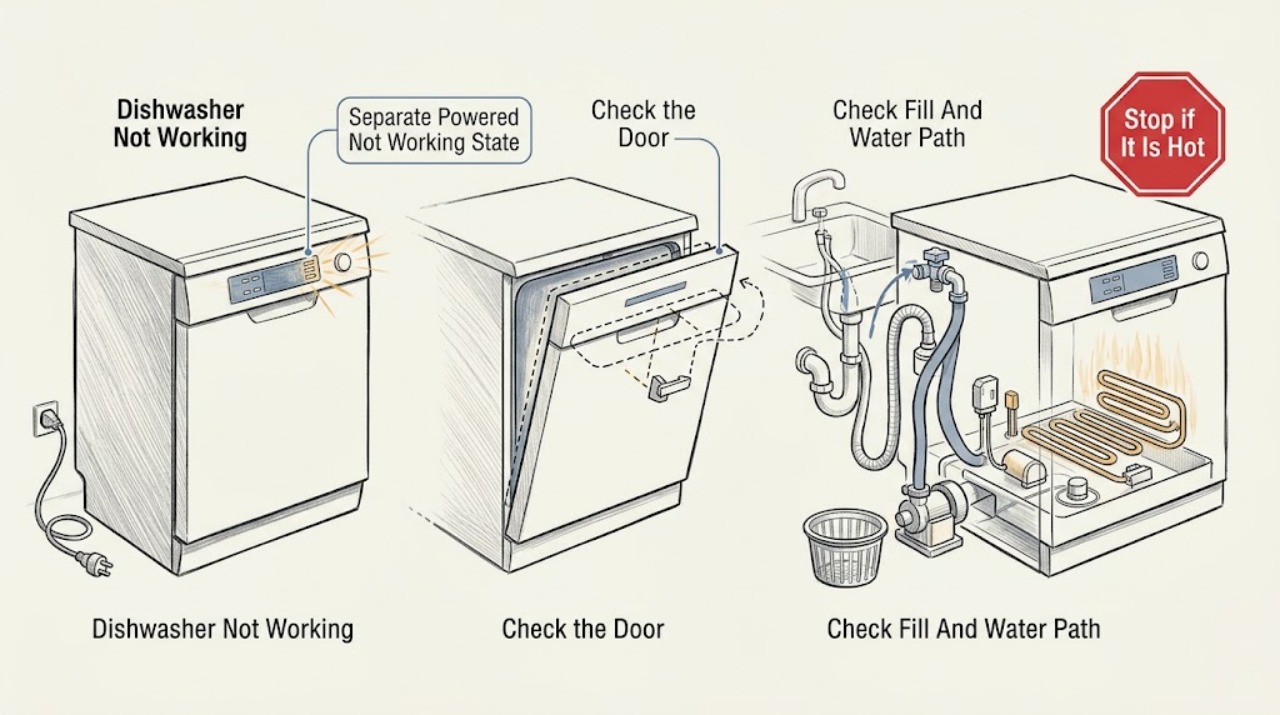
Use this page for a powered Hotpoint dishwasher that behaves incorrectly—such as not filling, not emptying, not washing, or showing a broad operating problem. It is not the same as a completely dark appliance (not turning on), a programme that never launches after Start (not starting), or a programme that begins and then stops early (cycle not completing). First record whether the panel responds, whether the door latches, whether water enters, whether the spray arms move, and whether water drains. Hotpoint's official integrated-dishwasher guidance separates no-fill checks (water taps fully on and pipes not kinked), no-empty checks (waste hose, under-sink spigot, and clean base filter), and loss of electrical power checks. Follow the exact model guide for your layout and any displayed indication. If the appliance has an active leak, overflow, water near electrical parts, smoke, sparks, burning odor, a hot cord or socket, or repeated protective-device trips, stop, close the water supply, and disconnect power only when safe; do not open the cabinet or replace internal parts.
Before you begin
Safety first
- The owner may identify the model, verify the door and controls, inspect accessible taps and hoses, check visible waste routing, and clean a user-accessible filter only under the exact manual. Authorized service personnel must handle pumps, valves, heaters, sensors, floats, boards, interlocks, wiring, cabinet plumbing, and live diagnosis.
Work through in order
Diagnostic checks
Use only checks that match the exact appliance or system and its official guide.
-
Check 1
Check whether the display, indicator lights, or controls respond and whether the door closes and latches. Note if the programme never launches, starts and stops early, or runs but fails to fill, wash, heat, or drain.
Expected result: The dishwasher is dark; the panel is lit but Start does nothing; a programme begins and stops early; or the programme runs with one operation missing.
Next step: Select the fill, drain, wash, heat, or control branch below and record the model and installation type before changing settings.
Stop if: Stop for overflow, an active leak, water near electrical parts, smoke, sparks, burning odor, a hot cord or socket, or repeated protective-device trips.
Why this matters
Why: A dark appliance belongs to a no-power/not-turning-on path, while a lit panel with no launch belongs to not-starting. A mid-cycle stop belongs to cycle-not-completing. Only a powered appliance with a specific failed function remains in this broad not-working path.
-
Check 2
Record the exact Hotpoint model or product code and whether the dishwasher is integrated, freestanding, semi-integrated, or slimline. Check that no rack, utensil, or panel obstruction prevents the door from closing fully; do not disassemble the door or interlock.
Expected result: The door does not latch; the installation type is known; the model code is missing; or the door and controls appear normal.
Next step: Clear only an accessible loading obstruction and use Hotpoint's exact support page or manual. If the latch, interlock, or built-in installation needs access, arrange service.
Stop if: Do not bypass the door interlock, remove the control fascia, pull out an integrated appliance, or work with water or power connected.
Why this matters
Why: A door or installation mismatch can prevent a programme or operation from being authorized. Model identity is needed because Hotpoint maintains separate support paths and control layouts.
-
Check 3
If the exact guide identifies a no-fill condition, verify that the accessible water tap is fully open and the inlet pipe is not kinked, crushed, or visibly damaged. Remember that Hotpoint's integrated guide says the machine may need to drain before it fills.
Expected result: The tap is closed or partly closed; the pipe is kinked or crushed; the dishwasher is retaining water; the inlet route is normal; or water still does not enter after the external correction.
Next step: Correct only an accessible tap or hose-routing issue and use the exact model's permitted verification. If water still does not enter, keep the appliance off and arrange service.
Stop if: Do not disconnect a pressurized hose, clean an internal inlet screen, probe a valve, or test live wiring; close the tap for a leak or damaged hose.
Why this matters
Why: A closed tap, restricted pipe, or retained water can prevent the expected fill step. A normal external water path with persistent no-fill makes an inlet valve, filter, pressure or float system, wiring, or control fault more likely, but does not identify a part.
-
Check 4
If water remains or washing is ineffective, with the appliance isolated inspect the visible waste hose for kinks, the under-sink waste connection for a still-blanked spigot, and the user-accessible base filter only as the exact manual allows. Note whether spray arms are obstructed and whether the tub drains after the documented check.
Expected result: The waste hose is trapped or kinked; the under-sink spigot is not open; the base filter is blocked; the spray path is obstructed; or all visible checks are normal but water remains or washing is weak.
Next step: Correct only a visible hose, spigot, filter, or loading issue permitted by the model guide, then monitor one approved test. Arrange service for persistent retained water, poor circulation, heating failure, or any internal obstruction.
Stop if: Do not reach into standing water with power connected, remove the wash pump, dismantle spray plumbing, tilt or pull out an integrated dishwasher, or run repeated tests.
Why this matters
Why: Hotpoint links no-empty behavior to waste-hose installation, under-sink plumbing, and the base filter. A clear visible path with retained water can indicate a pump, air path, float, or control issue; weak washing after normal drainage can involve spray, circulation, water level, or heater systems.
-
Check 5
Record the model, failed operation, code or complete LED pattern, cycle stage, water level, door state, external checks, and result of any exact-manual reset. Keep the dishwasher off when the problem persists or involves an internal component, leak, or electrical symptom.
Expected result: The operation returns; the same operation fails again; an error or flashing indication persists; the dishwasher leaks or overflows; or a heater, pump, valve, sensor, board, or interlock is implicated by the exact guide.
Next step: Arrange authorized Hotpoint service and provide the evidence. Use qualified electrical help for a household supply or wet electrical hazard; do not order a part from the broad symptom.
Stop if: Do not bypass safety devices, probe connectors, replace internal parts, perform live tests, or run cycles to recreate an active leak or electrical fault.
Why this matters
Why: A lasting correction supports an accessible supply, route, loading, or filter condition. Recurrence or an internal indication exceeds this page's user checks and needs model-specific diagnosis.
Use your observations
Decision map
Find the observation that best matches what you see, then follow the next safe action.
-
PATH 01Safety boundary
What you see
The dishwasher has no display or indicator response and the socket, plug, or household supply has not been proven safe and live.
Do this next
Use a dedicated no-power diagnosis: check the safe supply according to the exact model guidance and arrange qualified electrical or appliance service when supply is confirmed or hazardous.
Why this path and its safety boundary
Why it matters: This is a no-power/not-turning-on intent rather than the powered not-working path.
Safety stop: Do not reset a tripping breaker, touch wet or damaged electrical parts, or open the dishwasher.
-
PATH 02Safety boundary
What you see
The controls have power but a selected programme never launches, or a programme begins and stops before its expected end without a specific operation being isolated.
Do this next
Record the door, control, water, drain, and indication state and use the matching intent's model-specific guide. Do not force a cycle or repeatedly reset it.
Why this path and its safety boundary
Why it matters: This belongs to not-starting or cycle-not-completing, not the broader powered not-working operation branches.
Safety stop: Stop for water accumulation, overflow, leak, smoke, burning odor, or repeated protective-device trips.
-
PATH 03Safety boundary
What you see
The panel responds, the door latches, and a selected programme reaches its fill step but no water enters; the exact model guide points to the fill path.
Do this next
Check only the accessible tap and hose route. Hotpoint's integrated guide says the dishwasher may need to drain before filling; arrange service if the external path is normal and no fill persists.
Why this path and its safety boundary
Why it matters: A closed tap, kinked or crushed inlet pipe, retained water that must drain first, or an internal inlet/pressure/control fault is possible.
Safety stop: Do not disconnect pressurized plumbing, access a valve, or test live wiring.
-
PATH 04Safety boundary
What you see
The panel responds and water enters, but the dishwasher leaves water in the tub or produces a poor wash after the accessible hose, under-sink, filter, and loading checks.
Do this next
Use only the exact model's permitted filter and hose checks, then arrange service for recurrence or internal access.
Why this path and its safety boundary
Why it matters: A visible waste-route or filter obstruction is possible first; persistent retained water or weak circulation makes pump, air path, float, spray, heater, sensor, or control service more likely.
Safety stop: Do not reach into standing water with power connected, remove the pump, dismantle spray plumbing, or move an integrated unit.
-
PATH 05Safety boundary
What you see
An indication persists after the model-approved external check, the exact guide names an internal component, or there is a leak, overflow, water near electrical parts, smoke, sparks, burning odor, hot cord or socket, or repeated protective-device trips.
Do this next
Stop the programme, close the water supply, and disconnect power only when safe. Arrange authorized Hotpoint service or qualified electrical help and provide the complete indication and model.
Why this path and its safety boundary
Why it matters: The issue exceeds the broad user-level not-working checks and may involve internal water, electrical, heating, pump, control, or safety systems.
Safety stop: Do not reconnect to reproduce the fault, reset repeatedly, bypass a door or anti-flood device, remove panels, or perform live tests.
Helpful context
Understand the symptom
Keep this broad symptom separate from adjacent intents
‘Not working’ can describe several states. If no light or display works, use a no-power or not-turning-on diagnosis. If the panel is alive but Start will not launch a programme, use a not-starting diagnosis. If a programme runs and then stops before its normal end, use a cycle-not-completing diagnosis. This page is for a powered dishwasher that performs one function incorrectly or gives a general operating problem, so the first useful observation is which operation fails: fill, wash, drain, heat, or control response.
Check the simplest operation boundary first
Confirm that the door closes and latches, the selected programme is appropriate, and the panel responds, without using an undocumented button sequence. A dishwasher that has power but will not fill can still be waiting for a drain operation; Hotpoint's integrated guidance says filling must first drain and directs owners to the water taps and kinked pipes. A dishwasher that will not empty needs a different path through the waste hose, under-sink connection, and base filter. Do not treat either symptom as a failed main board from the word ‘not working’ alone.
Use water and drain observations to choose the branch
After a safe stop, note whether water is absent, remains in the tub, sprays weakly, or reaches the floor. For a no-fill condition, check only the accessible tap and hose route specified by the model guide. For a no-empty condition, inspect the visible waste route and user-accessible base filter if the exact manual permits it. A clean filter and clear visible hose with persistent retained water shifts the problem toward a pump, air path, valve, float, or control that requires service.
Do not use a generic reset as a diagnosis
Hotpoint publishes separate dishwasher formats and an error-code system with model and interface context. If an indication is present, record the complete code, flashing-light order, model, and cycle stage, then use the exact guide. Only perform a reset or reprogramme when that guide documents it. If the panel is responsive but filling, spraying, heating, or draining remains abnormal, the dishwasher is powered but not working correctly; that is a service decision, not proof of a particular part.
Stop before internal or electrical work
Hotpoint's support says to unplug before replacing a dishwasher part and offers engineer support when troubleshooting persists. Keep the water supply and appliance off for an active leak, overflow, standing water with an unknown source, or a hazard. Pumps, inlet valves, heaters, sensors, floats, control boards, door interlocks, wiring, and cabinet plumbing should be diagnosed by an authorized or qualified technician. Protect the floor and do not pull an integrated dishwasher out to reach a hidden connection.
Safety boundary
Stop conditions
- Stop the programme and close the water supply for uncontrolled filling, overflow, or an active leak; disconnect mains only when safe from a dry position.
- Do not repeatedly reset a broad fault, protective device, door interlock, float, or anti-flood system, and do not run cycles to reproduce a leak or electrical fault.
- Do not remove panels, access pumps, valves, heaters, sensors, boards, wiring, or cabinet plumbing, and do not perform live electrical tests.
- Use the exact Hotpoint model guide for controls, filters, drain routing, error meanings, reset sequences, and integrated versus freestanding or slimline procedures.
- Protect the floor and dishes and arrange service when standing water, unsafe water temperature, concealed leakage, or an inaccessible blockage remains.
When checks do not resolve it
Need a professional?
Arrange authorized Hotpoint dishwasher service when the appliance has confirmed power but still will not fill, empty, wash, heat, or respond correctly after the exact model's accessible door, tap, hose, under-sink, filter, and loading checks; when the selected programme actually never starts or stops early, use the dedicated not-starting or cycle-not-completing path. Stop immediately for uncontrolled filling, overflow, an active leak, water near electrical parts, smoke, sparks, burning odor, a hot or damaged cord or socket, or repeated protective-device trips; close the water supply and disconnect power only when safe. The owner may identify the model, confirm door closure, inspect accessible taps and hoses, and clean a user-accessible filter only as the model manual permits. Pumps, valves, heaters, sensors, floats, control boards, interlocks, wiring, cabinet plumbing, and live testing require authorized or qualified service.
Safety scope: The owner may identify the model, verify the door and controls, inspect accessible taps and hoses, check visible waste routing, and clean a user-accessible filter only under the exact manual. Authorized service personnel must handle pumps, valves, heaters, sensors, floats, boards, interlocks, wiring, cabinet plumbing, and live diagnosis.
Common questions
FAQ
What does ‘Hotpoint dishwasher not working’ mean?
This broad page is for a powered dishwasher with a specific failed operation such as filling, washing, heating, or draining. A dark unit is a not-turning-on problem, a powered unit that never launches is not-starting, and a programme that stops early is cycle-not-completing; use those dedicated paths instead.
What should I check if my Hotpoint dishwasher will not fill?
Use the exact model guide. Hotpoint's integrated-dishwasher guidance says to ensure the water taps are fully on and the pipes are not kinked or crushed, and notes that the dishwasher may need to drain before it fills. If the external path is normal and no water enters, arrange service.
What should I check if water remains in my Hotpoint dishwasher?
With power and water isolated, use the exact manual to inspect the visible waste hose, the under-sink waste connection, and the user-accessible base filter. Hotpoint's integrated guidance specifically lists hose installation, an open waste spigot, a clean base filter, and no kinked hose. Persistent retained water needs service.
Should I reset a Hotpoint dishwasher that is not working?
Only if the exact model guide documents the reset and no water or electrical hazard is present. Record the original symptom and whether it returns. A repeated reset does not diagnose a pump, valve, heater, sensor, board, or interlock fault and can mask a recurring problem.
When should I call a Hotpoint dishwasher engineer?
Call when a powered appliance still will not fill, wash, heat, or drain after the exact manual's accessible checks, when an error returns, or when the guide names an internal component. Stop immediately for overflow, a leak near electrical parts, smoke, sparks, burning odor, a hot cord or socket, or repeated protective-device trips; close the water supply and disconnect power only when safe.
Read the exact guide
Official sources
- Hotpoint Service Help and Advice - HotpointHotpoint UK · Opened official Hotpoint help page; used for model/category-specific support rather than generic component or code claims.
- Official Hotpoint Appliance Service Repair - HotpointHotpoint UK · Opened official Hotpoint service page; used to distinguish dishwasher, integrated, and slimline support and to route persistent faults to qualified service.
- How to Videos - Integrated Dishwashers Repair - HotpointHotpoint UK · Opened official Hotpoint integrated-dishwasher support page; used for the model-specific maintenance/service distinction and unplug-before-part-replacement safety boundary.
- Integrated Dishwasher Troubleshooting & Repair - HotpointHotpoint UK · Opened official Hotpoint troubleshooting page for integrated dishwashers; its tap, hose, drain, waste-spigot, filter, and power checks are used as model-format examples, not universal instructions for every Hotpoint dishwasher.
- Hotpoint Dishwasher Error CodesHotpoint UK · Opened official Hotpoint dishwasher error page; used only to require a complete indication and matching interface/model context, not to assign an error code to this general task.
Community feedback
Share a repair observation
Share a plain-text repair observation. Accepted observations are published automatically; this page may take a moment to update.