
On this page
Start here
Quick answer
If a Hotpoint dryer's drum is not spinning, stop the cycle and remove part of a heavy or wet load first. With the dryer stopped and power disconnected before any maintenance, check that the door closes, the cycle and Start control are set correctly, and the drum is not jammed by an object. A drum that turns unusually freely by hand can indicate a loose or broken drive belt, while a drum that is hard to move, scraping, or accompanied by humming points to a mechanical fault. Do not run a damaged or partially disassembled dryer; arrange qualified service when the simple load, door, control, and external-observation checks do not restore tumbling.
Before you begin
Safety first
- User checks are limited to safe controls and door observation, load reduction, lint-filter care, visible inspection, and gentle drum movement only after power is disconnected. A technician must inspect the belt, idler, supports, motor, blower, switches, wiring, and gas components as applicable.
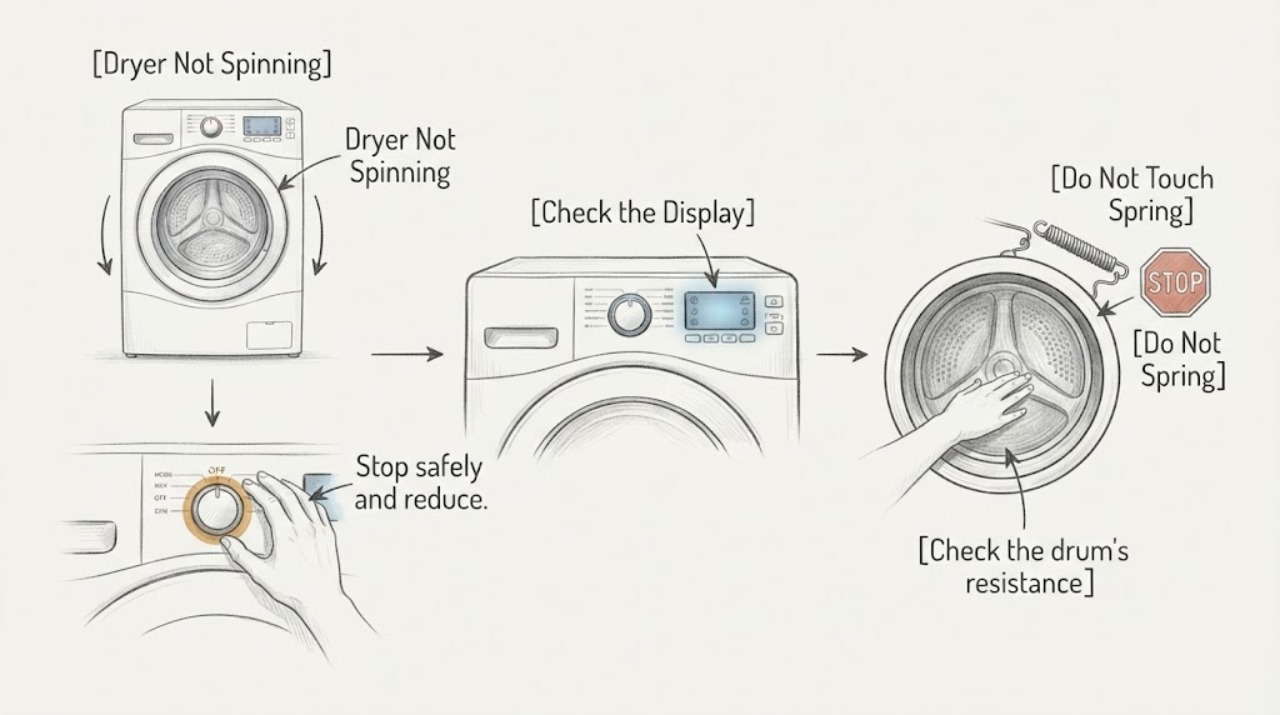
Work through in order
Diagnostic checks
Use only checks that match the exact appliance or system and its official guide.
-
Stop safely and reduce the load
Turn the cycle control Off and wait for all motion to stop. Remove some items, especially heavy wet towels, jeans, blankets, or a single bulky item, so the remaining load can move freely. Do not reach into the drum while it is moving.
Expected result: The drum begins tumbling with a smaller, balanced load, or it still does not move at all.
Next step: If the smaller load tumbles normally, use loads that leave room for free movement and follow the model's loading guidance. If it remains still, stop the cycle and continue with door and control checks.
Why this matters
Why: A change after reducing a heavy load supports overload or a slipping drive condition rather than proving a failed motor. No movement with the drum empty requires the next checks.
-
Check the door, cycle, and Start control
With the dryer stopped, confirm that the door closes fully and that no garment is caught in the opening. Confirm that a real drying cycle is selected rather than Off or a setting that does not run the drum, then use the normal Start control according to the model manual. Do not bypass the door switch or repeatedly force the control.
Expected result: The dryer starts and the drum turns after the door or control setting is corrected, or the dryer remains silent or only clicks.
Next step: If the dryer remains silent, stop using it and arrange service after checking only the household supply as permitted by the model manual. If the motor hums but the drum does not turn, stop the cycle and inspect drum movement only with power disconnected.
Why this matters
Why: A corrected door or setting explains the no-spin symptom. Silence or clicking after a correct start command suggests a power, door-switch, control, motor, or wiring issue that cannot be isolated safely by defeating a safety device.
-
Check the drum's resistance with power disconnected
Unplug the dryer or disconnect its supply at the appropriate isolator before any maintenance or cleaning. Once the drum is fully stopped and safe to touch, rotate it gently by hand from the normal opening; do not remove panels or reach into hidden mechanisms.
Expected result: The drum turns with ordinary resistance, turns unusually freely, is difficult to move, or scrapes and binds at one point.
Next step: Do not reconnect power to investigate a free-spinning, binding, or scraping drum. Record the result and arrange qualified dryer service for drive-system diagnosis.
Why this matters
Why: Unusually free rotation can be consistent with a loose or broken belt. Stiffness, scraping, or a repeating bind can indicate a seized support, bearing, idler, blower obstruction, or drum interference. Hand movement alone does not identify a replacement part.
-
Separate drum movement from motor symptoms
From outside the appliance, note what happens when a normal start command is given only if there is no gas smell, smoke, burning odor, visible damage, or exposed wiring. Listen for silence, a brief hum, repeated clicking, or a scraping sound; stop immediately if the sound is abnormal. Do not operate with covers removed.
Expected result: The motor runs but the drum stays still, the motor only hums or clicks, or the dryer stops with a hot or burning smell.
Next step: Leave the dryer unplugged and arrange service. If smoke, arcing, or a strong burning odor is present, keep clear and use the appropriate emergency or electrical-safety response rather than restarting it.
Why this matters
Why: Motor sound without drum movement makes the belt, idler, drum support, or coupling worth checking by a technician. Humming, repeated clicking, or a burning smell can indicate a stalled motor or electrical/mechanical fault and should not be tested repeatedly.
-
Check for an external obstruction and lint condition
With power disconnected, inspect only the drum opening, door area, lint filter, and visible external exhaust connection for a foreign object, excess lint, or a blocked path. Remove lint from the filter using the model-approved method; do not insert tools into the blower or cabinet and do not operate without the lint filter installed.
Expected result: A safe, visible object or lint blockage is removed and the drum then turns normally, or the drum remains stopped or the obstruction is inside the cabinet.
Next step: If the visible issue is corrected, test only according to the manual and stop if the drum still binds or sounds abnormal. If access beyond the opening is needed, leave the dryer disconnected for qualified service.
Why this matters
Why: A visible obstruction can prevent normal movement, but a cabinet obstruction or persistent no-spin condition needs service. Lint and exhaust care are safety matters but cleaning the filter does not prove the drive system is healthy.
-
Prepare a precise service handoff
Record the model and serial information from the dryer's external label, whether it is electric or gas, the load size, whether the drum turns freely or binds by hand with power disconnected, the sound at Start, and any smell, heat, or recent move or repair. Photograph only safe external areas and do not remove panels.
Expected result: The drum remains stopped after safe checks, the symptom recurs, or any mechanical, electrical, gas, smoke, or burning warning is present.
Next step: Keep the dryer out of service and contact Hotpoint support or a qualified appliance technician. Provide the model, symptom timing, drum-movement result, sounds, and safety observations.
Why this matters
Why: A symptom history separates an overload or control correction from a drive, motor, support, or safety fault and prevents a guessed part purchase. A damaged or malfunctioning appliance should not be operated while awaiting diagnosis.
Use your observations
Decision map
Find the observation that best matches what you see, then follow the next safe action.
-
PATH 01Next step
What you see
The drum spins after a heavy or wet load is reduced.
Do this next
Use a balanced load with room to tumble and follow the exact model loading guidance. If the no-spin symptom returns with a normal load, stop and arrange service.
-
PATH 02Next step
What you see
The drum turns unusually freely by hand with power disconnected.
Do this next
Do not restart the dryer to test it. A loose or broken belt is possible; leave the appliance disconnected and arrange qualified drive-system service.
-
PATH 03Next step
What you see
The drum is stiff, scrapes, or binds, or an object cannot be removed from the opening.
Do this next
Keep power disconnected and request service for the drum supports, idler, blower, belt path, or obstruction. Do not force the drum or remove cabinet panels as a user check.
-
PATH 04Next step
What you see
The dryer is silent, only hums or clicks, or does not respond after the door and cycle controls are correct.
Do this next
Stop cycling it and arrange qualified diagnosis of the supply, door switch, motor, control, and wiring. Do not bypass a safety switch or test live wiring.
-
PATH 05Next step
What you see
Smoke, arcing, burning odor, gas odor, a damaged cord, or a partially disassembled or damaged dryer is present.
Do this next
Stop use, keep clear, and use the appropriate emergency or gas-safety response. Do not reconnect, relight, or operate the dryer until qualified help has assessed it.
Helpful context
Understand the symptom
A non-spinning drum can be a load or control problem, but it can also mean the drive system cannot turn the drum. Start with observations that do not require removing panels: load weight, door closure, cycle selection, drum movement, and unusual sounds. The exact model manual controls which user checks are permitted.
Treat a gas smell, smoke, burning insulation, arcing, a damaged cord, or a scraping drum as a stop condition. Do not reach into a moving drum, bypass a door switch, use a match on a gas dryer, or run the appliance with panels removed.
Safety boundary
Stop conditions
- Stop immediately for smoke, arcing, burning electrical or plastic odor, a gas smell, damaged wiring or cord, uncontrolled heat, or visible fire damage.
- Disconnect power before maintenance or cleaning and never reach into a moving drum.
- Do not bypass the door switch, use a match to light a gas dryer, operate with panels removed, test live wiring, or force a binding drum.
- Do not keep restarting a dryer that hums, scrapes, smells hot, or fails to spin after a normal load and control check.
Only after diagnosis
Potential parts
- drive belt
Consider only when a technician confirms a loose, broken, or worn belt after the drum turns unusually freely or the motor runs without drum movement.
Match the exact Hotpoint model and revision; no part fit can be inferred from the no-spin symptom alone. - drum support, roller, glide, or idler assembly
Consider only when a technician confirms scraping, binding, abnormal resistance, or a worn support component.
Confirm the exact model and the diagnosed position before ordering; do not substitute a generic support from the symptom alone. - drive motor or motor-control component
Consider only after qualified testing distinguishes a failed motor or control from a belt, support, obstruction, or supply problem.
Electrical diagnosis and exact model matching are required before any replacement.
When checks do not resolve it
Need a professional?
Arrange qualified service when the drum remains still after reducing the load and checking the closed door and cycle controls, when it turns unusually freely or binds by hand with power disconnected, or when the motor hums, clicks, scrapes, overheats, or smells burned. Treat gas odor, smoke, arcing, and visible electrical damage as immediate safety stops.
Safety scope: User checks are limited to safe controls and door observation, load reduction, lint-filter care, visible inspection, and gentle drum movement only after power is disconnected. A technician must inspect the belt, idler, supports, motor, blower, switches, wiring, and gas components as applicable.
Common questions
FAQ
Why is my Hotpoint dryer running but the drum is not spinning?
A heavy wet load can make the drive belt slip. If the motor runs but the drum remains still after reducing the load, stop the dryer and arrange service; a loose or broken belt, idler, support, or motor fault may be involved.
What does it mean if the Hotpoint dryer drum spins freely by hand?
With power disconnected, unusually free rotation can be consistent with a loose or broken belt. It is not a reason to keep restarting the dryer; leave it disconnected for qualified diagnosis.
Can I open the dryer and replace the belt myself?
Only follow a model manual's user-repair instructions when you understand them and have the required skills. Otherwise keep the dryer disconnected and use qualified service, especially for gas, electrical, or safety-switch work.
Should I keep using a Hotpoint dryer that is not spinning?
No. After the safe load, door, and control checks, stop using it if the drum remains still, binds, scrapes, hums, smells burned, or the appliance is damaged.
Read the exact guide
Official sources
- Dryer - Drum Does Not TurnGE Appliances / Hotpoint Support · GE and Hotpoint dryer drum-no-spin troubleshooting
- Hotpoint Dryer Use and Care BookHotpoint Appliances · Hotpoint dryer operation, loading, cleaning, maintenance, and safety guidance
Community feedback
Share a repair observation
Share a plain-text repair observation. Accepted observations are published automatically; this page may take a moment to update.