
On this page
Start here
Quick answer
When a Hotpoint tumble dryer will not start, first note whether the display and indicators are completely dead or whether the controls light but the programme will not run. Check only accessible basics: a sound power connection, a household breaker that has tripped, the heat switch or programme selection, and whether the door closes and the latch engages without obstruction. Hotpoint documents F06 as a door-lock condition that can prevent a programme starting, F01 as an electronic-board fault when functions are not selectable, and F12 as an electronic-control fault when the dryer does not turn on. Use the exact model manual for any reset; do not open the cabinet, bypass the door lock, or test live parts. Stop for a damaged cord, burning smell, smoke, water near electrical parts, overheating, or a code that returns, and arrange qualified appliance service.
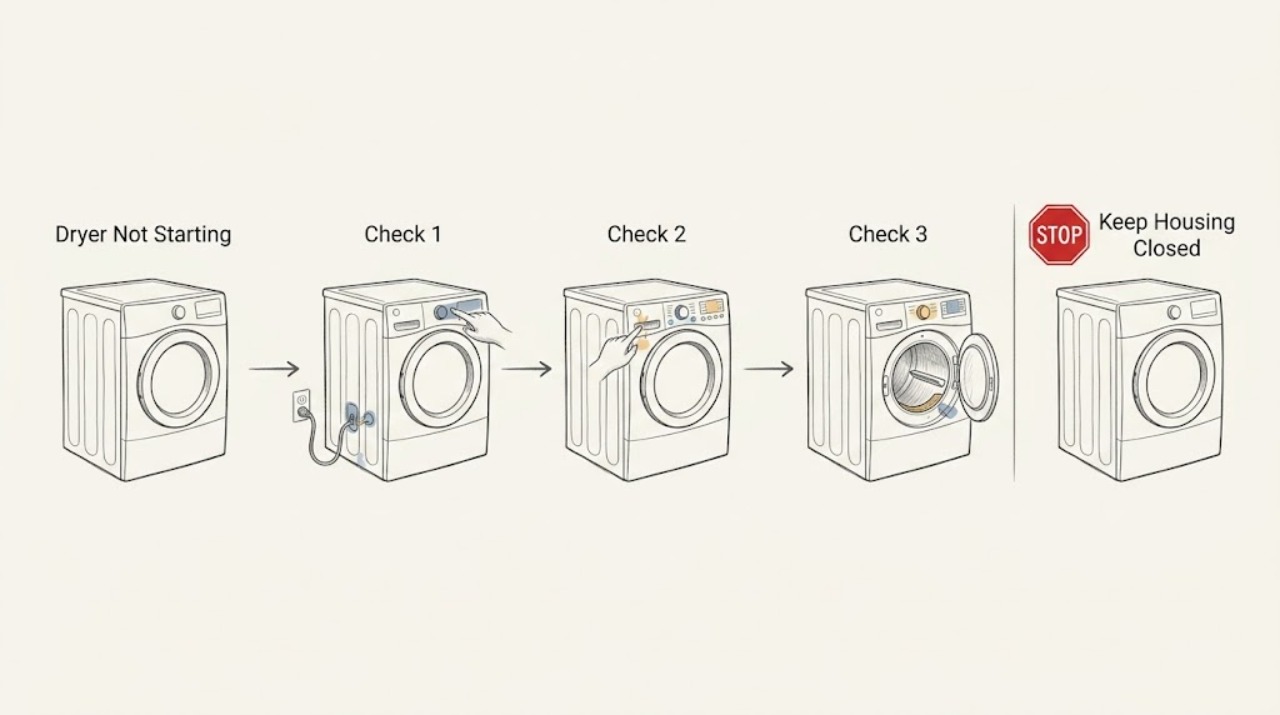
Work through in order
Diagnostic checks
Use only checks that match the exact appliance or system and its official guide.
-
Check 1
Leave the dryer stopped and inspect the accessible power connection, plug, cord, and control indicators without removing covers or touching damaged electrical parts.
Expected result: The display and indicators are completely dark; some indicators work; the cord or plug is visibly damaged; the household breaker appears tripped; or the dryer has smoke, burning smell, or unusual heat.
Next step: If there is no hazard, confirm the dryer is connected as the manual specifies and check the household supply only from a safe user-accessible point. If the panel remains dark or a breaker trips again, keep the dryer off and arrange service.
Stop if: Stop immediately for a damaged cord or plug, scorch marks, smoke, burning smell, water near electrical parts, or a repeated breaker trip.
Why this matters
Why: A dark control panel points first to the supply or electronic-control path, while working indicators point toward programme, door-lock, or control conditions. Visible electrical damage or an odor is a safety stop, not a reset opportunity.
-
Check 2
With the drum empty and the dryer stopped, select the intended programme and verify the visible heat switch or setting is in the position required by the exact model; do not force a stiff dial or control.
Expected result: The programme can be selected and indicators change; the dial does not rotate but progress lights respond; no programme can be selected; or the control is jammed or damaged.
Next step: Follow the model manual's programme-selection sequence once. If controls remain unresponsive, the heat setting cannot be selected, or the control is damaged, stop and arrange service.
Stop if: Do not remove the control panel, force the dial, spray cleaner into controls, or repeatedly cycle a non-responsive programme.
Why this matters
Why: Hotpoint says some models use progress indicators rather than a rotating programmer, while inability to select functions can align with an electronic fault path. A broken or jammed control needs diagnosis, not repeated turning.
-
Check 3
Close the dryer door gently and inspect the visible door edge and lock opening for lint or an item that prevents the door from seating; do not press or defeat the latch to make the machine run.
Expected result: The door closes and the latch engages smoothly; a visible obstruction is present; the door springs back or will not close; or the door closes but the programme still will not start.
Next step: Remove only loose lint or an obvious surface obstruction without tools, close the door once, and retry the documented start command. If the latch still misses, F06 appears, or the programme does not start, arrange service.
Stop if: Never tape, hold, bypass, short, or dismantle the door interlock; stop for a cracked door, damaged hinge, sharp edge, or a lock that cannot engage.
Why this matters
Why: A door-lock or door-closure condition can stop a Hotpoint programme from starting. Hotpoint identifies F06 as a door-lock fault and directs users to check for obstructions before service.
-
Check 4
Read and photograph any displayed fault code or flashing-light pattern before switching conditions, then match the exact code and dryer type to the Hotpoint manual or official code guide.
Expected result: The code is F01, F06, F12, another listed code, a model-specific flashing pattern, or an unlisted/ambiguous display.
Next step: Follow only the matching manual instruction. Treat an unlisted, recurring, or control-related code as a service trigger rather than guessing at a motor, board, heater, or lock part.
Stop if: Do not open the cabinet, test internal wiring, bypass the lock, or replace a part based on the code alone.
Why this matters
Why: Hotpoint describes F01 as an electronic-board fault when functions are not selectable, F06 as a door-lock fault that can prevent starting, and F12 as an electronic-control fault when the dryer does not turn on. The exact model and display pattern still control.
-
Check 5
If the exact Hotpoint manual permits a user reset for the recorded code, perform at most one reset using the accessible control or supply procedure described there, with the dryer empty and no electrical or heat hazard.
Expected result: The display clears and the dryer accepts a programme; the same code returns; the panel remains dark; or a new odor, heat, sound, or breaker trip appears.
Next step: If the code returns, the dryer stays inactive, or any hazard appears, keep it off and request qualified service with the code and model details. Do not repeat the reset.
Stop if: Do not open the dryer, remove internal panels, reset repeatedly, or continue when smoke, odor, overheating, or a breaker trip occurs.
Why this matters
Why: A single successful reset may clear a transient control state, but recurrence or a new symptom means the cause remains unresolved. Hotpoint directs service for persistent electronic and control faults.
-
Check 6
After one safe correction or manual-approved reset, run one short, empty, model-approved test while observing the start response, drum movement, heat, sounds, indicators, and door-lock behavior from outside the appliance.
Expected result: The dryer starts normally; the display accepts a programme but the drum does not move; it starts and stops; the code returns; or abnormal heat, noise, smoke, or odor appears.
Next step: Stop after the first failed or unsafe test and provide the professional with the model, code, cycle, display behavior, and the single correction attempted.
Stop if: Do not run repeated tests, reach into the drum, remove panels, or continue operation through overheating, smoke, odor, or abnormal movement.
Why this matters
Why: A normal start after one correction supports a transient selection or lock condition, but failure to move, recurring code, or a new safety symptom can indicate an internal motor, control, heater, or lock fault.
Use your observations
Decision map
Find the observation that best matches what you see, then follow the next safe action.
-
PATH 01Safety boundary
What you see
The panel is dark but the accessible power connection is intact and there is no visible supply hazard.
Do this next
Keep the dryer off and arrange qualified appliance service; provide the model and whether a breaker had tripped.
Why this path and its safety boundary
Why it matters: The simple supply check did not explain the no-start condition; an internal supply or electronic-control fault remains possible.
Safety stop: Do not open the cabinet or test live parts.
-
PATH 02Safety boundary
What you see
The controls light but the programme will not begin, and the door does not close or latch normally.
Do this next
Remove only an obvious loose surface obstruction and retry once. If the latch still misses or F06 returns, arrange service.
Why this path and its safety boundary
Why it matters: The door-lock or door-closure path is more likely than a general power failure; Hotpoint associates F06 with this condition.
Safety stop: Never bypass or hold the door lock closed.
-
PATH 03Safety boundary
What you see
The display or progress lights work, but no programme can be selected or the control is jammed.
Do this next
Record the display pattern and model, then arrange qualified service rather than forcing the control.
Why this path and its safety boundary
Why it matters: This matches Hotpoint's documented electronic-board/control symptom path more closely than a door obstruction.
Safety stop: Do not remove the control panel or attempt internal electrical diagnosis.
-
PATH 04Safety boundary
What you see
F01 or F12 remains after the exact model's single permitted reset, or no programme starts.
Do this next
Keep the dryer out of use and schedule qualified appliance repair with the code and model information.
Why this path and its safety boundary
Why it matters: Hotpoint describes these as electronic-board/control fault paths that require service when persistent.
Safety stop: Do not repeat resets or replace a board without confirmed diagnosis and compatibility.
-
PATH 05Safety boundary
What you see
A short test begins but the drum does not move, the dryer stops, or an abnormal sound, heat, smoke, or odor appears.
Do this next
Turn the dryer off, keep it out of use, and arrange qualified service; do not continue testing.
Why this path and its safety boundary
Why it matters: The no-start symptom has moved beyond a user-accessible programme or latch check and may involve motor, drive, heater, control, or airflow components.
Safety stop: Stop immediately for smoke, burning smell, overheating, or a damaged cord.
-
PATH 06Safety boundary
What you see
The code is unlisted, the display is ambiguous, the same fault returns, or the appliance requires cabinet access.
Do this next
Preserve the code/photo and arrange qualified Hotpoint appliance service with the model, cycle, and observations.
Why this path and its safety boundary
Why it matters: The available generic evidence cannot safely identify the failed part or authorize an internal repair.
Safety stop: Do not guess at parts, bypass safety devices, or dismantle the dryer.
Helpful context
Understand the symptom
Start by separating power from the start command
A completely dark dryer has a different first path from one whose display or progress lights work but whose cycle does not begin. Hotpoint also notes that on some models the programmer dial may not rotate and indicator lights show status instead. Record what the controls do before assuming the motor or control board has failed.
The door lock is a start condition
A door that is not fully closed, has an obstruction at the lock, or cannot engage can prevent a programme from starting. Check the visible door edge and lock opening only; never tape, hold, or bypass the interlock. A returning lock error needs service rather than repeated force.
Do not turn a no-start check into an internal repair
Lint-filter and water-container maintenance matters for dryer operation, but it does not prove that an electrical, motor, door-lock, or control fault is user-repairable. Keep the dryer out of use for a damaged cord, smoke, burning smell, water near electrical parts, or a persistent error code and provide the model and observations to a qualified engineer.
Safety boundary
Stop conditions
- Stop for smoke, burning smell, overheating, a damaged cord or plug, water near electrical parts, uncontrolled drum movement, or a repeated breaker trip.
- Do not open the cabinet, test live parts, bypass the door lock, force controls, or replace an internal component from a code alone.
- Stop after one model-approved reset or external correction if the dryer remains inactive, the code returns, or a new abnormal symptom appears.
Only after diagnosis
Potential parts
- dryer door-lock assembly
Consider only after qualified diagnosis confirms a failed lock or latch after visible obstruction and door seating checks are excluded.
Confirm exact model, lock design, mounting, and manufacturer fit information before selection; never bypass the interlock. - dryer start switch or control interface
Consider only after qualified diagnosis confirms that the start control is damaged or not signaling the control system.
Confirm exact model, revision, connector, and safe installation procedure before selection. - dryer electronic control board
Consider only after a qualified technician confirms an electronic-board/control fault such as persistent F01 or F12; a code alone does not prove board failure.
Confirm exact model and board revision; internal electrical replacement requires qualified procedures.
When checks do not resolve it
Need a professional?
Call for a recurring code, a non-starting or dark panel after external checks, unresolved door lock, failed drum movement, or any need for cabinet access.
Have this ready
- Exact model or industrial code
- Complete error code or flashing-light pattern and a photo
- Whether the panel is dark or controls respond
- Door-latch behavior, programme, and any sound, heat, odor, or movement
- The one external check or model-approved reset attempted
Common questions
FAQ
What should I check first when my Hotpoint dryer will not start?
Note whether the panel is dark or responsive, check the accessible power connection and household supply, confirm programme and heat selection, and make sure the door closes and latches without obstruction. Do not open the cabinet.
Can a Hotpoint dryer door stop the programme from starting?
Yes. Hotpoint associates F06 with a door-lock condition in which the door cannot close or the programme will not start. Check only for a visible obstruction and door seating; never bypass the interlock.
What does F01 mean on a Hotpoint tumble dryer?
Hotpoint describes F01 as an electronic circuit-board fault when some or all functions are not selectable. Use the exact model guidance for any single permitted reset and arrange service if the fault remains.
What does F12 mean on a Hotpoint dryer?
Hotpoint describes F12 as an electronic-control fault when the tumble dryer is not operating or turning on. Treat a persistent F12 as a service condition rather than replacing a board by guesswork.
When should I stop troubleshooting a Hotpoint dryer that will not start?
Stop for smoke, burning smell, overheating, electrical damage, water near electrical parts, a repeated breaker trip, a door that cannot lock, a recurring code, or any need to open the cabinet or test internal parts. Arrange qualified service with the model and code details.
Read the exact guide
Official sources
- Hotpoint Service Tumble Dryer RepairHotpoint UK Appliances Limited · Hotpoint UK tumble dryers; exact model manual controls the final procedure.
- Tumble Dryer Troubleshooting - Quick Fixes & TipsHotpoint UK Appliances Limited · General Hotpoint tumble-dryer guidance; exact model instructions govern.
- Hotpoint Tumble Dryer Error CodesHotpoint UK Appliances Limited · Hotpoint UK tumble dryers; error meanings are model and display-pattern dependent.
Community feedback
Share a repair observation
Share a plain-text repair observation. Accepted observations are published automatically; this page may take a moment to update.