
On this page
Start here
Quick answer
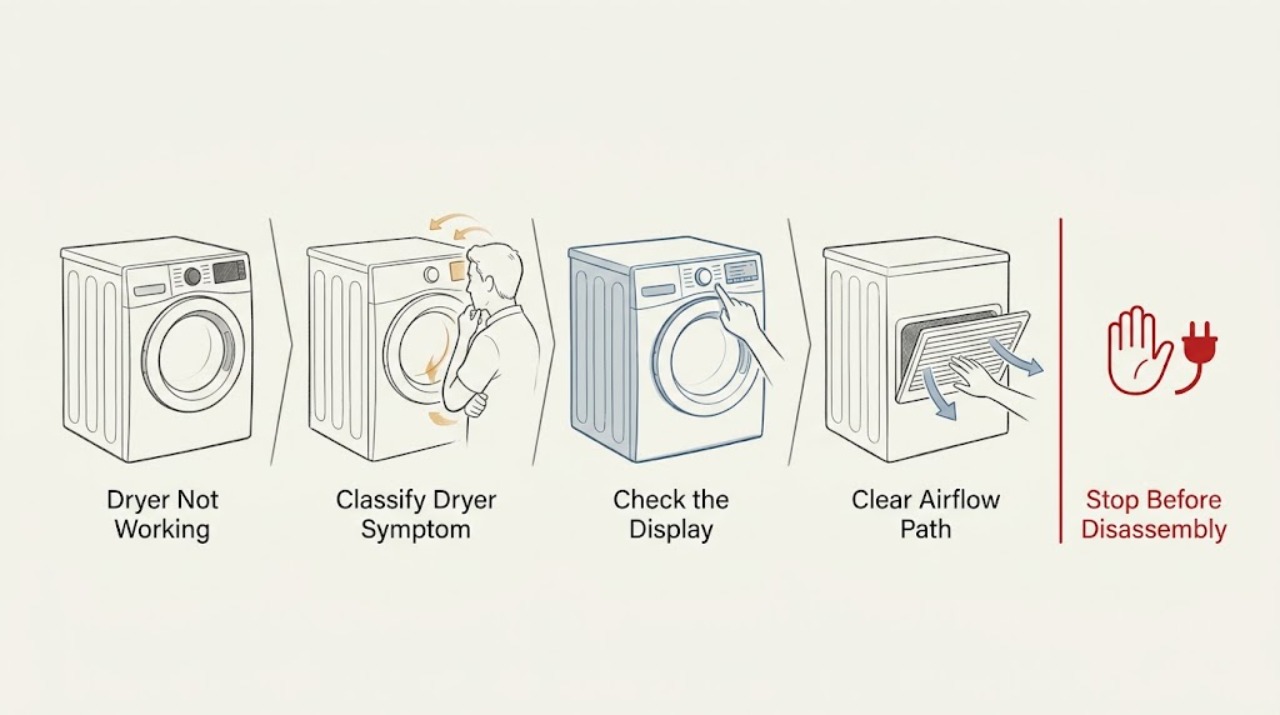
First identify whether your Hotpoint dryer has no power, powers on but will not start, turns without heating, stops during a cycle, or shows a code or flashing lights. Check the plug and household supply only from the outside, confirm the door closes, clean the fluff filter, empty a condenser dryer's water container, and check a vented model's hose for crushing or blockage. Do not assume a dial is faulty if the model uses progress lights instead of a rotating programmer. If the dryer still will not operate, shows a recurring electronic, door-lock, motor, pump, or heating fault, or has smoke, a burning smell, damaged wiring, or repeated breaker trips, stop using it and arrange qualified service. Unplug before any permitted maintenance and never remove panels or make live electrical measurements.
Work through in order
Diagnostic checks
Use only checks that match the exact appliance or system and its official guide.
-
Check 1
Record what happens when a documented drying programme is selected: the panel is completely dark, the panel lights but the cycle will not start, the drum turns with no heat, the machine stops partway through, or an error code or flashing-light pattern appears. Check whether the model uses a progress-light display instead of a rotating dial; do not open the cabinet.
Expected result: The panel has no lights, the door will not latch, the dial stays in one position but progress lights work, the drum turns without heat, or a code or flashing pattern is shown.
Next step: Continue with the external power and door checks for a dark or no-start panel, the filter, water-container, and vent checks for a performance or heat symptom, and the exact Hotpoint error-code guide for a displayed code. Arrange service for a recurring or unsafe fault.
Why this matters
Why: Hotpoint documents separate causes for power, door-lock, electronic, heating, and programmer behavior, and notes that some models communicate status through progress lights rather than a rotating dial. The symptom determines which safe visible check is relevant.
-
Check 2
From outside the appliance, confirm the plug is seated, the household supply is available, and any breaker or protective device has not tripped. Check that the door closes fully without an obstruction and that the selected programme and control-lock state match the model manual. Do not repeatedly reset a breaker or use an outlet that shows heat or damage.
Expected result: The supply is absent, a breaker has tripped, the door does not close or latch, controls are locked, the dial is a progress-light design, or all external power and door checks are normal but the dryer still will not start.
Next step: Restore a safe household supply only once and follow the model's control instructions. If the breaker trips again, the cord or outlet is damaged, or the door and supply are normal but the cycle will not start, unplug when safe and request service.
Why this matters
Why: Hotpoint lists power connection, circuit protection, door closure, and control or programmer behavior among causes of a no-start symptom. A normal supply and door with a continued no-start condition makes an internal control, lock, or motor fault more likely.
-
Check 3
Unplug the dryer and let it cool. Remove and clean the accessible fluff filter as the user manual describes. For a vented model, inspect the visible vent hose for crushing or blockage and make sure the exhaust path is not obstructed; do not dismantle the duct or cabinet to reach an internal fan or heater.
Expected result: The filter is heavily covered, the vent hose is crushed or blocked, airflow improves after the accessible maintenance, or the filter and visible vent path are clear but the dryer still stops, does not heat, or will not operate.
Next step: Clean the filter after each use and correct only an obvious, safe external hose restriction according to the manual. If the symptom remains or the vent needs disassembly, keep the dryer unplugged and arrange qualified service.
Why this matters
Why: Hotpoint says a clean fluff filter supports efficient operation and identifies a blocked or crushed vent hose as a non-mechanical cause of poor performance. Clear external airflow does not prove an internal heater, thermostat, motor, or control is good.
-
Check 4
For a condenser or heat-pump model, check the accessible water container and refit it fully after emptying it, following the exact manual. Confirm the selected programme and heat setting are intended for the load; do not use a short or low-temperature programme as proof that the heater has failed.
Expected result: The container is full or not seated, the selected programme is a low-temperature or short setting, the drum turns but clothes remain wet, or the container and programme are correct but the dryer still does not heat or complete the cycle.
Next step: Empty and refit the container and run one model-appropriate programme only when there is no safety symptom. If the container refills abnormally, heat remains absent, or the dryer stops again, stop using it and request service.
Why this matters
Why: Hotpoint states that a full water container can prevent a condenser dryer from heating effectively and that programme and sensor behavior vary by model. Correcting the container or programme can restore operation; persistent no-heat or stop conditions need diagnosis.
-
Check 5
Record every error code, flashing-light sequence, programme, and the point at which the dryer stops. If the official Hotpoint guide permits a single unplug-and-reconnect step for that code, follow it only after the dryer is safe and cool; do not clear a returning code repeatedly or remove panels to inspect a motor, heater, thermostat, pump, or control board.
Expected result: The code clears once and the dryer completes a normal cycle, the same code returns, the drum does not rotate, water remains, the controls stay dark, or a burning smell, smoke, damaged cord, unusual heat, or breaker trip occurs.
Next step: If the fault returns or the drum, pump, door, or controls behave abnormally, unplug when safe and arrange qualified service with the code and observations. Stop immediately for smoke, burning odor, damaged wiring, or repeated breaker operation.
Why this matters
Why: Hotpoint associates recurring codes with electronic, motor, pump, door-lock, heating, and internal-control faults and directs owners toward professional assistance. A one-time reset does not establish that an internal fault is repaired.
Use your observations
Decision map
Find the observation that best matches what you see, then follow the next safe action.
-
PATH 01Next step
What you see
The panel is dark, the plug or supply is unavailable, or a breaker has tripped.
Do this next
Check the connection and household supply from outside once. If the breaker trips again or the cord or outlet is hot or damaged, stop and arrange qualified electrical or appliance service.
-
PATH 02Next step
What you see
The panel works but the door does not close or the programme will not start.
Do this next
Remove only an obvious, safe obstruction and confirm the model's control-lock setting. If the latch or door remains faulty, unplug when safe and request service.
-
PATH 03Next step
What you see
The dryer turns but does not heat, or a condenser model has a full water container.
Do this next
Empty and refit the accessible container, clean the fluff filter, and check the model-appropriate programme and visible vent path. Request service if no heat persists.
-
PATH 04Next step
What you see
The dryer is vented and its hose is crushed or visibly blocked.
Do this next
Correct only an obvious external restriction as the manual permits and keep the filter clean. If the duct needs disassembly or performance remains poor, request qualified service.
-
PATH 05Next step
What you see
A code or flashing-light pattern returns after the documented single reset or the drum does not rotate.
Do this next
Stop resetting and provide the exact code, model, programme, and symptom to qualified Hotpoint service. Do not open the cabinet or replace an internal part based on the code alone.
-
PATH 06Next step
What you see
Smoke, burning odor, damaged wiring or cord, unusual cabinet heat, water near electrical parts, or repeated breaker operation appears.
Do this next
Stop immediately, disconnect power only if safe, keep clear of the dryer, and arrange qualified service. Use local emergency guidance for active smoke or fire.
Helpful context
Understand the symptom
Not working can describe several different symptoms
A Hotpoint dryer may appear not to work because it has no supply, the door is not registering closed, a control lock or displayed fault is preventing the cycle, the drum turns without heat, or a condenser model has a full water container. Some models show progress lights rather than a rotating programme dial. Identify the exact symptom before deciding that an internal part has failed.
Start with accessible airflow and collection points
Hotpoint recommends cleaning the fluff filter regularly, emptying a condenser dryer's water container, and keeping a vent hose and duct free from crushing or blockage. These are maintenance checks, not permission to open the cabinet. The correct filter, container, vent, and programme behavior vary by model, so use the matching user manual.
Error codes change the stopping point
A recurring code or flashing-light pattern is evidence for the technician, not a reason to keep resetting the dryer. Hotpoint's code guidance associates different patterns with electronic control, motor, pump, door-lock, and heating conditions. Record the code and model information, unplug only as the official guidance permits, and stop if the fault returns.
Only after diagnosis
Potential parts
- door latch or door-lock assembly
Consider this category only if qualified service confirms that the door closes but the safety switch or lock does not permit a cycle to start after visible obstructions are excluded.
Confirm the complete Hotpoint model information and authorized fitment before ordering or installing any latch or lock component. - drive motor or belt assembly
Consider this category only if qualified service confirms that the programme starts but the drum does not rotate after power, door, filter, and control checks.
Motor and belt parts are model-specific and require qualified diagnosis and installation; do not open the cabinet while connected to power. - heater or thermostat assembly
Consider this category only if qualified service confirms a no-heat condition after the filter, airflow, water-container, programme, and sensor checks are correct.
Heating components vary by model and require qualified safety and compatibility checks before replacement.
When checks do not resolve it
Need a professional?
Arrange qualified service when a Hotpoint dryer remains inoperative after the safe power, door, filter, water-container, vent, and documented programme checks, or when a code returns, the drum does not rotate, or it does not heat. Stop immediately for smoke, burning odor, damaged cord or wiring, unusual heat, water near electrical parts, or a repeated breaker trip. Unplug only when safe; do not remove panels, bypass a door lock, or make live electrical measurements.
Common questions
FAQ
Why is my Hotpoint dryer not starting?
Check the external supply, door closure, control-lock state, and whether the model uses progress lights rather than a rotating dial. If the controls and door are normal but it still will not start, a recurring code or internal fault needs service.
Why does my Hotpoint dryer turn but not heat?
Clean the fluff filter, check a vented model's visible hose, empty and refit a condenser model's water container, and confirm the programme and heat setting. Persistent no-heat operation needs qualified diagnosis.
Can a full water container stop a Hotpoint condenser dryer working?
Yes. Hotpoint says a full container can prevent effective heating and leave clothes wet. Empty and refit it according to the model manual; if the condition returns or the dryer still stops, request service.
When should I stop using a Hotpoint dryer?
Stop for smoke, burning odor, damaged wiring or cord, unusual heat, water near electrical parts, repeated breaker trips, a recurring code, or a drum that will not rotate. Unplug only when safe and arrange qualified service.
Read the exact guide
Official sources
- Hotpoint Service Tumble Dryer RepairHotpoint · Hotpoint tumble-dryer repair guidance, programmer display behavior, filter and water-container maintenance, and service escalation
- Hotpoint Service Help and AdviceHotpoint · Hotpoint service help, transportation hardware, and dryer filter maintenance guidance
- Why Is My Hotpoint Tumble Dryer Not Working? Troubleshooting GuideHotpoint · Hotpoint tumble-dryer power, door, filter, water-container, vent, programme, and service troubleshooting
- Hotpoint Washer-Dryer Error Codes - Quick Troubleshooting GuideHotpoint · Hotpoint washer-dryer error-code meanings and service boundaries for control, motor, pump, door-lock, and heating faults
Community feedback
Share a repair observation
Share a plain-text repair observation. Accepted observations are published automatically; this page may take a moment to update.