
On this page
Start here
Quick answer
If an Indesit washing machine will not start, first check whether it has any electrical response, then confirm the power control, programme, delay setting, and firmly closed door. The machine may wait for the door lock, water supply, or a drain condition before it begins. Check the live socket and external plug or fuse only from a dry, safe position; inspect accessible hoses for a closed tap, kink, leak, or blockage. Record any flashing lights or error code and use the exact model handbook because controls differ. Do not force the door, reach into standing water, repeatedly reset a breaker, or continue after a leak, wet electrical area, burning smell, smoke, or repeated trip.
Before you begin
Safety first
- Keep the washing machine and surrounding floor dry. Use only external, low-risk checks that match the exact model handbook. A locked door, standing water, leak, smoke, burning smell, exposed wiring, or repeated trip is a stop condition; never bypass a safety interlock or work inside the machine as a homeowner.
Work through in order
Diagnostic checks
Use only checks that match the exact appliance or system and its official guide.
-
Check 1
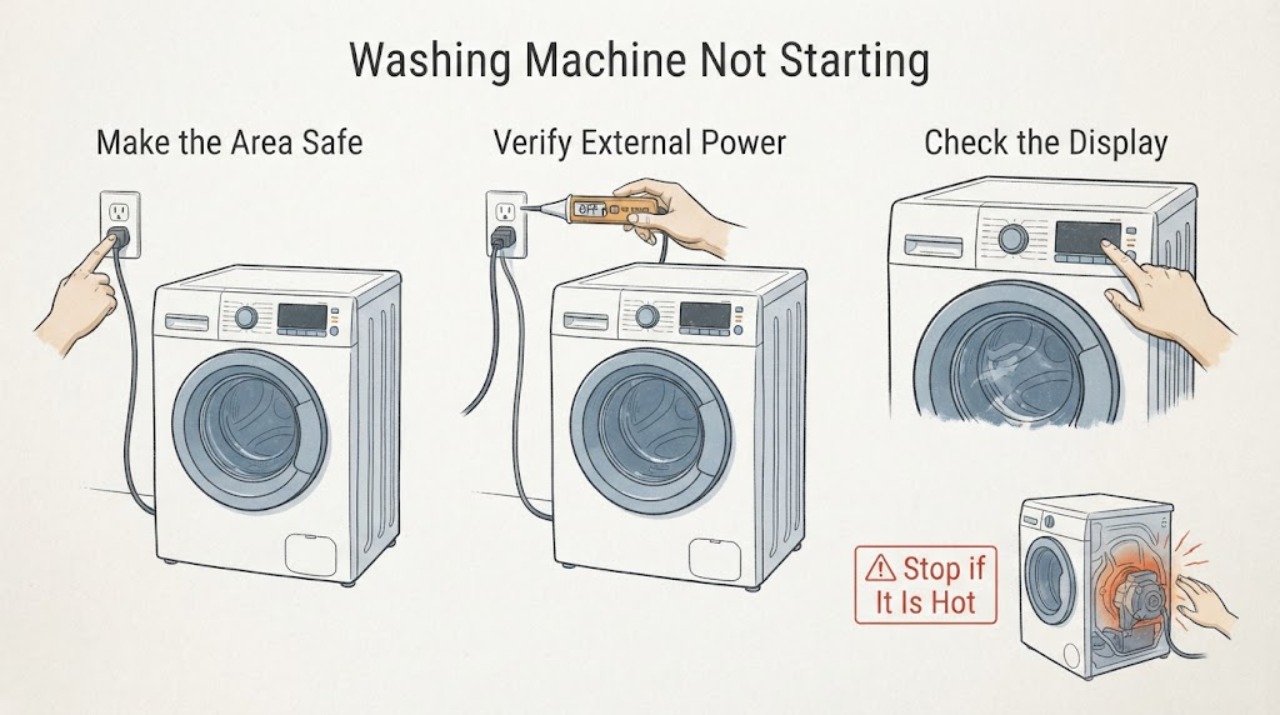
Stop using the machine and keep children away if there is a leak, standing water near the machine or outlet, burning smell, smoke, sparking, exposed wiring, or a repeated breaker trip. Do not touch wet electrical parts or force the door; from a dry, safe position, close the water tap if it is safely reachable and protect the floor.
Expected result: The area is dry and free of odor, smoke, electrical damage, and uncontrolled water, or a listed hazard is present.
Next step: For a hazard, leave the machine off and obtain qualified appliance or electrical help; use emergency help for fire or immediate danger. If safe, continue without opening the cabinet.
Why this matters
Why: An active water or electrical hazard is a stop condition, not a starting fault to test. A dry, quiet area permits external checks only.
-
Check 2
From a dry position, check that the plug is fully seated, the socket switch is on, and the relevant fuse or breaker has not operated. If the socket appears safe, verify it with a small known-working appliance; do not keep resetting protection if it trips again.
Expected result: The machine has no lights or display, the socket or breaker is off, the socket is live but the machine stays dead, or the machine has normal electrical response.
Next step: Restore only an obviously switched-off external supply once. If the breaker trips, the outlet is damaged, or the machine remains dead, leave it off and call a qualified electrician or appliance technician.
Why this matters
Why: No response with a dead socket points outside the washing machine. A live socket with no machine response points toward the plug, lead, internal power supply, or control and needs service if the connection looks sound.
-
Check 3
With the machine dry and powered, confirm the on/off control responds, select a normal programme from the model handbook, cancel any delay-start or lock option shown on the display, and press the model's Start or Start/Pause control as instructed. Record any flashing lights or code before clearing them.
Expected result: A delay, control lock, incompatible option, unselected programme, or wrong start control was active, or the controls respond but the programme still does not begin.
Next step: Correct the setting once and wait for the normal door-lock and fill sequence. If the panel is unresponsive or a code returns, follow the exact code guidance and arrange service when directed.
Why this matters
Why: A machine can appear inactive while waiting for a delayed start or a valid programme/start command. A responsive control panel with no start after the documented setup makes a door, supply, or fault-code branch more likely.
-
Check 4
Check that no garment, detergent residue, or object is caught between the door seal and frame; close the door firmly as the handbook shows and observe the door-lock indicator. Do not slam, pry, bypass, or manually release a locked door.
Expected result: The door cannot close flush, an obstruction is visible, the lock indicator never appears, or the door closes and locks but the cycle still does not start.
Next step: Remove only an accessible obstruction with the machine stopped. If the lock remains absent, a door code appears, or water is inside, keep the door closed and request service rather than bypassing the interlock.
Why this matters
Why: The machine will not safely start until the door is closed and the interlock confirms it. A clear, correctly closed door with no lock confirmation can indicate an interlock or control fault.
-
Check 5
If the door can close and the programme tries to start, inspect the accessible fill hoses for an open tap, kink, leak, or visible blockage and check that the drain hose is not kinked or incorrectly positioned. If water is already in the drum, do not open a filter or hose unless the model handbook gives a safe, unplugged procedure and the water can be contained away from electrics.
Expected result: The tap is closed, the fill hose is kinked or leaking, the drain hose or household connection is blocked or misplaced, or the accessible water paths look correct.
Next step: Correct only an obvious tap or hose-position issue without dismantling the machine. For a leak, standing water, repeated fill/drain fault, or suspected pump or valve problem, keep it off and call service.
Why this matters
Why: A machine may pause or refuse to proceed when it cannot fill or drain safely. A leak or standing water changes this from a simple start check to a water-containment and service issue.
-
Check 6
Record the exact display code or light pattern, model number, water level, and door-lock state. Only if the area is dry, there is no smell, damage, leak, or repeated trip, and the handbook permits it, switch the machine off and perform one normal reset; do not repeatedly cycle power or clear a code that calls for service.
Expected result: The machine starts normally after the documented reset, or the same code, flashing pattern, no-start condition, leak, or electrical symptom returns.
Next step: If it fails again, leave the machine out of service and provide the recorded details to an Indesit technician. If water or electrical danger is present, stop immediately and seek appropriate professional help.
Why this matters
Why: A single reset may clear a transient control state. A returning code or symptom is evidence for model-specific diagnosis, not a reason to keep retrying.
Use your observations
Decision map
Find the observation that best matches what you see, then follow the next safe action.
-
PATH 01Next step
What you see
Water is near an outlet or electrical connection, the machine or floor is wet, there is smoke, burning smell, sparking, exposed wiring, or a repeated breaker trip.
Do this next
Do not touch the machine, plug, outlet, or switches while wet and do not reset it. Move to a dry safe location, keep others away, and obtain qualified appliance or electrical help; use emergency help for fire or immediate danger.
-
PATH 02Next step
What you see
No display or indicator responds and the external socket is not live.
Do this next
Have the household supply checked by a qualified person. If the socket is live but the machine remains dead, keep it off and arrange appliance service.
-
PATH 03Next step
What you see
The panel responds but a delay, lock, programme setting, or door interlock prevents the start sequence.
Do this next
Cancel the delay or lock only as the handbook instructs, choose a compatible programme, close the door without force, and stop if the lock indicator or fault code does not behave normally.
-
PATH 04Next step
What you see
The machine begins its sequence but cannot fill, detects a leak, or has water remaining from an earlier cycle.
Do this next
Close the water tap if safe, inspect only accessible hose routing, and do not open a filter with water present unless the exact manual provides a safe procedure. Persistent faults need service.
-
PATH 05Next step
What you see
A code or flashing pattern returns, or the machine still will not start after safe external checks and one permitted reset.
Do this next
Keep the machine out of service and give the technician the exact code, model, sequence, water level, and door-lock behavior. Do not bypass the lock or replace internal parts based on a code alone.
Helpful context
Understand the symptom
First identify what not starting means
An Indesit washing machine can be completely dead, powered but refusing to begin, waiting for a delayed start, clicking while the door-lock indicator stays off, or starting and then stopping during filling. Note whether the display or indicator lights respond, whether the pump or motor makes a sound, whether the door is locked, and whether water is already in the drum. Do not treat every flashing light as the same fault; use the model handbook and record the exact pattern.
Use the lowest-risk checks first
Keep the floor and controls dry. Check the plug, socket, fuse or breaker only when there is no water or damage around them. If a breaker trips again, the plug or socket is scorched, or there is a burning smell, smoke, or exposed wiring, stop. Never reach into a powered machine, force a locked door, or remove a filter while water can spill onto electrical equipment.
Door, delay, water, and drain are separate gates
A closed door is not necessarily a locked door, and a selected programme may still be waiting for its delay period. A machine may also wait for water or stop after detecting a fill or drain problem. On some Indesit models, a door-lock or software fault is represented by a code or flashing display. Do not infer a universal button sequence; use the exact handbook for the model.
When to stop troubleshooting
If the machine leaks, fills when it should be off, leaves standing water, smells of burning, trips protection, or remains unresponsive after external checks, leave it out of service and arrange qualified appliance or electrical help. Give the technician the model, code or light pattern, water level, door-lock state, and what happened immediately before the failure.
Safety boundary
Stop conditions
- Do not touch wet electrical equipment or switches, and do not reach into standing water.
- Stop for smoke, burning smell, sparking, exposed wiring, damaged plug or socket, or a repeated breaker trip.
- Do not force, pry, or bypass a locked door or door interlock.
- Do not open a pump filter or hose with standing water unless the exact handbook gives a safe, unplugged procedure and the water can be contained safely.
- Do not repeatedly reset power or replace internal electrical, pump, valve, or control parts without model-specific qualified diagnosis.
When checks do not resolve it
Need a professional?
Arrange qualified Indesit appliance service when the machine remains dead with a live socket, the door does not confirm its lock, a code or flashing pattern returns, it will not fill or drain, or it still will not start after the model's safe external checks. Contact an electrician for a damaged socket or repeated breaker trips. Stop immediately for water near electrics, a leak that cannot be controlled, burning smell, smoke, sparking, exposed wiring, or any unsafe condition.
Common questions
FAQ
Why does my Indesit washing machine turn on but not start?
Check the selected programme, delay setting, Start control, door closure and lock indicator, water tap, and drain condition. A returning code or a door that will not lock needs model-specific service rather than a bypass.
Can a closed door still stop an Indesit cycle from starting?
Yes. The door must close in the correct position and the interlock must confirm it. Check for an accessible obstruction and the lock indicator, but never force or bypass a locked door.
Could a water or drain problem prevent the machine from starting?
Yes. A closed or kinked fill hose, leak, blocked drain path, or water left in the drum can stop a programme or prevent it from progressing. Inspect accessible routing only and use the exact handbook before opening any water-bearing part.
Should I keep resetting the breaker if the washer will not start?
No. Check the external supply only from a dry, safe position. If protection trips again, or there is water, a damaged outlet, burning smell, smoke, or sparking, leave the machine off and obtain qualified help.
What information should I give Indesit service?
Provide the model, exact code or flashing-light pattern, whether the display responds, the door-lock state, water level, hose observations, and the point at which the sequence stops. Mention any leak, odor, smoke, spark, or breaker event.
Read the exact guide
Official sources
- Help and Advice | Indesit ServiceIndesit Service · Indesit appliance help, water remaining, pump-filter, and user-manual boundaries
- Indesit | Washing Machine FaqIndesit Service · Indesit washing machine electrical supply, start control, door, water inlet, drain, and troubleshooting guidance
- Indesit | Washing Machine Error CodesIndesit Service · Indesit washing machine door-lock, software, pump, electronic, and start-related fault-code guidance
- Your Family Disaster PlanU.S. Department of Energy; FEMA and American Red Cross · Household electrical safety when water or other damage makes an appliance area unsafe
- Quick GuideIndesit · Indesit washing machine and washer-dryer cycle start, door-lock, pause, and programme behavior
Community feedback
Share a repair observation
Share a plain-text repair observation. Accepted observations are published automatically; this page may take a moment to update.