
On this page
Start here
Quick answer
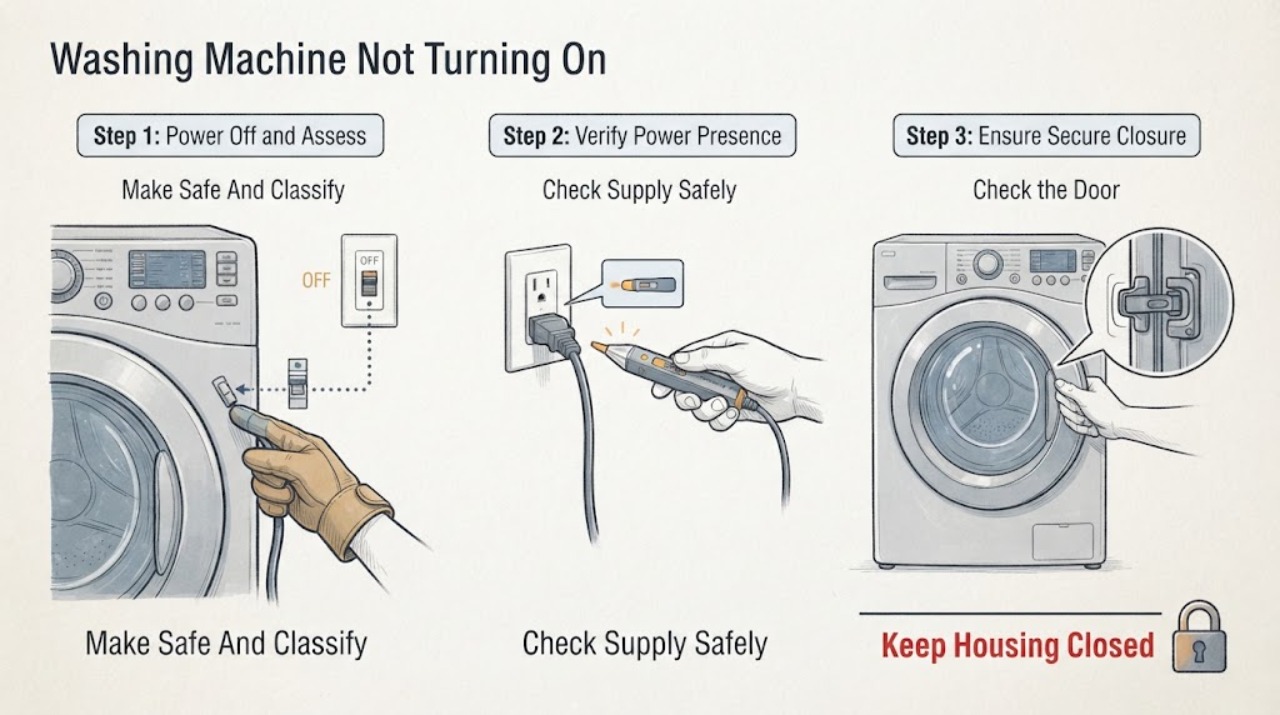
If an Indesit washing machine appears dead, first note whether the display is completely dark or whether it lights but will not start. From a dry, safe position, check the wall switch, plug, cord, and dedicated outlet without opening the appliance; never keep resetting a tripped breaker. If the display works, confirm that the door closes and latches, the programme dial or selector is in a valid position, any delay or control lock is cleared according to the exact manual, and Start is pressed as required. If water is left in the drum, a door or pump code appears, or the machine stops before filling, follow the drain, door, or supply branch rather than forcing the door. Burning smell, smoke, sparks, visible damage, water near electrical parts, or repeated trips are stop conditions requiring qualified service.
Work through in order
Diagnostic checks
Use only checks that match the exact appliance or system and its official guide.
-
Check 1
Stop using the machine and classify the symptom without removing covers: the display is dark, the display is lit but no programme starts, a cycle stops after starting, or the machine shows water or a code. Look and listen only from a dry, safe position.
Expected result: Record display state, indicator lights, exact code or light pattern, water level visible through the door if applicable, and whether the issue began after a leak, a move, or a breaker trip.
Next step: If there is smoke, a burning smell, sparking, a hot or damaged cord, water near the plug or electrical area, or repeated tripping, leave the appliance off and arrange qualified help. Otherwise continue with the external checks.
Stop if: Do not touch the appliance while standing in water, open panels, bypass the door lock, or repeatedly reset a breaker.
Why this matters
Why: A dark panel follows the electrical supply path. A lit panel with no start follows door, selector, lock, delay, or control logic. Water remaining or a stop after start can follow drain or water-supply conditions instead of a total power failure.
-
Check 2
If the panel is dark, turn the appliance off and inspect the accessible plug, cord, wall switch, and outlet from a dry position. Check whether another appliance has also lost power, but do not open the outlet or alter the wiring.
Expected result: The wall supply is off, the plug or cord has scorching or damage, the breaker trips again, or the outlet appears normal but the Indesit panel remains dark.
Next step: Restore a wall switch only if it is safe and has not tripped because of damage; if the machine still has no display, request qualified electrical or appliance service and provide the supply observations.
Stop if: Do not use an extension lead, substitute a fuse, remove the plug, work on a live circuit, or keep resetting protection.
Why this matters
Why: A shared loss points to the household supply. Scorching, damaged insulation, a loose connection, or a recurring trip indicates an electrical fault. A normal-looking outlet does not prove the washing machine's internal supply is sound.
-
Check 3
If the display lights, remove any fabric caught in the door opening, close the door normally, and confirm the programme selector has not been moved away from its intended position. Check for a lock or delay indicator and use only the exact model manual to clear a control lock or delay setting.
Expected result: The door latches and a start indication appears, the lock or delay remains active, the selector or lights show an unexpected position, or the door will not close or lock.
Next step: Try the correct Start control once after the door and selector are normal. If the door will not latch or a lock indication returns, stop and arrange service rather than forcing the door.
Stop if: Do not defeat or bridge the door lock, force the door, or remove the control panel.
Why this matters
Why: An unrecognised closed door, a programme selector in the wrong position, or a delay/control lock can prevent the cycle from starting even when power is present. A persistent F06 or damaged latch points to the door-sensing path.
-
Check 4
If the machine lights but pauses at the beginning or shows a tap symbol or fill-related light, confirm the cold-water tap is open and inspect the visible fill hose for kinks, crushing, loose ends, or a leak. Do not disconnect a pressurised hose.
Expected result: The tap is closed, the hose is kinked or leaking, the visible connections are dry and open, or the fill indication persists with normal supply.
Next step: Correct only an accessible tap position or gentle hose routing, dry any small external moisture, and make one supervised start attempt. If there is a leak or no fill with good supply, turn off the water and arrange service.
Stop if: Do not run with a leaking hose, remove an inlet filter under pressure, or continue if water is reaching the plug, outlet, or electrical controls.
Why this matters
Why: An off tap, kink, blockage, or leak can prevent the machine from progressing and may look like a failed Start command. A normal external supply with a persistent fill indication moves the question toward the inlet valve, filter, pressure, or control and needs model-specific diagnosis.
-
Check 5
If water remains in the drum or the machine will not advance after a previous cycle, inspect the visible drain hose for a kink and check the hose routing against the exact manual. If a pump filter is accessible on this model, use the manual's safe emptying procedure only after isolating power and controlling the water; do not open a flooded filter by guesswork.
Expected result: The drain hose is kinked or inserted incorrectly, water remains, a pump or filter warning appears, the drain path is visibly clear, or water is leaking onto the floor.
Next step: If safe, stop the water supply, keep the plug and outlet dry, and follow the model manual or request service for draining. Do not reopen the door against retained water or reconnect power while the area is wet.
Stop if: Do not reach into a wet filter, tilt a water-filled machine, mix drain chemicals, or connect power near standing water.
Why this matters
Why: Indesit associates retained water and some light patterns with waste-pipe, pump, or filter conditions. Incorrect hose routing can also interrupt a cycle. A clear accessible path with retained water may indicate a pump or control fault, while a leak adds an immediate water-and-electricity boundary.
-
Check 6
Record the exact code or complete flashing-light sequence and compare it with the Indesit page or the manual for the exact model. Only for a code whose official instructions allow it, isolate the appliance from mains power for the stated short interval, wait as directed, and make one restart attempt.
Expected result: The code clears and the machine starts, the code returns, the panel remains blank, or several lights and functions remain unavailable.
Next step: Stop after the one permitted reset. Save the code, model, and result for qualified service when the fault returns or the machine remains inactive.
Stop if: Do not guess a code from another model, cycle the power repeatedly, or continue after heat, odor, smoke, water, or a trip.
Why this matters
Why: A single permitted reset can clear a temporary control or data state, but a returning F01, F09, F12, F18, F06, F05, or F11 condition is evidence for service rather than repeated resets. A blank panel after a safe supply check keeps the electrical or control path open.
-
Check 7
When the external checks do not restore operation, prepare a service description with the model number, display state, code or light pattern, door status, water remaining, supply observations, and the point at which the cycle stops. Keep the appliance off until the fault is assessed.
Expected result: A qualified technician confirms a supply, door lock, inlet, pump, control, or other model-specific fault, or the symptom cannot be reproduced safely.
Next step: Book qualified appliance service and provide the recorded evidence. If the appliance is under a safety recall or the door-lock system is suspected, use the manufacturer's current support route for that model.
Stop if: Do not remove the rear or control panels, probe live circuits, replace a lock or board without diagnosis, or resume use after a safety symptom.
Why this matters
Why: “Not turning on” is not a single part diagnosis. The same symptom can be caused by household power, an interlock, a water or drain hold, or an electronic control fault. A confirmed model-specific diagnosis is needed before selecting a component.
Use your observations
Decision map
Find the observation that best matches what you see, then follow the next safe action.
-
PATH 01Safety boundary
What you see
There is smoke, burning smell, a spark, damaged wiring, water near electrical parts, or a repeated breaker trip.
Do this next
Stop using the machine. From a dry, safe position isolate power only if that can be done without touching damaged equipment or standing in water, then arrange qualified electrical or appliance help.
Why this path and its safety boundary
Safety stop: Do not restart, open panels, or repeatedly reset the breaker.
-
PATH 02Safety boundary
What you see
The display and indicators are completely dark.
Do this next
Check the accessible wall switch, plug, cord, outlet, and circuit from a dry position; a sound supply with a dark panel goes to qualified service.
Why this path and its safety boundary
Safety stop: Do not alter wiring or the outlet.
-
PATH 03Safety boundary
What you see
The panel lights but Start is not accepted, a door or lock indication appears, or the selector is not in its expected position.
Do this next
Close the door without force, restore the selector, and use the exact manual for lock or delay controls; persistent lock indications need service.
Why this path and its safety boundary
Safety stop: Do not bypass the interlock or force the door.
-
PATH 04Safety boundary
What you see
A tap symbol or fill-related light appears, or the programme pauses before taking water.
Do this next
Confirm the cold-water tap and visible fill hose condition; a leak or persistent no-fill condition goes to service.
Why this path and its safety boundary
Safety stop: Do not disconnect a pressurised hose or run with a leak.
-
PATH 05Safety boundary
What you see
Water remains in the drum, the door will not open normally, or a waste/pump indication appears.
Do this next
Keep power isolated and water controlled; follow the exact manual for a safe drain check or request service.
Why this path and its safety boundary
Safety stop: Do not open a wet filter by guesswork or connect power near standing water.
-
PATH 06Safety boundary
What you see
A code or multi-light pattern remains after its exact model meaning is checked, or it returns after one permitted reset.
Do this next
Record the code and request model-specific service; F06, F12, F01, F09, F18, F05, and F11 each point to different decision paths in Indesit's guide.
Why this path and its safety boundary
Safety stop: Do not apply a code meaning from another model or keep resetting.
-
PATH 07Safety boundary
What you see
Power, door, programme, water, and safe reset checks do not restore operation.
Do this next
Leave the machine off and book qualified appliance service with the model and recorded observations.
Why this path and its safety boundary
Safety stop: Do not perform live testing or replace internal parts from the symptom alone.
Helpful context
Understand the symptom
Start by separating no power from no programme start
“Not turning on” can mean a dark panel, a panel that lights but will not accept a programme, or a programme that starts and then stops. Check which state is present before changing settings. Indesit notes that models vary, so record the model number, selector position, light pattern, and any code rather than applying a control combination from a different machine. This avoids treating a door-lock or water-supply hold as a failed main control.
Water and drain conditions can look like a start failure
A machine may be powered but unable to proceed when the door is not sensed as closed, the cold-water supply is off, the fill hose is kinked, or retained water points to a drain restriction. Indesit also warns that hose position can affect a cycle and that indicator patterns differ by model. Inspect only accessible connections and use the manual for any pump-filter procedure; never open a wet filter or move a water-filled appliance while it is connected to power.
Codes narrow the path but do not identify a universal repair
Indesit lists F01 and F18 as control or data faults that may justify a brief power reset, F06 as a door-lock fault, F05 and F11 as waste or pump-related conditions, and F12 as an electronic control fault associated with not turning on. These labels are model-family guidance, not permission to replace a board or lock. Write down the exact code and use the manual for the specific model; a returning code belongs with qualified service.
Safety boundary
Stop conditions
- Water near the plug, outlet, cord, or control area, or standing water where power must be handled.
- Smoke, burning smell, sparks, visible arcing, melted insulation, or a hot plug or cord.
- Repeated breaker trips or any need to open an outlet, probe a live circuit, or alter wiring.
- A door that will not latch or open safely, especially with water retained in the drum.
- A leaking or pressurised hose, an uncontrolled drain, or a wet filter that cannot be handled by the exact manual procedure.
Only after diagnosis
Potential parts
- washing machine door-lock assembly
Consider only if a qualified diagnosis confirms that the door-lock or door-sensing path is faulty and the exact model fit is verified.
Confirm the complete model and manufacturer fit information before ordering; a no-start symptom alone does not identify this part. - washing machine inlet valve
Consider only when supply, hose, and accessible inlet checks are normal but a technician confirms that the valve does not admit water.
Verify model-specific fit and electrical specification with the manufacturer or qualified technician. - washing machine electronic control module
Consider only after a returning control or data code and the external supply and interlock paths have been professionally diagnosed.
Do not select a module from a code alone; confirm the exact model and programmed fit through qualified service.
When checks do not resolve it
Need a professional?
Arrange qualified appliance service when the panel stays dark despite a sound accessible supply, or when the machine remains inactive after the safe external checks., Arrange service for a door that will not latch, a returning door-lock code, a persistent fill indication with good supply, or retained water after the safe drain path is checked., Use the exact model manual or Indesit support for a code or flashing-light pattern; do not transfer a code meaning between models., Contact licensed electrical help for a damaged cord or plug, scorching, a repeated breaker trip, sparks, or suspected outlet or circuit trouble., For smoke, fire, active arcing, or a strong burning smell, stop immediately and use emergency help from a safe location rather than testing again.
Common questions
FAQ
Why is my Indesit washing machine not turning on at all?
First separate a dark display from a lit panel that will not start. Check the accessible supply from a dry position, then stop for damage or repeated trips. If the supply is sound but the panel remains dark, arrange qualified service rather than opening the appliance.
Why does my Indesit washer light up but not start?
Check the door latch, selector position, delay or control-lock indication, and any exact code. A door-lock fault or a programme that is not correctly selected can block Start even when the display works.
Can no water supply make an Indesit washing machine look dead?
Yes. If the panel is active but the programme pauses before filling, an off tap, kinked fill hose, blockage, or leak may be preventing progress. Correct only safe, accessible hose routing and request service for a persistent fill indication or any leak.
What should I do if an Indesit washing machine shows F12?
Indesit associates F12 with an electronic control condition and a machine that is not turning on. Record the exact model and code, follow the model-specific official guidance, and arrange service if it returns; do not replace a control module from the code alone.
Is it safe to reset the washer repeatedly?
No. Only perform a short power reset when the exact official instruction allows it, and make one restart attempt. Stop for water near electrical parts, smoke, burning smell, sparks, damaged wiring, or a repeated breaker trip.
Read the exact guide
Official sources
- Indesit | Washing Machine Error Codes | Indesit ServiceIndesit Service · Indesit washing machine error-code meanings and model-specific service guidance
- Washing Machines SafetyElectrical Safety First · Electrical safety around washing machines, water, damage, heat, arcing, and breaker trips
- Indesit | Washing Machine Faq | Indesit ServiceIndesit Service · Indesit washing machine power, programme, door, water supply, hose, drain, and indicator troubleshooting
Community feedback
Share a repair observation
Share a plain-text repair observation. Accepted observations are published automatically; this page may take a moment to update.