
On this page
Start here
Quick answer
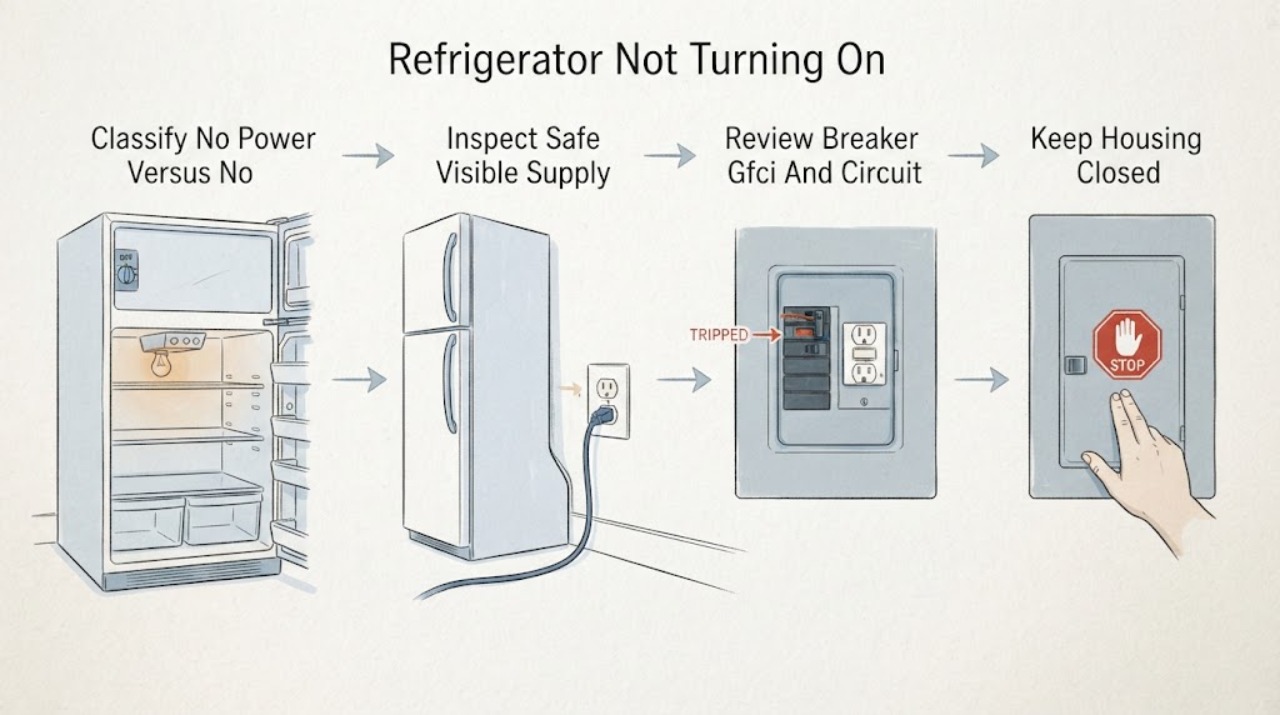
Use this page only when the JennAir refrigerator is electrically dead or the controls do not respond. First distinguish that from a refrigerator with working lights/display that has stopped cooling or whose compressor is not starting; that is a different service path. From a dry, safe position, note whether the interior light, dispenser light, display, alarm, and any control respond, then inspect only the visible plug/cord, user-accessible outlet or disconnect, and breaker/GFCI status. JennAir's official no-operation guidance calls for a grounded three-prong supply, a separate circuit, no extension cord, and model-specific control instructions. A lit display can still be in sleep, control-lock, Sabbath, showroom/demo, or power-outage behavior on some JennAir models; the exit sequence varies by model. Follow the exact Owner's Manual for one ordinary control action or one safe documented power reset only when there is no electrical hazard and the protective device is not repeatedly opening. If the refrigerator remains completely dark, the panel stays unresponsive, the breaker/GFCI trips again, there is smoke, burning odor, heat, water near electrical parts, or access would require moving a built-in unit or opening a panel, leave it off and arrange qualified electrical and JennAir service. Do not perform live tests, bypass grounding or interlocks, use an extension cord, or replace a board, cord, fuse, or control from the symptom alone.
Before you begin
Safety first
- The owner may classify visible symptoms, record model and circuit information, inspect dry external supply hardware, follow ordinary model-specific control instructions, and perform one documented reset only when safe. Qualified personnel must handle electrical testing, panels, built-in-unit movement, internal wiring, controls, compressor/cooling components, and any wet, hot, damaged, or repeatedly tripping installation.
Work through in order
Diagnostic checks
Use only checks that match the exact appliance or system and its official guide.
-
Check 1
Without opening anything, check whether the interior light, dispenser light, display, alarm, and buttons respond. Note whether the refrigerator is completely dark, whether only the display is dark, or whether the display/lights work while the cabinet is not cooling. Do not press controls repeatedly or open a door as a substitute for an electrical test.
Expected result: Nothing responds; only the display is dark; a logo or lock indication is visible; or lights/display respond but cooling is absent.
Next step: Record the pattern and exact model, then follow the matching branch. If smoke, burning odor, abnormal heat, water near electrics, or a tripped protective device is present, stop immediately.
Stop if: Do not remove panels, probe wiring, bypass a control lock/interlock, or reconnect a unit with an electrical hazard.
Why this matters
Why: No response supports a power or interface branch. A logo, lock, sleep, Sabbath, showroom/demo, or power-outage indication can be a mode/state issue. Working lights or display means the unit is not completely without power and belongs in a cooling/no-cooling or mode branch rather than the dead-appliance route.
-
Check 2
From a dry, safe position, inspect the visible power cord, plug, user-accessible outlet or disconnect, and any obvious switch controlling the outlet. Compare the arrangement with the exact JennAir installation instructions: grounded three-prong connection, no extension cord or power strip, and no crushed, wet, loose, hot, or discolored hardware. Do not move a built-in refrigerator or open an electrical box.
Expected result: The plug is out, a switch/disconnect is visibly off, the outlet arrangement is not grounded or uses an extension, the cord/connection is damaged, or the visible supply appears normal.
Next step: Correct only an obvious user-accessible position allowed by the manual and only when there is no hazard. Otherwise leave the refrigerator off and arrange qualified electrical service; do not substitute another outlet as a test.
Stop if: Do not touch wet/hot/damaged hardware, use an extension cord, defeat grounding, pull out an integrated unit, or perform a live voltage test.
Why this matters
Why: A visible open supply can explain a completely dark refrigerator. A damaged or ungrounded connection is a safety fault. A normal-looking exterior does not prove that the outlet, branch circuit, control, or internal supply is healthy.
-
Check 3
Without repeatedly resetting anything, record whether a breaker, GFCI, or household fuse is visibly open and whether other lights or appliances lost power. Note the refrigerator's installation type and whether it is on a dedicated circuit. Do not increase a fuse/breaker rating, bypass a GFCI, or use another circuit to test the refrigerator.
Expected result: Only the refrigerator circuit is affected; several household loads are out; the protective device has opened; no protective device appears open; or the panel/connection is inaccessible.
Next step: Leave the circuit as found and have a qualified electrician assess it, especially if it opens again. If the circuit is normal but the refrigerator remains dead, arrange JennAir appliance service.
Stop if: Do not repeatedly reset a breaker/GFCI, replace a fuse with a larger one, remove a panel, or touch a wet/overheated electrical area.
Why this matters
Why: A refrigerator-only loss may still be an appliance, receptacle, or dedicated-circuit issue; several affected loads make a household circuit issue more plausible. JennAir directs continued power problems to an electrician, and the exact installation is model-dependent.
-
Check 4
Use the exact JennAir Owner's Manual to identify a visible sleep, control-lock, Sabbath, showroom/demo, power-outage, or cooling-off indication. Perform only the ordinary user action documented for that model; do not guess a long-press combination. Remember that a control lock can disable dispenser inputs without removing refrigerator power.
Expected result: A mode/lock or power-outage message is visible; the panel wakes but cooling is off; the panel remains dark; or the mode is unknown.
Next step: Follow only the exact manual's mode-exit or cooling-on instruction once. If the panel remains unresponsive or the appliance does not return to normal, stop at user-level checks and arrange service.
Stop if: Do not enter service diagnostics, clear an unknown code, bypass a lock/interlock, remove a display or hinge cover, or repeatedly cycle power.
Why this matters
Why: A documented mode can explain an apparently unresponsive interface or cooling-off state. A dark panel with no mode indication remains a supply/control problem. A panel that responds but has no cooling is not the same as an electrically dead refrigerator.
-
Check 5
Only when there is no smoke, odor, heat, water, damaged hardware, or recurring protective-device trip, and only if the exact model guide permits it, perform one documented power reset or normal control restart. Record whether the display, interior light, controls, and cooling indication return. Do not use a reset to keep an unknown electrical fault operating.
Expected result: The refrigerator returns to normal user operation; the panel returns but cooling is absent; the panel remains dead; the same code returns; or the protective device opens again.
Next step: Keep the unit out of service for a persistent no-power or control fault and contact JennAir or qualified service. Give the model, installation type, circuit history, visible symptoms, mode/code, and reset result to the technician.
Stop if: Do not reset repeatedly, run with covers off, perform live tests, bypass safety devices, or reconnect after smoke, burning odor, heat, water, or another trip.
Why this matters
Why: A one-time recovery may reflect a power interruption or mode state, but it does not prove an intermittent fault is repaired. A working interface with no cooling belongs to a separate cooling/no-start diagnosis; a dead panel or recurring trip needs service.
Use your observations
Decision map
Find the observation that best matches what you see, then follow the next safe action.
-
PATH 01Safety boundary
What you see
The interior light, display, dispenser light, alarms, and controls are all inactive.
Do this next
Leave the unit off and arrange qualified electrical/appliance service, especially if the protective device opened or the refrigerator is hard-wired or built-in.
Why this path and its safety boundary
Why it matters: An open supply or household circuit can explain a dead unit. If the visible supply is normal, an internal power path, control, or wiring fault remains possible; no user-level observation selects a board or cord.
Safety stop: Do not keep resetting, use a larger fuse/breaker, move the unit, open panels, or perform live tests.
-
PATH 02Safety boundary
What you see
A display or JennAir logo is lit, but controls appear inactive or the refrigerator seems not to respond.
Do this next
Use the exact Owner's Manual for the visible state and perform one ordinary user action. If the panel stays unresponsive or the refrigerator remains off, arrange service.
Why this path and its safety boundary
Why it matters: JennAir documents sleep, control lock, power-outage confirmation, Sabbath, and showroom/demo behaviors on applicable models. These states can mimic a no-start complaint but are not interchangeable across model families.
Safety stop: Do not guess a button sequence, enter diagnostics, or remove the interface/hinge panel.
-
PATH 03Safety boundary
What you see
The interior light or display responds, but the refrigerator is not cooling or the compressor does not start.
Do this next
Check the exact model's cooling-on/mode instruction once. If cooling remains absent, stop this no-power workflow and arrange model-specific refrigeration service.
Why this path and its safety boundary
Why it matters: This is not an electrically dead refrigerator. It belongs to a cooling/no-cooling or not-starting service path, except when the exact manual confirms showroom/demo or another user mode has intentionally disabled cooling.
Safety stop: Do not open the sealed system, test a compressor or board live, or repeatedly cycle power to force cooling.
-
PATH 04Safety boundary
What you see
A breaker/GFCI/fuse is open, opens again, or multiple household loads lose power when the refrigerator is unavailable.
Do this next
Leave the circuit and refrigerator off and contact a qualified electrician. Arrange appliance service after the supply is safe or in parallel when the refrigerator is implicated.
Why this path and its safety boundary
Why it matters: The electrical installation or appliance load may be unsafe; repeated resets cannot distinguish them. JennAir's official guidance sends a continuing power problem to an electrician.
Safety stop: Do not reset repeatedly, change protection, use an extension cord, bypass grounding/GFCI, or touch damaged hardware.
-
PATH 05Safety boundary
What you see
Visible supply is safe and apparently available, but the panel and normal controls remain unresponsive after the exact model's one documented user-level reset or mode check.
Do this next
Keep the refrigerator out of service and arrange JennAir or qualified appliance service with the model, installation type, visible indicators, and event history.
Why this path and its safety boundary
Why it matters: An internal power, interface, control, or wiring fault is more likely than a simple lock or sleep state. The official JennAir interface guidance directs persistent nonresponse to service.
Safety stop: Do not remove covers, replace a control/board/cord, probe circuits, bypass an interlock, or repeatedly restore power.
Helpful context
Understand the symptom
Define “not turning on” before troubleshooting
An entirely dark refrigerator, a dead control panel, and a refrigerator whose display works but does not cool are not the same complaint. If the display, lights, or dispenser respond, record that fact and use the model's cooling/no-cooling guidance instead of treating the appliance as electrically dead. JennAir's no-operation support page is specifically organized around supply, protective devices, and controls.
A mode can look like a dead control
Depending on the JennAir architecture, sleep mode may leave only a logo lit, control lock may disable dispenser inputs, Sabbath mode may suppress lights and sounds, and showroom/demo mode may turn cooling off while leaving interior lighting. These are not universal features or universal button sequences. Use the exact model manual and do not borrow a reset or mode-exit sequence from a different JennAir refrigerator.
Keep food and power safety separate
When the refrigerator has no power, keep the doors closed as much as practical and protect perishable food using the model-appropriate food-safety guidance. Do not taste food to decide whether it is safe. If the cord, outlet, panel, or surrounding floor is wet, hot, scorched, or damaged, safety and qualified electrical service take priority over restoring cooling.
When checks do not resolve it
Need a professional?
Safety scope: The owner may classify visible symptoms, record model and circuit information, inspect dry external supply hardware, follow ordinary model-specific control instructions, and perform one documented reset only when safe. Qualified personnel must handle electrical testing, panels, built-in-unit movement, internal wiring, controls, compressor/cooling components, and any wet, hot, damaged, or repeatedly tripping installation.
Common questions
FAQ
How do I know whether my JennAir refrigerator has no power or simply is not cooling?
Check the interior light, dispenser light, display, logo, alarm, and controls. If none respond, follow the no-power path. If the display or lights respond but the cabinet is not cooling or the compressor is not starting, the refrigerator has power and needs a cooling/no-cooling diagnosis instead.
What power supply does JennAir specify for a refrigerator?
JennAir's official full-size no-operation guidance calls for a grounded three-prong, 115-volt, 60-Hz, 15- or 20-amp supply, recommends a separate circuit, says the outlet should not be switched, and says not to use an extension cord. Treat these as manufacturer guidance for the applicable page and verify the exact model and local installation requirements.
Could showroom or demo mode make a JennAir refrigerator seem not to turn on?
On some JennAir built-in or column models, showroom/demo mode can turn cooling off while leaving interior lighting or a responsive-looking interface. Use the exact Owner's Manual for the mode indicator and exit sequence; do not copy a sequence from another model.
Does control lock turn off my JennAir refrigerator?
No. JennAir says the control-lock feature disables dispenser controls but does not shut off refrigerator power, ice-maker power, or dispenser lighting. If every light and control is dead, investigate the power-supply branch instead; the lock procedure itself is model-specific.
Can I reset a JennAir refrigerator that will not turn on?
Only use one documented model-specific reset when there is no smoke, burning odor, heat, water, damaged hardware, or recurring breaker/GFCI trip. JennAir's interface pages direct persistent nonresponse to service. Do not keep cycling power or use a reset to reproduce an unexplained fault.
What should I do with the food while the JennAir refrigerator has no power?
Keep the doors closed as much as practical and evaluate food using temperature and official food-safety guidance rather than taste. JennAir's power-outage page says refrigerated food should stay at or below 40°F and frozen food at or below 0°F; follow local guidance if temperatures or time are uncertain.
Read the exact guide
Official sources
- Control Panel or Interface Not Working - Built-In RefrigeratorJennAir Product Help · Opened the official JennAir built-in interface page; used only for the conditional built-in mode/control branches and persistent nonresponse boundary.
- Control Panel or Interface Not Working - ColumnJennAir Product Help · Opened the official JennAir column interface page; used conditionally to show that sleep, Sabbath, showroom, and reset behavior varies by architecture and model.
- Using the Control Lock FeatureJennAir Product Help · Opened the official JennAir control-lock page; used to distinguish a locked dispenser interface from loss of refrigerator power and to preserve the model-specific instruction boundary.
- No Operation - Will Not Turn On - RefrigeratorJennAir Product Help · Opened the official JennAir no-operation page; used for the general no-power classification, grounded supply/no-extension guidance, protective-device branch, and exact-manual control boundary. The architecture-specific page is not treated as universal for every JennAir refrigerator.
- What to Do During a Power OutageJennAir Product Help · Opened the official JennAir power-outage page; used for keeping doors closed and the food-safety boundary when the refrigerator has no power, not to diagnose an electrical component.
- Checking the Power SupplyJennAir Product Help · Opened the official JennAir power-supply page; used conditionally for grounded supply, separate-circuit/no-extension guidance and electrician escalation, not to assign an undercounter architecture to an unspecified refrigerator.
Community feedback
Share a repair observation
Share a plain-text repair observation. Accepted observations are published automatically; this page may take a moment to update.