
On this page
Start here
Quick answer
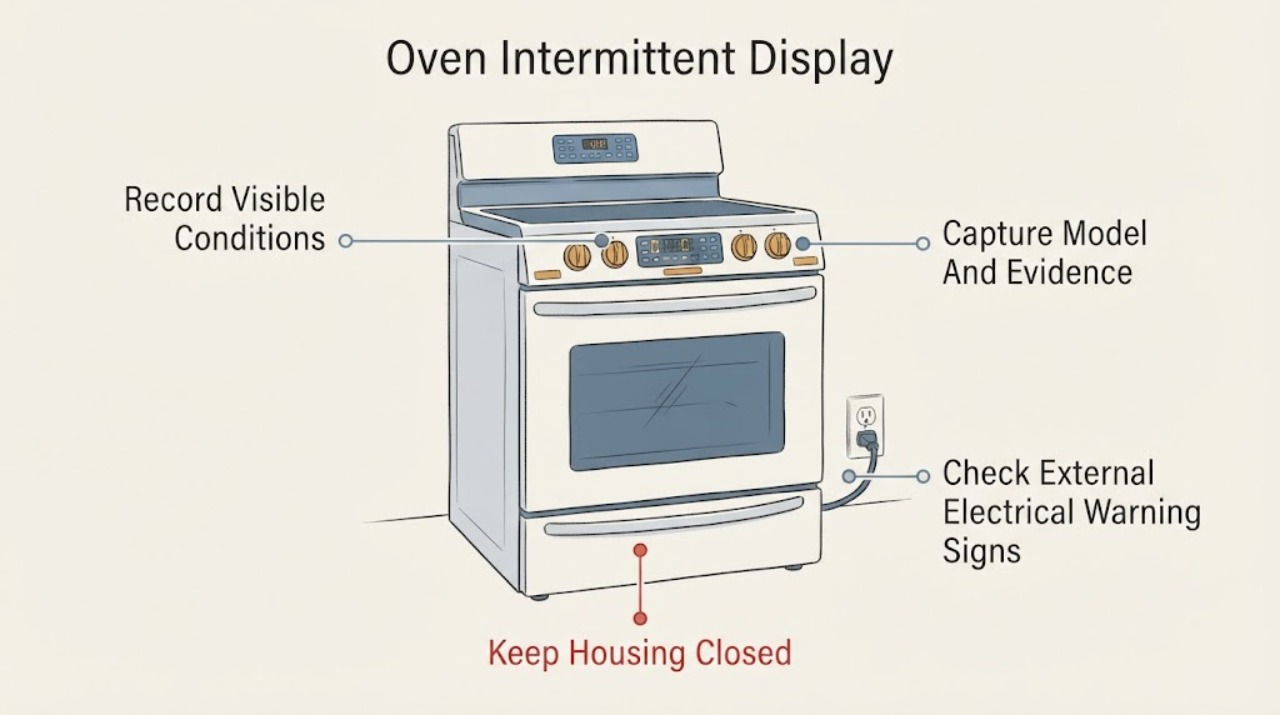
An intermittent Kenmore oven display is a symptom, not proof that a control board or display module has failed. When it happens, stop trying to reproduce it with the oven hot, record whether the oven still heats and whether the controls respond, and photograph any visible code or clock state. Find the complete model number before using a manual: Kenmore says its manual lookup is model-specific and requires at least 11 characters. If a breaker repeatedly trips, there is a shock, smoke, burning smell, heat at the outlet or cord, or other electrical damage, stop using the oven and arrange qualified repair or electrical service. For a display-only recurrence without a safety sign, give Kenmore support or a qualified servicer the model, symptom timing and photos; do not open the console or order an unverified board.
Before you begin
Safety first
- Limit owner work to observing and photographing the display, recording the model and checking for external electrical warning signs from a safe dry position. Do not open the control console, probe live wiring, strike the panel, repeatedly reset a tripped breaker, bypass protection or order an unverified electronic part.
Work through in order
Diagnostic checks
Use only checks that match the exact appliance or system and its official guide.
-
Check 1
During the next occurrence, without striking the panel or deliberately reheating the oven, record whether the display is blank, flickering, missing segments or lit but unresponsive, and whether the oven light, heating and keys still work.
Expected result: The display changes while other functions continue, or the display and oven functions fail together.
Next step: Photograph the state and stop using the oven if the event is accompanied by smoke, heat, shock, burning smell or a tripped protective device; otherwise continue to model-specific documentation and service triage.
Why this matters
Why: A display-only event and a wider loss of power/control are different symptom boundaries; neither observation alone identifies a failed board or display module.
-
Check 2
Photograph the failing display and record any code, clock reset, time, cooking state and whether the event followed a power interruption; read the complete Kenmore model number from the rating plate or documentation.
Expected result: The model number is complete and can be entered in Kenmore's manual search, or it is missing/unclear.
Next step: Use the exact manual when the model is available; if it is not, send the photos and model-plate details to Kenmore support or a qualified servicer rather than borrowing instructions from another oven.
Why this matters
Why: Kenmore says its manual lookup is model-specific and requires a model number of at least 11 characters; without it, button sequences and parts cannot be safely matched.
-
Check 3
From a dry, safe position, look for a tripped breaker, smoke, burnt odor, shock, or an unusually hot outlet, switch, cord or plug; do not remove covers or probe wiring.
Expected result: A breaker repeatedly trips, a shock occurs, smoke/burning odor is present, or an outlet/switch is hot.
Next step: Stop using the oven; isolate power only by a safe method, do not reset repeatedly, and arrange qualified appliance repair or electrician service.
Why this matters
Why: These are electrical safety warning signs, not evidence that a particular display part is bad. CPSC directs users to stop using and obtain repair/electrical evaluation in these conditions.
-
Check 4
Give Kenmore support or a qualified servicer the model number, display photographs, exact timing, whether heat and controls continued, and any breaker or safety observations.
Expected result: The display fault recurs, the exact manual does not resolve it, or diagnosis would require opening the console or testing live/internal wiring.
Next step: Keep the oven out of service if any safety warning is present and arrange model-qualified service; do not order an unverified board or bypass a protective device.
Why this matters
Why: Kenmore provides model manuals and customer-care/repair routes, but the no-model symptom does not establish whether the cause is the display, control, wiring or supply.
Use your observations
Decision map
Find the observation that best matches what you see, then follow the next safe action.
-
PATH 01Next step
What you see
The display flickers or loses segments, but the oven light, heat and controls continue to work.
Do this next
Photograph the state, capture the exact model, consult that model manual and arrange service if the symptom recurs; do not open the console.
Why this path and its safety boundary
Why it matters: This is a display/control symptom with no confirmed failed component; a generic part or button sequence cannot be selected without the model.
-
PATH 02Next step
What you see
The display goes blank and the oven functions also stop, or the clock repeatedly resets.
Do this next
Record the event and check for electrical warning signs from a safe position; if a breaker repeatedly trips or any shock, smoke, burnt odor or hot outlet occurs, stop using the oven and obtain qualified service. Otherwise provide the model and evidence to Kenmore support.
Why this path and its safety boundary
Why it matters: The report may involve a broader loss of power or control, but the observation does not distinguish a house circuit issue from an internal oven fault.
-
PATH 03Next step
What you see
The display fault occurs with smoke, burning odor, shock, a hot outlet/cord, or repeated breaker trips.
Do this next
Stop using the oven, isolate power only when safe, do not repeatedly reset the breaker or open the control panel, and arrange qualified appliance or electrical service.
Why this path and its safety boundary
Why it matters: This is an electrical safety condition rather than a routine display adjustment.
-
PATH 04Next step
What you see
The model number is missing or cannot be read.
Do this next
Photograph the rating plate and contact Kenmore support for identification; do not apply another Kenmore model's reset, wiring or parts instructions.
Why this path and its safety boundary
Why it matters: Kenmore's manual lookup cannot be narrowed to the correct oven/range instructions or compatible parts.
Helpful context
Understand the symptom
First separate a display symptom from a full power loss
When the display misbehaves, note the exact state: completely blank, flickering, missing segments, showing a changed clock, or lit but ignoring keys. At the same moment, note whether the oven light, heating, timer and other controls still respond. These observations describe the fault boundary; they do not prove that the display, control board, wiring or house supply is the failed part. Do not press the panel, strike the console or keep heating the oven to make the fault recur.
Capture the model and the visible evidence
Photograph the display while it is failing, record any code or clock reset, and write down whether the event followed a power interruption, a cooking cycle or simply occurred while idle. Locate the complete Kenmore model number from the rating plate or documentation before selecting a manual. Kenmore's manual portal says model numbers are at least 11 characters and uses that number to return the matching oven or range resources.
Use the exact manual instead of a generic reset sequence
With the model in hand, retrieve the matching Kenmore manual and compare its display, clock, lock and diagnostic instructions. Kenmore's public portal is a lookup entry point, so an unscoped display symptom does not justify copying a button combination from another range or wall oven. If the manual does not resolve a recurring display fault, provide the model and the recorded behavior to Kenmore support or a qualified servicer.
Stop for electrical warning signs
If the oven repeatedly trips a fuse or breaker, gives a shock, smokes, smells burnt, or leaves an outlet, switch, cord or plug unusually hot, stop using it. Do not repeatedly reset the protective device or open the control panel. CPSC guidance says to unplug an appliance that repeatedly trips a breaker or gives a shock and have it repaired or replaced; it also says not to use a hot outlet or switch until a qualified electrician checks it.
Hand off an unresolved intermittent fault
A service request should include the complete model number, oven type if known, display photographs, the exact time and condition of each occurrence, whether heating continued, whether keys responded, and whether a breaker moved. That evidence helps the servicer choose the model-specific manual and distinguish a display-only report from a broader power or control problem. Do not name or buy a control board, display module, harness or fuse without an exact model match and a qualified diagnosis.
When checks do not resolve it
Need a professional?
Use Kenmore support, a qualified appliance servicer or an electrician for persistent display loss, broader power loss, repeated trips or any electrical warning sign.
Safety scope: Limit owner work to observing and photographing the display, recording the model and checking for external electrical warning signs from a safe dry position. Do not open the control console, probe live wiring, strike the panel, repeatedly reset a tripped breaker, bypass protection or order an unverified electronic part.
Common questions
FAQ
Does an intermittent display prove the Kenmore control board is bad?
No. It is a symptom. Record whether heat and the controls continue, capture the model and use the exact manual or a qualified diagnosis before naming a display, board, wiring or power fault.
Can I use another Kenmore oven's reset sequence?
Do not assume it applies. Kenmore's manual portal is model-specific, so retrieve the manual for the complete model number before using a documented button sequence.
What if the display problem trips the breaker?
Stop using the oven. CPSC says an appliance that repeatedly trips a breaker or gives a shock should be unplugged and repaired or replaced; do not repeatedly reset the breaker or open the console.
Read the exact guide
Official sources
- Contact Us | Kenmore Customer SupportKenmore / Transform SR Brands LLC · Official Kenmore contact page for product questions and repair routing; it does not establish a component diagnosis.
- Find Your Manual | Kenmore Appliance Manuals & GuidesKenmore / Transform SR Brands LLC · Official Kenmore manual portal; applies to Kenmore ovens/ranges as a lookup process, not to a particular display fault without the model.
- Customer Care & Support | Kenmore AppliancesKenmore / Transform SR Brands LLC · Official Kenmore support hub; it lists manuals, customer care and repair resources but does not diagnose this no-model symptom.
- CPSC and NESF Urge Consumers to Plug Into Electrical SafetyU.S. Consumer Product Safety Commission · Official U.S. CPSC safety guidance for appliances that repeatedly trip breakers, give shocks or have hot electrical connections; it does not diagnose Kenmore ovens.
Community feedback
Share a repair observation
Share a plain-text repair observation. Accepted observations are published automatically; this page may take a moment to update.