
On this page
Start here
Quick answer
For Kenmore Pro 790.42003, a report of the upper oven stopping around 280–285°F at a 350°F Bake setting does not by itself identify a sensor, element, or control failure. The report did not check the lower oven or other modes, so first verify the complete model and whether the symptom is upper-only. Confirm Bake and the set temperature, allow the exact manual's preheat indication to finish, and measure with a properly placed oven thermometer rather than judging by the display alone. Compare the upper cavity with the lower only as a safe observation, not as a reason to swap parts. Use the model's documented calibration feature only if the thermometer shows a repeatable offset; do not enter service mode or perform live electrical tests. If the upper oven remains capped near 285°F, the bake element does not heat normally, both cavities are affected, or the temperature is unsafe or uncontrolled, stop using the oven and arrange qualified service.
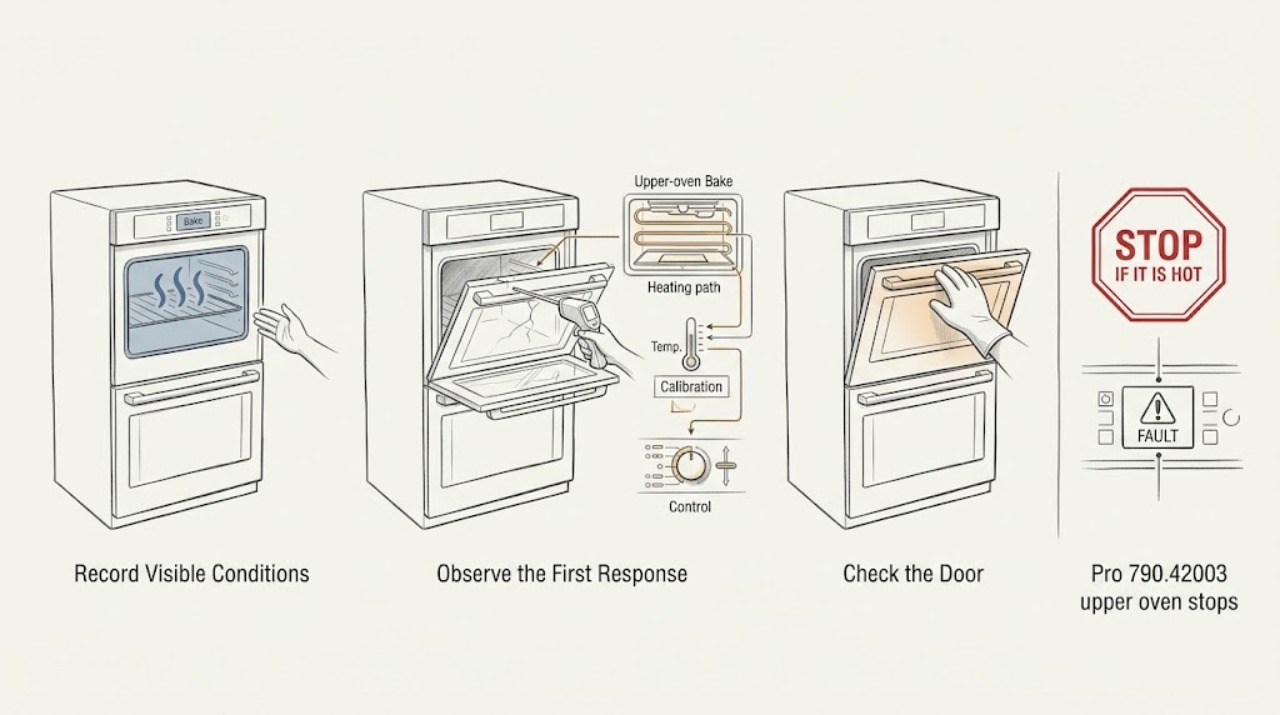
Work through in order
Diagnostic checks
Use only checks that match the exact appliance or system and its official guide.
-
Check 1
Read the full rating-plate model and serial information and confirm Kenmore Pro 790.42003, including any suffix or market marking. Record whether the appliance has separate upper and lower cavities and which cavity is being tested.
Expected result: The label matches 790.42003; it has a suffix or market not captured in the topic; or the appliance is not a double wall oven.
Next step: Use the complete model manual from Kenmore's official portal. If the label does not match, stop this model-specific path and do not borrow its calibration or control steps.
Stop if: Do not remove trim, enter a service menu, or select a part from the 790 prefix alone.
Why this matters
Why: The upper/lower controls, calibration behavior, and manual depend on the complete identity. The exact report names 790-42003 but leaves the lower oven and other modes untested, so that scope must not be assumed.
-
Check 2
With the oven cool and the door closed, verify that the affected cavity is set to Bake at the intended temperature, that any required start/accept step has completed, and that Delay Start, lockout, Sabbath mode, or a self-clean lock is not active. Record whether the control shows an active preheat state.
Expected result: Bake starts after a setting correction; the display is active but the upper cavity remains cool; preheat never completes; or the lower cavity responds differently.
Next step: Follow only the exact manual for a control-state change. If the cavity remains cold or the mode cannot be selected, stop and arrange service without opening the control area.
Stop if: Stop for an unresponsive control, an oven that heats after Off, smoke, arcing, or a door/latch that will not operate normally.
Why this matters
Why: A mode or lock state can imitate no heat. If the upper cavity alone remains cool with an active control, the affected path is narrower than a whole-appliance power failure, but no component is proven.
-
Check 3
Place an oven-safe thermometer in the affected upper cavity at the position required by the exact manual, keep the door closed, and compare the thermometer with the setpoint after a complete normal preheat and several stable cycles. Do not use a phone sensor or touch the element.
Expected result: The thermometer approaches the setpoint; it repeatedly levels near 280–285°F while set to 350°F; it fluctuates broadly; or the displayed temperature and thermometer disagree by a stable amount.
Next step: Repeat only as the exact manual permits with consistent placement. If the measured offset is repeatable and the manual provides user calibration, record the result before considering that adjustment; otherwise arrange service.
Stop if: Stop if the thermometer is damaged, the oven temperature rises uncontrollably, or smoke, burning odor, arcing, or a hot control area appears.
Why this matters
Why: A repeatable thermometer result separates actual under-temperature from a display or placement issue. The exact report establishes the upper-cavity symptom but not whether its reading was independently measured, so one approximate observation is not enough to name calibration or a part.
-
Check 4
If the lower cavity can be operated normally and safely, compare only its broad behavior with the upper cavity using the exact manual's matching Bake procedure and the same thermometer method. Do not infer that the lower cavity shares the upper cavity's fault.
Expected result: Only the upper cavity caps near 285°F; both cavities underheat; the lower cavity reaches its target while the upper does not; or the lower cavity was not tested.
Next step: Record cavity, mode, setpoint, thermometer placement, and measured result. Do not swap elements, sensors, or control boards based on the comparison; request qualified diagnosis for a repeatable upper-only or whole-oven fault.
Stop if: Do not continue if either cavity has uncontrolled heat, smoke, arcing, gas odor, a damaged door, or a breaker trip.
Why this matters
Why: Upper-only behavior keeps a local bake/heating, sensor, calibration, or control branch in focus. Both cavities underheating raises a supply or shared-control concern, while an untested lower cavity remains unknown rather than normal.
-
Check 5
From a cool oven and a safe distance, note whether the upper cavity behaves differently in Bake versus another normal user mode that the exact manual allows, without entering service mode or touching an element. Record whether the Bake element visibly heats only when observed through the normal opening and only after the cavity is safely operating.
Expected result: Only upper Bake underheats; Bake and another mode both underheat; the element shows an obvious break while cool; or no safe visual distinction is available.
Next step: Keep the oven off for a repeatable mode-specific fault or visible damage and arrange qualified service. Provide the full model and cavity-specific measurements; do not choose a sensor, element, or board from the symptom alone.
Stop if: Do not remove an element, open the control area, test live wiring, or enter diagnostic/service mode.
Why this matters
Why: A mode-specific result narrows the affected heating path, but an element that looks intact can still have an electrical or control fault and a visible defect does not authorize user replacement. The exact report did not check other modes, so those results must be gathered rather than assumed.
Use your observations
Decision map
Find the observation that best matches what you see, then follow the next safe action.
-
PATH 01Next step
What you see
The upper cavity is the only tested cavity, its control and Bake state are correct, and a repeatable thermometer measurement remains near 280–285°F at a 350°F setting.
Do this next
Use the exact 790.42003 manual to determine whether user calibration is allowed. If the offset persists or calibration is unavailable, keep the oven off and arrange qualified service.
Why this path and its safety boundary
Why it matters: This matches the reported upper-only symptom, but it still does not distinguish calibration from a bake heating, sensor, or control fault.
-
PATH 02Next step
What you see
The lower cavity reaches its target while the upper cavity underheats, or only upper Bake differs from another safe mode.
Do this next
Provide service with cavity, mode, setpoint, thermometer placement, and repeated readings. Do not replace a sensor, element, or control board from this pattern alone.
Why this path and its safety boundary
Why it matters: The fault is localized to the upper cavity or Bake path more than to a whole-appliance temperature setting, but no single component is proven.
-
PATH 03Next step
What you see
Both cavities underheat, the display is abnormal, or the same supply/control symptom affects multiple modes.
Do this next
Stop using the oven and arrange qualified appliance or electrical service. Do not open the control area or perform live measurements.
Why this path and its safety boundary
Why it matters: A shared supply or control issue becomes more plausible than an isolated upper Bake path, but the exact fault still requires model-specific diagnosis.
-
PATH 04Next step
What you see
The oven smokes, arcs, smells burned, heats after Off, trips the breaker, has a damaged door, or shows uncontrolled temperature.
Do this next
Stop the oven, isolate power only if safe, keep clear, and obtain qualified appliance or electrical help. Do not restart to collect another reading.
Why this path and its safety boundary
Why it matters: This is an immediate stop-use condition rather than a calibration or preheat adjustment.
Helpful context
Understand the symptom
The exact community report names Kenmore Pro model 790-42003 and says the upper oven in Bake would not exceed approximately 280°F when set to 350°F; the author had not checked the other modes or lower oven. The official Kenmore manual portal requires entering the complete model number before retrieving model-specific instructions. Treat 790.42003 as an electric built-in double-oven identity only after the appliance label matches.
A displayed setpoint, a preheat indicator, and the actual air temperature are different observations. A single thermometer reading can be affected by placement, door openings, and cycling; repeat a safe measurement according to the exact manual before calling it a calibration problem. A real upper-only cap is a different branch from both cavities failing or the lower cavity working normally.
Do not enter service mode, probe energized wiring, remove the control area, touch heating elements while hot, or keep operating an oven with smoke, arcing, burning odor, uncontrolled heat, or a damaged door. Kenmore customer care provides model manuals and repair routes; component selection belongs to qualified service after diagnosis.
When checks do not resolve it
Need a professional?
Have this ready
- Full Kenmore Pro 790.42003 model and serial, market/suffix, upper or lower cavity, Bake or other mode, setpoint, preheat behavior, thermometer type and placement, repeated readings, cavity comparison, display/lock state, breaker history, and any smoke, odor, arcing, door, or element observations. Do not request a sensor, element, or control board solely from the 285°F symptom.
Common questions
FAQ
Is 285°F the normal maximum for Kenmore Pro 790.42003 Bake?
Not from the available evidence. The exact report says the upper oven stopped near 280°F while set to 350°F, but it is a user symptom report, not a specification, and the lower oven and other modes were not checked. Verify the actual air temperature with the exact manual's measurement method.
Could calibration explain an upper oven that stops near 285°F?
It could be one branch only if a repeatable thermometer measurement shows a stable offset and the exact manual permits user calibration. A single reading cannot distinguish calibration from a Bake heating, sensor, or control fault; do not enter service mode.
Should I replace the bake element first?
No. A community reply suggested a bake-element possibility, but the post did not establish that diagnosis. First separate setpoint/preheat and thermometer issues from an upper-only or both-cavity fault; have service confirm the failed component.
Does a working lower oven prove the upper oven sensor is bad?
No. A working lower cavity would make an upper-localized problem more likely, but it cannot identify a sensor, element, or control board. Record the cavity-specific result and arrange model-specific diagnosis.
Can I enter diagnostic mode to test the oven?
Do not enter service or diagnostic mode for this user-level check. It can expose unsafe controls or create misleading results. Use only the normal Bake controls and the exact manual's user calibration or measurement instructions; call qualified service for deeper testing.
Read the exact guide
Official sources
- Find Your Manual | Kenmore Appliance Manuals & GuidesKenmore / Transform SR Brands · Opened the official Kenmore manuals portal; it requires entering the complete model number to retrieve model-specific manuals and resources for ovens and related appliances.
- Kenmore pro dual oven maxes out at 285FReddit r/appliancerepair · Exact-model community report for Kenmore Pro 790-42003; the author reports the upper oven in Bake not exceeding approximately 280°F at a 350°F setting and explicitly leaves the lower oven and other modes unchecked.
- Customer Care & Support | Kenmore AppliancesKenmore / Transform SR Brands · Opened the official Kenmore customer-care page; it provides product manuals, safety/compliance, warranty, and appliance repair routes without selecting a component for this symptom.
Community feedback
Share a repair observation
Share a plain-text repair observation. Accepted observations are published automatically; this page may take a moment to update.