
On this page
Start here
Quick answer
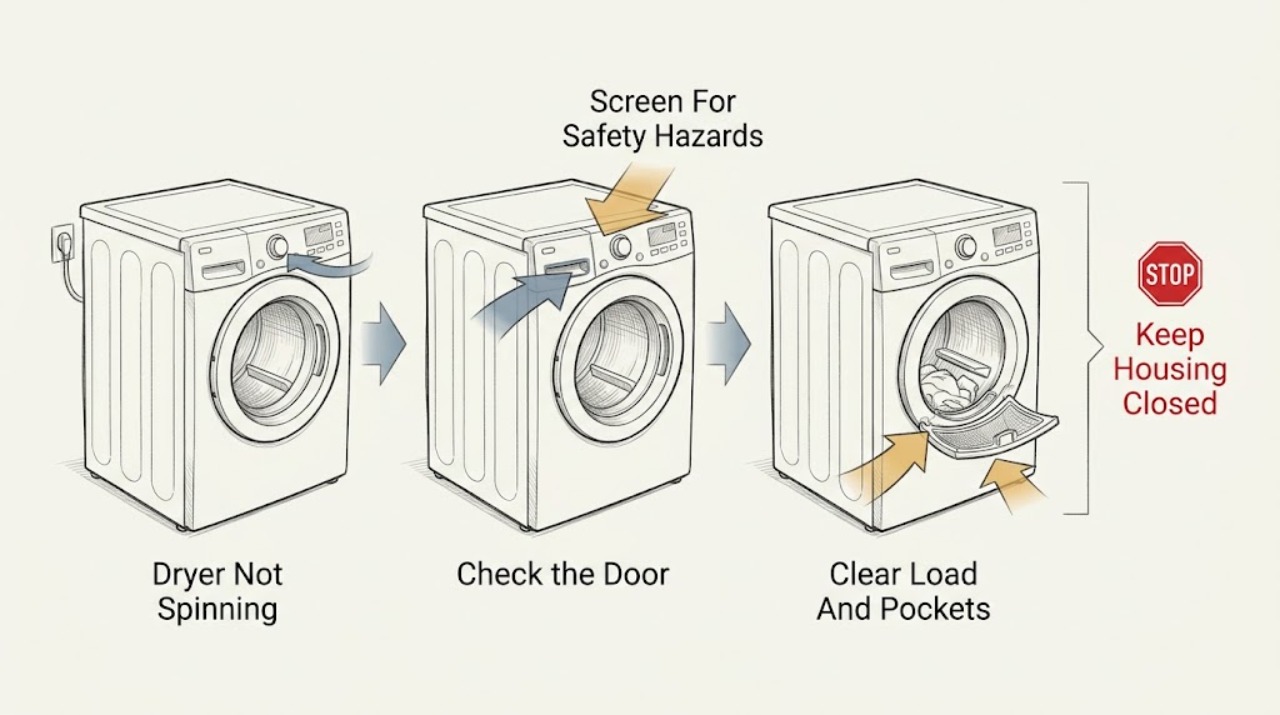
If a KitchenAid dryer is not spinning, stop and check for overheating, burning or gas odor, smoke, sparks, violent noise or movement, a damaged cord, water near electricity, or a breaker trip; leave it out of service and obtain the appropriate professional help for any of those symptoms. Otherwise confirm that the controls and drum light have power, the door is fully latched, the correct cycle is selected, and the Start or Hold to Start command was held as the model requires. With the dryer off and cool, remove a tangled load and clear pockets, inspect only the visible front and rear drum edges for an accessible object, check the lint screen and accessible lint opening, and confirm the cabinet is stable and level. A motor-side fault, belt, idler, roller, blower, control, or electrical supply problem cannot be safely diagnosed by opening the cabinet, so do not bypass the door switch, test live wiring, or run repeated cycles to reproduce the failure.
Work through in order
Diagnostic checks
Use only checks that match the exact appliance or system and its official guide.
-
Check 1
Stop the dryer from a safe position and wait for the drum and cabinet to cool; inspect from outside for smoke, flame, burning or gas odor, sparks, water near electrical equipment, violent movement, a damaged cord, or a breaker or outlet device that operated.
Expected result: Record whether the dryer is cool and dry, whether the drum stopped normally, and whether any heat, odor, smoke, flame, spark, water, damage, or protection trip remains.
Next step: Leave the dryer unused and obtain the appropriate emergency, gas, electrical, or appliance professional for a hazard; do not reconnect or run it to see whether it spins.
Stop if: Do not touch wet equipment, reach into a moving or hot drum, reset protection repeatedly, or open a panel near smoke, flame, gas, water, or arc damage.
Why this matters
Why: Any fire, gas, electrical, water, or abnormal-heat symptom is a stop condition, even if the drum is now stationary. A cool, dry appliance without those symptoms permits only the low-risk checks below.
-
Check 2
From the dry, safe front of the dryer, check whether the control panel or drum light responds, the door is fully latched with clothing clear of the latch, the selected cycle is a drying cycle, and the model's Start, Push to Start, or Hold to Start command is used as specified.
Expected result: Classify the dryer as dark with no response, powered but locked, powered with a door indication, powered and accepting a start command, or powered but silent with no drum movement.
Next step: Dry hands and the control surface, use only the model-specific unlock and start sequence once, and arrange service if the panel remains dark, the latch will not engage, or the drum still does not move.
Stop if: Do not open the control panel, bypass the door switch, change the breaker or fuse rating, use an extension cord, or test live voltage.
Why this matters
Why: No display or light points toward supply or control power. A door or control-lock indication can inhibit the motor. A powered, correctly latched dryer that accepts the command but never turns the drum points toward a motor, drive, or control fault rather than a simple cycle selection.
-
Check 3
With the dryer disconnected or otherwise safely isolated, stopped, and cool, remove the load and inspect pockets, zippers, buckles, buttons, rivets, coins, clips, pens, shoes, and balled-up sheets or blankets; do not reach into a moving drum.
Expected result: Record whether the no-spin symptom occurred only with one garment, a tangled or heavy bundle, or a loose item, and whether the empty drum is free of visible obstruction.
Next step: Separate large items and clear pockets for future loads; arrange service if the empty dryer still does not spin or if an object is trapped beyond safe access.
Stop if: Do not force the drum, remove a trapped item with improvised tools, or restart the dryer to see whether the load was the cause.
Why this matters
Why: A tangled load or loose garment hardware can cause abnormal tumbling or stop the drum from moving normally. If the drum remains stationary with the load removed, the issue is less likely to be clothing and more likely to involve the door, drive, motor, control, or a trapped object.
-
Check 4
After safe isolation and cooling, inspect the visible front and rear drum seams and the lint-screen opening for a coin, clip, screw, sock, or other foreign object; remove only an object plainly accessible without touching the heater, belt, blower, wiring, or sharp sheet metal.
Expected result: Record whether an object is lodged at a seam or lint path, whether the drum edge or seal is damaged, and whether the lint screen is installed and clear.
Next step: Leave inaccessible objects and damaged areas untouched and arrange qualified service; do not operate the dryer with a foreign object or damaged seal still present.
Stop if: Do not reach into the blower housing, remove guards, use tools near wiring or a heater, or pull the drum apart.
Why this matters
Why: A seam object can prevent or interfere with drum rotation, while an object entering the lint path can affect the blower. An inaccessible object, damaged edge, or unchanged no-spin condition needs internal service.
-
Check 5
From outside the cool dryer, check that it is stable and level as the installation instructions require, all installed legs contact the floor, the cabinet is not touching a wall or another appliance, and the lint screen and visible exhaust path are not blocked.
Expected result: Record a rocking or sliding cabinet, missing leg, contact vibration, a stacked or pedestal installation issue, lint accumulation, a crushed visible vent, or an installation that otherwise restricts airflow.
Next step: Remove only safe loose objects and follow the model installation instructions for accessible leveling or vent care; arrange service for a stacked, unstable, blocked, or damaged installation.
Stop if: Do not move a heavy or stacked dryer alone, place hands under the cabinet, dismantle a pedestal, or operate it while it rocks or overheats.
Why this matters
Why: An unstable cabinet can prevent normal drum operation and create vibration. Lint or restricted airflow can cause overheating and is a safety reason to stop, but clearing the visible lint path does not repair a stationary drum or justify cabinet disassembly.
-
Check 6
Record the KitchenAid model number, gas or electric type, power and door results, selected cycle, Start response, load and pocket result, drum-edge and lint observations, level and airflow result, and any heat, odor, spark, noise, or protection response; provide the record to qualified service without opening the cabinet.
Expected result: Confirm whether the drum remains stationary with a clear load and safe controls, whether the dryer stays cool and dry, and whether the suspected belt, roller, motor, blower, control, or wiring area would require panel access.
Next step: Keep the dryer out of service and arrange qualified appliance service; include an electrician or gas professional when the supply circuit, cord, receptacle, or gas behavior is implicated.
Stop if: Do not remove the front or rear panel, test live voltage, bypass a door or thermal safety, lubricate internal parts, or run another cycle to reproduce the fault.
Why this matters
Why: A persistent no-spin state after safe external checks supports an internal drive, motor, belt, control, door-switch, or electrical diagnosis. A symptom that includes overheating, burning or gas odor, smoke, sparks, violent noise, or a trip overrides normal diagnosis and remains a safety stop.
Use your observations
Decision map
Find the observation that best matches what you see, then follow the next safe action.
-
PATH 01Safety boundary
What you see
The control panel and drum light are dark, or the supply connection or protection device is abnormal.
Do this next
From a safe dry position, use only the model installation information for a basic visible supply check; arrange qualified electrical service if power is absent or protection operates again.
Why this path and its safety boundary
Why it matters: The dryer may have a house-circuit, supply-cord, receptacle, or internal power issue rather than a drive failure.
Safety stop: Do not change breaker size, repeatedly reset protection, open the receptacle, or test live wiring.
-
PATH 02Safety boundary
What you see
The dryer has power, but the door is not latched, a control-lock indicator is on, the control surface is wet or unresponsive, or the Start command is not accepted.
Do this next
Dry hands and the surface, clear clothing from the latch, and follow the exact model's control-lock and Start instructions once; arrange service if the door or controls still prevent starting.
Why this path and its safety boundary
Why it matters: The door interlock or control state can prevent the motor from being energized.
Safety stop: Do not bypass the door switch, force the latch, open the console, or continue with a damaged cord, heat, smoke, sparks, or an electrical trip.
-
PATH 03Safety boundary
What you see
The drum fails to move only with a tangled or heavy load, or a coin, clip, button, or other item is visible at a safe drum seam or lint opening.
Do this next
With the dryer off, cool, and safely isolated, separate the load or remove only the plainly accessible object; arrange service if the drum remains stationary, an object is trapped, or a seal is damaged.
Why this path and its safety boundary
Why it matters: The load or accessible foreign object may be interfering with normal drum movement.
Safety stop: Do not reach beyond visible safe access, force the drum, or restart to test the suspected object.
-
PATH 04Safety boundary
What you see
The dryer rocks, slides, contacts another object, has a missing leg, or has visible lint or exhaust restriction along with the no-spin symptom.
Do this next
Stop if the dryer overheats, clean only the accessible lint screen or visible path as the manual permits, and arrange service for an unstable, stacked, blocked, or damaged installation.
Why this path and its safety boundary
Why it matters: Installation instability can interfere with operation, while restricted airflow can create an overheating and fire risk even if it is not the direct reason the drum is stationary.
Safety stop: Do not move the dryer alone, open the cabinet, operate it while rocking, or continue when heat or odor is abnormal.
-
PATH 05Safety boundary
What you see
Power, door, controls, load, visible drum edges, and installation are normal, but the drum remains stationary or only hums without rotating.
Do this next
Keep the dryer out of service and arrange qualified appliance repair using the model and symptom record.
Why this path and its safety boundary
Why it matters: A belt, idler, roller, motor, blower, control, door switch, or internal electrical fault is possible and cannot be distinguished safely from outside.
Safety stop: Do not remove panels, manually spin a powered drum, bypass a switch, lubricate parts, or run repeated cycles.
-
PATH 06Safety boundary
What you see
The no-spin symptom occurs with overheating, burning or gas odor, smoke, flame, sparks, violent noise or movement, a damaged cord, water near electricity, or a breaker trip.
Do this next
Leave the area when smoke, flame, sustained electrical danger, or unburned gas is present; keep the dryer unused and obtain the appropriate emergency, gas, electrical, or appliance professional.
Why this path and its safety boundary
Why it matters: This is a fire, gas, water, or electrical safety event and overrides ordinary dryer diagnosis.
Safety stop: Do not restore power, reset protection repeatedly, touch wet or damaged equipment, create a switch spark near gas, or run the dryer again.
Helpful context
Understand the symptom
Stop safely before trying another cycle
Turn the dryer off from a safe position and keep clear of a moving or hot drum. Smoke, flame, a burning smell, sparks, an unusually hot cabinet, a gas smell, violent movement, a damaged cord, water near electrical equipment, or a breaker that trips is not a routine no-spin symptom. Leave the dryer unused and use the appropriate emergency, gas, electrical, or appliance-service path. Do not pull a cord through water or open a panel while the dryer is energized.
Power, door, controls, and cycle selection come before drive parts
A dryer with no light or display may have a supply or breaker issue; a dryer with power may still not run if the door is not latched, the Start command was not held long enough, the touch surface is wet, the controls are locked, or the selected cycle does not start tumbling. KitchenAid guidance also lists a correctly installed power supply and model-specific installation instructions. These checks can explain a stationary drum without proving that a belt or motor has failed.
A clear load and stable cabinet narrow the diagnosis
A tangled sheet, heavy bundle, shoe, coin, button, zipper, or paper clip can stop or obstruct normal tumbling. Whirlpool-family guidance also links a missing leg or unlevel dryer to vibration, and a small object at the drum seam or lint chute to scraping or rattling. If the drum remains stationary with a clear load, a latched door, correct controls, and safe power, internal drive or control service is the next decision; do not dismantle the dryer to confirm it.
Only after diagnosis
Potential parts
- drive belt
Consider this only when qualified diagnosis identifies a broken, stretched, or damaged belt after power, door, load, and installation checks.
Confirm the exact KitchenAid model and manufacturer fit information before ordering; do not replace a belt based only on a stationary drum. - drum support roller or idler
Consider this only when professional inspection links the no-spin, drag, or abnormal noise to a worn support roller or idler.
A qualified technician should identify the component and verify exact model fit before replacement. - drive motor or electronic control
Consider this only when the dryer has safe confirmed power and door operation but a professional traces the stationary drum to the motor or control.
Do not assume compatibility across KitchenAid dryer families; confirm the model-specific component and service procedure.
When checks do not resolve it
Need a professional?
Arrange qualified appliance service when the drum remains stationary after safe power, door, control, load, visible-object, and installation checks; a belt, motor, roller, blower, control, or switch would need access; or the dryer is stacked or unstable. Stop immediately for overheating, burning or gas odor, smoke, flame, sparks, violent movement or noise, water near electrical equipment, a damaged cord, or a breaker or outlet trip. Use a licensed electrician when the receptacle, cord, or house circuit is implicated and a gas professional for abnormal gas behavior.
Common questions
FAQ
Why does my KitchenAid dryer have power but not spin?
Check the door latch, control lock, selected cycle, Start command, clear load, visible drum edges, and stable installation. If the drum remains stationary after those safe checks, arrange service for the drive or control system.
Can a heavy or tangled load stop a KitchenAid dryer drum?
Yes. Sheets, blankets, shoes, or a balled-up load can prevent normal tumbling or cause vibration. Remove the load, separate large items, and arrange service if the empty drum still does not move.
Should I open the dryer to check the belt?
No. Keep the dryer disconnected and arrange qualified service for a belt, motor, roller, blower, control, or wiring diagnosis. Do not bypass the door switch or test live parts.
When should I stop using a KitchenAid dryer that will not spin?
Stop for overheating, burning or gas odor, smoke, flame, sparks, violent movement or noise, water near electricity, a damaged cord, or a breaker trip. Do not restart until the appropriate professional confirms it is safe.
Read the exact guide
Official sources
- Dryer Not Starting or No OperationWhirlpool Product Help · Dryer start, door latch, cycle, control lock, and breaker guidance
- Squealing or Squeaking Sound - DryerWhirlpool Product Help · Dryer belt, pulley, lint-path, and service boundary guidance
- TROUBLESHOOTING – DRYERKitchenAid · KitchenAid dryer no-spin, power, door, cycle, installation, and unusual-sound guidance
- Scraping Sound - DryerWhirlpool Product Help · Dryer drum-edge foreign-object inspection
- Sounds or Noises in a DryerWhirlpool Product Help · Dryer load, roller, level, seam, and rattling sound diagnosis
- Not Tumbling or Spinning - DryerWhirlpool Product Help · Whirlpool-family dryer no-tumble, power, Start command, moisture, and supply guidance
- Cleaning the Dryer DrumWhirlpool Product Help · Dryer lint, drum, vent, airflow, and overheating safety guidance
Community feedback
Share a repair observation
Share a plain-text repair observation. Accepted observations are published automatically; this page may take a moment to update.