
On this page
Start here
Quick answer
If a KitchenAid dryer will not start, check the power cord and household breaker or fuse, make sure the door is firmly closed, select a cycle, and press or hold Start exactly as the model manual requires. Older KitchenAid manuals list these as the basic no-run checks and show that some models need Start held for about three seconds. A control-lock indicator can prevent normal input on models that have that feature; unlock it only with the model's documented control. If the dryer has no display or response, a breaker trips again, or the motor only hums, keep it off and arrange service. Stop immediately for a hot cabinet, burning or electrical smell, smoke, sparks, gas odor, or overheating. Do not bypass the door switch, open the cabinet, test live wiring, or keep resetting a tripping breaker.
Before you begin
Safety first
- Keep the dryer off for smoke, fire, burning/electrical smell, sparks, overheating, hot cabinet/outlet, repeated breaker trips, gas odor, or flammable-contaminated loads. Do not bypass the door switch, open the cabinet, test live wiring, substitute fuses, use an extension cord, or repeatedly restore power. For gas odor, leave and contact the gas supplier or emergency service from a safe location.
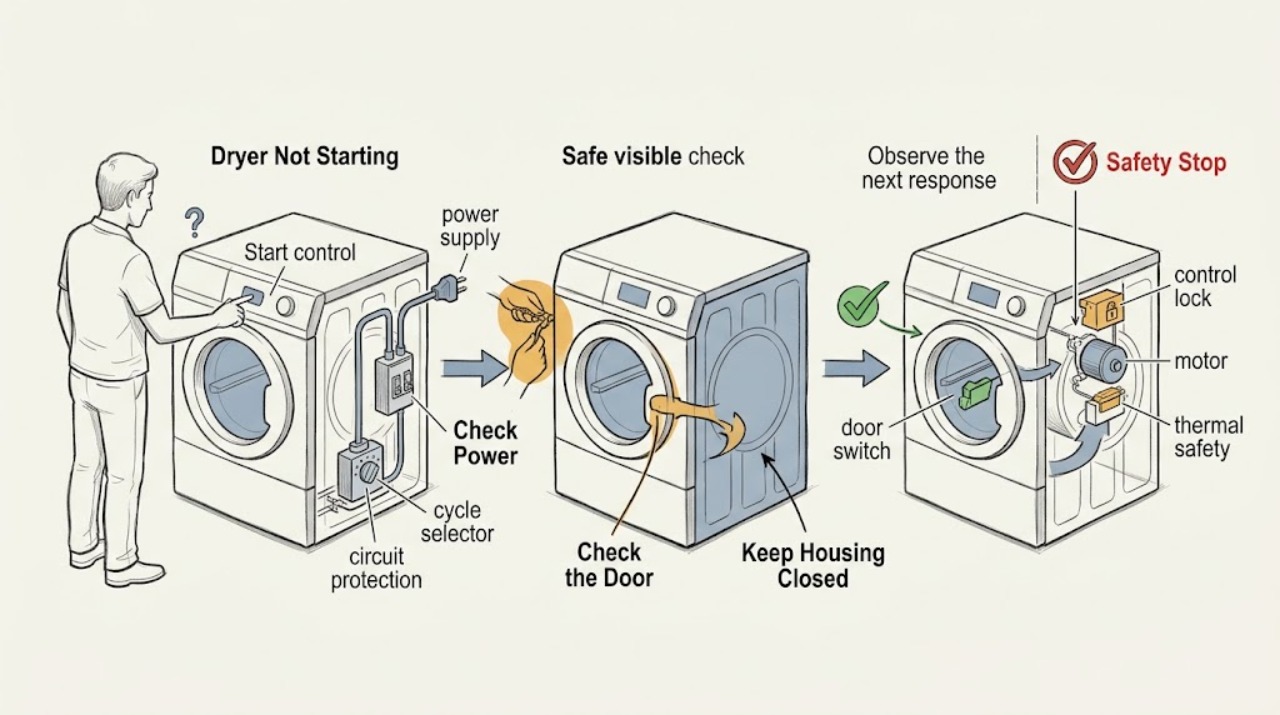
Work through in order
Diagnostic checks
Use only checks that match the exact appliance or system and its official guide.
-
Check 1
Stop trying to start the dryer and note any smoke, fire, sparks, hot cabinet or outlet, burning/electrical smell, gas odor, unusual heat, or repeated breaker trip.
Expected result: No hazard is present, or one of these heat, fire, gas, or electrical symptoms is present.
Next step: For smoke or fire leave and call emergency services. For suspected gas leave without operating switches or phones in the area and call the gas supplier or fire department from safety. Otherwise keep the dryer off and arrange qualified service.
Stop if: Do not reset a tripping breaker repeatedly, open panels, or restart after smoke, sparks, overheating, or gas odor.
Why this matters
Why: A normal no-start can proceed to dry user checks; a hazard requires the dryer to remain off and may require emergency, gas, electrical, or appliance service.
-
Check 2
From a dry position, check that the dryer power cord is fully seated and that the household breaker or fuse supplying it is in its normal state. Do not use an extension cord or open the terminal area.
Expected result: The cord is loose, the breaker/fuse is tripped, the supply appears normal, or power status is uncertain.
Next step: Correct only a clearly loose connection or one tripped breaker from a dry safe position; if it trips again or supply is uncertain, leave the dryer off and call a qualified electrician or appliance technician.
Stop if: Do not install a larger fuse, repeatedly reset a trip, test live voltage, or touch a wet cord/outlet.
Why this matters
Why: KitchenAid lists the cord, fuse, and breaker among basic no-run checks. A normal supply does not clear the dryer's internal control, motor, switch, or thermal circuit.
-
Check 3
With the drum stopped, remove clothing caught in the opening and close the door firmly. Check only for a visible obstruction or damaged latch; do not tape, press, or bypass the door switch.
Expected result: The door closes and latches normally, an obstruction or damage is visible, or the panel still does not respond.
Next step: Remove only a loose visible obstruction and make one documented start attempt. If the latch or switch is uncertain, keep the dryer off and arrange service.
Stop if: Do not operate with a damaged door, defeat the switch, or reach into a moving drum.
Why this matters
Why: A door-switch signal is required for safe operation on dryer designs; a visibly damaged latch or a panel that remains unresponsive needs service rather than a bypass.
-
Check 4
Select a valid drying cycle and temperature, check for a lock icon or Control Locked message, then press or hold Start for the interval specified by the exact model manual. Do not use a random key sequence from another model.
Expected result: No cycle is selected, Start was not pressed/held long enough, the controls are locked, or the selected cycle is accepted but the drum remains still.
Next step: Correct the visible selection or unlock using the model manual, then make one start attempt. If the controls remain locked or the motor does not respond, keep the dryer off and call service.
Stop if: Do not force buttons, enter service mode, or bypass the control lock or door interlock.
Why this matters
Why: KitchenAid manuals show that some models require a Start hold and that Control Lock disables normal operation or restart until unlocked. A correct control state with no motor response points to service.
-
Check 5
Confirm that the dryer is not in an intentional pause, delay, or completed state and that the cycle selector is not at OFF. If the display shows an error or a lint-screen prompt, record it and follow only the model's user instructions.
Expected result: The cycle is paused/completed, the selector is OFF, an error or prompt is displayed, or the machine is ready but still silent.
Next step: Make one model-approved new-cycle attempt after correcting a visible state. If it returns or the dryer stays silent, arrange service.
Stop if: Do not ignore an error, keep cycling the control, or run after overheating or a safety symptom.
Why this matters
Why: A completed or paused state can require a new cycle and Start action. An error or ready-but-silent state can indicate a control, door, motor, or thermal problem and should not be cleared by repeated starts.
-
Check 6
With the dryer off and cool, remove an overloaded or tightly packed load and confirm the lint screen is present and not blocked. Do not run the dryer to test a contaminated load or clean inside the cabinet.
Expected result: The drum is overloaded, the lint screen is missing or heavily blocked, the load contains oil/solvent contamination, or the load and screen are appropriate.
Next step: Use only clean, suitable loads and a correctly installed screen on a future permitted cycle. Keep the dryer off for contamination, hot parts, or persistent no-start and call service.
Stop if: Do not dry oil-, gasoline-, solvent-, or other flammable-contaminated items, run with a missing screen, or open the cabinet.
Why this matters
Why: An overloaded or unsafe load can create protection or fire concerns, while KitchenAid warns that lint and contaminated fabrics are hazards. A suitable load with no start shifts attention back to controls and motor diagnosis.
-
Check 7
After the safe controls and load checks, make at most one brief start attempt from beside—not inside—the dryer and note whether there is silence, a click, a hum, or a motor that starts and stops. Stop immediately for heat, smell, smoke, or abnormal sound.
Expected result: The dryer is silent, clicks but does not tumble, hums, starts then stops, or shows a hazard.
Next step: Keep the dryer off and provide the observation to a qualified technician. Use emergency or gas service for any hazard.
Stop if: Do not repeat start attempts, bypass the door switch, open panels, or test live components.
Why this matters
Why: Silence after valid inputs can involve the door switch, control, timer, motor circuit, or thermal protection; a click or hum can involve a start circuit or motor load. Sound cannot identify a part safely.
-
Check 8
Keep the dryer out of service when it still will not start after the documented user checks, the breaker trips again, an error returns, the motor hums, or any hazard occurred. Record the full model/serial, display, power state, door/lock state, cycle, and sound.
Expected result: The no-start is persistent, intermittent, or accompanied by heat, smoke, gas, sparks, a trip, or a contaminated load.
Next step: Arrange KitchenAid designated or qualified appliance service and restore use only after the fault is corrected and the dryer is declared safe.
Stop if: Do not open the cabinet, bypass safety devices, substitute fuses, or keep testing.
Why this matters
Why: Internal electrical, motor, door-switch, timer/control, thermal, gas, or wiring faults require model-specific qualified diagnosis.
Use your observations
Decision map
Find the observation that best matches what you see, then follow the next safe action.
-
PATH 01Safety boundary
What you see
Smoke, fire, sparks, burning/electrical smell, hot cabinet/outlet, repeated breaker trip, overheating, or gas odor is present.
Do this next
Leave smoke/fire or suspected gas areas and contact emergency/gas-supplier help from a safe location; otherwise keep power off and call qualified service.
Why this path and its safety boundary
Why it matters: The immediate risk is fire, shock, heat, or gas—not a normal start-control issue.
Safety stop: Do not reset, relight, use a phone or switch near gas, or return to inspect the dryer.
-
PATH 02Safety boundary
What you see
The cord is not seated, the household breaker/fuse is tripped, or the supply is uncertain without a hazard.
Do this next
Correct only a clearly loose connection or single trip from a dry safe position; call an electrician if it trips again or remains uncertain.
Why this path and its safety boundary
Why it matters: The dryer may not be receiving the required household supply.
Safety stop: Do not use an extension cord or replace a fuse with a larger rating.
-
PATH 03Safety boundary
What you see
The door does not latch, a visible obstruction/damage is present, or the machine behaves as though the door is open.
Do this next
Remove only a visible obstruction and try once; keep the dryer off and call service for latch or switch concerns.
Why this path and its safety boundary
Why it matters: The door interlock may be preventing a safe start.
Safety stop: Do not tape or bypass the door switch.
-
PATH 04Safety boundary
What you see
No cycle is selected, Start was not held as required, the selector is OFF, or Control Lock is shown.
Do this next
Select a valid cycle and use the exact manual's Start/unlock procedure once.
Why this path and its safety boundary
Why it matters: The control has not accepted a start request.
Safety stop: Do not enter another model's service sequence or force controls.
-
PATH 05Safety boundary
What you see
The load contains oil, gasoline, dry-cleaning solvent, another flammable substance, or the dryer is hot/overheating.
Do this next
Keep the dryer off, move away from ignition sources if safe, and follow the relevant safety/service path.
Why this path and its safety boundary
Why it matters: The load or appliance may present fire or explosion risk.
Safety stop: Do not dry contaminated items even after washing.
-
PATH 06Safety boundary
What you see
Power, door, control lock, cycle selection, and Start action are correct but the drum remains silent, clicks, hums, or starts then stops.
Do this next
Keep the dryer off and arrange qualified diagnosis; do not order a part from the sound alone.
Why this path and its safety boundary
Why it matters: A door switch, control/timer, motor circuit, thermal protection, wiring, or related part may be involved.
Safety stop: Do not open panels, test live wiring, or bypass protection.
-
PATH 07Safety boundary
What you see
The fault returns after one safe documented attempt or an error remains.
Do this next
Provide the model, serial, cycle, display, power, door/lock, and sound observations to KitchenAid or qualified service.
Why this path and its safety boundary
Why it matters: Repeated starts will not establish the failed component and can add heat or electrical stress.
Safety stop: Do not continue cycling or use the dryer until repaired.
Helpful context
Understand the symptom
First separate a no-start from a no-heat problem
A dryer can have lights or a display and still fail to start, or it can tumble without producing heat. This article addresses a drum that does not begin tumbling. Confirm the selected cycle, temperature, door closure, and Start action before assuming a component has failed. KitchenAid manuals cover multiple models, so button names, control-lock behavior, and the required Start hold vary; the complete model manual controls.
Use the dry, low-risk checks first
From a dry position, check that the power cord is fully seated and the household circuit has not tripped. Do not open the console or probe the outlet. With the drum stopped, close the door firmly, select a valid cycle, and press or hold Start as the manual shows. If the panel is locked, use only the documented unlock control. A door that feels closed may still fail to signal its switch; do not tape or bypass it.
A repeated breaker trip is not a reset procedure
A single household breaker trip can be checked from a safe, dry position, but a breaker that trips again means the dryer should remain disconnected or switched off. KitchenAid's safety guidance warns against unqualified servicing and identifies fire, electrical, and gas hazards. Do not substitute a larger fuse, run an extension cord, or keep restoring power to see whether the motor starts.
Do not start with a contaminated or unsafe load
KitchenAid warns not to dry items exposed to cooking oils, gasoline, dry-cleaning solvents, or other flammable substances, even after washing. Remove any such load only when it can be done safely and keep it away from ignition sources. Smoke, a hot cabinet, burning smell, sparking, or gas odor requires the dryer to remain off and a qualified or emergency response as appropriate.
When the user checks end, service begins
If power, door, control lock, cycle selection, and the documented Start action are correct but the motor does not begin, likely paths include the door switch, timer or electronic control, motor circuit, thermal protection, or wiring. The symptom cannot identify a replacement part. KitchenAid says its tech sheets can include wiring diagrams and component tests but are intended for people with appliance-repair experience; do not use them as a live-testing guide for a homeowner.
Only after diagnosis
Potential parts
- dryer door switch or latch assembly
Consider only if a qualified diagnosis confirms the control is not receiving a closed-door signal after the latch and visible opening are checked.
Confirm the complete model and switch design; never bypass the interlock or test live wiring. - dryer motor or motor-start component
Consider only if power, door, control, and cycle inputs are valid and a qualified technician identifies a motor or start-circuit fault.
Confirm exact model and electrical specification; silence or humming alone does not prove this part is failed.
When checks do not resolve it
Need a professional?
Safety scope: Keep the dryer off for smoke, fire, burning/electrical smell, sparks, overheating, hot cabinet/outlet, repeated breaker trips, gas odor, or flammable-contaminated loads. Do not bypass the door switch, open the cabinet, test live wiring, substitute fuses, use an extension cord, or repeatedly restore power. For gas odor, leave and contact the gas supplier or emergency service from a safe location.
Common questions
FAQ
Why will my KitchenAid dryer not start even though it has power?
Check the door latch, selected cycle, Control Lock indicator, and the exact Start action. Some models require Start to be held. If valid inputs produce no response, keep the dryer off and arrange service.
How long do I hold Start on a KitchenAid dryer?
It varies by model. One KitchenAid dryer guide says approximately three seconds, while other models differ. Use the exact manual rather than holding indefinitely or forcing the control.
Can Control Lock make a KitchenAid dryer seem dead?
Yes, on models with that feature it can disable normal controls or prevent restart. Check for a lock icon and use only the documented unlock procedure; do not enter service mode or bypass the lock.
What if the breaker trips when I press Start?
Keep the dryer off. A single trip can be checked from a dry safe position, but a repeat trip needs qualified electrical or appliance diagnosis. Do not repeatedly reset it or install a larger fuse.
What does a click or hum mean when the dryer will not start?
It can involve the door switch, control, motor-start circuit, thermal protection, or wiring, but sound alone cannot identify a part. Stop repeated attempts and arrange service.
Can I start the dryer with the door switch bypassed?
No. The door interlock is a safety device. Do not tape, bridge, or bypass it; have a qualified technician diagnose a latch or switch problem.
When is a KitchenAid dryer no-start an emergency?
Smoke, fire, burning or electrical odor, sparks, overheating, a hot outlet/cabinet, repeated breaker trips, gas odor, or a flammable-contaminated load requires immediate stop. Leave when appropriate and call emergency, gas, electrical, or appliance help from safety.
Read the exact guide
Official sources
- Where Can I Find the Tech Sheet for My Appliance?KitchenAid Product Help · KitchenAid major-appliance repair documentation guidance.
- DRYER User InstructionsKitchenAid · KitchenAid dryer safety and troubleshooting manual; exact model controls.
- PRO LINE Front-Loading Use and Care GuideKitchenAid · KitchenAid dryer models covered by this guide; exact model controls.
- Owner's ManualKitchenAid · KitchenAid dryer manual covering several models; exact model instructions control.
Community feedback
Share a repair observation
Share a plain-text repair observation. Accepted observations are published automatically; this page may take a moment to update.