
On this page
Start here
Quick answer
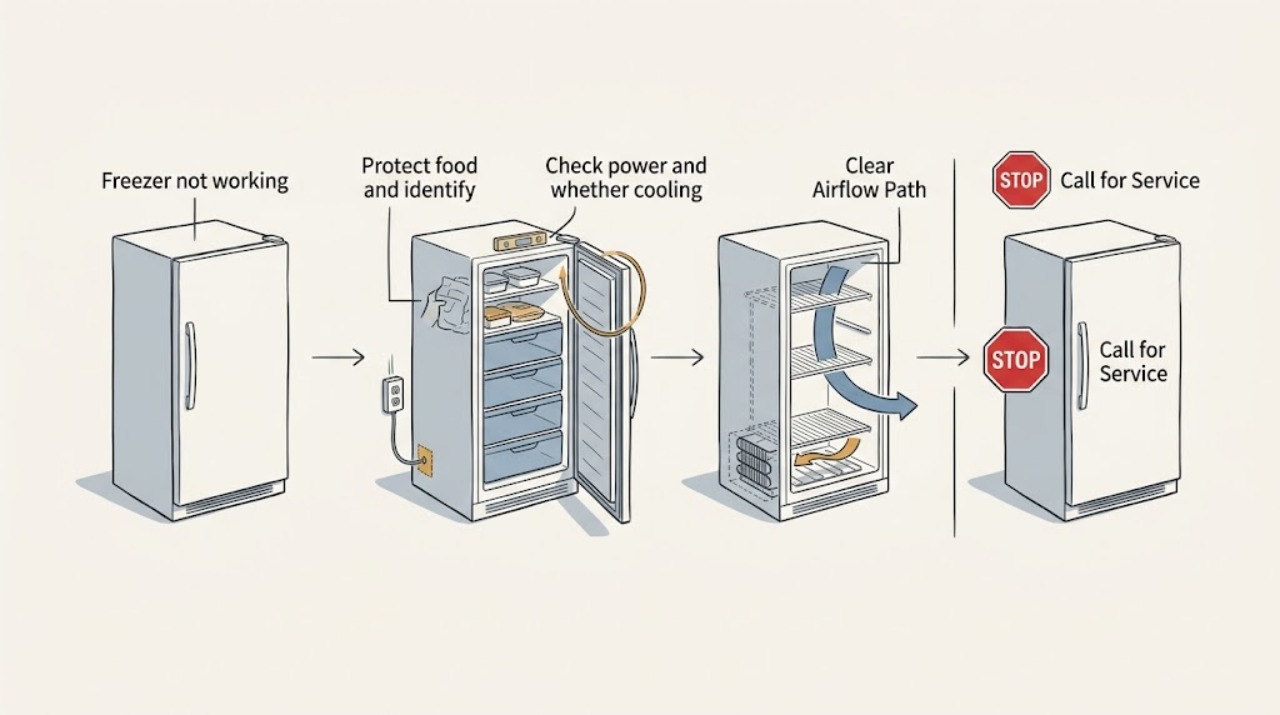
When a KitchenAid freezer is not working, first protect the food and check whether the appliance has power and cooling enabled. Look for a loose or damaged cord, a tripped breaker, a Cooling Off or Showroom/Demo indication, an incorrectly set control, a door that is not sealing, blocked air vents, an overloaded compartment, or a recent power outage or installation. Keep the door closed while the temperature is rising. Do not remove sealed-system covers, handle refrigerant, or work on live electrical parts. If power and cooling settings are correct but the freezer remains warm, the compressor or fan does not start, frost blocks the air path, or the problem persists after the safe external checks, arrange qualified KitchenAid service.
Work through in order
Diagnostic checks
Use only checks that match the exact appliance or system and its official guide.
-
Protect food and identify the failure pattern
Keep the freezer door closed as much as possible and move perishable frozen food to another working freezer or a cooler with ice if the compartment is warming. Without opening service covers, note whether the interior light or display works, whether the compressor or fan can be heard, whether frost or water is present, and whether an alert or Power Outage indication appears. Do not taste food to test safety.
Expected result: The unit may be completely without power, powered with no cooling sound, running but warm, heavily frosted, or showing a control or outage indication.
Next step: Continue to the safe power and cooling-setting check. If there is smoke, a burning smell, a hot or damaged cord or outlet, or exposed water near electricity, keep clear and arrange qualified service or emergency help as appropriate.
Why this matters
Why: A dead display points first to supply or control power; lights with no cooling point toward Cooling Off, Demo mode, or a cooling-system fault; heavy frost can obstruct airflow; and an outage indicator explains a temperature rise without identifying the present fault.
-
Check power and whether cooling is enabled
Inspect the power cord for visible damage and confirm that its plug is seated securely in the intended wall outlet. Check the household breaker or fuse without opening the appliance. If the display shows Cooling Off, Showroom, Demo, or a similar indicator, use the exact KitchenAid owner's manual to restore cooling; do not guess a button combination from another model.
Expected result: The breaker may be tripped, the cord or outlet may be damaged, cooling may be disabled while lights work, or power and cooling may appear normal.
Next step: If power is safely restored and the manual confirms cooling is enabled, continue with door, load, and airflow checks. If the breaker trips again, the outlet or cord is damaged, or cooling cannot be enabled from the model instructions, stop and arrange qualified electrical or appliance service.
Why this matters
Why: KitchenAid states that a freezer will not cool when cooling is turned off and that Demo mode can power the display and lights while disabling cooling. A damaged supply or a breaker that trips again is not a normal reset situation.
-
Check temperature setting, door seal, and internal airflow
Use the model's controls to confirm the freezer is set for normal freezing and that no vacation, cooling-off, or unusual mode is active. Inspect the door gasket for tears, gaps, trapped packaging, or frost preventing a seal. Rearrange food so it is not pressed against the back wall or covering air vents, and close the door promptly. Do not chip frost with a knife or force a swollen drawer.
Expected result: A loose seal, blocked vent, overpacked compartment, or recent large load can explain warm spots or slow recovery. A clean gasket and open vents with a freezer that remains warm point toward the cooling system or another fault.
Next step: Correct only the accessible loading or sealing issue and keep the door closed. If frost blocks vents despite normal use, or the temperature does not recover after the model's normal stabilization period, use qualified service rather than dismantling the freezer.
Why this matters
Why: KitchenAid says correct loading preserves airflow, a damaged or poorly sealed door can make the compressor work harder, and a large addition of warm food or frequent door opening can temporarily raise temperature. These checks do not confirm compressor or refrigerant health.
-
Check installation location and permitted condenser maintenance
Verify that the freezer is in a location within the operating conditions specified by its exact manual and that exterior vents or the base grille are not blocked. If the model's owner documentation permits user cleaning and the surrounding area is unusually dusty, greasy, or affected by pet hair, clean accessible condenser areas with the approved method. Do not remove a cover that KitchenAid says requires certified service, and do not touch refrigerant tubing.
Expected result: An unsuitable hot or cold location, blocked grille, or heavy accessible dust can make cooling inefficient. A suitable location and clear approved airflow path with no improvement points to an internal cooling or control problem.
Next step: Correct an accessible obstruction or location issue only as the manual permits, then keep the door closed and observe recovery. If the freezer remains warm or the compressor runs abnormally, stop and arrange service.
Why this matters
Why: KitchenAid notes that room conditions, airflow, and condenser condition can affect freezer performance, but also says some models do not require coil cleaning or allow it only through a certified technician.
-
Use one observation period, then stop at the service boundary
After any permitted correction, leave the freezer closed and observe one normal cooling period without repeatedly changing the controls or cycling the power. Note whether the compressor or fan starts, whether the temperature trends colder, whether frost returns rapidly, and whether an alert or unusual noise appears. Do not run the appliance with a damaged cord, expose live wiring, add refrigerant, or remove sealed-system panels.
Expected result: The freezer may begin cooling after Cooling Off, Demo mode, a door-seal, loading, power, or airflow issue is corrected, or it may stay warm with no compressor start, persistent frost, repeated alerts, or abnormal noise.
Next step: If the freezer remains warm or any electrical, leak, noise, frost, or food-safety concern persists, keep the door closed, protect the food, and arrange qualified KitchenAid service. Do not continue repeated resets or open the cabinet.
Why this matters
Why: Improvement after a safe external correction supports that cause but does not establish long-term component health. Persistent warmth after the controls and airflow are correct requires diagnosis of the compressor, start components, fans, defrost system, sensor, control, or sealed system.
Use your observations
Decision map
Find the observation that best matches what you see, then follow the next safe action.
-
PATH 01Next step
What you see
Food is warming or the freezer has stopped cooling.
Do this next
Keep the door closed and transfer food to another working freezer or an ice-filled cooler when practical. Do not taste food to test safety; follow applicable local food-safety guidance while arranging repair.
-
PATH 02Next step
What you see
The display or light works but Cooling Off, Showroom, Demo, or a similar mode is active.
Do this next
Use the exact KitchenAid owner's manual to turn cooling back on or exit the mode. If the correct model procedure is unavailable or cooling does not resume, arrange service rather than guessing at controls.
-
PATH 03Safety boundary
What you see
The breaker is tripped, trips again, or the cord, plug, outlet, or nearby wiring is damaged or hot.
Do this next
Do not repeatedly reset the breaker or use an extension lead. Keep the appliance disconnected if safe and arrange qualified electrical inspection, plus appliance service when the freezer is involved.
Why this path and its safety boundary
Safety stop: True
-
PATH 04Next step
What you see
The door gasket leaks, vents are blocked by food, frost obstructs airflow, or the freezer was recently installed or heavily loaded.
Do this next
Correct only the accessible loading, sealing, or model-approved setup issue, keep the door closed, and allow the exact manual's normal stabilization period. If the freezer remains warm or frost returns, arrange service.
-
PATH 05Safety boundary
What you see
Power and cooling settings are correct, external airflow is clear, but the compressor or fan does not start, the freezer remains warm, a fault repeats, or unusual noise or leakage appears.
Do this next
Keep the door closed, protect the food, and arrange qualified KitchenAid service. Do not remove sealed-system covers, handle refrigerant, test live parts, or replace a compressor or control from the symptom alone.
Why this path and its safety boundary
Safety stop: True
Helpful context
Understand the symptom
Protect food before troubleshooting
A freezer that stops cooling can spoil food while the appliance still has lights or a display. Keep the door closed, transfer food to another working freezer or an ice-filled cooler when practical, and do not taste food to decide whether it is safe. Then record whether the KitchenAid unit is completely dead, powered but warm, or showing a Cooling Off, Showroom, or other indication.
A freezer can look powered while cooling is disabled
KitchenAid explains that Showroom or Demo mode can leave the controls and lights working while the refrigerator and freezer do not cool. Some models also display Cooling Off when the cooling function has been disabled. Button combinations vary by model, so use the exact owner's manual rather than guessing at a reset sequence.
Keep sealed-system work out of the home checks
Power, controls, loading, door sealing, accessible vents, and model-approved condenser cleaning are reasonable external checks. A compressor that will not start, a fan that is not running, a sealed-system problem, refrigerant issue, or internal control fault requires a qualified technician. Do not remove panels, pierce tubing, or test exposed electrical parts.
Only after diagnosis
Potential parts
- freezer door gasket
Consider a replacement only if the exact gasket is visibly torn, permanently deformed, or cannot seal after accessible cleaning and alignment checks; warm temperatures can have many other causes.
Confirm the complete KitchenAid product number and manufacturer fit information before ordering. - cooling or control component
A compressor, start component, fan, defrost component, sensor, or control is conditional on qualified diagnosis after power, settings, door, loading, and permitted airflow checks.
Do not choose or install an internal cooling component from the symptom alone; qualified service must identify the fault and verify exact model compatibility.
When checks do not resolve it
Need a professional?
Call qualified KitchenAid appliance service for persistent no-cooling performance or any compressor, fan, frost, leak, control, or sealed-system symptom. Use qualified electrical service when the outlet, cord, plug, or breaker is involved.
Common questions
FAQ
Why is my KitchenAid freezer not working but the light is on?
Check whether Cooling Off or Showroom/Demo mode is active, then verify the controls, door seal, airflow, and recent power outage or installation. KitchenAid notes that a freezer can have lights and a display while cooling is disabled. If cooling is enabled but the freezer stays warm, arrange service.
What should I do with food when my KitchenAid freezer stops working?
Keep the door closed and transfer food to another working freezer or an ice-filled cooler when practical. Do not taste food to decide whether it is safe; follow applicable local food-safety guidance while the appliance is repaired.
Can blocked vents make a KitchenAid freezer warm?
Yes. KitchenAid says crowded storage or items pushed against air vents can disrupt cold-air circulation. Rearrange food to leave the vents clear and close the door promptly, but persistent warmth, heavy frost, or an inactive compressor needs qualified diagnosis.
Should I clean the condenser coils when my KitchenAid freezer stops working?
Only if the exact owner's manual permits user cleaning. KitchenAid says some models need no routine cleaning and others allow coil access only to a certified technician. Never remove sealed-system covers or handle refrigerant; use service if the freezer remains warm.
Read the exact guide
Official sources
- 9 possible freezer troubleshooting fixes & tipsKitchenAid · KitchenAid guidance for a freezer that stops working, food protection, power, compressor, temperature, loading, door, frost, and service decisions.
- Cooling Off Indicator Light - RefrigeratorKitchenAid Product Help · Official guidance that cooling-off mode prevents the refrigerator and freezer from cooling and that controls vary by model.
- Demo Mode - Top Freezer RefrigeratorKitchenAid Product Help · Official explanation that Demo or Showroom mode can power lights and controls while disabling cooling; button sequences vary by model.
- Not Cooling - Freezer Section - RefrigeratorKitchenAid Product Help · Official checks for room conditions, loading, power outage, condenser, cooling state, controls, Demo mode, installation, door opening, and service.
Community feedback
Share a repair observation
Share a plain-text repair observation. Accepted observations are published automatically; this page may take a moment to update.