
On this page
Start here
Quick answer
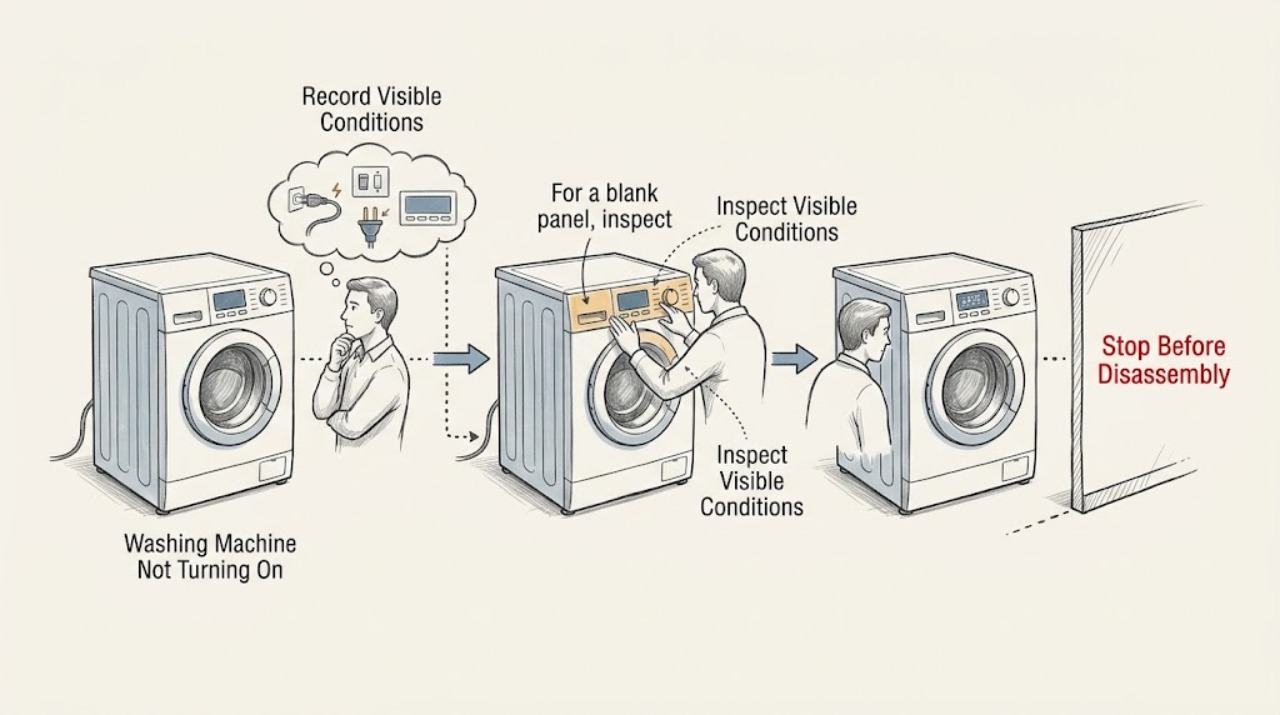
First decide whether a KitchenAid washer has no power at all or has a live display that will not start. From a dry position, inspect the cord and outlet, check for a tripped circuit only once, and record whether the console lights, beeps or shows a lock, delay or error message. If the washer is wet near the outlet, leaks, vibrates violently, smells burnt, emits smoke or an arc, gives a shock, has a hot receptacle or trips the breaker again, stop using it and obtain qualified help. If the display works, confirm the intended programme, close the lid or door fully and press Start once as the exact KitchenAid manual directs. Use the exact model manual for control-lock, delay-start, error-code and reset behavior; if one authorized reset does not restore operation, keep the washer off rather than opening the cabinet or bypassing the lid or door lock.
Work through in order
Diagnostic checks
Use only checks that match the exact appliance or system and its official guide.
-
Check 1
Stop the washer and classify the symptom without opening it: is the display completely blank, does it show lights or a code but ignore Start, or does it begin and then stop? Record the selected programme, whether the lid or door is closed, and any sound or message. Do not reach into a wet tub or restart the washer when a safety warning is present.
Expected result: There is no display, the panel responds but the cycle will not begin, a code or lock appears, or the washer starts briefly and stops.
Next step: Follow the matching branch and retrieve the exact model manual. Keep the washer off for a leak, wet electrical area, violent movement, burning smell, smoke, spark, shock, abnormal heat or repeated breaker trip.
Why this matters
Why: A blank panel points first to power or control, while a responsive panel points toward programme, Start, lid or door lock, delay, code or control sequencing. A code must be matched to the exact KitchenAid model.
-
Check 2
For a blank panel, inspect the accessible plug, cord and receptacle from a dry, stable position. Confirm the plug is seated and check the household circuit indication once, but do not touch a hot or damaged connection, use an adapter or extension cord, pull the washer through water, or repeatedly reset the breaker.
Expected result: The outlet is dead, the breaker trips again, the cord or plug is frayed, hot or discolored, the receptacle is loose or hot, or the external supply appears normal and cool.
Next step: Stop for any heat, smoke, spark, shock, damage or repeated trip and obtain qualified appliance or electrical service. If the supply is normal, use the exact model manual rather than opening the console.
Why this matters
Why: A dead outlet or damaged connection can explain a blank console, but heat, damage or another trip may indicate an electrical hazard. A normal-looking supply does not clear the washer if the panel remains blank or another warning is present.
-
Check 3
For a powered panel that will not start, verify the intended cycle and options, look for Control Lock, Child Lock, Delay Start or a paused indicator, and close the lid or door fully without trapped clothing. Press Start or Start/Pause once as the exact KitchenAid manual describes. Do not force the lid or door or bypass its lock.
Expected result: The washer starts after the lid or door is closed and Start is pressed, a lock or delay indication remains, the panel shows a code, or the controls still do nothing.
Next step: Use only the exact manual's single unlock, cancellation or start instruction. Record any code and request service if the lock or no-start condition remains.
Why this matters
Why: A paused or locked control state can make a powered washer appear dead. A persistent lock, code or unresponsive panel suggests a model-specific control, lock or power problem rather than a missed button.
-
Check 4
If the washer starts to fill or tumble but does not continue, observe the visible water supply, drain outlet, lid or door state and display without moving the appliance. Look for a closed valve, kinked hose, drain backup, a lid or door that unlocks unexpectedly, or an error message. Do not loosen wet hoses, add water by hand or reach into moving parts.
Expected result: The washer has no water, water backs up or leaks, the lid or door lock changes, the cycle stops with a code, or the visible water path and lock appear normal.
Next step: Correct only an accessible valve or hose position according to the exact manual. Stop for leakage or water near electricity; for a returning code or lock failure, keep the washer off and arrange service.
Why this matters
Why: A water-path or lock condition can stop the programme even when the display is powered. A normal visible path with a recurring stop shifts attention to model-specific sensing, control or drive service.
-
Check 5
If the washer fills but will not agitate, drain or spin, wait for the drum to stop and record the stage, water level, lid or door indication and any unusual sound. Check only for an obvious unbalanced load or cabinet movement from outside; do not hold the cabinet, reach underneath, open a panel or run repeated cycles.
Expected result: The load is one-sided, the cabinet moves violently, water remains, the pump or motor makes a harsh new sound, or the load and cabinet appear normal but the stage still fails.
Next step: Use the exact KitchenAid manual for a single safe load or leveling correction. Keep the washer out of service for repeated stage failure, violent movement, abnormal sound or any leak.
Why this matters
Why: A load or installation issue can affect motion, while residual water, harsh noise or a stable washer that still fails may indicate a drain, lock, drive or control fault. Severe movement is a stop condition.
-
Check 6
Only when no hazard is present and the exact KitchenAid guidance allows it, perform the stated one-time reset or cancellation. Restore power once, observe the panel without starting a full load, and stop if the code returns, the controls remain unresponsive or the washer develops a leak, noise, movement, heat, odor or electrical warning.
Expected result: The washer powers and starts normally, the same code or no-start symptom returns, a different code appears, or a water, motion or electrical warning remains.
Next step: Do not keep resetting the breaker or run another cycle to prove the result. Keep the washer off and provide the technician with the model, code, stage and safety observations.
Why this matters
Why: A successful reset may clear a transient control or power state but does not prove that the lock, motor, pump, control or wiring is repaired. A returning symptom needs model-specific diagnosis.
Use your observations
Decision map
Find the observation that best matches what you see, then follow the next safe action.
-
PATH 01Next step
What you see
The console is blank, the outlet is dead, the plug or receptacle is hot or damaged, or the breaker trips again.
Do this next
Stop using the washer and obtain qualified appliance or electrical service. Do not repeatedly reset the breaker, use another outlet as a test or open the console.
Why this path and its safety boundary
Why it matters: The fault may be household power, a cord or receptacle, or the washer's electrical system.
-
PATH 02Next step
What you see
The panel is powered and shows a lock, delay or paused state, but there is no leak, heat, smoke or electrical warning.
Do this next
Use only the exact KitchenAid manual's single cancellation or unlock instruction and press Start once; arrange service if the state returns.
Why this path and its safety boundary
Why it matters: A start condition or control state may be preventing operation.
-
PATH 03Next step
What you see
The washer begins a cycle but stops at fill, drain, agitation or spin, with a kinked hose, backup, lid or door change, or a displayed code.
Do this next
Record the stage and code, correct only an accessible hose or valve issue per the exact manual, and request service for persistent failure or leakage.
Why this path and its safety boundary
Why it matters: A model-specific water path, lock, sensing or control condition may be preventing the next stage.
-
PATH 04Next step
What you see
A single manual-authorized reset clears the display and the washer remains stable, dry and responsive.
Do this next
Resume use only if the exact manual permits it and no symptom returns. Keep the model and reset result for service if the condition recurs.
Why this path and its safety boundary
Why it matters: A transient power or control state is possible, but the reset is not proof of a repaired component.
-
PATH 05Next step
What you see
The washer leaks, water reaches electricity, it vibrates violently, or there is smoke, a burning smell, an arc, abnormal heat, a shock or another breaker trip.
Do this next
Stop using the washer. Isolate water or power only from a safe dry position and obtain qualified appliance, plumbing or electrical help; do not restart it to confirm the symptom.
Why this path and its safety boundary
Why it matters: This is a water, impact or electrical safety boundary, not a routine no-start condition.
Helpful context
Understand the symptom
No power and no start are different failures
A blank console means the washer may not be receiving power, while a lit console that does nothing may be waiting for a programme, Start command, lid or door confirmation, control lock or delay to be cleared. KitchenAid has multiple washer designs, so note the exact model and the display behavior before using a code or reset from another machine.
The model manual controls the safe reset
KitchenAid's official manual page asks for the model number before presenting appliance documents. Some KitchenAid washer manuals use a Start/Pause command after the lid is opened and closed, while other controls and lock indicators vary. Perform only the exact model's one-time cancellation or power-reset instruction and stop if the condition returns.
Keep water and electrical warnings outside the normal troubleshooting path
A wet floor or water near a cord changes the risk of any power check. Do not reach through water, move the washer alone, use an adapter or extension cord, or keep resetting a breaker. Smoke, a burning smell, visible arcing, a hot outlet, a shock or repeated power loss requires qualified appliance or electrical service.
When checks do not resolve it
Need a professional?
Call qualified KitchenAid appliance service when the panel remains blank after safe external power checks, a lock or no-start condition returns, the washer stops at a water or motion stage, an error code is unlisted or returns after one authorized reset, or any leak, violent movement, heat, smoke, odor, arc, shock or repeated breaker trip occurs.
Common questions
FAQ
How can I tell whether my KitchenAid washer has no power or just will not start?
A blank console points first to the outlet, cord, breaker or appliance power path. A lit console that ignores Start points toward the selected programme, control lock, delay, lid or door confirmation, code or control state. Record the display and exact model before applying a manual step.
Why does my KitchenAid washer light up but not run?
Check the exact model's displayed lock, delay or pause state, close the lid or door fully and press Start or Start/Pause once as the manual directs. If the lock or code remains, do not bypass it; keep the washer off and request service.
Can I keep resetting the breaker if my KitchenAid washer will not turn on?
No. Check the circuit indication once from a safe position, but stop for a repeated trip, heat, smoke, spark, damaged cord or shock. Keep the washer out of service and obtain qualified appliance or electrical help.
When should I call for KitchenAid washer service?
Call when safe external checks and one exact-model-authorized reset do not restore operation, or sooner for a leak, water near electricity, violent vibration, unusual noise, smoke, burning smell, arc, abnormal heat, shock or repeated breaker trip.
Read the exact guide
Official sources
- Kitchen Appliance Manuals | KitchenAidKitchenAid · Use the exact KitchenAid washer model number before applying a control, lock, code, reset or user-service instruction.
- Guide to addressing moisture and mould indoorsHealth Canada · General laundry-room moisture and leak guidance; it is not a KitchenAid internal repair manual.
- Home Electrical Safety ChallengeElectrical Safety Foundation International · General appliance safety guidance; it does not identify a KitchenAid model or internal component.
- Owner's ManualKitchenAid · An official KitchenAid washer manual used for the no-power, Start/Pause and safety examples; the exact washer model still controls.
- CPSC Guide to Home Wiring HazardsU.S. Consumer Product Safety Commission · General electrical safety guidance for stopping use of an appliance with warning signs; it is not a KitchenAid washer diagnosis.
Community feedback
Share a repair observation
Share a plain-text repair observation. Accepted observations are published automatically; this page may take a moment to update.