
On this page
Start here
Quick answer
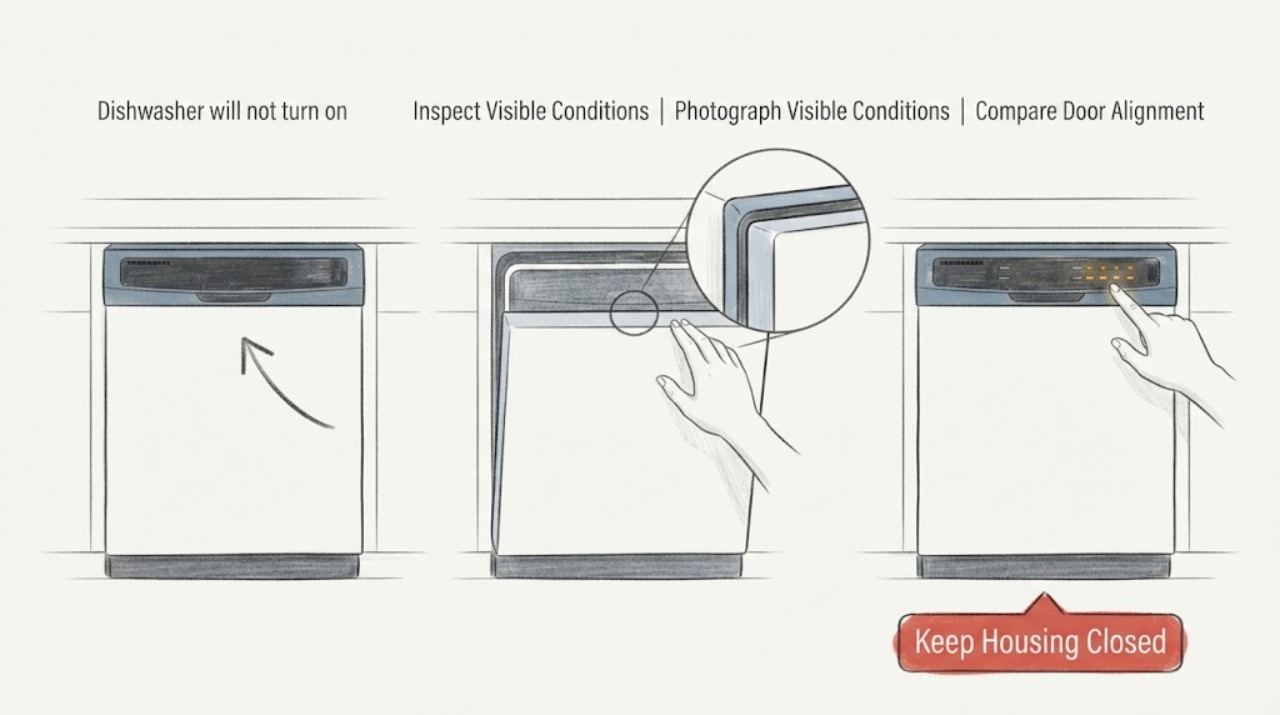
“QuadWash Inverter” is a feature-series description, not a complete LG model number, so do not treat an intermittent beep as a model-specific fault code or assume a control board is bad. First photograph the display and confirm the exact model from the rating label or installation paperwork. Then check the dishwasher's breaker and installer-provided power connection only from outside, confirm that the door closes and latches squarely, and follow the exact model's Start sequence. LG documents that some dishwashers beep and refuse to start when Start is pressed but the door is not closed within the model's specified interval; other beeps can occur after a hot cycle, and an error code must be present before using code guidance. If the breaker and connection are sound but the panel remains dark, or if the new installation leaks, has damaged wiring, or trips power, stop and return it to the installer or qualified LG appliance service.
Work through in order
Diagnostic checks
Use only checks that match the exact appliance or system and its official guide.
-
Check 1
Find and photograph the complete LG model and serial label, recording every suffix rather than relying on the words QuadWash or Inverter. Note the market, whether the dishwasher is built in, whether the panel is dark or shows lights/letters, and whether the beep occurs on Power, Start, door movement, or after a cycle.
Expected result: A complete model is available, only the feature-series name is known, an error code is clearly displayed, or there is only a beep with no code.
Next step: Use the exact manual once the model is known. Until then, limit checks to the external power, door, and visible installation state; do not apply a button sequence from another LG dishwasher.
Stop if: Stop if the label cannot be read and the unit is hardwired, if there is water near electrics, a damaged cord, burning smell, smoke, or a breaker that will not stay on.
Why this matters
Why: LG says dishwasher controls, Control Lock combinations, and indicators can vary by model. A beep without a visible code cannot be mapped to a particular fault, and a feature name cannot substitute for the model's manual.
-
Check 2
From outside the unit, check the dishwasher breaker and any installer-provided plug or visible power connection only if it is safely accessible without moving the appliance. Press Power once and observe the panel; do not open the junction box or touch wiring.
Expected result: The breaker is off, trips again, the panel lights normally, the panel is dark despite stable external power, or the connection is hardwired/inaccessible.
Next step: If there is no hazard and the breaker was clearly tripped, restore it once. If it trips again, the panel stays dark, or the connection cannot be checked safely, leave the dishwasher off and contact the installer, a qualified electrician, or LG appliance service.
Stop if: Do not repeatedly reset the breaker, pull out the dishwasher, remove a cover, touch wiring, or use a live electrical tester.
Why this matters
Why: LG identifies an unconnected power source or tripped breaker as a cause of an unresponsive dishwasher, but a second trip or a dark panel after power is confirmed needs inspection rather than repeated resets. A lit panel moves the decision away from total power loss.
-
Check 3
With the dishwasher empty and not running, close the door normally and check from the front that it is not blocked by a rack, trim, countertop, cabinet baseboard, or an installation misalignment. Then use the exact model's documented Start method; if its manual uses a Start-then-close sequence, close the door within the stated interval without slamming it.
Expected result: The door does not latch squarely, an external cabinet/trim obstruction is visible, the panel flashes/beeps but starts when the correct close-and-Start sequence is followed, or it still beeps and will not start.
Next step: Correct only a plainly visible rack or trim obstruction and retry once. For a misaligned built-in door, a persistent latch problem, or an unknown sequence, have the installer or qualified service inspect it rather than removing the door or latch.
Stop if: Do not force the door, bypass the latch, remove the door panel, or continue if water is leaking from the new installation.
Why this matters
Why: LG installation guidance links a properly aligned opening and door closure to installation, and LG's dishwasher material documents a safety alert when Start is not followed by timely door closure on models using that workflow. This is a door/start-state decision, not proof of a failed latch or control board.
-
Check 4
If the display is lit, look for CL, a lock icon, dashes, or a complete error code before pressing more buttons. If CL/lock is visible, use only the exact model manual's unlock instruction; if dashes appear after Start or Cancel, wait for the documented drain/cancellation to finish.
Expected result: CL or a lock icon clears, dashes disappear after draining, a complete error code appears, or the panel only beeps with no code and remains unresponsive.
Next step: Start only after the lock or cancellation state clears. For a complete code, record it and use the exact manual. For a lit but unresponsive panel after those states are excluded, stop and request inspection.
Stop if: Do not try multiple LG unlock combinations, enter service mode, bypass the latch, force a drain, or run with a leak or standing water near electrical parts.
Why this matters
Why: LG identifies CL as Control Lock and dashes after Start as a cancellation/drain state; it also warns that the button combination can vary by model. A beep without a code is not enough to declare a water, motor, or board fault.
-
Check 5
Classify the beep by timing without opening the machine: does it happen only when the door is opened after a hot wash/rinse/dry, when Start is not followed by door closure, when a button is touched, or while a displayed code is present? Record the exact indicator and whether the cycle actually begins.
Expected result: The beep follows a hot cycle/door opening, follows a failed Start-and-close sequence, accompanies a code, or occurs intermittently while the panel is otherwise dark or unresponsive.
Next step: Allow a hot interior to cool and follow the normal model sequence once. If the beep persists with no code, or the dishwasher never starts after power and door checks, return the installation to the installer or arrange qualified service.
Stop if: Do not silence the symptom by repeatedly pressing buttons, open a hot door unnecessarily, or continue if there is steam injury risk, water leakage, smoke, or burning odor.
Why this matters
Why: LG documents a high-temperature alert after certain hot cycles and a Start/door alert on applicable controls. If an error code is present, use model-specific code guidance; if the beep has no code and the panel cannot operate, it is an unresolved control/power symptom rather than a named fault.
-
Check 6
Inspect only the visible installation area for a kinked inlet/drain hose, water on the floor, or a door that is forced against surrounding cabinetry. Do not disconnect a hose, pull out the built-in unit, or reach under the machine; photograph the condition and call the installer for any correction.
Expected result: There is a visible leak, standing water, a sharply bent hose, cabinet interference, or no visible installation issue.
Next step: If water is present, stop the dishwasher, close the accessible water shutoff, keep water away from electrical parts, and contact the installer/service. For a visible hose or cabinet issue, let the installer correct it rather than improvising a connection.
Stop if: Do not run another cycle with a leak, disconnect a pressurized line, remove the kick plate, pull the appliance, or touch electrical connections.
Why this matters
Why: LG's installation guidance treats door alignment, hose routing, water supply, and drainage as installation conditions. A new-unit failure after installation may therefore belong to the installer even when the control panel beeps; a clear exterior does not prove internal wiring or valves are sound.
Use your observations
Decision map
Find the observation that best matches what you see, then follow the next safe action.
-
PATH 01Next step
What you see
The panel lights, the exact model's normal door/Start sequence is followed, and the cycle starts without a code or leak.
Do this next
Monitor one normal cycle and retain the exact model record. If the beep/no-start returns, stop repeated attempts and give the installer/service the timing and indicator record.
Why this path and its safety boundary
Why it matters: The original symptom was more consistent with an operating sequence or installation alignment issue than a proven electronic failure.
-
PATH 02Next step
What you see
The breaker is on and the accessible power connection is secure, but the dishwasher panel remains completely dark.
Do this next
Leave the newly installed dishwasher off and contact the installation technician, a qualified electrician, or LG appliance service. Do not open the junction box or repeatedly reset power.
Why this path and its safety boundary
Why it matters: LG treats this as an inspection condition after safe power checks; it is not evidence for a particular board, fuse, or wiring part.
-
PATH 03Next step
What you see
The panel is lit and shows CL/lock or dashes, or the buttons chime without changing state.
Do this next
Use only the complete model's documented unlock or cancellation behavior once. If the state remains, request inspection rather than trying another model's combination or service mode.
Why this path and its safety boundary
Why it matters: The controls may be locked or completing cancellation/draining. LG says Control Lock persists after power-off on some models, and button combinations vary; a chime is not a universal error code.
-
PATH 04Next step
What you see
The dishwasher beeps when Start is used, the door does not close squarely or within the model's documented sequence, and the new installation shows cabinet/rack interference.
Do this next
Stop forcing the door and have the installer correct alignment or latch engagement. Retry only after the installer confirms the door closes normally.
Why this path and its safety boundary
Why it matters: A door-start safety state or installation misalignment is more likely than a proven control-panel failure.
-
PATH 05Next step
What you see
The beep has no displayed code, persists after power/door/lock checks, or is accompanied by a leak, damaged connection, burning smell, smoke, or repeated breaker trip.
Do this next
Stop use, isolate water or power only from a safe accessible control, and contact the installer or qualified LG appliance service with the exact model and record. Do not dismantle the dishwasher.
Why this path and its safety boundary
Why it matters: The feature-series label and beep cannot identify the fault. A persistent control/power symptom or installation hazard needs qualified inspection.
Helpful context
Understand the symptom
Separate three observations that are often conflated: the dishwasher has no power, the controls are powered but locked or waiting for a door/Start sequence, or the unit has power but will not begin a cycle. LG says the same symptom can arise from an unconnected power source, Control Lock, or a cancellation that is still draining. The exact model is needed before using any button combination; “QuadWash Inverter” alone is not enough to select one.
Because this is a new installation, keep installation responsibility separate from appliance diagnosis. Check only the visible breaker, display, door alignment, and accessible exterior connections. Do not pull out a built-in dishwasher, remove the junction-box cover, touch wiring, disconnect a water line, or run another cycle when there is water near electrical parts.
When checks do not resolve it
Need a professional?
Request installer or qualified LG service for persistent no-start after the external breaker, door, and exact-sequence checks, for a panel that remains dark, or for any leak or damaged installation connection.
Have this ready
- Provide the complete model and serial, market, installation date, built-in or freestanding status, breaker/connection observation, display or code photo, whether CL/dashes appeared, exact door/Start timing, beep timing, door alignment, water/leak observations, and any prior reset.
Common questions
FAQ
Is an intermittent beep an LG dishwasher error code?
Not by itself. LG documents beeps for some door/Start timing and high-temperature situations, and says to use error-code guidance when a code is actually displayed. Record the complete display and model before treating the sound as a fault.
Could the dishwasher be locked even after it was turned off?
Yes. LG says Control Lock can remain active after the dishwasher is turned off on applicable models. The unlock buttons vary, so use the exact manual for the complete model rather than borrowing a combination from another QuadWash dishwasher.
Why does it beep when I press Start but not run?
On LG controls that use a Start-then-close workflow, the door must be closed within the documented interval or an indicator flashes, a tone sounds, and the cycle does not start. A misaligned new installation can also prevent the door from latching. Check the exact manual and installer alignment; do not force or bypass the latch.
Should I pull out a newly installed dishwasher to check the wiring or hoses?
No. Limit yourself to the visible breaker, panel, door, and exterior installation condition. A leak, inaccessible connection, damaged cord, or need to open a junction box belongs with the installer, electrician, or qualified appliance technician.
Read the exact guide
Official sources
- LG Dishwasher – How to Use the Control Lock FeatureLG USA Support · LG dishwasher Control Lock behavior and model-dependent unlock guidance applied to the assigned QuadWash Inverter feature-series topic.
- Installation - DishwasherLG USA Support · LG dishwasher installation, door alignment, power, inlet, drain, and installer/service boundary applied to the recently installed QuadWash Inverter feature-series topic.
- LG Dishwasher - Understanding Control Panel IndicatorsLG USA Support · LG QuadWash Inverter dishwasher feature-series scope only; the opened LG indicator guidance states that control-panel indicators vary by dishwasher model and does not establish an exact model number.
- Owners Manual.pdfLG Electronics · Opened LG dishwasher manual example for symptom-level Start/door timing, automatic power behavior, Control Lock, and chime distinctions; not an exact-model manual for the incomplete QuadWash Inverter identity.
- LG Dishwasher - Common NoisesLG USA Support · LG dishwasher beeping/noise interpretation at symptom level for the assigned QuadWash Inverter feature-series topic.
- [LG DIOS Dishwasher] Panel Buttons UnresponsiveLG USA Support · LG dishwasher panel-unresponsive, power, Control Lock, cancellation, and chime symptom guidance applied cautiously to the assigned QuadWash Inverter feature-series topic.
Community feedback
Share a repair observation
Share a plain-text repair observation. Accepted observations are published automatically; this page may take a moment to update.