
On this page
Start here
Quick answer
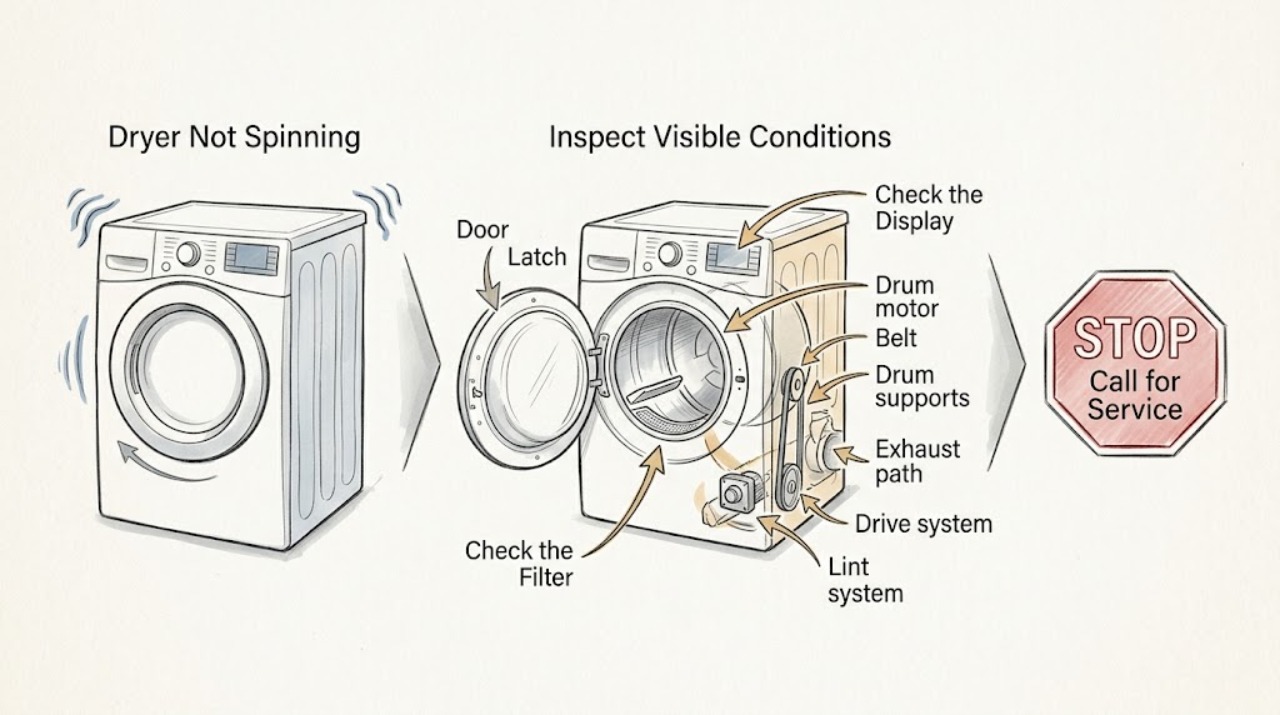
An LG dryer that is not spinning may be paused by an open door, Control Lock, a cycle or Start/Pause selection issue, an unsuitable load, a blocked or incorrectly seated lint filter, or a motor or drive fault. First decide whether the drum never starts, stops after starting, or only appears stopped because a very small automatic-dry load ends early or Wrinkle Care tumbles intermittently. Check the door and filter for clothing or obstruction, select a dry cycle, and press Start/Pause. Run the low-risk load and control checks with the drum empty or lightly loaded; do not open the cabinet or reach toward moving parts. If the drum still will not turn after the door, controls, and load checks, or if there is a drive noise, overheating, burning smell, smoke, gas odor, sparking, or repeated breaker trip, stop using the dryer and arrange qualified service.
Work through in order
Diagnostic checks
Use only checks that match the exact appliance or system and its official guide.
-
Check 1
From outside the dryer, observe one normal start attempt and note whether the drum never moves, turns and stops, reverses briefly, or tumbles only at intervals; record whether the door is open, Wrinkle Care is active, or an error appears.
Expected result: The drum pauses after the door opens, tumbles intermittently under a programmed feature, stops after a very small automatic-dry load, or remains still with no relevant display message.
Next step: Follow the matching branch. Do not open the cabinet or repeat start attempts if the dryer makes a violent noise, smells hot or burnt, smokes, sparks, or trips power.
Why this matters
Why: LG documents door-open pauses, intermittent reverse operation on some models, early completion for very small automatic-dry loads, and periodic Wrinkle Care tumbling. A still drum with an empty or normal load is a different service branch.
-
Check 2
With the dryer off, inspect the door opening for clothing caught in the seal or latch area and make sure the lint filter is fully seated; close the door firmly, select a dry cycle, and press Start/Pause once.
Expected result: The door closes and the drum starts; clothing or a mis-seated filter was found; a dE or dE4 code appears; or the door closes but the drum remains still.
Next step: Remove only a simple obstruction and reseat the filter, then make one normal start attempt. If the door is bent, the latch will not engage, the code returns, or the drum stays still, stop and arrange service.
Why this matters
Why: LG says a door that is not completely closed can stop operation and that clothing or an incorrectly seated filter can contribute to a dE condition. A persistent code or still drum after a proper close is not resolved by forcing the door.
-
Check 3
Check the display for CL or a lock symbol, confirm that a dry cycle—not only an option button—has been selected, and use the exact model manual's Child/Control Lock release sequence; do not force unresponsive buttons.
Expected result: CL or a lock indicator is present, an option was pressed without a selected cycle, the controls become responsive after the model-specific unlock, or the panel remains disabled.
Next step: Select the cycle and press Start/Pause once after unlocking. If the panel remains unresponsive, shows another code, or the dryer has an electrical odor or heat, stop using it and arrange service.
Why this matters
Why: LG identifies CL as Control Lock/Child Lock, which disables dryer controls on supported models, and says pressing a select-function button without a cycle can also leave it inactive. A panel that remains disabled after the documented unlock needs service.
-
Check 4
Turn the dryer off, then compare the load with the model guidance: remove bulky excess items, or add enough dry laundry for the automatic cycle to sense a normal tumbling load; for a diagnostic observation, use an empty drum only if the manual permits.
Expected result: The drum was overloaded, the load was so small that automatic drying ended early, or a normal load still leaves the drum motionless.
Next step: Adjust only the load size and run one normal cycle. If the drum still does not turn, do not keep increasing or rearranging the load; arrange service for a motor or drive diagnosis.
Why this matters
Why: LG says an overloaded drum may not rotate correctly and that a very small load may skip to air dry or end early because the clothes do not contact the moisture sensor. A still drum with a suitable load and no door or lock issue points to service.
-
Check 5
Record any code or indicator before clearing it, then match it to the exact LG model manual; visually check that the lint filter is installed, and if an airflow warning is shown, inspect only the accessible lint area and outside exhaust opening for visible lint without dismantling the duct.
Expected result: LE1 or another motor-related code appears; FO or INSERT FILTER remains; dE/dE4 returns; D80/D90/D95 or Flow Sense indicates restricted airflow; or no code is shown.
Next step: Follow only the model-specific user instruction for the displayed code. Stop if lint is packed, the outlet is hot, the dryer overheats, or cleaning would require opening the cabinet; arrange qualified service or professional vent cleaning as appropriate.
Why this matters
Why: LG maps LE1 to a drum-motor rotation issue on applicable models, FO to filter seating, dE/dE4 to the door, and D-series or Flow Sense warnings to restricted airflow. A code that returns after the documented user-level check requires service.
-
Check 6
Stop immediately for a burning smell, smoke, visible sparking, a hot or damaged plug or cord, severe grinding or impact, abnormal overheating, a gas odor, a damaged gas line, or a breaker that trips again.
Expected result: The hazard persists, the drum cannot be freed without opening the cabinet, or diagnosis would require touching wiring, a motor, a belt, an energized part, or a gas path.
Next step: Stop using the dryer and keep people away. Isolate power at the normal switch or breaker only if safe and dry; never touch water, damaged wiring, hot parts, or a gas line. For a gas odor, leave the area and follow local gas-emergency guidance; arrange qualified appliance service.
Stop if: Stop and call qualified appliance service; use a licensed gas professional for gas work.
Why this matters
Why: These symptoms can involve fire, electric shock, moving parts, restricted exhaust, or gas safety. They are outside a safe user-level spin check.
Use your observations
Decision map
Find the observation that best matches what you see, then follow the next safe action.
-
PATH 01Next step
What you see
The door was opened, clothing is caught at the door, or dE/dE4 appears.
Do this next
Remove only the visible obstruction, seat the lint filter, close the door firmly, and make one normal Start/Pause attempt. A bent door, returning code, or still drum requires service.
-
PATH 02Next step
What you see
CL or a lock symbol is present, or an option button was pressed before selecting a drying cycle.
Do this next
Use the exact model's Control Lock release, select a dry cycle, and press Start/Pause. Persistent disabled controls or another code require service.
-
PATH 03Next step
What you see
The load is very small, overloaded, or the dryer is in an intermittent Wrinkle Care or reverse-rotation phase.
Do this next
Use a suitable load and observe one normal cycle. LG describes these behaviors as possible reasons the drum can appear to stop; a normal load that remains still needs service.
-
PATH 04Next step
What you see
FO, INSERT FILTER, D80/D90/D95, Flow Sense, or another filter/airflow indication appears.
Do this next
Reseat the accessible lint filter and inspect the outside exhaust opening for visible lint. Do not dismantle the duct; a returning warning, packed lint, heat, or poor exhaust needs professional attention.
-
PATH 05Next step
What you see
LE1 appears, the drum remains still with a suitable load and no door or lock issue, or a new mechanical noise occurs.
Do this next
Stop repeated start attempts and arrange LG or qualified appliance service for motor, belt, support, and control diagnosis. Do not remove the cabinet or reach under the drum.
-
PATH 06Next step
What you see
Burning smell, smoke, sparking, abnormal heat, severe impact, gas odor, damaged gas line, or a repeat breaker trip occurs.
Do this next
Stop immediately, keep clear, isolate power only if safe and dry, and seek qualified service. For suspected gas, leave the area and follow local gas-emergency guidance without operating switches or retrying the dryer.
Helpful context
Understand the symptom
Confirm that it is a spin problem
A dryer can pause when its door is opened, and LG notes that a very small automatic-dry load may finish quickly when the clothes do not contact the moisture sensor. Some LG models also reverse direction or pause briefly as part of normal operation, while Wrinkle Care can tumble for short intervals after a cycle. Watch one safe start attempt and note whether the drum never moves, turns briefly then stops, or is only pausing between programmed movements.
Door, controls, and load size change the next step
LG's drum-not-turning guidance separates a door-open stop, a load that is too small for automatic sensing, and an overloaded drum. The Control Lock feature disables dryer buttons on supported models, and its release method varies by model. These checks can be made from the user interface and door opening; a door that is bent, a latch that will not engage, or a drum that remains still with an empty drum points toward service.
A code can identify a blocked start or drive fault
Record the complete display before resetting anything. LG documents dE/dE4 as a door-not-closed condition, CL as Child Lock, FO or INSERT FILTER as a lint-filter seating condition, and LE1 as a drum-motor rotation fault on applicable models. An airflow warning or gas-related code has a different path from a drive fault. Use the exact model manual because the guide covers many models and the display behavior can differ.
Keep belt and motor diagnosis professional
A drum that remains still after an empty-drum start attempt may need service; it does not prove that a particular belt, roller, idler, motor, or control board has failed. Listen and look only from outside for a new squeal, grinding, repeated clicking, or a drum that starts then stops. Do not remove the dryer cabinet, reach under the drum, or try to free a jam while connected to power.
Only after diagnosis
Potential parts
- drum motor or motor-control component
Consider only when a qualified technician confirms LE1 or a drum-motor fault after the door, controls, and load checks are clear.
Confirm the complete model and manufacturer fit information; an LE1-style symptom does not establish a particular replacement part. - drum belt, roller, idler, or support component
Consider only after a technician confirms a mechanical drive fault such as a still drum with a motor response, slipping, or a diagnosed abnormal drive noise.
Cabinet and moving-part work is professional service; confirm model-specific compatibility and do not select a part from sound alone. - door latch or door-switch assembly
Consider only when dE/dE4 returns with a correctly seated filter and visibly unobstructed, properly aligned door, and a technician confirms the door-sensing fault.
Confirm the complete model and manufacturer fit information; never bypass the door safety switch. - lint filter or exhaust-path component
Consider only if the exact model requires a damaged filter or a technician confirms a restricted or damaged exhaust component after accessible cleaning checks.
Do not substitute an unverified filter or dismantle the vent path; confirm model-specific fit and safe installation.
When checks do not resolve it
Need a professional?
Arrange LG or qualified appliance service when the drum remains still after the door, control-lock, filter, and load checks; when LE1 or a recurring door or filter code appears; when the drum starts and stops with a new mechanical noise; or when diagnosis would require a cabinet, belt, motor, wiring, exhaust duct, or gas-path access.
Common questions
FAQ
Why does my LG dryer stop spinning when I open the door?
LG says opening the door during operation stops the drum for safety. Close the door, make sure the filter is seated and no clothing is caught at the opening, select a dry cycle, and press Start/Pause. A returning door code or a door that will not latch needs service.
Can a small load make an LG dryer look like it stopped spinning?
Yes. LG explains that a very small automatic-dry load may not contact the moisture sensor, so the cycle can move to air dry or end early. Try a suitable load once; if the drum is still motionless with a normal load, arrange service rather than continually adding clothes.
What does CL mean on an LG dryer that will not start?
CL indicates Control Lock or Child Lock on supported LG dryers. The controls remain disabled until the model-specific lock release is used. Check the exact manual, select a dry cycle, and press Start/Pause; persistent disabled controls or another code require service.
What does LE1 mean when an LG dryer drum is not turning?
On applicable models, LG maps LE1 to a drum-motor rotation issue and suggests removing some items if the load is too heavy; if it persists, service is required. Do not open the cabinet or try to reach the motor or drive system.
When should I stop using an LG dryer that is not spinning?
Stop for burning smell, smoke, sparking, abnormal heat, severe grinding or impact, gas odor, a damaged gas line, or a breaker that trips again. Keep clear and isolate power only if safe and dry. For suspected gas, leave the area and follow local gas-emergency guidance; arrange qualified service.
Read the exact guide
Official sources
- [LG Dryer] [Electric] Laundry is not drying wellLG USA · LG dryer load size, lint filter, exhaust, and airflow checks
- Gas safety - Home ownersHealth and Safety Executive · Domestic gas-appliance safety, suspected unsafe appliances, suspected leaks, and qualified gas-engineer boundaries
- [LG Dryer error code] A CL error appears on the display or the select function button is not workingLG USA · LG dryer Control Lock behavior, model-specific unlock methods, and cycle-selection behavior
- LG Dryer - Error Code List(New)LG USA · LG dryer door, motor, filter, airflow, gas, power, sensor, and control error-code interpretation
- [LG Dryer] Dryer Drum Not TurningLG USA · LG dryer door-open pauses, load size, drum rotation, cookware-free start observation, and service escalation
- [LG dryer] [Electric heat pump] The drum rotates in the opposite direction. Stops in the middle of operation.LG USA · LG dryer model-dependent reverse rotation and programmed pauses
Community feedback
Share a repair observation
Share a plain-text repair observation. Accepted observations are published automatically; this page may take a moment to update.