
On this page
Start here
Quick answer
Separate an LG dryer with no display from one that powers on but will not run. With the dryer cool and dry, check the drum light or display, the wall connection and breaker, Child Lock or Control Lock, the door and lint-filter seating, the selected cycle, and the required Start or Start/Pause action. A dE or dE4 code points to a door-not-closed condition; CL indicates Control Lock on supported models, while other codes must be read against the exact model's LG guide. Do not open the terminal block, test live voltage, bypass the door switch, or keep resetting a breaker. Stop for overheating, a hot or discolored cord or receptacle, burning smell, smoke, sparks, gas odor, or a repeated trip and arrange qualified service.
Before you begin
Safety first
- Do not open the terminal block, probe live voltage, bypass the door switch or Control Lock, reach into a moving drum, adjust gas components, or operate with overheating, smoke, sparks, arcing, burning smell, gas odor, wet electrical parts, or repeated trip.
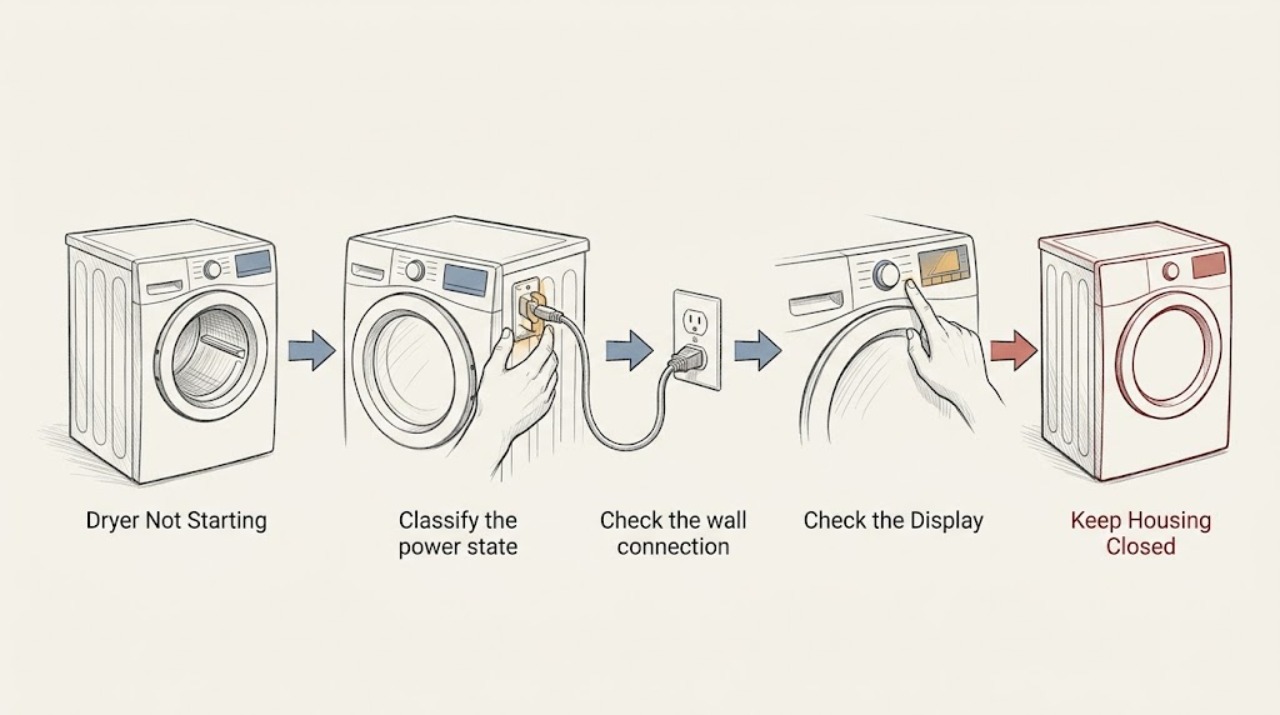
Work through in order
Diagnostic checks
Use only checks that match the exact appliance or system and its official guide.
-
Classify the power state and capture the symptom
With the dryer stopped, open the door and note whether the drum light is on, whether the display responds to Power, whether the control panel is blank, and whether pressing Start produces a click, beep, flashing process window, or code. Record whether the dryer is gas or electric from the model information without opening any panel.
Expected result: The display and drum light are both off, the drum light is on but the panel will not power up, the display works but Start does nothing, or a code is shown.
Next step: Follow the power branch for a blank dryer, the control and door branch for a powered dryer, and the code branch when an exact code is visible. If a safety symptom is present, skip operation and use the stop branch.
Stop if: Stop for a hot or discolored cord or receptacle, wet electrical area, overheating, burning smell, smoke, sparks, arcing, gas odor, or repeated breaker trip.
Why this matters
Why: LG's no-power guidance treats a light that is on with a dead control panel as a service clue, while a blank light and display make the outlet, cord, breaker, or household power the first external branch. A powered panel with no run points toward Control Lock, door, cycle, or code checks.
-
Check the wall connection and breaker once
Check that the dryer cord is securely connected at the visible outlet and that the outlet and surrounding area show no moisture, scorch mark, looseness, or heat damage. Check the household breaker or fuse visually; do not remove a terminal cover or slide the dryer to reach hidden wiring. If the protection device is clearly off and the area is safe, restore it once only.
Expected result: The outlet is dead, the breaker is off, the drum light remains off, the dryer powers after one restoration, or the breaker trips again.
Next step: If the dryer remains without power, have the outlet and supply checked by a qualified electrician or LG service technician. If one safe restoration returns power, continue to the control and door checks; if it trips again, leave the dryer off.
Stop if: Do not touch a hot, wet, damaged, or discolored connection, and do not continue after a repeated trip, smoke, sparks, arcing, or burning smell.
Why this matters
Why: LG identifies a tripped breaker, faulty outlet, power outage, or power connection as common no-power causes. Electric dryers can use more than one circuit protection device, so a display or light may not tell the whole supply story. A recurring trip is an electrical fault boundary, not a reason to reset repeatedly.
-
Clear Control Lock and choose a cycle before Start
If the display responds, look for CL, a lock icon, or unresponsive buttons. Use the exact model instructions to press the Control Lock or Child Lock control for the documented hold, then turn the cycle selector to a dry cycle before pressing Start or Start/Pause. Do not press function buttons before selecting a cycle when the model requires a cycle first.
Expected result: CL or a lock icon is present, buttons are unresponsive, the selector is not on a cycle, Start responds only after the correct sequence, or the panel remains unresponsive with no lock indicator.
Next step: Make one start attempt after the lock is cleared and a cycle is selected. If the lock cannot be cleared, returns immediately, or the panel is still dead while the drum light works, record the model and request service.
Stop if: Do not pry buttons, bypass a lock, or keep operating if the cabinet heats abnormally, smokes, sparks, smells burnt, or trips protection.
Why this matters
Why: LG says Control Lock prevents function buttons from operating and that unlocking differs by model. It also notes that selecting a function without first selecting a dry cycle can leave a button apparently inactive. A panel still unresponsive after the model-specific unlock and cycle selection needs service.
-
Check door closure and lint-filter seating
Open the door and remove only a visible item of clothing caught in the opening. Confirm the lint filter is fully pushed into its housing, the door closes squarely and firmly, and the gasket or frame is not visibly bent or damaged. Do not force the door or bypass the door switch.
Expected result: A garment is caught, the filter is not seated, the door is misaligned or damaged, a dE or dE4 code appears, or the door closes normally with no code.
Next step: Remove the obvious obstruction, seat the filter, close the door normally, and make one Start attempt. If dE returns or the frame or latch is damaged, leave the dryer off and request service.
Stop if: Do not operate with a bent door, damaged seal, exposed switch, cracked panel, smoke, sparks, burning smell, or any need to bypass the latch.
Why this matters
Why: LG associates dE or dE4 with a door that is not completely closed and lists clothing at the door, filter seating, and door misalignment as possible clues. A damaged frame or recurring door code is a service issue; a normal latch moves the diagnosis to power, controls, drum, or the exact error code.
-
Read the exact code and check only its external condition
Photograph or write down the complete display code, including capitalization, punctuation, flashing indicators, or a filter or Flow Sense message. Check only the external condition named by the code, such as an inserted filter, an obvious exhaust obstruction, a water container or drain hose on models that use one, or the visible gas-supply state on a gas model. Do not guess a code from a partial display.
Expected result: The display shows dE or dE4, CL, PF, a power-related code, a filter or airflow code, a gas or drain code, or an unfamiliar code.
Next step: Use the exact LG error guide or owner manual for the recorded code. Perform only its safe external check once; if the code returns, the dryer will not start, or the guidance involves internal parts, stop and arrange service.
Stop if: Stop for gas odor, smoke, sparks, arcing, overheating, burning smell, wet electrical parts, or a repeated breaker trip; do not attempt internal code repair.
Why this matters
Why: LG's error list maps different codes to door closure, control state, power, lint-filter detection, airflow, drain, gas supply, motor, compressor, or sensor conditions, and the applicable set varies by model. A code that remains after its documented external check is a service boundary, not proof of a particular part.
-
Make one supervised start attempt and observe drum motion
After the safe power, lock, door, and code checks, select a normal cycle and press Start once while standing clear of the opening. Observe only whether the drum begins turning and whether the dryer immediately stops or displays a code; never place a hand inside while it can move.
Expected result: The drum turns normally, the drum does not turn, the door or Start indicator blinks, or the dryer starts and stops immediately.
Next step: If the drum turns, record whether heat or a code is the remaining symptom. If it does not turn, stops, or blinks an error, stop repeated attempts and request service.
Stop if: Do not reach into the drum, bypass the door, continue with scraping or burning sounds, or operate after smoke, sparks, overheating, burning smell, gas odor, or a repeated trip.
Why this matters
Why: LG says an open door can pause the drum and that a dE indication requires closing the door and pressing Start/Pause. If an empty drum still does not rotate after the documented Start/Pause action, LG directs the owner toward service. Immediate stops can reflect a code or a control, motor, door, or safety condition.
-
Use one documented reset, then hand off the evidence
If the dryer is cool, dry, and free of hazards, use at most the one reset sequence specified by the exact LG model. Some LG guidance uses a power disconnect followed by holding the documented controls while power is removed; do not improvise a factory reset. Record what happened after the reset, including display, light, lock, door, code, and drum state.
Expected result: The dryer starts once, remains dead, returns the same code, stays locked, or the breaker trips again.
Next step: Leave the dryer off if the fault returns and arrange qualified appliance service; use a qualified electrician for a suspected outlet, cord, or household-supply problem. Provide the model, fuel type, code, cycle, power state, and observations from each safe check.
Stop if: Do not repeat resets or continue after a hot connection, wet electrical area, overheating, smoke, sparks, arcing, burning smell, gas odor, or repeated trip.
Why this matters
Why: A reset may clear a transient power or control state but cannot establish that the door switch, motor, control, supply, or internal wiring is sound. LG directs owners to service when no-power or error conditions persist after the documented reset.
Use your observations
Decision map
Find the observation that best matches what you see, then follow the next safe action.
-
PATH 01Next step
What you see
Overheating, hot or damaged cord or receptacle, wet electrical area, burning smell, smoke, sparks, arcing, gas odor, or repeated trip
Do this next
Turn the dryer off, keep clear of hot or energized parts, avoid flames or electrical switching when gas is suspected, and arrange qualified service.
-
PATH 02Next step
What you see
Display and drum light are off or the light is on but the panel will not power up
Do this next
Check the visible outlet, cord, breaker, and household power once; persistent no power or a trip needs qualified electrical or appliance service.
-
PATH 03Next step
What you see
CL or lock icon, unresponsive controls, dE or dE4, unseated filter, clothing at the door, or an unselected cycle
Do this next
Use the exact model unlock sequence, select a cycle, seat the filter, and close the door normally; a lock or door code that remains needs service.
-
PATH 04Next step
What you see
A different exact code appears or the drum still will not turn after the safe checks
Do this next
Use the model-specific LG code guide and perform only its external check; if the code returns or the drum stays still, stop and request service.
-
PATH 05Next step
What you see
A documented reset does not restore operation or the same failure returns
Do this next
Leave the dryer off and provide the model, fuel type, code, cycle, power state, and observations to qualified appliance service.
Helpful context
Understand the symptom
No display and no run are different symptoms
An LG dryer can have a supply problem, a locked control panel, a door that is not recognized as closed, an unselected cycle, or a mechanical or electronic fault. Record whether the display or drum light works, whether Start makes a sound, whether the drum turns, and whether a code appears. If the dryer powers on but is not heating, that is a different diagnostic path; this page first establishes why it will not start.
Keep checks external and de-energized
Only inspect the cool, dry, visible exterior, door opening, lint-filter seating, and household protection status. Do not remove the terminal cover, reach into a moving drum, bypass the door switch, or probe wiring. LG dryers may be gas or electric, but both can contain electrical and hot components; gas odor, heat damage, smoke, sparks, arcing, or a recurring trip is a stop condition.
When checks do not resolve it
Need a professional?
Request qualified appliance service when the LG dryer still will not start after the safe power, control, door, cycle, and code checks. Use qualified electrical service for an outlet, cord, breaker, or household-supply concern, and qualified gas service for a gas-supply or ignition concern.
Safety scope: Do not open the terminal block, probe live voltage, bypass the door switch or Control Lock, reach into a moving drum, adjust gas components, or operate with overheating, smoke, sparks, arcing, burning smell, gas odor, wet electrical parts, or repeated trip.
Have this ready
- Provide the exact model, gas or electric type, display and drum-light state, cycle selected, Start response, door and filter observations, complete code or indicator, breaker behavior, and whether the drum turned.
Common questions
FAQ
Why is my LG dryer completely unresponsive?
Check the drum light, visible cord and outlet condition, household breaker, and whether a wall switch controls the outlet. If the light is on but the panel will not power up, or if the light stays off after one safe supply check, LG recommends service rather than internal troubleshooting.
Why does my LG dryer show dE or dE4 and not start?
LG uses dE or dE4 for a door-not-closed condition. Check for clothing at the opening, seat the lint filter, and close the door firmly without forcing it. A bent door, damaged frame, or code that returns after one documented reset needs service.
What does CL mean when my LG dryer will not respond?
CL indicates Control Lock on supported models. Use the exact model instructions to disable it, then select a dry cycle before pressing the function or Start button. If the lock will not clear or returns, stop and request service.
Read the exact guide
Official sources
- [LG Dryer error code] A CL error appears on the display or the select function button is not workingLG USA Support · LG dryers and washer-dryer combos with the CL function; unlock method varies by model
- Power On, Wont Run - Laundry DryerLG USA Support · LG dryers; use the exact model manual for controls
- LG Dryer - Why is a dE error code displayed on my electric dryer?LG USA Support · LG electric dryer models displaying dE; verify exact model
- [LG Dryer power] The power turns off during use, or there is no power supplyLG USA Support · LG gas and electric dryers; model and regional supply can vary
- [LG Dryer] Dryer Drum Not TurningLG USA Support · LG dryers; the displayed indicator and model behavior may differ
- LG Dryer - Error Code List(New)LG USA Support · LG dryers; code coverage and controls vary by model
- Troubleshooting No Power on a DryerLG USA Support · LG dryers; confirm exact model instructions
Community feedback
Share a repair observation
Share a plain-text repair observation. Accepted observations are published automatically; this page may take a moment to update.