
On this page
Start here
Quick answer
If an LG freezer will not turn on, first decide whether it has no power at all or has power but is not cooling. Check the accessible plug, wall outlet, power strip, and household breaker without opening the appliance; LG says a loose plug, defective outlet, or tripped breaker can leave a refrigerator/freezer without power. If the display or LED pattern works, record it before resetting: LG documents model-specific freezer sensor, defrost, fan, and cycle errors that need the exact manual or professional inspection. After power is restored, keep the door closed and allow the freezer time to cool while protecting food in a backup freezer or cooler. Stop for a damaged cord, scorch marks, water near electrical parts, repeated breaker trips, smoke, burning smell, or an internal repair need, and arrange qualified service.
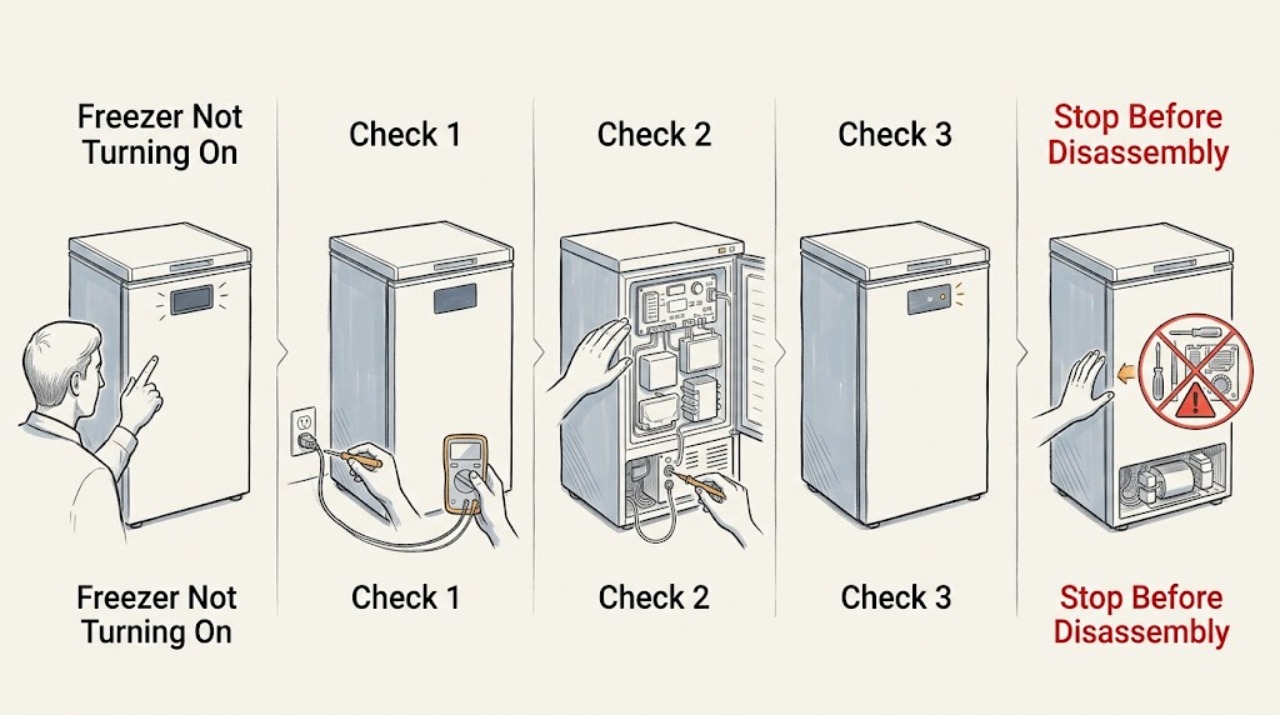
Work through in order
Diagnostic checks
Use only checks that match the exact appliance or system and its official guide.
-
Check 1
Without opening panels or touching damaged electrical parts, observe the freezer's interior light, display, control response, fan sound, compressor sound, and food temperature while keeping the door closed as much as possible.
Expected result: The light and display are both dark; the display works but cooling is absent; an LED pattern or error appears; or there is smoke, burning smell, unusual heat, or water near electrical parts.
Next step: Record the model, display/LED pattern, when the freezer stopped, food temperature or thawing, and any sound. Move food to a backup freezer or cooler if needed, then continue only with a safe external power check.
Stop if: Stop immediately for smoke, burning smell, scorch marks, a damaged cord or plug, water near electrical parts, or an appliance that is hot or unsafe to approach.
Why this matters
Why: A fully dark appliance follows a power path, while a working display or LED pattern indicates that the freezer is receiving at least some power and may have a cooling or model-specific fault. A hazard ends user troubleshooting.
-
Check 2
Inspect the accessible power plug and cord for looseness or damage, confirm the plug is not feeding through a power strip or extension arrangement, and check the household breaker from a dry, safe position.
Expected result: The plug is loose; the cord or outlet is damaged; the freezer uses a power strip; the breaker is tripped; or the connection and breaker appear normal.
Next step: If there is no damage or hazard, restore only an obvious accessible connection as the manual allows and use a direct wall outlet. If the breaker will not reset, trips again, or the freezer remains dark, keep it off and arrange an electrical or LG service inspection.
Stop if: Do not handle wet connections, damaged cords, exposed conductors, hot outlets, or a breaker that repeatedly trips.
Why this matters
Why: LG identifies loose connections, defective outlets, power strips, and tripped breakers as possible reasons a refrigerator/freezer does not turn on. A normal external supply check does not prove that the appliance electronics are healthy.
-
Check 3
If the wall outlet is accessible and dry, verify it with a small known-working appliance or the outlet's normal test method; do not use the freezer's cord as the test instrument and do not open the outlet.
Expected result: The test appliance also fails; the outlet works but the LG freezer stays dark; or the outlet is warm, loose, sparking, or otherwise damaged.
Next step: For an outlet issue, stop using it and contact the building manager or qualified electrician. For a working outlet with a dead freezer, arrange LG or qualified appliance service rather than opening the appliance.
Stop if: Stop for sparking, heat, burning odor, looseness, water, or any need to remove an outlet cover or test wiring.
Why this matters
Why: A failed test appliance points toward the outlet or building supply, while a working outlet with a dark freezer points toward the freezer's cord, input, controls, or internal electronics. A damaged outlet is an electrical-service condition.
-
Check 4
If the freezer display or LEDs work, photograph the exact pattern and compare it with the model manual or LG's matching error-code guidance before performing any reset.
Expected result: The pattern matches a freezer sensor, defrost, fan, cycle, or other listed condition; the display is ambiguous; or the same code returns.
Next step: Follow only the exact model's external instruction. For an unlisted, ambiguous, or recurring pattern, keep the freezer out of use as needed and arrange qualified diagnosis.
Stop if: Do not remove the evaporator cover, chip ice from a fan, test wiring, or replace a sensor, fan, or board based on an LED pattern alone.
Why this matters
Why: LG documents freezer sensor, defrost, fan, and cycle indicators as distinct conditions. For example, an FF pattern can involve the freezer fan or ice blocking it, while other patterns require professional inspection; a code alone does not identify a replaceable part.
-
Check 5
If the model-specific guidance permits one power reset and there is no electrical hazard, use only the documented accessible procedure; if an FF/fan condition is shown, protect the food and follow the exact manual's frost and service instructions instead of forcing the fan.
Expected result: The display returns and the freezer begins its normal start sequence; the same pattern returns; the fan remains blocked; or the appliance stays dark or warm.
Next step: Keep the door closed, monitor temperature with the least door opening possible, and move food if it is thawing. If the code returns, cooling does not resume, or the procedure requires internal access, arrange service.
Stop if: Do not chip ice, reach near a fan, repeatedly reset, or continue if water reaches electrical areas or the food cannot be kept safely cold.
Why this matters
Why: LG describes a single reset or controlled defrost path for certain fan errors, but repeated symptoms need technician diagnosis. Power restoration does not immediately prove that the freezer has returned to safe storage temperature.
-
Check 6
After power is restored or one documented external correction, keep the freezer closed and observe whether cooling returns, whether airflow is blocked by stored food, whether the door seals, and whether the cabinet has reasonable ventilation around it.
Expected result: Cooling gradually returns; the freezer remains warm with a working display; air outlets are blocked; the door is not sealing; or the freezer remains inactive.
Next step: Rearrange only loose food that blocks a visible air outlet and confirm the door closes without a caught package. If the freezer remains warm, a fan or compressor is silent, or the issue returns, arrange qualified service and protect the food.
Stop if: Do not remove covers, force the door seal, change sealed-system parts, or continue operation with water leakage or unsafe temperature.
Why this matters
Why: LG notes that blocked airflow, a door that is not closed completely, poor ventilation, ambient conditions, and the normal time needed after power restoration can affect freezing. Persistent warmth with normal external conditions may require service.
-
Check 7
Run no more than one short, model-approved verification after the external checks, observing the display, fan/compressor response, temperature trend, door seal, and any return of the fault without repeatedly opening the freezer.
Expected result: The freezer operates normally; the display works but cooling remains absent; the same error returns; the breaker trips; or smoke, odor, water, or unusual heat appears.
Next step: Stop after the first failed or unsafe verification, move food as needed, and provide the technician with the model, code, power observations, temperature history, and exact checks attempted.
Stop if: Do not run repeated tests, leave food in a warming freezer, or open the appliance to diagnose internal components.
Why this matters
Why: A normal display is not proof of cooling, and a repeated fault or unsafe symptom identifies a service boundary. A freezer that has warmed may also need time to return to operating temperature after power is restored.
Use your observations
Decision map
Find the observation that best matches what you see, then follow the next safe action.
-
PATH 01Safety boundary
What you see
The display and interior light are dark, but the plug, outlet, and breaker are normal and there is no visible electrical hazard.
Do this next
Keep the freezer off, protect the food, and arrange qualified LG appliance service.
Why this path and its safety boundary
Why it matters: The external supply checks did not explain the no-power condition; the cord input, control, or internal appliance electronics may need inspection.
Safety stop: Do not open the cabinet or test internal electrical parts.
-
PATH 02Safety boundary
What you see
The outlet fails the safe external check or the breaker will not reset or trips again.
Do this next
Stop using the outlet/freezer and contact a qualified electrician, building manager, or appliance professional as appropriate.
Why this path and its safety boundary
Why it matters: The building supply or an electrical fault must be resolved before the freezer can be safely assessed.
Safety stop: Do not repeatedly reset the breaker or handle a hot, wet, loose, or sparking connection.
-
PATH 03Safety boundary
What you see
The display works and a freezer sensor, defrost, fan, or cycle pattern is shown.
Do this next
Follow only the matching manual guidance and arrange service for a persistent or unclear pattern.
Why this path and its safety boundary
Why it matters: The freezer has power, but LG's model-specific fault path may prevent normal cooling or require inspection.
Safety stop: Do not replace or bypass a fan, sensor, heater, board, or other safety-related component from the display pattern alone.
-
PATH 04Safety boundary
What you see
An FF/fan condition is shown and frost may be blocking the fan, but food can be moved safely and the exact model guidance permits a controlled defrost.
Do this next
Move food to backup cold storage if available, follow the exact model's controlled defrost/reset instructions once, and arrange service if the pattern returns.
Why this path and its safety boundary
Why it matters: LG identifies ice around the freezer fan as one possible FF cause, but food protection and water control are part of the procedure.
Safety stop: Do not chip ice, reach into the fan area, or leave food in unsafe temperatures while waiting.
-
PATH 05Safety boundary
What you see
Power and controls return, but the freezer remains warm, airflow is blocked, the door does not seal, or cooling does not recover after the normal post-power period.
Do this next
Correct only a loose food obstruction or caught package, keep the door closed, protect food, and arrange qualified service if warmth persists.
Why this path and its safety boundary
Why it matters: The condition may involve airflow, door sealing, ventilation, fan, compressor, or another cooling issue rather than a simple power interruption.
Safety stop: Do not remove covers or change sealed-system or electrical components.
-
PATH 06Safety boundary
What you see
Smoke, burning smell, water near electrical parts, damaged wiring, severe heat, repeated breaker trips, or another immediate hazard is present.
Do this next
If safe, stop using the freezer without touching damaged parts, keep people clear, protect food, and seek qualified electrical or appliance help.
Why this path and its safety boundary
Why it matters: The situation is outside safe user troubleshooting.
Safety stop: Stop all operation immediately; do not reset, open, or continue diagnosis.
Helpful context
Understand the symptom
No power is different from no cooling
A dark interior light and blank display suggest a supply path, while a working display with warm food points toward a cooling, setting, fan, or fault-code path. LG's power guidance recommends checking the plug, outlet, and breaker; its cooling guidance separately discusses airflow, ventilation, door closure, and the time required after power is restored.
Protect food while you diagnose
Keep the freezer door closed as much as possible and move perishable food to a backup freezer or cooler if the temperature is rising. Do not treat a light or display as proof that the compressor is cooling, and do not repeatedly open the door to check progress.
Codes and internal parts need the exact model
LG lists different meanings for freezer sensor, defrost, fan, and cycle indicators. A code can narrow the service path, but it does not authorize replacing a board, fan, sensor, or sealed-system part at home. Preserve the code and model information for the exact manual or technician.
Safety boundary
Stop conditions
- Stop for smoke, burning smell, scorch marks, sparking, a damaged cord or outlet, water near electrical parts, severe heat, or repeated breaker trips.
- Do not open the cabinet, chip ice from a fan, test wiring, replace internal parts, or continue with a freezer that cannot maintain safe food temperature.
- Stop after one model-approved external correction or reset if the freezer stays dark or warm, an error returns, or a new hazard appears.
Only after diagnosis
Potential parts
- freezer fan motor
Consider only after qualified diagnosis confirms a fan fault; an FF pattern can also be associated with frost blocking the fan.
Confirm exact model, fan position, connector, mounting, and manufacturer's fit information before selection. - freezer temperature sensor
Consider only after qualified diagnosis confirms a sensor fault; a sensor or LED code alone does not prove the part is the cause.
Confirm exact model, sensor type, connector, and installation procedure before selection. - freezer electronic control board
Consider only after qualified diagnosis confirms an electronic control failure following safe power checks.
Confirm exact model and board revision; internal electrical replacement requires qualified procedures.
When checks do not resolve it
Need a professional?
Call for a dead appliance after external power checks, recurring code, absent cooling, fan/defrost symptom, repeated breaker trip, or any need for internal access.
Have this ready
- Exact LG model number
- Display or LED pattern and a photo
- Whether the interior light, display, fan, or compressor responds
- When the freezer stopped and what happened to stored food
- Outlet/breaker observations and the single model-approved procedure attempted
Common questions
FAQ
What should I check first if my LG freezer will not turn on?
Determine whether the light and display are both dark, then check the accessible plug, wall outlet, power strip, and breaker without opening the appliance. Protect food and stop for electrical hazards.
What if my LG freezer has power but is not cooling?
A working display does not prove that cooling is occurring. Check only visible airflow blockage, door closure, and ventilation, record any LED pattern, keep the door closed, and arrange service if cooling does not recover.
What does an FF error mean on an LG freezer?
LG describes FF as a freezer-fan motor condition that can also occur when frost blocks the fan. Follow the exact model's controlled defrost/reset guidance once, protect the food, and request service if the pattern returns.
How long can an LG freezer take to cool after power returns?
LG says cold air may become noticeable after about 1–2 hours and that reaching normal operating temperature can take 1–2 days depending on the food and conditions. Keep the door closed and move food if it is thawing; a persistent warm freezer needs service.
When should I stop troubleshooting an LG freezer?
Stop for smoke, burning smell, sparking, damaged wiring, water near electrical parts, repeated breaker trips, an unlisted or recurring code, or any need to open the cabinet or reach near a fan. Keep food safe and arrange qualified service.
Read the exact guide
Official sources
- LG Refrigerator - Why Isn't My Freezer Cooling Properly?LG USA Support · General LG refrigerator/freezer cooling guidance; exact model instructions govern.
- [LG refrigerator freezing] Food in the freezer is not frozen. Food has slightly thawed. The freezer's function is degraded.LG USA Support · General LG refrigerator/freezer cooling guidance; exact model instructions govern.
- LG Refrigerator - Troubleshooting an E FF or E rF Error CodeLG USA Support · Applicable to LG refrigerator/freezer systems showing the documented FF or rF patterns.
- [LG refrigerator power] Power is not supplied.LG USA Support · General LG refrigerator/freezer power guidance; exact freezer model instructions govern.
- Error codes on analog display modelsLG USA Support · Applicable to LG models using the documented analog display patterns; exact model may differ.
Community feedback
Share a repair observation
Share a plain-text repair observation. Accepted observations are published automatically; this page may take a moment to update.