
On this page
Start here
Quick answer
When an LG freezer is not working, first decide whether it has no power at all or has power but is warm. Check the plug and household breaker, confirm that the display or interior light responds, and make sure the door closes fully without food blocking the seal or cold-air outlet. If frost or ice is blocking circulation, protect the food and follow the exact model guidance for a safe defrost; never chip ice with a knife or ice pick. An error pattern can point to a fan, sensor, defrost, or control fault that needs professional diagnosis. Move vulnerable food to a working freezer when cooling is lost, stop for a hot or damaged cord, water near electrical parts, smoke, or a burning smell, and arrange qualified refrigerator or freezer service when power and airflow checks do not restore cooling.
Before you begin
Safety first
- This article supports external power, door, airflow, frost, display, and food-protection checks only. Do not open sealed-system or electrical covers, bypass safety components, or use sharp tools or improvised heat.
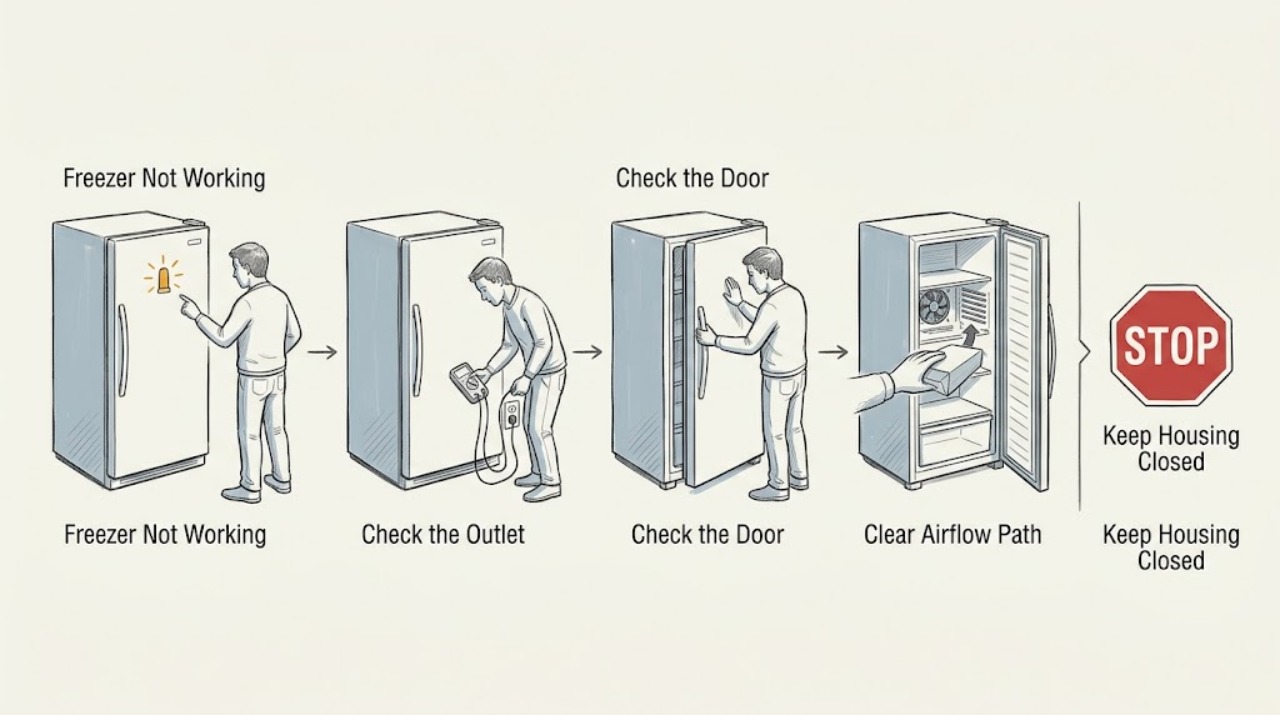
Work through in order
Diagnostic checks
Use only checks that match the exact appliance or system and its official guide.
-
Classify the failure before opening the door repeatedly
Observe the freezer from outside, then open it briefly to check whether the display or interior light responds, whether the compressor or fan has any normal operating sound, and whether food is soft or merely less cold after a recent power event.
Expected result: There is no light or display, the freezer has power but is warm, frost or ice is visible, the door is not sealing, or cooling was recently interrupted and has not yet recovered.
Next step: Move vulnerable food to a working freezer or cooler when cooling is lost, then use the matching power, door, frost, or error-code check below.
Stop if: Do not keep the door open to test temperature, handle spoiled food, or continue if there is smoke, a burning smell, water near electrical parts, or a hot cord.
Why this matters
Why: No electrical response supports a power or control path. A powered warm compartment supports door, airflow, frost, fan, defrost, temperature, or sealed-system checks. A recent outage can make the compartment temporarily warm while it returns to operating temperature.
-
Check the plug, outlet, and breaker safely
With dry hands, inspect whether the freezer plug is firmly seated in a wall outlet and whether the household breaker has tripped; if the outlet is accessible and the model permits it, use another small appliance to determine whether the outlet supplies power without moving the freezer.
Expected result: The plug was loose, the breaker was tripped and resets, the outlet does not power another appliance, or the freezer remains unresponsive after the supply appears normal.
Next step: Reconnect only a clearly loose plug and allow one normal restart; consult an electrician for an outlet or breaker problem and arrange LG or qualified appliance service for persistent no power.
Stop if: Do not use a power strip or extension cord, repeatedly reset a breaker, touch damaged insulation, or move the freezer to reach hidden wiring.
Why this matters
Why: A loose plug, failed outlet, or tripped breaker can prevent operation. A breaker that will not reset or a freezer that remains dead with a working outlet points toward building wiring or an appliance fault.
-
Check the door seal and cold-air path
Inspect the gasket and door perimeter for food, drawers, shelves, residue, or overpacking that prevents a complete seal; confirm that stored items do not block the visible cold-air outlet and that the appliance has its model-required ventilation clearance.
Expected result: The door closes fully with an even seal and the air outlet is clear, or food catches the door, the gasket has a gap, shelves are misplaced, the compartment is overpacked, or the outlet is blocked.
Next step: Reposition only loose food or correctly reinstallable shelves and close the door; monitor one cooling cycle, then arrange service for a damaged gasket, persistent gap, or continued warming.
Stop if: Do not pull the gasket off, force the door, drill or alter the cabinet, or place hands near a moving fan.
Why this matters
Why: A door gap admits warm humid air and can raise the freezer temperature or create frost. Blocked air circulation prevents cold air from reaching stored food; a clear path makes fan, defrost, or sealed-system causes more likely.
-
Inspect frost and defrost evidence without sharp tools
With food protected and the appliance disconnected only as the exact model instructions permit, inspect for thick frost on the freezer wall, shelves, air outlet, or fan area; use a soft cloth or the model's documented defrost method and keep water away from electrical parts.
Expected result: Frost is light and localized, thick frost blocks the outlet or fan, water is not draining, or no frost is present while the freezer remains warm.
Next step: Use only the model-approved defrost procedure and dry the area fully; arrange service when frost returns, a drain is blocked, food cannot be protected, or cooling remains absent.
Stop if: Never chip ice with a knife or ice pick, use a heat source near the liner, puncture the cabinet, or energize the appliance while water can reach electrical parts.
Why this matters
Why: Heavy frost can block air circulation and may accompany a defrost or door-seal problem. No frost with a warm powered cabinet does not prove a defrost fault and can require fan, control, or sealed-system diagnosis.
-
Record error lights or unusual fan behavior
Record any displayed code or internal LED pattern and listen briefly from outside for a fan that is blocked, repeatedly trying to start, or silent while the freezer is warm; do not remove panels or reach into the fan or compressor area.
Expected result: The pattern indicates a freezer sensor, defrost, fan, condenser-fan, or cycle error, or the unit has no code but still does not cool.
Next step: Photograph the display or LED pattern and arrange professional diagnosis; follow a model-specific ice-clear procedure only when LG documents it and food and water can be safely managed.
Stop if: Do not bypass a sensor, fan, heater, or control, insert tools into the fan, or repeatedly power-cycle a unit showing a fault.
Why this matters
Why: LG identifies sensor, defrost, fan, and cycle patterns as conditions requiring inspection; ice can also block a fan. A no-code warm freezer still needs a normal power, seal, airflow, and service decision rather than an invented code diagnosis.
-
Perform one documented restart and protect the food
After the power, door, airflow, and frost checks are complete and no hazard is present, reconnect the freezer or restore its breaker once as the model instructions allow, close the door, and observe the display and cooling response without repeatedly opening it.
Expected result: The display and normal cooling response return, the unit remains warm, the error returns, water accumulates, or the breaker trips again.
Next step: Leave the freezer closed and out of service when cooling does not return; provide the model, food-protection steps, power result, frost, door, airflow, and error observations to LG or a qualified appliance technician.
Stop if: Do not restart after smoke, a burning smell, water near electrics, a hot cord, or a breaker trip; do not keep food in a freezer that cannot maintain safe cold storage.
Why this matters
Why: A single restart can clear a transient power state, but it cannot repair a fan, sensor, defrost, sealed-system, or control fault. A returning code, trip, leak, or persistent warm cabinet requires professional diagnosis.
Use your observations
Decision map
Find the observation that best matches what you see, then follow the next safe action.
-
PATH 01Safety boundary
What you see
The display and interior response are absent, the plug or outlet is loose or dead, or the breaker will not remain reset.
Do this next
Protect the food, use an electrician for the outlet or circuit, and arrange qualified appliance service when the household supply is normal but the freezer remains dead.
Why this path and its safety boundary
Why it matters: The freezer does not have a confirmed usable supply, or an appliance electrical fault remains possible.
Safety stop: Do not repeatedly reset, use a power strip, touch damaged cord insulation, or move the freezer to reach wiring.
-
PATH 02Safety boundary
What you see
The freezer is powered but the door has a gap, food blocks the seal or outlet, or the cabinet is overpacked.
Do this next
Reposition loose contents, restore correct shelf and drawer placement, close the door, and monitor without repeated opening; arrange service for gasket damage or continued warming.
Why this path and its safety boundary
Why it matters: Warm-air entry or blocked cold-air circulation can explain the degraded freezing function.
Safety stop: Do not remove the gasket, force the door, or put hands near a fan.
-
PATH 03Safety boundary
What you see
Thick frost blocks an air outlet or fan area, water does not drain, or an LG defrost-related code appears.
Do this next
Move food to backup storage and follow only the exact model's safe defrost guidance; request service when the code returns or cooling remains abnormal.
Why this path and its safety boundary
Why it matters: Ice accumulation, a blocked drain, defrost sensor, thermal fuse, heater, or control issue may be involved.
Safety stop: Do not chip ice, use sharp tools or open flame, puncture the liner, or energize the unit while water can reach electrical parts.
-
PATH 04Safety boundary
What you see
An LED or display pattern identifies a freezer sensor, fan, condenser-fan, or cycle error, or the fan is blocked or repeatedly trying to start.
Do this next
Record the code or pattern, protect food, and arrange professional diagnosis; do not bypass or disassemble the fan or control system.
Why this path and its safety boundary
Why it matters: LG identifies these patterns as requiring inspection; ice may be a contributor but the internal component cannot be confirmed by sound alone.
Safety stop: Do not insert tools into the fan, defeat a sensor, or repeatedly cycle power.
-
PATH 05Safety boundary
What you see
Power, door, airflow, and safe frost checks are normal, but the freezer remains warm or a restart does not restore cooling.
Do this next
Keep food in working cold storage and arrange LG or qualified refrigerator/freezer service with the complete observation record.
Why this path and its safety boundary
Why it matters: A sealed-system, compressor, fan, sensor, defrost, or control problem remains possible and requires qualified diagnosis.
Safety stop: Do not remove sealed-system covers, handle refrigerant tubing, or continue operation when electrical or heat damage is present.
Helpful context
Understand the symptom
Separate no power from no cooling
A blank display and no interior response point toward the electrical supply or a control fault. A powered freezer with warm food points toward temperature setting, door sealing, blocked airflow, frost, fan, defrost, or sealed-system diagnosis. The same symptom can also follow a recent outage or power restoration while the cabinet is cooling down, so record what changed and protect food before testing.
Protect food and avoid puncturing the freezer
Keep the door closed as much as possible while deciding what to move to a working freezer or cooler. If frost must be removed, use only the model's documented procedure and non-sharp methods; LG warns that knives and ice picks can damage the appliance. Do not remove sealed-system covers, disturb refrigerant tubing, or work around wet electrical connections.
Safety boundary
Stop conditions
- Move vulnerable food to a working freezer or cooler when the LG freezer is warm, and minimize door opening while arranging service.
- Stop immediately for smoke, a burning smell, a hot or damaged cord, water near electrical parts, exposed wiring, a breaker that trips again, or unusual compressor or fan heat.
- Do not chip frost with a knife or ice pick, puncture the liner, use a flame or improvised heat source, or insert tools into a fan or drain.
- Do not bypass a sensor, heater, thermal fuse, fan, control, or other safety component, and do not open sealed-system or refrigerant parts.
- Arrange qualified LG or appliance service when an error pattern returns, safe defrost does not restore cooling, the door seal is damaged, or power and airflow checks leave the freezer warm.
Only after diagnosis
Potential parts
- freezer door gasket
Consider this category only if inspection confirms a damaged or permanently deformed gasket is allowing warm air into an otherwise operating freezer.
Confirm the exact LG model and gasket profile before ordering; do not force, cut, or substitute a seal by appearance alone. - freezer fan motor or fan assembly
Consider this category only if qualified diagnosis confirms a fan fault after checking for safe, model-authorized frost clearance.
Confirm the exact model and fan design with LG or a qualified technician; do not reach into or bypass a fan. - freezer defrost or temperature-sensor component
Consider this category only when a documented error pattern or professional testing identifies a defrost or sensor failure.
Confirm the exact LG model, component function, and approved fit information before any replacement; do not bypass a thermal fuse or heater.
When checks do not resolve it
Need a professional?
Arrange qualified refrigerator or freezer service when an LG freezer remains warm after safe power, door, airflow, and model-authorized frost checks, or when a sensor, fan, defrost, cycle, or control error returns. Use an electrician for a defective outlet or household circuit. Treat smoke, burning smell, water near electrical parts, a hot or damaged cord, repeated breaker trips, and unusual heat as stop-use conditions; protect the food before troubleshooting.
Safety scope: This article supports external power, door, airflow, frost, display, and food-protection checks only. Do not open sealed-system or electrical covers, bypass safety components, or use sharp tools or improvised heat.
Common questions
FAQ
Why is my LG freezer not working?
First distinguish no power from a powered but warm freezer. Check the plug, outlet, breaker, door seal, cold-air outlet, overpacking, frost, and any error pattern. A persistent warm cabinet can involve a fan, defrost system, sensor, control, or sealed system and needs qualified service.
What should I do if my LG freezer has no power?
With dry hands, check the plug and household breaker, and determine whether the wall outlet works without moving the freezer. Use a direct wall outlet, not a power strip. A breaker that will not reset, a dead outlet, or a freezer that remains dark after the supply is normal needs an electrician or appliance technician.
Can a blocked vent or overpacked LG freezer stop it from freezing?
Yes. LG says food, shelves, or drawers can block cold-air circulation, and an overpacked or poorly sealed door can let warm air in. Reposition only loose contents and ensure the door closes; continued warming or a damaged gasket needs service.
How do I remove ice from an LG freezer that is not working?
Protect the food and follow only the exact model's documented defrost procedure. Do not use a knife or ice pick, puncture the liner, or improvise heat. A returning frost or defrost error requires professional diagnosis.
When should I call for LG freezer service?
Call when safe power, door, airflow, and model-authorized frost checks do not restore cooling, or when an error pattern returns. Stop immediately for smoke, burning smell, water near electrical parts, a hot cord, repeated breaker trips, or unusual heat, and move food to working cold storage.
Read the exact guide
Official sources
- [LG refrigerator freezing] Food in the freezer is not frozen. Food has slightly thawed. The freezer's function is degraded.LG USA Support · Official LG support guidance for freezer performance in refrigerator/freezer products; model features and recovery time vary.
- LG Refrigerator - Troubleshooting an F dH or r DH Error CodeLG USA Support · Official LG support article for refrigerator/freezer defrost-related error codes; model display and safe defrost details vary.
- Error codes on analog display modelsLG USA Support · Official LG all-model analog-display guide; LED patterns and exact recovery steps vary by product.
- [LG refrigerator power] Power is not supplied.LG USA Support · Official LG support guidance for refrigerator/freezer power symptoms; exact product model and installation instructions control.
- [LG refrigerator frost build-up] There is frost build-up and icicles in the freezer compartmentLG USA Support · Official LG support guidance for freezer frost and ice; the exact model manual controls any defrost procedure.
Community feedback
Share a repair observation
Share a plain-text repair observation. Accepted observations are published automatically; this page may take a moment to update.