
On this page
Start here
Quick answer
For an LG LRE3061ST that reaches a set temperature and then seems unable to hold it, first separate normal heating cycles, convection temperature conversion, and a repeatable temperature offset from true loss of heat. LG identifies the LRE3061ST as a 6.3 cu. ft. freestanding electric range with bake, broil, and convection modes. Confirm the selected mode, preheat fully, keep the rack and door seal from blocking or leaking heat, and record the same symptom across more than one bake cycle. In Convection Bake, LG says Auto Conversion can display a temperature 25°F lower than the entered recipe temperature. If the offset is repeatable after the correct mode and preheat are confirmed, the official LG calibration table places LRE3061* in calibration Type 13: hold Bake for three seconds, adjust with plus or minus, and press START, using only the range and increments allowed by the exact manual. If calibration does not restore consistent cooking, an error appears, the oven does not heat, power trips, or there is smoke, burning odor, arcing, or uncontrolled heat, stop and arrange qualified LG service; do not select a sensor or element from the symptom alone.
Before you begin
Safety first
- Do not remove the rear cover or control panel, probe live wiring, touch energized elements, bypass a relay or thermal safety, or run the range after smoke, arcing, uncontrolled heating, or electrical damage. Isolate power only from a safe dry position and only when necessary to stop a hazard.
Work through in order
Diagnostic checks
Use only checks that match the exact appliance or system and its official guide.
-
Check 1
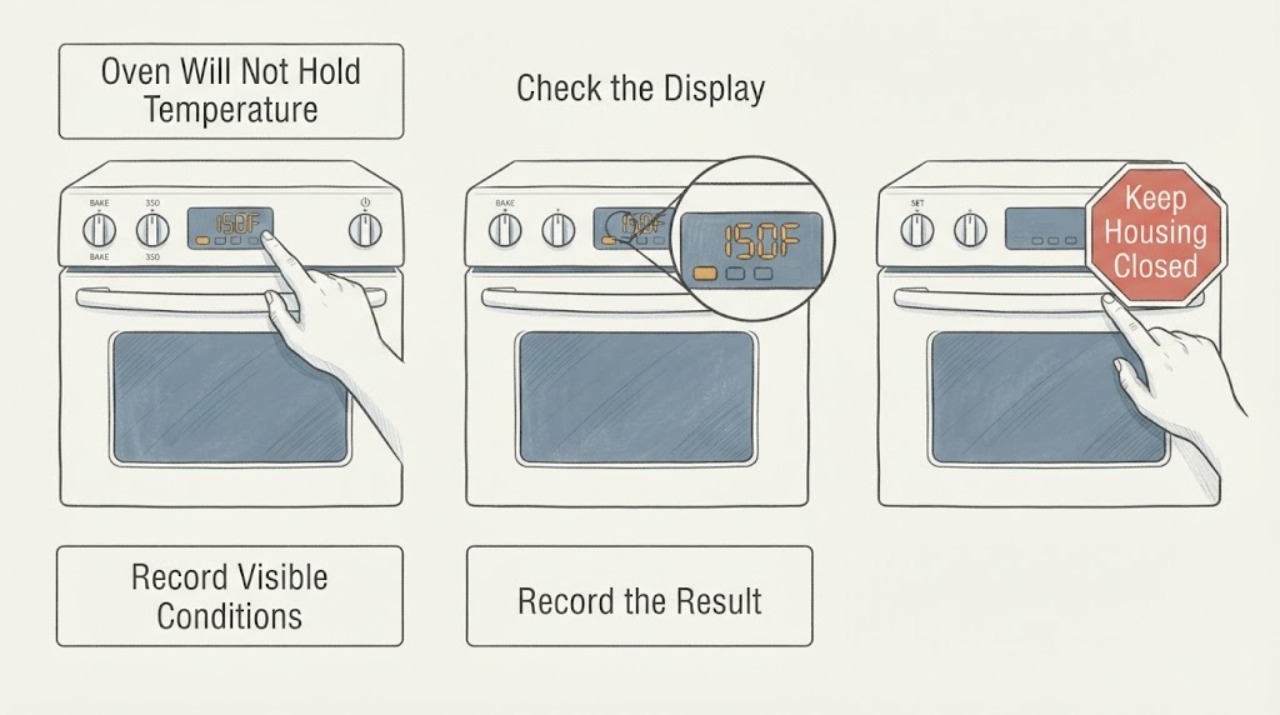
Classify the complaint before changing anything. Write down the mode (Bake or Convection Bake), entered temperature, whether the oven was fully preheated before food was added, rack position, cooking time, food result, and whether the display ever showed an error. Keep the door closed during the observation and do not touch an energized element.
Expected result: The problem occurs only in Convection Bake, only before preheat finishes, only with one rack or recipe, in every mode, or with a displayed error or no heat at all.
Next step: Repeat the same safe Bake setup once without changing several variables at the same time. If every mode fails or an error appears, stop user testing and arrange qualified service.
Stop if: Do not remove panels, touch elements, insert a probe through wiring openings, or keep operating after smoke, burning odor, arcing, uncontrolled heat, or a power trip.
Why this matters
Why: A mode, preheat, rack, or recipe difference is not equivalent to a failure to maintain heat. A problem in every mode, an error, or no heat after a confirmed start moves the case toward model-specific service diagnosis.
-
Check 2
If Convection Bake is involved, check the display and recipe temperature rather than assuming the displayed number is the original setpoint. LG documents Auto Conversion for convection modes and says it can reduce the displayed temperature by 25°F; use the exact LRE3061ST manual to confirm whether Auto Conversion is enabled before comparing a convection recipe with ordinary Bake.
Expected result: Convection Bake displays a temperature 25°F below the entered recipe temperature, Auto Conversion is enabled, or the same undercooking occurs in ordinary Bake after a complete preheat.
Next step: Use the exact manual's Auto Conversion setting and compare like-for-like Bake cycles. Do not calibrate to compensate for a convection conversion that is operating as designed.
Stop if: Do not change calibration and Auto Conversion together, and do not continue if the oven overheats, heats after cancellation, or shows smoke or arcing.
Why this matters
Why: The 25°F convection conversion is an intended setting behavior and can explain an apparent mismatch without proving that the oven loses heat. Persistence in ordinary Bake removes that particular explanation but still does not select a heating part.
-
Check 3
Check the visible heat path and cavity setup while the oven is off and cool enough to approach. Confirm the rack is seated, the door closes evenly, there is no visible gasket tear or gap, and no rack or large item is preventing closure. Record whether the issue is a repeatable offset in ordinary Bake or only an inconsistent food result; do not remove the door or rear cover.
Expected result: A rack or item holds the door open, a gasket gap is visible, the same ordinary-Bake offset repeats, or the door and cavity appear normal while the result varies.
Next step: Correct only a plainly visible rack or closure obstruction. If the gasket is damaged or a closed door still leaves a stable temperature problem, arrange service and provide the observation record.
Stop if: Do not bend the door, remove the gasket, use a flame or high heat to reshape it, or operate with a damaged seal or exposed wiring.
Why this matters
Why: LG notes that a rack that prevents closure can let hot air escape and cause undercooking. A repeatable offset with a closed door is a calibration/service question; variable results with normal closure require the cooking setup and measurement method to be made consistent before a part is blamed.
-
Check 4
Only after the same ordinary-Bake offset is repeatable, check the exact model manual and LG calibration table. LG lists LRE3061* as Type 13; the listed procedure is to press and hold Bake for three seconds, adjust the permitted amount with plus or minus, and press START to accept. Make one small adjustment within the manual's allowed range, then repeat the same baking setup rather than making successive large changes.
Expected result: The temperature/cooking offset is consistent across comparable Bake cycles, improves after one permitted adjustment, remains unchanged, or the control does not enter the documented Type 13 adjustment state.
Next step: Keep the final adjustment and test result in the service record. If the problem remains after the model-appropriate adjustment, stop changing settings and arrange qualified LG service.
Stop if: Do not use a Type 13 sequence on a different model, exceed the exact manual's adjustment range, open the control panel, or test the heating circuit live.
Why this matters
Why: A repeatable offset can justify a user calibration adjustment; calibration is not a repair for a heating circuit, sensor, relay, supply, or control fault. Failure to improve, an unavailable calibration state, or a fault in every mode needs service.
-
Check 5
Check the electrical symptom only from a dry, safe position: confirm the display and controls remain powered, note any breaker trip or reset clock, and record whether Bake and Broil both fail or only one mode fails. Do not remove the rear cover, measure the terminal block, or repeatedly reset the circuit. A single reset is appropriate only when the exact manual or LG guidance allows it and no hazard is present.
Expected result: The range is dead, a breaker trips again, the display works but one or all modes do not heat, the oven heats after a single safe reset, or the oven continues heating after cancellation.
Next step: Leave the range off for repeat trips, uncontrolled heating, or no heat and arrange qualified appliance/electrical service. Provide the mode-specific history and final calibration setting.
Stop if: Do not probe live wiring, bypass a relay or thermal device, restart after smoke or arcing, or continue if the cord, outlet, breaker, or nearby surface is hot, wet, or damaged.
Why this matters
Why: A supply interruption or control state can be different from a stable temperature offset. Repeat trips, uncontrolled heating, or no heat after a confirmed setting are service boundaries; a successful reset does not prove a permanent repair.
Use your observations
Decision map
Find the observation that best matches what you see, then follow the next safe action.
-
PATH 01Next step
What you see
The apparent low temperature occurs only in Convection Bake and the display is 25°F below the entered recipe temperature while Auto Conversion is enabled.
Do this next
Compare an ordinary Bake cycle or use the exact manual's Auto Conversion setting and recipe guidance. Do not offset the thermostat to undo an intended conversion.
Why this path and its safety boundary
Why it matters: This is consistent with LG's documented convection conversion behavior, not proof that the oven cannot hold heat.
-
PATH 02Next step
What you see
The oven is fully preheated in ordinary Bake, the door closes evenly, the same rack and recipe setup is used, and the cooking result shows a repeatable high or low offset across comparable cycles.
Do this next
Use only the LRE3061* Type 13 calibration procedure and the range allowed by the exact manual. Recheck once; request service if the offset persists or the result is unstable.
Why this path and its safety boundary
Why it matters: A consistent offset can support a calibration decision. It does not establish that the temperature sensor, heating element, relay, or control is defective.
-
PATH 03Next step
What you see
The door has a visible gap or torn gasket, a rack or item prevents closure, or the problem changes when the cavity setup is corrected.
Do this next
Correct only the visible obstruction. Arrange service for a damaged gasket, door alignment, or a continuing temperature problem with the door closed.
Why this path and its safety boundary
Why it matters: Heat escaping through an incomplete closure or a setup change can explain undercooking without selecting an internal heating component.
-
PATH 04Next step
What you see
Bake and other heating functions fail after the mode and START action are confirmed, an error returns, calibration does not help, the display is dead, or the range trips power.
Do this next
Keep the range off and arrange qualified LG appliance or electrical service. Provide the exact model, modes tested, error, reset history, and calibration setting; do not open the range.
Why this path and its safety boundary
Why it matters: The problem has moved beyond a user calibration adjustment and may involve the electrical supply, heating circuit, sensor, relay, or control. The symptom does not identify one part.
-
PATH 05Safety boundary
What you see
Smoke, burning odor, visible arcing, uncontrolled heating after cancellation, water near electrical parts, a hot or damaged cord/outlet, or a repeated breaker trip occurs.
Do this next
Stop using the range, isolate power only from a safe dry position if possible, keep clear of heat and fumes, and seek qualified appliance/electrical help. For active fire or dangerous smoke, leave the area and contact emergency services.
Why this path and its safety boundary
Why it matters: This is an electrical, fire, or heat-safety event rather than an ordinary cooking-temperature adjustment.
Safety stop: No restart, live measurement, panel removal, bypass of a relay or thermal protection, or repeated breaker reset.
Helpful context
Understand the symptom
The LRE3061ST is a freestanding electric single-oven range. LG's product page links the exact model family to its manuals, while the specification sheet lists Bake, Broil, Convection Bake, Convection Roast, and other modes. This matters because “will not hold temperature” can mean the wrong mode or conversion setting, a repeatable calibration offset, or a heating/control problem; the words alone do not identify a failed sensor or element.
LG's own heating guide says the range is supplied calibrated and that cooking profiles, recipe results, rack position, and preheating affect perceived temperature. It also says a new oven should be used long enough to learn its cooking behavior before calibration. For this model, the calibration table places LRE3061* in Type 13, so any user adjustment must follow that model family rather than a procedure copied from another LG range.
Only after diagnosis
Potential parts
- oven temperature sensor or sensing circuit
Consider only after a qualified technician confirms a repeatable temperature-sensing fault on the exact LRE3061ST platform and rules out mode conversion, calibration, supply, wiring, and heating behavior.
Do not order a sensor from an inaccurate-temperature symptom or a generic LRE/LRG family listing. Verify the complete model suffix and the measured failure first. - bake, broil, or convection heating element
Consider only if a qualified technician documents that a specific heating circuit or element fails its model-appropriate inspection or measurement and explains the mode-specific symptom.
A temperature offset or one undercooked recipe does not prove an element failure. Do not touch or test an energized element or assume the bake element is the cause. - electronic oven control or relay assembly
Consider only after supply, settings, calibration, sensor input, and the affected heating modes have been assessed and the technician documents a control or relay fault.
Do not select a board because calibration did not help or because the oven is old. Confirm the exact LRE3061ST variant, connector configuration, and failed control path.
When checks do not resolve it
Need a professional?
Call qualified LG appliance service for a persistent temperature offset after the documented LRE3061* Type 13 calibration check, no heat in one or more modes, recurring errors, a dead display, repeat power trips, or any need to access the sensor, element, control, wiring, or supply.
Safety scope: Do not remove the rear cover or control panel, probe live wiring, touch energized elements, bypass a relay or thermal safety, or run the range after smoke, arcing, uncontrolled heating, or electrical damage. Isolate power only from a safe dry position and only when necessary to stop a hazard.
Have this ready
- Provide the complete LRE3061ST rating-label identity and serial details, mode and temperature used, preheat status, rack position, door/gasket observations, repeated cooking or measurement results, Auto Conversion state, calibration amount and result, error history, and any breaker, odor, heat, or arcing symptom.
Common questions
FAQ
Why does my LG LRE3061ST reach temperature and then fall below it?
First confirm that you are comparing the same mode and that preheat is complete. LG says convection Auto Conversion can display a temperature 25°F below the entered recipe temperature, and that cooking profiles and rack position affect results. A repeatable offset in ordinary Bake can justify the model's calibration check; a persistent problem after calibration needs service rather than a guessed sensor or element.
How do I calibrate an LG LRE3061ST oven?
LG's calibration table lists LRE3061* under Type 13. The Type 13 procedure is to press and hold Bake for three seconds, adjust with plus or minus, and press START to accept. Use the exact owner's manual and its permitted range, make one small adjustment only after the offset is repeatable, and stop changing settings if the result does not improve.
Does a fluctuating oven temperature mean the sensor is bad?
Not necessarily. Heating cycles, convection conversion, preheat timing, rack position, door closure, and cooking profile can affect the result. If all comparable Bake cycles show the same offset or one heating mode fails, document that pattern for a qualified technician; do not replace a sensor from fluctuation alone.
Should I use an oven thermometer to prove the LRE3061ST is inaccurate?
LG cautions that store-bought thermometers are not recommended for accurate oven-temperature measurement. Use a consistent documented method and repeated cooking observations, and provide the measurement device and placement to the service provider. A single inexpensive thermometer reading should not determine a part replacement.
What if the LG range has no heat or trips the breaker?
Confirm the mode and START action once from a safe position, but do not open the range or perform a live test. Leave it off for a recurring trip, dead display, smoke, burning odor, arcing, uncontrolled heating, hot or damaged electrical parts, or no heat after the permitted basic check, and arrange qualified appliance or electrical service.
Read the exact guide
Official sources
- How can I calibrate the oven temperature?LG Electronics USA · Official LG calibration PDF opened to check the LRE3061* model family and its procedure. It lists LRE3061* under Type 13 and gives the Type 13 button sequence; the exact owner's manual remains authoritative for the permitted range and any model-specific limitation.
- LG LRE3061 Freestanding Electric Range Oven Specification SheetLG Electronics USA · Official LG specification sheet opened for the LRE3061 family. It lists LRE3061ST stainless steel, identifies a freestanding electric range oven, and documents the relevant bake, broil, convection, control, and power characteristics; it does not diagnose a temperature fault.
- LG Range - Troubleshooting an Oven That is Not HeatingLG Electronics USA · Official LG range troubleshooting page opened for undercooking, overcooking, not-heating, and does-not-reach-set-temperature paths. It gives model-scoped cautions and directs owners to the exact owner's manual for calibration; it is not used to select an internal part.
- LG Range - Understanding Convection CookingLG Electronics USA · Official LG range support page opened for the convection branch. It explains that Auto Conversion is enabled by default in the documented range flow and can reduce the displayed convection temperature by 25°F; it does not establish a fault in the LRE3061ST heating circuit.
- LG LRE3061ST.FSTLLGA Product SupportLG Electronics USA · Official LG support page opened for the exact LRE3061ST product family. It identifies the 6.3 cu. ft. electric single-oven range and links the online manual, owner's manual, specification, troubleshooting, and repair routes.
Community feedback
Share a repair observation
Share a plain-text repair observation. Accepted observations are published automatically; this page may take a moment to update.