
On this page
Start here
Quick answer
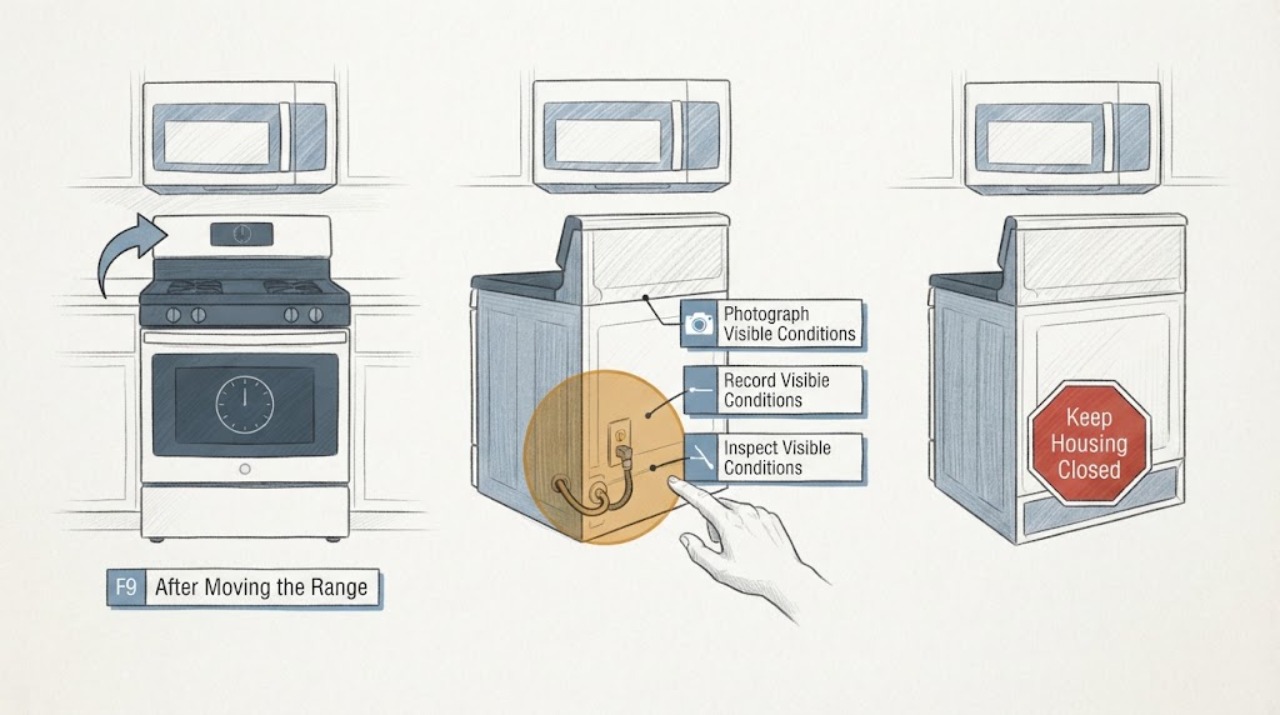
On an LG LDE4413 electric double-oven range, an F9 display with no heat after the range was moved should be treated as an unresolved heating or power-supply event, not as proof that a particular element or control board failed. LG's official material identifies LDE4413ST and LDE4413BD as the two electric-double-oven suffixes and provides separate upper and lower oven circuits and controls; confirm the complete suffix and serial from the rating label before using a manual. The exact community report for this model describes the clock and lights returning after the move, then F9 after about five minutes with neither oven nor cooktop heating, but that report is not an official universal F9 definition. Keep the range out of service, do not slide it again or open the terminal box, and have a qualified appliance technician or electrician check the de-energized supply and installation. Record whether the display, lights, fan, cooktop, upper cavity, and lower cavity behaved differently, plus the full F9 display and serial. Stop immediately for a burning smell, smoke, sparks, damaged cord, hot receptacle, or a tripped breaker.
Work through in order
Diagnostic checks
Use only checks that match the exact appliance or system and its official guide.
-
Check 1
From the front of the cool, stationary range, photograph the entire display and write every character exactly as shown, including whether it is F9, F-9, or another symbol. Record the full rating-label model and serial, the selected mode, the upper or lower cavity, and when the code first appeared relative to moving the range.
Expected result: The label resolves to LDE4413ST or LDE4413BD with a readable serial, or the suffix/serial is missing; the display is a recurring F9 or a different message such as PF or a lock indication.
Next step: Use the exact LG support page/manual for the confirmed suffix. If identity or characters remain uncertain, leave the range unused and provide the photo and label information to qualified service instead of inferring the code.
Stop if: Do not move the range to reach a hidden label, open the control area, or clear the display before recording it.
Why this matters
Why: LG's exact product family has multiple suffixes and two cavities, while a similar-looking code can belong to another model or a power/mode message. The timing and complete display determine whether a model-specific manual can be used.
-
Check 2
Without starting a heating cycle, document the last safe observations separately: did the clock/display and oven lights work, did a cooling or convection fan run, did any cooktop element heat, and did the upper and lower ovens show the same no-heat result? Keep the range stationary and the circuit isolated while recording this history.
Expected result: The display or lights work but both cavities and the cooktop were cold; only one cavity was affected; the fan ran without heat; or the whole unit lost power.
Next step: Give the cavity pattern and fan/light behavior to a qualified appliance technician or electrician. Do not run another preheat merely to compare cavities or reproduce F9.
Stop if: Do not touch an element, attempt a live voltage test, bypass a control, or use a fan or light as evidence that it is safe to heat.
Why this matters
Why: A live display or fan does not prove that the high-power heating supply is healthy. Both cavities plus the cooktop failing after a move points first to a shared supply/installation path; one-cavity failure keeps a cavity-specific heating or control path open. These are routing clues, not part identifications.
-
Check 3
From a safe, dry position, inspect only the visible cord, plug, receptacle face, accessible strain relief, and surrounding wall area without pulling or pushing the range. Look for scorch marks, melted plastic, crushed insulation, a hot or loose-looking receptacle, moisture, or a breaker that has tripped again; do not remove a cover or reach behind the appliance.
Expected result: There is visible heat damage, an odor, moisture, damaged insulation, a loose-looking connection, repeated breaker operation, or no visible abnormality.
Next step: If any damage, heat, moisture, odor, or repeat trip is present, keep power isolated from a safe location and arrange qualified electrical/appliance help. If nothing is visible, still provide the move history and do not slide the range or open its connection box; have the installation checked with power safely off.
Stop if: Do not wiggle the plug, push the range to make contact, reset a tripped breaker repeatedly, remove the terminal-box cover, or measure energized voltage.
Why this matters
Why: A post-movement timing link makes the supply and installation worth checking, but an external inspection cannot prove the condition of the terminal block, branch circuit, or internal wiring. Any damage or repeat trip is an electrical stop condition.
-
Check 4
Read the complete serial without moving the range and check the LG-hosted CPSC recall notice for the LDE4413ST or LDE4413BD range. If the serial is in the listed range, keep children and pets away from the front knobs and use the documented Control Lock/Lock Out when the range is not in use; do not treat the recall check as an F9 repair.
Expected result: The serial matches a listed range, does not match, or cannot be read; the range has front-mounted knobs and the control-lock function is available or unknown.
Next step: For a match or uncertain serial, contact LG through the recall notice and keep the range controlled and unused until the safety instructions are followed. Continue F9 troubleshooting only through qualified service after the electrical condition is safe.
Stop if: Do not test the knobs by deliberately activating a burner or oven, leave objects on the range, or allow children/pets near the controls.
Why this matters
Why: The notice concerns accidental front-knob activation and fire risk, not the cause of F9. A match changes the safety and service priority even if the display problem is separate; an unreadable serial leaves recall status unresolved.
-
Check 5
Prepare a service handoff with the exact suffix/serial, a photo of F9, the move and microwave-installation timeline, whether the range was unplugged, the display/light/fan history, the upper-versus-lower cavity result, cooktop result, visible cord/receptacle observations, breaker history, and any recall match. Keep the appliance cool and unused while arranging the visit.
Expected result: F9 returns, both cavities or the cooktop remain cold, the suffix is uncertain, the power review is abnormal, or the appliance has no visible hazard but still will not heat.
Next step: Ask a qualified appliance technician or electrician to verify the de-energized installation and model-specific fault path before any component decision. If the range is within warranty or the microwave installation was performed by a contractor, preserve that record for the responsible service channel.
Stop if: Do not order a heater, thermistor, relay, control board, or terminal part from F9 alone; do not open panels or resume cooking until the cause is assessed.
Why this matters
Why: The remaining possibilities include supply, installation wiring, cavity heating, sensing, control, or another model-specific condition. The code and symptoms do not safely identify a user-replaceable heater, sensor, or board.
Use your observations
Decision map
Find the observation that best matches what you see, then follow the next safe action.
-
PATH 01Next step
What you see
The clock, lights, or fan work, but neither oven and the cooktop heat after the move, while the complete model is LDE4413ST or LDE4413BD and F9 is recurring.
Do this next
Keep the circuit isolated and arrange a qualified de-energized electrical/appliance inspection. Do not slide the range, wiggle a plug, open the terminal box, or repeat preheat.
Why this path and its safety boundary
Why it matters: The shared high-power supply or installation path becomes the first service-routing concern; the display or fan alone does not establish a healthy heating supply, and the Reddit report is only an anecdotal match.
-
PATH 02Next step
What you see
Only the upper or only the lower cavity was cold, while the other cavity or cooktop still worked and the exact suffix is confirmed.
Do this next
Leave the affected cavity unused and provide the technician the cavity, cycle, timing, and whether the other cavity/cooktop heated. Do not swap parts between cavities or run repeated comparisons.
Why this path and its safety boundary
Why it matters: The failure pattern is narrower than a complete range power loss, but F9 still does not name a particular heater, sensor, or control part; the cavity and mode are essential service details.
-
PATH 03Next step
What you see
The display is actually PF, a lock/mode message, or an incomplete/unreadable character rather than a confirmed recurring F9.
Do this next
Preserve the display photo, confirm the complete suffix, and use only the matching LG manual or qualified support. Keep the range unused if it will not run normally.
Why this path and its safety boundary
Why it matters: The event may be power interruption, a selected mode, or unresolved identity rather than the LDE4413 no-heat path; moving history does not make the characters interchangeable.
-
PATH 04Next step
What you see
A cord, receptacle, or surrounding area is scorched, melted, wet, hot, smells burnt, sparks, or causes a repeat breaker trip.
Do this next
Stop use, keep clear, and isolate power only from a safe location without touching wet or damaged parts. Arrange qualified electrical/appliance help; seek emergency help for smoke or fire.
Why this path and its safety boundary
Why it matters: This is an electrical/fire stop condition, not a code-reset or component-shopping problem.
-
PATH 05Next step
What you see
The serial matches the CPSC notice's LDE4413ST or LDE4413BD range, or the serial cannot be read and the front knobs can be reached by children or pets.
Do this next
Keep children and pets away, use Control Lock/Lock Out only as documented for the exact unit, and contact LG using the recall notice. Do not test activation or leave objects on the range.
Why this path and its safety boundary
Why it matters: The recall safety question is independent of F9 and raises accidental-activation risk even if the range is currently not heating.
Helpful context
Understand the symptom
First lock down the identity. LDE4413 is a family prefix, not the complete suffix: LG's support page lists an LDE4413ST product page, and the official specification sheet lists LDE4413ST and LDE4413BD. The same sheet describes a freestanding electric double oven with separate upper and lower oven features. A partial model or a different LG range can use a different code map, so do not borrow an F9 procedure from another model.
The exact user report is unusually close to this scenario: the range was unplugged and moved for an above-range microwave installation, the clock and light returned, and then F9 appeared after roughly five minutes of preheat while the oven and cooktop did not heat. That is useful timing evidence, not proof that moving caused a particular part to fail. Because the appliance is a 40-amp, 208/240-volt electric range according to LG's specification sheet, the safe next decision is an external, de-energized power/installation review rather than a live test or a guessed heater replacement.
There is an additional model-specific safety check: the LG-hosted CPSC recall notice lists some LDE4413ST and LDE4413BD serial ranges for front-knob activation. Read the complete serial from the oven-door or storage-drawer area without moving the range, compare it with the notice, and use Control Lock/Lock Out when the range is not in use if the exact model's instructions permit it. This recall check does not explain F9; it is a separate reason to keep children and pets away from the controls.
When checks do not resolve it
Need a professional?
Arrange qualified appliance/electrical service before using the range when F9 returns, both cavities or the cooktop stay cold after the move, the complete suffix/serial is uncertain, or the supply/installation cannot be verified safely from outside. Stop immediately for smoke, sparks, burning electrical odor, scorch or melting, a hot or wet receptacle, damaged cord, uncontrolled heat, or repeated breaker trips; isolate power only from a safe location and seek emergency help for fire. Do not slide the range again, open the terminal box or control panels, perform a live test, reset repeatedly, or replace a heater, sensor, board, relay, or wiring part from F9 alone.
Common questions
FAQ
Does F9 prove the bake element or control board failed on an LG LDE4413?
No. The opened LG pages identify the LDE4413 electric double-oven platform and its two suffixes, but do not expose a suffix-specific F9 definition in the public page text. The exact community report documents F9 with no heat, but it cannot prove a part. After a move, have the de-energized supply and installation checked before any component decision.
Why can the display or fan work when the ovens do not heat?
LG's specification sheet lists the LDE4413 as a high-power electric double oven with separate upper/lower oven features and controls. A display or fan observation therefore does not prove the heating supply is healthy. Record whether both cavities and the cooktop were cold and give that pattern to qualified service; do not use the fan or light as a live test.
Should I slide the range back or open the terminal box after installing the microwave?
No. A move-related timing link makes the installation worth checking, but pushing the range, wiggling a plug, opening the connection box, or measuring energized voltage can create shock, fire, or equipment risk. Keep power isolated and arrange a qualified electrical/appliance inspection, especially if there is heat, damage, moisture, odor, sparking, or a repeat breaker trip.
Is there a separate safety issue for some LDE4413 ranges?
Yes. The LG-hosted CPSC notice lists some LDE4413ST and LDE4413BD serial ranges in a recall for accidental activation of front-mounted knobs. Read the complete serial without moving the appliance, keep children and pets away from the controls, and follow the notice's Control Lock/Lock Out guidance if the unit is included. This is separate from the F9 diagnosis.
Read the exact guide
Official sources
- LG Recalls Electric Ranges Due to Fire HazardU.S. Consumer Product Safety Commission / LG Electronics · Official LG-hosted CPSC recall notice for specified LG electric range model and serial ranges.
- LDE4413ST.BSTLLGA Product SupportLG Electronics · LDE4413 model support page used to verify identity and check the availability of model-specific F9 documentation; the opened page does not itself state the F9 meaning.
- LG LDE4413 electric oven not heatingReddit · Exact Reddit post reporting the assigned LDE4413 move-for-microwave and F9/no-heat symptom timeline; anecdotal context only.
- LDE4413 Freestanding Electric Double Oven Specification SheetLG Electronics · LG's official specification sheet for the LDE4413 electric double-oven family.
Community feedback
Share a repair observation
Share a plain-text repair observation. Accepted observations are published automatically; this page may take a moment to update.