
On this page
Start here
Quick answer
Do not treat “Refrigerator Door Timer” as proof that an LG refrigerator has a failed timer. ThinQ identifies an LG connected-appliance feature, not the refrigerator's complete model, and LG says alarm controls and timing vary by model. First determine whether the alarm starts only after a door has been left open for a while and stops as soon as every door or drawer is fully closed, or whether it continues with the doors closed. Check the food, shelves, bins, drawers, gasket, and visible gaps without forcing anything. If your exact model's panel has a Door Alarm control, use only that model's manual for its documented setting; some LG models allow a three-second hold while others do not offer a disable control. If the alarm continues after complete closure, or the refrigerator has a gap, damaged gasket, rising temperature, interior light that does not behave normally, or another warning, arrange LG service rather than replacing a timer, wiring, or sensor yourself.
Before you begin
Safety first
- Owner checks are limited to confirming the complete model, recording the alarm pattern, clearing plainly visible door obstructions, inspecting the gasket and visible gaps, and using a documented model-specific alarm setting. Do not open hinge covers or electrical areas, disconnect a door sensor or buzzer, test live wiring, enter service mode, or replace a timer, sensor, board, or light component from the sound alone.
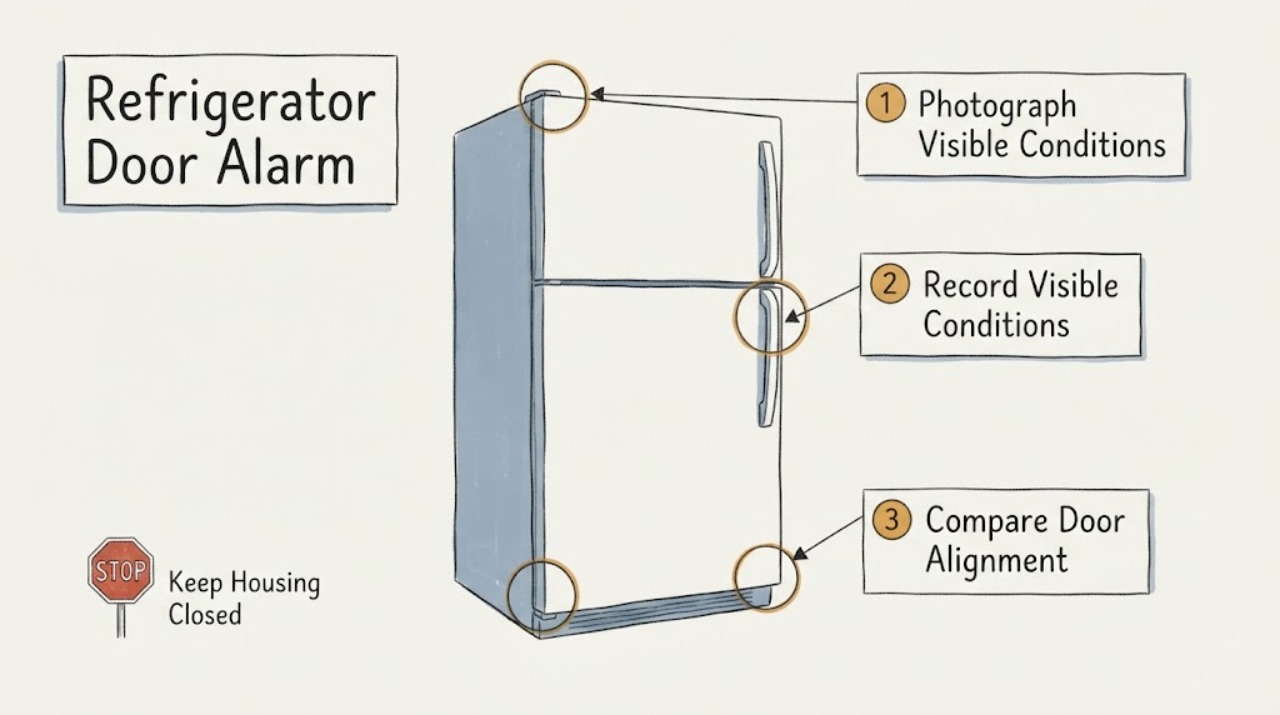
Work through in order
Diagnostic checks
Use only checks that match the exact appliance or system and its official guide.
-
Check 1
Confirm the refrigerator's complete LG model and serial information from the appliance label, and record the market or region if shown. Treat ThinQ as a feature name, not as the model number. Photograph the control panel so the exact Door Alarm, Lock, light, temperature, and alert controls can be matched to the correct manual.
Expected result: A complete model string is available; only ThinQ or a product-family name is known; or the panel has a Door Alarm/Lock control but the matching manual is not identified.
Next step: Use the complete model in LG's support/manual lookup. Until it is confirmed, classify only the alarm behavior and physical door condition; do not order a timer or change wiring.
Stop if: Do not copy a three-second hold, lighting delay, diagnostic sequence, or replacement instruction from another LG model.
Why this matters
Why: LG uses ThinQ on multiple refrigerator products, and official manuals can document different alarm intervals and controls. The identity is insufficient for a universal timer setting, button combination, sensor interpretation, or part choice.
-
Check 2
Record the alarm's trigger without deliberately leaving the refrigerator open: note which compartment was opened, whether the alarm began only after a delay, whether it stopped immediately after every door or drawer was closed, and whether it repeats at intervals. Also note whether the display shows a separate alert or whether the interior light appears to remain on.
Expected result: The alarm occurs only after a door has been open for a while and stops after complete closure; it continues after closure; or the sound is accompanied by a separate display, light, temperature, or cooling change.
Next step: For normal timed behavior, consult the exact manual if the user wants to change the setting. For a persistent alarm or another warning, keep the doors closed, protect temperature-sensitive food, and continue with the safe physical checks below or arrange service if the checks are normal.
Stop if: Do not keep the door open to force the alarm, repeatedly power-cycle the refrigerator, or disconnect an alarm/sensor wire.
Why this matters
Why: An alarm that follows an open door and stops on closure is consistent with normal door-open warning behavior. Continued sound after closure, or a separate display/light/cooling abnormality, is not enough to identify a timer and shifts attention to closure detection or another model-specific condition.
-
Check 3
With the doors closed between observations, inspect only the visible closure path: move a container, shelf, bin, drawer, plastic bag, or cover that plainly blocks closure; verify shelves and drawers are fully seated; and look around the gasket for dirt, a folded section, or a section that has come loose. Do not force a door or remove a hinge cover.
Expected result: The door or drawer now closes fully and the alarm stops; a repeatable obstruction or incorrectly seated shelf was found; the gasket has a visible gap or damage; or the closure looks complete but the alarm remains.
Next step: Keep the opening clear and monitor only if the alarm stops and the refrigerator maintains temperature. If a gasket is torn, a gap remains, or the alarm continues with a complete closure, arrange LG service and do not replace a part from the symptom alone.
Stop if: Do not stretch, glue, heat-form, cut, or tape the gasket, adjust concealed hinges, or press a hidden sensor with a tool or magnet.
Why this matters
Why: LG identifies overfilling, shelf or drawer position, objects caught at the door, and gasket condition as reasons a refrigerator may still be detected as open. A clean-looking exterior with a continuing alarm does not prove a failed timer; a door sensor or another component may need service.
-
Check 4
If the exact manual shows a Door Alarm control on this model, compare the manual's stated enable/disable method with the photographed panel. LG documents a three-second hold on many models, while another LG manual documents a separate door-alarm button and a separate Lock function; use only the matching manual and make one documented setting change if desired.
Expected result: The exact manual confirms a Door Alarm control and the documented setting changes; the panel has no such control; or the manual and panel do not match.
Next step: Keep the documented setting or restore it using the exact manual. If the alarm persists despite the documented state and a complete door closure, request LG support; do not disable the refrigerator's detection circuit.
Stop if: Do not enter service mode, alter firmware or wiring, disconnect a buzzer, or use a button sequence found for a different model.
Why this matters
Why: Alarm configuration is not universal across LG refrigerators. A missing Door Alarm control may mean that model does not allow manual deactivation, and an unmatched sequence cannot distinguish a setting from a fault.
-
Check 5
Check the safe consequences of the alarm from outside the cabinet: note whether the refrigerator and freezer temperatures remain in their normal ranges, whether the door gasket has a persistent gap, whether frost or condensation is increasing, and whether the interior light or display remains abnormal after a full closure. Do not remove a top hinge cover or access a door connector.
Expected result: The alarm stops, closure is complete, and temperatures remain stable; the alarm continues with no visible gap; temperature rises or frost/condensation increases; or a cord, plug, cabinet, or control area is hot, wet, damaged, or smells burnt.
Next step: For persistent alarm, abnormal cooling, or a damaged gasket, keep the doors closed and arrange LG or qualified refrigerator service. For heat, smoke, burning odor, water near electrical parts, or a damaged cord/plug, stop using the appliance and isolate power only if safe, then obtain qualified electrical/appliance help.
Stop if: Do not open electrical covers, test a door sensor live, repeatedly reset power, or continue operation after smoke, arcing, abnormal heat, or water near electrical parts.
Why this matters
Why: A stable refrigerator with a normal closed-door response points toward a configuration or transient closure issue. A persistent alarm with no visible obstruction can involve door-closed detection or another component, while a temperature or electrical warning raises the need for prompt service and food protection.
Use your observations
Decision map
Find the observation that best matches what you see, then follow the next safe action.
-
PATH 01Next step
What you see
The alarm begins only after a compartment has been left open for the documented or observed delay and stops after every refrigerator door or freezer drawer is fully closed, with no gap, abnormal light, temperature warning, or cooling change.
Do this next
Use the complete model manual if the owner wants to enable, disable, or understand the alarm setting. Keep openings brief and return to service only with normal closure and stable temperatures.
Why this path and its safety boundary
Why it matters: This is consistent with a normal door-open warning, not evidence of a failed timer. The exact delay is model-dependent, so a timer value from another LG refrigerator cannot be applied to ThinQ generally.
-
PATH 02Next step
What you see
The alarm stops after moving a container, reseating a shelf or drawer, cleaning/reseating a loose gasket section, or fully closing a previously incomplete door.
Do this next
Keep the doorway and gasket contact area clear and monitor temperature. Arrange service if the gap returns, the gasket is damaged, the door sags, or the alarm returns with a clear opening.
Why this path and its safety boundary
Why it matters: An external closure or sealing condition explains the immediate alarm better than a replaceable timer. LG lists food/shelf placement, caught objects, gasket condition, and installation/leveling among the first checks.
-
PATH 03Next step
What you see
Every door or drawer is fully closed with no visible gap or obstruction, but the alarm continues, the interior light/display remains abnormal, or temperature/frost/condensation changes.
Do this next
Keep the refrigerator closed, protect perishable food if temperature is rising, and arrange LG or qualified appliance service. Provide the complete model, alarm timing, display/light behavior, temperature trend, and closure photos.
Why this path and its safety boundary
Why it matters: LG says a continuing closed-door alarm can require service and may involve door-closed detection or another component. The sound does not identify a timer, sensor, board, or wiring fault from the outside.
-
PATH 04Next step
What you see
The identity is only ThinQ, the control panel has no identifiable Door Alarm control, the exact manual is unavailable, or the sound may instead be a lighting/display-delay behavior.
Do this next
Recover the complete LG model and market information, then use its manual or LG support to identify the sound. Do not add a timer, change wiring, disable the buzzer, or order a sensor while the identity is unresolved.
Why this path and its safety boundary
Why it matters: ThinQ is not enough to establish a timer interval, alarm setting, lighting behavior, or compatible component. A generic setting or part instruction would risk changing the wrong function.
-
PATH 05Next step
What you see
The cord, plug, control area, cabinet, or floor is hot, wet, scorched, sparking, or associated with a burning odor, or the refrigerator cannot maintain a safe temperature.
Do this next
Stop using the refrigerator; isolate power and water only from a safe dry position when possible, keep the doors closed while protecting food, and obtain qualified electrical/appliance service. Use emergency procedures for active smoke or fire.
Why this path and its safety boundary
Why it matters: This is an electrical, water, food-safety, or cooling-service path rather than an alarm-setting question. Continued operation or repeated resets can increase risk and does not diagnose the sound.
Helpful context
Understand the symptom
A refrigerator door alarm is a timed response to what the control believes is an open compartment; it is not automatically a replaceable “door timer.” LG's official guidance says a door alarm can sound after the door has been open for a specific period, but a continuing alarm after proper closure needs a different decision path. The exact delay and the available on/off control are model-dependent.
The task identity says LG and ThinQ, but ThinQ is a connected-feature label rather than a complete refrigerator model. Do not copy a button sequence or a light-delay explanation from another LG model. Confirm the model shown on the appliance label and use its manual before treating a setting as a fault.
When checks do not resolve it
Need a professional?
Contact LG or qualified appliance service for a continuing alarm with a fully closed door, an unresolved model/setting identity, damaged gasket or door alignment, abnormal light/display or temperature, or any electrical, water, smoke, heat, or food-safety warning.
Safety scope: Owner checks are limited to confirming the complete model, recording the alarm pattern, clearing plainly visible door obstructions, inspecting the gasket and visible gaps, and using a documented model-specific alarm setting. Do not open hinge covers or electrical areas, disconnect a door sensor or buzzer, test live wiring, enter service mode, or replace a timer, sensor, board, or light component from the sound alone.
Have this ready
- Provide the complete model and serial information, market/region, the ThinQ/connected-feature status if relevant, which door or drawer was opened, approximate trigger and stop behavior, panel photos, obstruction/gasket findings, temperature trend, interior-light/display behavior, and any heat, water, odor, or electrical observations.
Common questions
FAQ
Does LG ThinQ have a universal refrigerator door-timer setting?
No universal setting can be inferred from ThinQ. LG uses ThinQ as a feature label across refrigerator products, while alarm intervals and controls are model-dependent. Use the complete model manual and do not replace a timer or alter wiring for a general door-alarm complaint.
Why does the alarm sound after I close the LG refrigerator door?
First check for a container, shelf, drawer, bag, or gasket section preventing a complete seal. LG says that if the door is completely closed with no visible gaps but the alarm continues, a door sensor or another component may need service. The alarm alone does not identify which part failed.
Can I turn off the LG refrigerator door alarm?
Only if the exact model manual documents that control. LG says many models allow a three-second hold of the Door Alarm/Lock button, but it also notes that models without that button cannot deactivate the alarm; another LG manual uses a model-specific Door Alarm button. Do not copy a sequence from a different model.
Is a door alarm the same as a refrigerator light timer?
Not necessarily. A door alarm responds to the refrigerator's door-open condition, while lighting and display behavior can be model-specific. With only the ThinQ label, the function cannot be identified safely; record whether the alarm, light, display, temperature, or cooling changes and use the complete model manual.
Should I unplug the refrigerator to stop the beeping?
Do not repeatedly power-cycle it as a diagnosis. If the alarm continues after complete closure, keep the doors closed and arrange service; if there is smoke, burning odor, abnormal heat, water near electrical parts, or a damaged cord/plug, isolate power only from a safe dry position and obtain qualified help.
Read the exact guide
Official sources
- HOME APPLIANCESLG Electronics · Not asserted as the user's refrigerator. It supports only the identity caution that ThinQ/ThinQ Care is a feature label on a specific LG model, not a substitute for the complete refrigerator model or its manual.
- LG Refrigerator - Why is my Refrigerator's Door Alarm Going Off when the Door is Closed?LG USA Support · Official symptom-level LG guidance. It supports model-dependent alarm controls, food/door/gasket/level checks, and service escalation, but does not establish a universal ThinQ alarm timer or the user's exact refrigerator model.
- USING YOUR REFRIGERATORLG Electronics · Not asserted as the user's ThinQ refrigerator manual. It is used to demonstrate why alarm timing and controls must be checked against the exact model: this opened manual documents a 60-second door-open threshold, interval behavior, and separate alarm/lock controls for its listed models.
- The refrigerator keeps beeping even when the door is closed. What should I do?LG USA Support · Official all-models guide with an explicit model-variation note. It supports separating normal open-door warning from persistent closed-door beeping and sending a closed, gap-free alarm to support; it does not prove a ThinQ-specific component fault.
Community feedback
Share a repair observation
Share a plain-text repair observation. Accepted observations are published automatically; this page may take a moment to update.