
On this page
Start here
Quick answer
A small amount of frost can form normally when moisture meets cold air inside an LG refrigerator, especially after a door-open or warm-food event. Heavy, spreading, or recurring frost usually points to humid air entering through a door that is blocked or not sealing, food blocking an air path, a blocked defrost drain, or an airflow or defrost problem. First photograph the frost location and check whether it is on the door edge, shelves or food, a vent, the rear wall, or the bottom of the freezer. Check closure, clean the visible gasket with the model-approved method, and move loose packages away from vents without scraping ice. LG warns against knives and ice picks; follow the exact model instructions for defrosting. If frost returns, a drain or fan area is iced, cooling is unstable, or food is no longer safe, arrange qualified LG appliance service.
Before you begin
Safety first
- This article supports ordinary-access observation, door and gasket inspection, moving loose food from vents, and model-specific manual review. Do not chip or heat ice, probe drains, remove panels, reach into fans, bypass controls, or test energized parts.
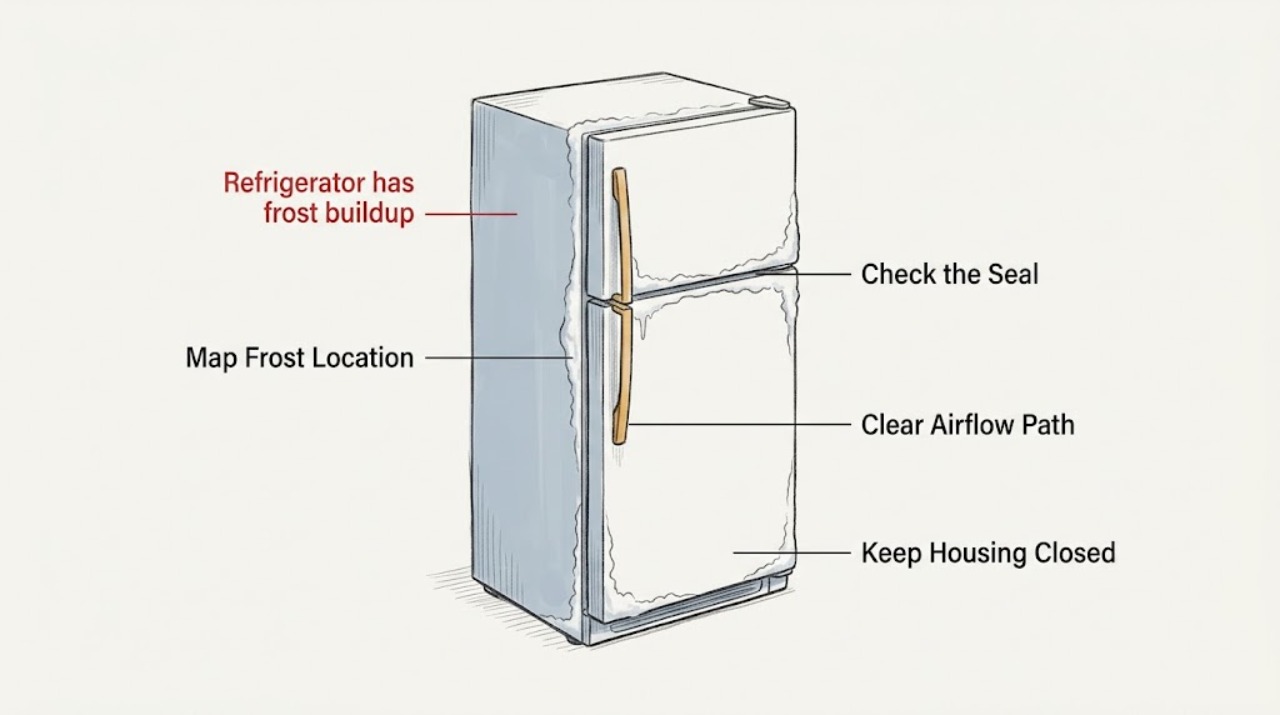
Work through in order
Diagnostic checks
Use only checks that match the exact appliance or system and its official guide.
-
Check 1
Open the LG refrigerator or freezer briefly and photograph the frost before moving food; inspect from a stable position without touching the ice or removing an interior cover.
Expected result: Record whether the frost is light and even, on shelves or food, along the door edge, around a vent, across the rear wall, or pooled as ice on the freezer floor; note which compartment and whether cooling is stable.
Next step: Keep the photo and pattern with the model information, then continue only with door and vent checks when food remains safe and no immediate hazard is present; arrange service for heavy ice or unstable cooling.
Stop if: Stop for smoke, burning odor, sparking, damaged wiring, a hot cabinet, unsafe food temperatures, or frost that requires cover removal to inspect.
Why this matters
Why: A light pattern after humidity, warm food, or a restart may be temporary. Door-edge frost makes an air leak more likely, while rear-panel, vent, or freezer-floor ice makes airflow or defrost drainage more relevant.
-
Check 2
Check that shelves, drawers, bins, and food packages do not obstruct the LG door, then inspect the visible gasket around the affected compartment for dirt, a tear, a gap, compression, or a section out of position.
Expected result: The door closes fully and the gasket contacts the cabinet continuously, or a package blocks closure, the gasket is dirty or damaged, the door is misaligned, or frost is concentrated at the leaking edge.
Next step: Remove only the obstruction and clean the visible gasket as the model instructions allow. If the gasket is torn, loose, or cannot seal, arrange LG appliance service rather than reshaping or replacing it by appearance.
Stop if: Do not pull the gasket from its channel, adjust hinges, force the door, or apply heat unless the exact LG manual authorizes that procedure.
Why this matters
Why: A blocked or poor door seal lets humid outside air enter and can produce frost or temperature fluctuation. A clean, continuous seal with frost elsewhere makes airflow, drain, or defrost causes more relevant.
-
Check 3
Move only loose packages away from the LG refrigerator's accessible supply and return vents and from the rear wall; do not remove a vent or evaporator cover and do not reach into a fan.
Expected result: The vents are clear and food is not packed against the rear wall, or a package blocks a vent, frost covers a vent, warm spots or frozen items appear near the airflow path, or a fan is noisy or stopped.
Next step: Maintain the model-specific vent clearance and monitor the same frost area. Arrange service if ice blocks a cover or fan, temperatures remain uneven, or the fan behaves abnormally.
Stop if: Do not chip ice, remove panels, touch a moving fan, apply direct heat, or continue if water reaches electrical parts.
Why this matters
Why: Restricted airflow can create uneven cooling and allow frost or ice to accumulate. If the vents are clear but ice remains around a fan or rear cover, an internal airflow or defrost problem is more likely than loading alone.
-
Check 4
Review recent use and visible moisture: note whether hot or uncovered food was added, a door remained open, power was recently restored, frost melted and pooled at the freezer floor, or water appears at the front; do not open a drain or rear panel.
Expected result: The frost followed a one-time humidity or power event and is light, or it keeps returning with water pooling, ice at the freezer bottom, a wet front edge, or no obvious moisture-entry cause.
Next step: Cover moist food, let hot food cool before storage, keep doors closed promptly, and follow only the exact model manual for any defrost procedure. Arrange service when water or frost returns.
Stop if: Do not pour chemicals or hot water into a drain, probe the drain with a sharp object, remove the rear panel, or use direct heat.
Why this matters
Why: A one-time humidity or restart event can temporarily create frost. Water pooling or ice at the freezer bottom can indicate blocked defrost drainage, while recurrent frost without a door cause makes defrost or control service more likely.
-
Check 5
After correcting only a door obstruction, gasket surface issue, food-loading issue, or model-authorized defrost procedure, close the doors fully and monitor the same area during normal use without scraping away new frost.
Expected result: Frost stops spreading and cooling remains stable, or the same pattern returns, a vent or drain ices again, water pools, the fan becomes noisy or stops, or food temperatures remain unstable.
Next step: Keep the appliance closed and food protected, then arrange qualified LG service for recurring frost, blocked internal airflow, a stopped fan, water pooling, or unstable cooling.
Stop if: Stop using the appliance for smoke, burning odor, sparking, damaged wiring, water near electrical components, severe overheating, or unsafe food temperatures.
Why this matters
Why: A stable result supports a moisture-entry or loading contribution. Recurrence in the same location, repeated drain ice, fan symptoms, or unstable cooling means the underlying defrost, airflow, sensor, control, or seal problem remains unresolved.
Use your observations
Decision map
Find the observation that best matches what you see, then follow the next safe action.
-
PATH 01Safety boundary
What you see
Frost is light, follows a humid or prolonged door-open event, warm or uncovered food, or a recent power restart, and cooling remains stable.
Do this next
Keep moist food covered, let hot food cool before storage, minimize door-open time, and monitor the pattern without scraping the liner.
Why this path and its safety boundary
Why it matters: A temporary moisture event is more likely than a failed component.
Safety stop: Arrange service if the frost becomes heavy, spreads, recurs without another moisture event, or cooling becomes unstable.
-
PATH 02Safety boundary
What you see
Frost or condensation is concentrated along the freezer or refrigerator door edge and the gasket has a gap, dirt, damage, or an obstruction prevents full closure.
Do this next
Remove the obstruction and clean the gasket as directed; arrange model-specific service if the gasket remains loose, torn, or unable to seal.
Why this path and its safety boundary
Why it matters: Warm humid air entering at the door is more likely than a primary internal defrost failure.
Safety stop: Do not pull out the gasket, force the door, adjust hinges, or reshape the seal with heat.
-
PATH 03Safety boundary
What you see
Packages block a vent or rear airflow path, or moving food restores a previously warm or frozen spot while the frost pattern is limited to that area.
Do this next
Keep the model-specific vents clear and monitor the result; request service if ice still blocks the vent, rear cover, or fan area.
Why this path and its safety boundary
Why it matters: Restricted circulation is a plausible contributor to uneven cooling and frost buildup.
Safety stop: Do not reach into a fan, remove covers, chip ice, or apply direct heat.
-
PATH 04Safety boundary
What you see
Melted frost or water repeatedly freezes on the freezer floor, or water leaks forward while the upper frost pattern returns.
Do this next
Protect food, follow only the exact LG manual's natural-defrost procedure, and arrange service if the drain or internal panel needs access or the ice returns.
Why this path and its safety boundary
Why it matters: A blocked defrost drain can be preventing meltwater from reaching the drain tray; the ice may also restrict cold-air movement.
Safety stop: Do not probe the drain, pour chemicals or boiling water, remove the rear panel, or use sharp tools or direct heat.
-
PATH 05Safety boundary
What you see
A thick layer repeatedly covers the rear panel or fan area after door, loading, and accessible vent checks, and temperatures or run behavior are abnormal.
Do this next
Keep food protected and arrange qualified LG appliance service with the frost location, fan behavior, temperature history, and prior safe checks.
Why this path and its safety boundary
Why it matters: An internal defrost, fan, airflow, sensor, or control problem is more likely than a one-time humidity event.
Safety stop: Do not remove the evaporator cover, access energized parts, or repeatedly force-defrost the appliance.
-
PATH 06Safety boundary
What you see
Frost is accompanied by unsafe food temperatures, smoke, burning odor, sparking, damaged wiring, water near electrical parts, or a refrigerator that is unusually hot.
Do this next
Stop using the appliance, keep people away as appropriate, protect food, and arrange prompt qualified appliance service or emergency help for an immediate hazard.
Why this path and its safety boundary
Why it matters: This is no longer an ordinary frost check; cooling, electrical, or water exposure may create a separate hazard.
Safety stop: Do not continue tests, remove panels, touch wiring, or keep powering an appliance that is smoking, sparking, or wet around electrical components.
Helpful context
Understand the symptom
Start with the frost pattern
LG distinguishes light, temporary frost from buildup that affects the refrigerator. A small amount can form when humid air, vapor from warm food, or moisture in uncovered food meets cold surfaces. Heavy frost at a door edge suggests an air leak, while ice around a vent, rear cover, or freezer floor points toward airflow or defrost drainage. Photograph the pattern before removing anything; the location is often more useful than the amount alone.
Check the door before assuming an internal failure
A package, shelf, drawer, misaligned door, or sticky gasket can keep an LG refrigerator from closing tightly. Outside air then enters, condenses, and freezes. Check the entire gasket and the door path without pulling the seal from its channel. LG notes that cleaning a gasket with a warm damp cloth can improve the seal when it is not torn, but the exact model determines the safe adjustment procedure.
Do not turn frost removal into a liner or wiring repair
LG's support guidance warns against knives and ice picks. Do not scrape, chip, or apply improvised heat near the liner, evaporator cover, fan, drain, wiring, or controls. If the model manual authorizes a natural defrost procedure, follow that procedure and protect the floor and food. Ice that returns in the same internal location needs diagnosis of the drain, defrost system, fan, or sensor rather than repeated forced removal.
Protect food when frost is affecting cooling
Keep the doors closed as much as practical while checking the refrigerator. Move perishable food to safe cold storage if the appliance is not maintaining temperature. LG explains that a blocked freezer drain can send melted frost back to the freezer floor and that ice can eventually block cold-air paths. A wet floor, unstable temperature, or a fan area packed with ice is a service boundary, not a reason to reach behind a cover.
Safety boundary
Stop conditions
- Do not use a knife, ice pick, awl, screwdriver, or other sharp tool to chip or scrape frost or ice.
- Do not apply an open flame, heat gun, hair dryer, boiling water, or improvised direct heat near the liner, evaporator, drain, fan, wiring, or controls.
- Do not remove interior panels, reach into a fan, probe a drain, bypass a sensor or defrost control, or test energized parts as a user check.
- Stop for smoke, burning odor, sparking, damaged wiring, water near electrical parts, an unusually hot cabinet, or food temperatures that are no longer safe.
- Arrange qualified LG appliance service for thick recurring frost, freezer-floor ice, a blocked fan or drain area, a stopped or abnormal fan, or unstable cooling after door and airflow checks.
Only after diagnosis
Potential parts
- LG refrigerator or freezer door gasket
Consider this category only when inspection confirms a torn, loose, or persistently unsealed gasket is causing door-edge frost after obstructions and visible cleaning are addressed.
Confirm the exact LG model, compartment, gasket profile, and installation procedure; do not substitute or reshape a gasket by appearance alone. - LG refrigerator defrost drain component
Consider this category only after recurring freezer-floor ice or water is diagnosed as a blocked or damaged defrost-drain path by the manual or a qualified technician.
Confirm the exact model and diagnosed drain component before ordering; frost alone does not identify a particular part. - LG refrigerator evaporator fan or defrost component
Consider this category only when recurring rear-panel frost, abnormal fan behavior, or unstable cooling leads a qualified technician to identify a specific airflow or defrost fault.
Confirm the exact LG model and electrical specification through the manufacturer or technician; do not access energized internal parts.
When checks do not resolve it
Need a professional?
Arrange qualified LG appliance service when frost is thick, spreading, or recurring; the door gasket or alignment cannot be restored; a vent, fan, or drain area is iced; water pools on the freezer floor; temperatures are unstable; or the model manual calls for internal defrost or component access. Request prompt help for smoke, burning odor, sparking, damaged wiring, water near electrical parts, an unusually hot cabinet, or unsafe food temperatures. Provide the LG model, frost location and photos, door and gasket observations, vent and loading condition, recent humidity or power event, temperature history, fan behavior, and any model-authorized defrost result.
Safety scope: This article supports ordinary-access observation, door and gasket inspection, moving loose food from vents, and model-specific manual review. Do not chip or heat ice, probe drains, remove panels, reach into fans, bypass controls, or test energized parts.
Common questions
FAQ
Is some frost normal in an LG refrigerator?
A small amount can form when humid air or food moisture meets cold surfaces, especially after a door-open or restart event. Thick, spreading, door-edge, rear-panel, or recurring frost is a different pattern and needs door, airflow, drain, and service checks.
Why is frost forming around the LG freezer door?
A package, drawer, misaligned door, dirty gasket, or damaged seal can let warm humid air enter. Check closure and visible gasket condition without pulling or heating the seal, then arrange model-specific service if it cannot seal.
Can I use a knife or ice pick to remove LG refrigerator frost?
No. LG warns that sharp tools can damage the refrigerator. Follow only the exact model manual's defrost procedure and use qualified service when ice blocks a fan, vent, drain, or internal cover.
What does ice on the bottom of the LG freezer mean?
A blocked defrost drain can keep meltwater from reaching the drain tray, allowing it to refreeze on the freezer floor. Protect food and follow the model-specific natural-defrost guidance; recurring floor ice needs appliance service.
Read the exact guide
Official sources
- LG Refrigerator - Troubleshooting Ice Buildup in an LG RefrigeratorLG USA Support · Use for freezer-floor ice and blocked-drain branches; the guide is general and states that content may differ by model.
- LG refrigerator frost build-up - FREEZER ONLYLG USA Support · Use for accessible freezer vent and loading checks; exact controls and layout vary by LG model.
- [LG refrigerator frost build-up] There is frost build-up and icicles in the freezer compartmentLG USA Support · Use for freezer frost pattern and door-seal branches; the guide covers all models but images and content may differ from a particular LG refrigerator.
- LG Refrigerator - Troubleshooting Frost or Moisture Buildup In Your LG RefrigeratorLG USA Support · Use for general LG refrigerator frost and moisture diagnosis across models; exact images and procedures may differ by model.
- [LG Refrigerator] Cold Air Escapes Through DoorLG USA Support · Use for visible door-seal checks; the guide is general and the installed model determines exact door and gasket service.
Community feedback
Share a repair observation
Share a plain-text repair observation. Accepted observations are published automatically; this page may take a moment to update.