
On this page
Start here
Quick answer
First separate a documented ice-maker-fan indication from a normal ice-making sound or a different refrigerator fan. On LG's official error list, IF or F1 means the refrigerator detected a problem with the ice-maker fan, and LG says frost or ice around that fan can cause it. If the display does not show IF/F1, record the exact code and symptom before calling it a fan failure: humming can be normal, and drilling, clicking or dripping can be normal ice-maker operation. Without opening the cabinet, check that food is not blocking vents, the doors close and seal, the ice maker is on, and the freezer is cold enough for ice production. For a confirmed IF/F1 branch, LG's public guidance calls for moving food and ice, unplugging the refrigerator, leaving the doors open for at least eight hours so frost melts naturally, drying the interior and allowing 24–48 hours after restart for temperatures to recover; never use a hair dryer or reach into a powered ice maker. If the indication or symptom returns, keep the refrigerator out of service as needed and arrange LG service rather than replacing a fan or sensor from the symptom alone.
Work through in order
Diagnostic checks
Use only checks that match the exact appliance or system and its official guide.
-
Check 1
Record the exact display code, whether the ice maker is producing ice, the sound pattern and whether the sound changes when a refrigerator door opens; do not paraphrase a code such as IF, F1, FF or rF.
Expected result: The display is IF/F1, another fan-related code, no code, or the sound matches a listed normal ice-making sound.
Next step: Use only the matching code or sound branch. If the code is different or unreadable, find the exact model's LG manual/support page before applying a reset or fan diagnosis.
Why this matters
Why: IF/F1 is LG's ice-maker-fan branch; FF/rF refer to other refrigerator/freezer fan contexts, while humming, drilling, clicking, cracking and dripping can be normal depending on timing.
-
Check 2
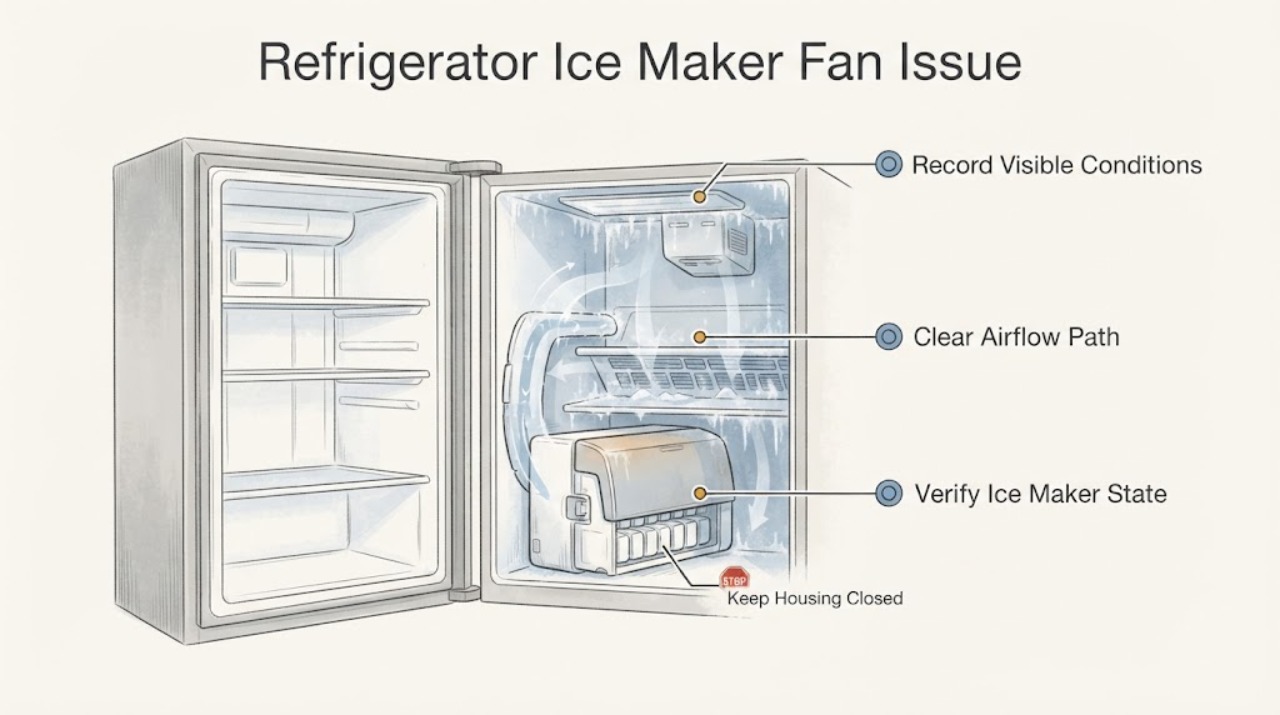
With doors closed and the appliance operating normally, inspect only visible freezer air vents, food placement, door closure and gasket condition; do not remove covers or put fingers near the ice-maker fan.
Expected result: A vent is blocked, a door does not close or seal, frost is visible around a seal, or the visible airflow path is clear.
Next step: Correct only a clear food-placement or closure issue. If frost is extensive, the code recurs or the compartment warms, preserve food safely and arrange service or use the documented defrost branch.
Why this matters
Why: LG identifies blocked vents, warm-air entry and poor sealing as conditions that can affect fan/cooling performance and frost; a clear external path does not prove a failed motor.
-
Check 3
Confirm that the ice maker is switched on and check the freezer temperature and installation timing against the exact LG model guidance; do not assume another model's button sequence.
Expected result: The ice maker is off, the refrigerator was installed recently, the freezer is warmer than the model's requirement, or these conditions are normal but the fan symptom remains.
Next step: Turn on the ice maker or allow the documented startup period only when that is the confirmed condition. If IF/F1 or a persistent fan symptom remains, continue to the defrost/service branch.
Why this matters
Why: LG says an off ice maker, insufficient cooling or the first-day installation period can explain no ice without proving an ice-maker fan failure.
-
Check 4
Only when the display actually shows IF or F1, move food and ice to a safe backup, unplug the refrigerator, leave its doors open for at least eight hours, use towels for meltwater and dry the interior before reconnecting.
Expected result: The indication clears after natural defrost and the refrigerator recovers, or IF/F1 returns after restart and the 24–48 hour recovery period.
Next step: Do not use direct heat or open the fan housing. If the code returns, arrange LG service and keep food in a safe appliance while cooling is uncertain.
Why this matters
Why: LG says frost around the ice-maker fan can trigger IF/F1 and provides natural defrost/recovery guidance; recurrence means the defrost did not establish a lasting resolution.
-
Check 5
Record the model, code, photos of frost or gasket condition, temperature observation, ice-production result and the outcome of any model-appropriate natural defrost before requesting LG service.
Expected result: The code repeats, the fan sound is abnormally loud, the refrigerator warms, frost returns, water leaks or food cannot be kept safely cold.
Next step: Stop using the affected function and arrange LG or qualified refrigerator service. Do not remove panels, bypass sensors, replace a fan or test live wiring.
Why this matters
Why: The unresolved condition may involve a model-specific fan, sensor, defrost or control system that cannot be selected from a generic symptom.
Use your observations
Decision map
Find the observation that best matches what you see, then follow the next safe action.
-
PATH 01Next step
What you see
The display shows IF or F1 and frost is visible or the ice maker has stopped producing ice.
Do this next
Move food and ice, unplug the refrigerator and follow LG's natural eight-hour defrost and drying path; arrange service if the indication returns.
Why this path and its safety boundary
Why it matters: LG defines IF/F1 as an ice-maker-fan problem and identifies frost or ice buildup as a possible cause.
-
PATH 02Next step
What you see
The refrigerator only hums or buzzes, and there is no IF/F1 indication or loss of cooling.
Do this next
Check vents, door closure, gasket and ice-maker state without opening the appliance, then monitor ice production and temperature.
Why this path and its safety boundary
Why it matters: LG says a circulating fan can hum or buzz during normal operation; the sound alone does not establish an ice-maker-fan failure.
-
PATH 03Next step
What you see
The sound is drilling, clicking, cracking or dripping at the ice-maker side and follows the ice-making cycle.
Do this next
Confirm the ice maker is connected to its water supply or switch it off if it is intentionally not connected; request service only if the sound becomes abnormal or cooling/ice production suffers.
Why this path and its safety boundary
Why it matters: LG describes these as normal ice-maker motor or temperature-change sounds in the documented circumstances.
-
PATH 04Next step
What you see
The code is FF or rF, or the refrigerator/freezer fan symptom is not confined to the ice-maker compartment.
Do this next
Do not use the IF/F1 article as a component diagnosis. Follow the exact code's LG guidance and use service if the fan code repeats after the documented external steps.
Why this path and its safety boundary
Why it matters: LG uses FF/rF for freezer or refrigerator compartment fan conditions, which are distinct from IF/F1's ice-maker-fan branch.
-
PATH 05Next step
What you see
The fan indication or noise returns after natural defrost, or cooling, frost, leakage or food safety remains abnormal.
Do this next
Keep food in a safe backup, stop dismantling or testing the refrigerator and arrange LG or qualified service.
Why this path and its safety boundary
Why it matters: A recurring condition exceeds a safe user-level check and does not identify a replaceable part by itself.
Helpful context
Understand the symptom
Identify the fan symptom before treating it as a failure
Write down the exact display code, whether ice production stopped, and what the sound does during a cycle. LG uses IF or F1 for an ice-maker-fan problem, while its noise guide describes normal humming or buzzing from a circulating fan, drilling from the ice-maker motor and clicking, cracking or dripping from temperature changes. A sound or slow ice output without a code is not enough to identify the ice-maker fan; preserve the observation and continue with the external checks.
Check the airflow path without opening the refrigerator
Look for food blocking visible air vents, confirm that the freezer and refrigerator doors close fully, and inspect the door gasket for a gap, tear or visible frost along the seal. LG says blocked vents and poor door sealing can affect fan operation or cooling. Do not remove an ice-room cover, probe the fan, push through frost or perform a powered ice-maker test when the concern is a fan blockage.
Separate a fan issue from an ice-making setup problem
Confirm that the ice maker is switched on and that the freezer has reached the temperature required by your model. LG's no-ice guide says a recently installed refrigerator may need up to 24 hours to begin making ice and recommends a freezer setting of -4°F or lower for its documented guidance; treat that value as LG's published no-ice guidance, not a universal control setting for every model. If the bin is empty but there is no IF/F1 indication, water supply, switch state, temperature or installation timing may be the next branch rather than a confirmed fan failure.
Use the documented natural-defrost path only for the matching fan indication
If the display actually shows IF or F1, move perishable food and ice to a safe backup, unplug the refrigerator, remove the ice from the bin and leave the doors open for at least eight hours so frost can melt naturally. Place towels to catch water and dry the interior before reconnecting. LG says to allow 24–48 hours after restart for the refrigerator to return to normal temperatures. Never use a hair dryer, heat gun or other direct heat, and do not reach into a powered ice-maker mechanism.
Escalate a recurring code or unresolved fan symptom
After a documented defrost and recovery period, note whether IF/F1 returns, whether ice production resumes, whether the sound stops when a door opens, and whether cooling remains normal. A recurring code, a fan noise that is louder than normal, persistent frost, warming compartments, leaking meltwater or food-safety concerns requires LG or qualified refrigerator service. Do not order an ice-maker fan, sensor or control board, remove panels or test live wiring from this symptom alone.
When checks do not resolve it
Need a professional?
Arrange LG or qualified refrigerator service when IF/F1 returns after the documented natural-defrost path, when a fan noise is abnormally loud or persistent, when cooling or ice production does not recover, or when there is recurring frost, leaking meltwater or food-safety risk. Do not choose an ice-maker fan, sensor or control board from the symptom alone.
Common questions
FAQ
Does IF always mean the refrigerator's main freezer fan is bad?
No. LG's error list uses IF or F1 for the ice-maker fan, while FF and rF refer to freezer or refrigerator compartment fan conditions. Record the exact characters before selecting a troubleshooting path.
Can an LG refrigerator fan sound be normal?
Yes. LG says humming or buzzing can occur while a circulating fan runs normally, and it describes drilling, clicking, cracking and dripping as normal in specific ice-making or temperature-change situations. A louder-than-normal sound or a recurring code needs service evaluation.
Can I use a hair dryer to clear ice around the ice-maker fan?
No. Use the documented unplugged, doors-open natural-defrost path and towels for meltwater. LG warns against a hair dryer because heat can warp plastic parts or create a fire hazard.
Read the exact guide
Official sources
- LG Refrigerator – Why is My Refrigerator Not Making Ice?LG USA Support · Official LG no-ice troubleshooting across refrigerator form factors; controls and test procedures vary by model.
- LG Refrigerator – Error Code ListLG USA Support · Official LG support for refrigerator error-code branches; exact model controls display format and available controls.
- LG Refrigerator - Troubleshooting Ice Maker NoisesLG USA Support · Official LG noise guidance for normal drilling, clicking, cracking, dripping, humming and buzzing conditions, with service escalation for persistent abnormal noise.
- LG Refrigerator Digital and Analog Error CodesLG USA Support · Official LG error-code guidance that distinguishes freezer, refrigerator and ice-maker fan contexts and lists visible airflow/seal checks.
- LG Refrigerator - Troubleshooting an E FF or E rF Error CodeLG USA Support · Official LG guidance for FF/rF compartment fan errors, used here only to distinguish them from the ice-maker IF/F1 branch and to support the conservative defrost/service boundary.
Community feedback
Share a repair observation
Share a plain-text repair observation. Accepted observations are published automatically; this page may take a moment to update.